VPN - biubiuVPN Fast & Secure
- 5.53K
- 4.3
- Installs
- 10.00M
- Price
- Free

Screenshots
Analysis by Reviewed
My first-week test of a VPN is less about chasing a perfect speed result and more about seeing whether I remember to use it when it matters. VPN - biubiuVPN Fast & Secure has a low-effort pitch: open the app, connect, and carry on. That makes it approachable if you are new to VPNs, though I would treat it as a straightforward browsing tool rather than assume it is the answer to every privacy concern.
The first week: a simple habit to try
In its first few days, the appeal is easy to understand. A VPN can be handy when you are using public Wi-Fi, travelling, or simply want your connection routed through a VPN instead of directly through your network. biubiuVPN is a free tools app from SOON BODYWERKZ, and its uncomplicated approach suits someone who wants to connect without learning a lot of networking terminology first.
Imagine checking messages and looking up directions while waiting at a café. I would connect before opening sensitive accounts, then disconnect when I no longer need the extra layer. That habit is more useful than leaving a VPN running automatically without thinking about what it does or which connection I am using.
To judge whether it fits your own phone, try it during a normal, low-stakes session first. Open the sites and apps you commonly use, switch between a couple of everyday tasks, and notice whether anything behaves differently. That gives you a more useful first impression than tapping connect once and judging the whole app by a single page load.
Know what a VPN can and cannot do
A VPN changes the route your traffic takes; it does not make every online action anonymous or protect you from phishing, weak passwords, or unsafe downloads. I would still use secure websites, keep apps updated, and avoid treating a VPN connection as permission to ignore basic security. If your main concern is privacy, read the app’s current privacy information and decide whether its practices match your expectations before making it part of your routine.
It is also worth checking how it behaves on your own network. Connect, use the apps you normally rely on, and see whether pages load as expected. If a work login, banking app, or video service behaves differently, disconnect and compare. This simple test helps you spot a compatibility trade-off before you depend on the VPN while travelling or doing something time-sensitive.
How biubiuVPN fits into everyday use
In practical terms, the app’s value depends less on a dramatic one-time benefit than on whether it earns a place in a routine. I would use it selectively: when joining an unfamiliar network, when I have a clear reason to route browsing through a VPN, or when I want to test whether a different connection location solves a specific access problem. I would not leave it on just because the button is there.
More From Our News Desk

Weather by Xiaomi Review: Clear at a Glance, Less Clear Up Close

X Under Pressure: Can It Recover When Posting Goes Wrong?

Clash of Clans Is Won Between the Battles

Android Auto Makes the Case for Quieter Car Software

MobiOffice: Transforming Mobile Productivity with Seamless Integration

EA SPORTS FC™ Mobile Soccer: Redefining Mobile Sports Gaming
A quick connection, with a little judgment
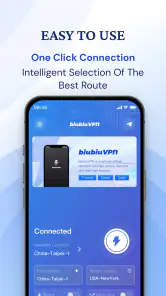
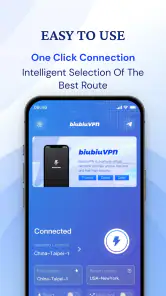
Setting up biubiuVPN is a breeze. Seriously, even if tech isn't your thing, you’ll have no trouble at all. Just download the app, pick a server, and boom—you’re surfing the web safely. I was pleasantly surprised by how intuitive the interface is. It's clean, simple, and gets straight to the point.
That simplicity helps when you need to connect in a hurry, but it should not replace checking what you are connecting to. A practical approach is to decide on the reason first, connect, then verify that the session is active before doing the task. If the connection drops during a network change, pause and reconnect rather than assuming the VPN stayed in place.
What a routine actually asks of you
For a less frustrating daily workflow, I would connect before opening the apps I want to use, then check that the connection is still active after switching between Wi-Fi and mobile data. A network change can interrupt a VPN session, so it is sensible to reconnect before continuing a private task. If a page suddenly stops working, briefly disconnecting can help tell whether the VPN route is the cause.
That small bit of attention is the maintenance this kind of tool asks of you: remember when you need it, notice when your network changes, and turn it off when it is causing trouble. It is not a complicated routine, but it does mean the app is only useful if you actually remember to use it. For occasional public Wi-Fi use, that may be enough; someone seeking a VPN that handles every connection decision automatically may prefer a service with settings tailored to that workflow.
Speed is a personal trade-off
Now, let's talk speed. One of my biggest pet peeves with VPNs is the whole "slow down" issue, but with biubiuVPN, I barely noticed a difference. Streaming, downloading, even gaming—everything was smooth sailing. It's like having the best of both worlds: security and speed.
I would still test performance against your own connection rather than treating one smooth session as a guarantee. A VPN adds another route, and the result can vary with the network, the destination, and the task. For a quick message check, a small delay may not matter; for a live game or a video call where responsiveness is important, I would compare with the VPN off and choose the steadier option.
Free to try, but compare on purpose
Compared with browsing without a VPN, using one adds a layer between your device and the network you are on, but it can also add friction: some services may respond differently, and a connection can feel less convenient if you have to troubleshoot it. Compared with paid VPN services, a free app can be easier to try without an upfront commitment, while someone who needs carefully documented privacy practices, predictable support, or a particular work setup should compare providers closely rather than choosing on convenience alone.
biubiuVPN has an average rating of 4.3 from around 87,000 ratings, and it has passed 10 million installs. That suggests many people have tried it, but popularity does not tell me whether a VPN’s policies suit my own privacy needs. The app is free to download, with optional in-app purchases ranging from $2.99 to $19.99 per item, so I would check what an offer includes before paying and decide whether I need it at all.
That is also the point at which I would ask what I need from a VPN over the next few months. If the answer is occasional protection on public Wi-Fi, a simple app may be enough. If I need a specific privacy standard, a work-compatible setup, or dependable access to a particular service, I would compare providers by those requirements before spending money or building a habit around one.
Location switching is a test, not a promise
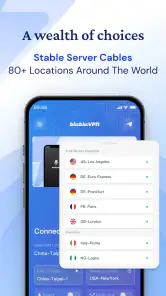
Ever tried to watch a show that's not available in your country? With biubiuVPN, that's a problem of the past. The app offers a wide range of servers across different countries, so whether you’re in the mood for some Japanese anime or British drama, you’re covered. I found it super handy for accessing content that’s geo-restricted.
One useful trade-off to keep in mind is that changing your apparent location does not guarantee that a streaming platform will accept the connection. Services can change how they handle VPN traffic, and access can vary. I would treat location switching as something to test for a specific purpose, not as a promise that every catalogue or website will always work.
For a one-off trip, I would test the location and the service before relying on it for a planned watch or a time-sensitive task. If it does not work, repeatedly switching locations may become more hassle than benefit. For people whose main reason for installing a VPN is consistent access to particular streaming libraries, a provider with a clearly documented track record for that use may be a better fit.
Reliability and support in the long run
During my time testing biubiuVPN, I was impressed by its reliability. No random disconnects or weird glitches; it just works. Plus, there's a nice little bonus with their 24/7 customer support. If you ever run into issues, help is just a click away.
Even with a connection that behaves well in ordinary use, I would keep a fallback plan for important tasks. If a login or payment page fails, try a normal connection only when the network is trusted, or postpone the task until you can use a suitable connection. The useful habit is not to force the VPN through every problem, but to recognize when it is helping and when it is getting in the way.
Who is likely to keep using it?
I can see this fitting someone who wants a low-effort VPN for occasional browsing on unfamiliar networks and is willing to check that it remains connected. It is less suitable for someone whose top priority is a detailed, independently assessed privacy setup, or who needs a specific guarantee for streaming, gaming latency, or work access. In those cases, I would compare established alternatives against the exact requirement instead of assuming any VPN will solve it.
The app is rated for Everyone, runs on Android 5.0 or later, and version 2.2.9 is the current release. Those details make it broadly accessible to compatible Android devices, but I would still keep the app updated and review its settings now and then. A VPN is most useful when it quietly fits a real routine; if you rarely need one, adding another step to every connection can become more tiring than helpful.
There is also a difference between installing a VPN and maintaining a useful habit. I would revisit whether I still need it after the novelty wears off: do I connect in situations where it helps, remember to check after changing networks, and understand what to do when an app stops working? If the answer is no, the extra tap may not be earning its place. If the routine stays easy and solves a recurring need, that is a better reason to keep it than a first-day impression.
My long-term take
All in all, biubiuVPN Fast & Secure delivers exactly what it promises. It’s fast, reliable, and keeps your online activities under wraps. Whether you’re a seasoned VPN user or a newbie, this app is definitely worth checking out. So, next time you're browsing, why not do it securely? Your online privacy will thank you!
My lasting recommendation is more measured: biubiuVPN is worth trying if you want a simple, free starting point and have realistic expectations about what a VPN does. Keep it when it reliably supports a habit you actually use; move on if you need stronger assurances, more predictable specialist performance, or fewer connection decisions. That is how I would judge its value after the first-week appeal has faded.
VPN - biubiuVPN Fast & Secure Frequently Asked Questions
What devices and operating systems can I use with biubiuVPN Fast & Secure?
biubiuVPN Fast & Secure is a mobile app for Android and iOS. Android users need a device running Android 5.0 or later, so checking your phone or tablet’s software version before downloading can help avoid compatibility problems. If you use more than one kind of device, confirm that the app is available for each platform you plan to use.
Who makes biubiuVPN Fast & Secure, and is it widely used?
The app is developed by SOON BODYWERKZ and is listed in the Tools category. It has an average rating of 4.3 from around 87,000 ratings, with about 5,500 written reviews and over 10 million installs. Those figures can offer a sense of its reach, but individual experiences with a VPN can vary, so it is worth reading recent reviews before deciding.
What does biubiuVPN Fast & Secure claim to offer?
biubiuVPN Fast & Secure is described as an easy-to-use app for a smooth, secure, and private connection on your device. That summary gives a general idea of its purpose, but your experience may depend on your device, network, and how you use the service. Before relying on any VPN for a particular task, try the app and review its settings and connection behavior.
Can I use biubiuVPN Fast & Secure on more than one device?
biubiuVPN Fast & Secure is a mobile app, so it can be downloaded to compatible Android and iOS devices. Before installing it on multiple devices, check the app’s current store page and subscription details to understand how access works across devices. If you plan to use a VPN regularly, it is also worth checking that each device meets the app’s operating-system requirements.
What should I know about the app’s cost before downloading it?
biubiuVPN Fast & Secure is free to download, with in-app purchases available. The app may suit users who want to try a VPN without paying upfront, while optional purchases can add costs if you choose them. Review the purchase details shown in the app before confirming anything, and consider whether the available options fit your budget and how often you expect to use the service. In-app purchase prices range from $2.99 to $19.99 per item.
Pros
- Simple and intuitive user interface.
- No logs policy ensures privacy.
- Fast connection speeds globally.
- Supports multiple devices simultaneously.
- Unlimited bandwidth usage.
Cons
- Limited free version features.
- Occasional connection drops.
- No dedicated IP option.
- Customer support can be slow.
- Ads in the free version.
- Category
- Tools
- Version
- 2.2.9









