JumpJumpVPN – Super Unlimited
- 3.89K
- 4.4
- Installs
- 10.00M
- Price
- Free

Screenshots


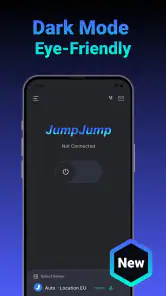
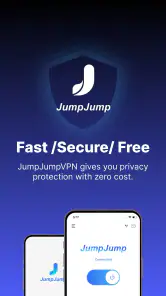
Analysis by Reviewed
Using a VPN is most useful when it solves a clear problem: protecting traffic on a shared connection, or letting you try a different server route when a site is unavailable in your region. JumpJumpVPN – Super Unlimited is a free Android tools app from SOON BODYWERKZ, and its appeal is the straightforward VPN workflow: choose a location, connect, and browse through that connection. I’d treat it as a practical everyday tool rather than a guarantee that every site will open or every connection will feel faster.
What changing your connection can—and can’t—do
A VPN routes your internet traffic through a server and presents a different IP address to websites. That can be helpful on public Wi-Fi or when checking whether a service behaves differently from another region. It does not make you invisible online: accounts, cookies, and app activity can still identify you, and a VPN cannot make an unsafe download safe. I find it most useful as one layer of caution, alongside using trusted apps and being careful about what I sign in to.
The distinction matters when you’re deciding what to connect. A VPN may help with ordinary browsing on a café network, but it is not a substitute for a secure website or good account protection. And regional access is never guaranteed; streaming services and other platforms can block VPN traffic or change how they handle it. If a site stops working after you connect, disconnecting or trying another location is a sensible first check—not proof that your phone or account is broken.
A more useful way to try it
For a low-friction first run, test the connection with a task that is easy to repeat, such as loading a familiar news page before and after connecting. That gives you a practical feel for whether browsing remains comfortable on your network without relying on a speed claim. If a page loads unusually slowly, try the service again later or return to your normal connection for that task; routing through a VPN can add an extra step between you and a website.
A realistic use is checking messages or reading the news while waiting at an airport or café. I would connect before opening sensitive accounts, then avoid assuming the VPN makes every activity private. For banking or work services, follow the organization’s own security guidance: some services may challenge a changed IP address, and a VPN can make that sign-in less convenient. This small bit of planning helps avoid confusing a location change with an account problem.
Where it sits among VPN choices
Compared with manually configuring a VPN through a phone’s network settings, a dedicated app can make the connect-and-disconnect routine easier to manage. Compared with a paid VPN subscription, a free app may be more appealing for occasional use, but I would not choose on convenience alone if I needed detailed controls, independently documented privacy practices, or a particular server location. Those needs call for comparing providers carefully before routing important activity through one.
JumpJumpVPN has an average rating of 4.4 from around 209,000 ratings, with more than 10 million installs. That scale suggests plenty of Android users have tried it, but popularity is not a substitute for checking whether its current behavior suits your needs. It is rated for Everyone, runs on Android 6.0 and later, and its current version is 2.3.6. The app is free to install, with optional in-app purchases ranging from $3.99 to $23.99 per item.
More From Our News Desk

Weather by Xiaomi Review: Clear at a Glance, Less Clear Up Close

X Under Pressure: Can It Recover When Posting Goes Wrong?

Clash of Clans Is Won Between the Battles

Android Auto Makes the Case for Quieter Car Software

MobiOffice: Transforming Mobile Productivity with Seamless Integration

EA SPORTS FC™ Mobile Soccer: Redefining Mobile Sports Gaming
What the one-tap routine feels like
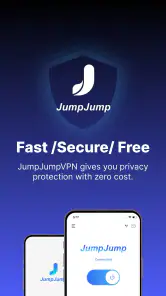
Ever found yourself stuck on the wrong side of a geo-block? Or maybe you're just tired of that creepy feeling when you realize sites are tracking your every move? Enter JumpJumpVPN - Fast & Secure VPN, your new best friend in the world of digital privacy.
What's the Deal with JumpJumpVPN?
Okay, let’s dive straight in. This app is like having a magic cloak for your data. When you fire up JumpJumpVPN, it whisks you away to a secure server, masking your IP address and encrypting your internet traffic. The result? You can browse, stream, and download without worrying about prying eyes or pesky geo-restrictions.
Setting Up: Easy Peasy Lemon Squeezy
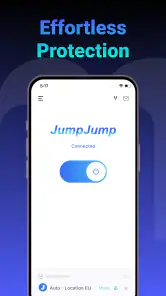
Getting started with JumpJumpVPN is as smooth as butter. Seriously, even your grandma could do it. Once you download and install the app, a couple of taps and you’re in! The interface is slick, intuitive, and doesn’t bombard you with unnecessary options. Just pick a server location, connect, and boom – you’re surfing the web like a ninja.
That simple routine is most useful when I already know what I want to do: connect for a short browsing session, check a page, and then decide whether the route is helping. I wouldn’t leave a VPN running automatically just because it is available. Instead, I’d make the connection part of a deliberate workflow: connect, try the task, and disconnect if the site or app becomes troublesome. This keeps the location change from surprising me later when a service asks for another sign-in or behaves differently.
Performance: Fast and Furious
Now, let’s chat speed. Nobody likes a buffering wheel, right? I was pleasantly surprised by how JumpJumpVPN kept my connection speedy and stable. Whether I was streaming my favorite shows in HD or gaming online with the squad, everything ran like a dream. No lag, no drama.
In practice, I’d be careful not to judge the connection by a single page load. The same site can feel different at home, on mobile data, and on a busy public network, and the VPN adds another route into that mix. A more useful check is to repeat a familiar, low-stakes task at roughly the same time and place, then compare how it feels with the VPN on and off. If video pauses or a game feels less responsive, that is a good reason to switch back rather than assume the app has failed.
This is also why I would separate browsing from activities where a brief interruption has a cost. Reading an article or checking a public timetable is easy to retry; joining a time-sensitive work call or making an important account change is less forgiving. For those moments, I’d use whichever connection has proved most predictable, and only add a VPN if I have a clear reason. Convenience is valuable, but it should not come at the expense of a task that needs steady access.
Security and Privacy: Top-Notch Stuff
This app isn’t just about speed; it’s also about keeping your data under lock and key. JumpJumpVPN uses military-grade encryption to ensure your information stays yours. Plus, they have a strict no-logs policy, which means they don’t keep tabs on what you’re up to online. It’s like having a digital vault where your data can chill out in peace.
For a careful user, the practical question is not only whether traffic is routed through a VPN, but also whether the provider’s privacy terms match the sensitivity of the activity. I would read the app’s current privacy information before relying on it for anything that matters, and I would avoid treating any VPN as a substitute for strong passwords, two-step sign-in where available, or sensible app choices. That is a worthwhile habit with any VPN, especially when the phone carries personal messages and saved account sessions.
I’d also keep expectations modest around location-based services. A changed IP address can make a website infer a different region, but it does not rewrite every location signal a phone or account may use. If a service still shows the usual location, that does not automatically mean the VPN is useless; it may simply rely on another source. For a region-specific task, I’d test the exact service first and keep a normal connection available as a fallback rather than planning an important activity around an assumed result.
Why I’m Sticking with It
There are loads of VPNs out there, but what sets JumpJumpVPN apart is its blend of speed, security, and simplicity. It’s perfect for both VPN newbies and seasoned pros. Whether you’re looking to bypass annoying regional blocks, keep your browsing anonymous, or just want that extra layer of security, this app’s got you covered.
I see the strongest case for it in uncomplicated, occasional use: the person who wants a straightforward way to try a different route without learning manual network setup. It is less compelling if your decision depends on a precise location being available every time, advanced connection controls, or a detailed privacy review before use. Those are not small preferences when you need a VPN for work, travel, or a particular service; they are reasons to compare options rather than choose based on a quick connection screen.
Compared with a browser’s private mode, a VPN changes the route and IP address seen by websites, while private browsing mainly limits what the browser keeps locally after a session. They solve different problems, so one does not replace the other. Compared with leaving the phone on its ordinary network, the VPN adds a routing layer but may also create extra friction with sign-ins or sites that distrust shared VPN addresses. I’d choose the option based on the risk and task, not use a VPN as a reflex for every tap.
For a useful everyday check, I would try it on a routine that does not expose anything sensitive: open a familiar public page, connect, and see whether it remains easy to use. Then repeat with a service that matters less than banking or work. This makes it easier to spot a practical issue early, such as a site refusing the connection, without turning troubleshooting into a stressful account problem. If it works comfortably for the things I actually do, that matters more than a broad claim about performance.
One question people often have is whether a VPN guarantees access to blocked streaming or regional content. I would not count on that. Services can restrict VPN routes, and availability can change, so this app is better approached as a way to try another route than as a promise that a particular catalogue or site will appear. If access to one exact service is the main reason you are installing a VPN, check that service with the app before building a routine around it.
Another sensible question is whether the free entry point means there is no reason to think about cost. The app is free to install, while optional in-app purchases are available. I would first see whether the basic connect-and-browse routine meets my needs, then consider a purchase only if I understand what I’m choosing and expect to use it. Someone who merely wants occasional protection on a shared network may have no reason to spend; someone comparing paid providers should weigh their privacy terms and the controls they need, not just the initial price.
The release date is September 6, 2023, and the 3.9 thousand reviews offer more detailed user feedback than the rating alone. I’d read recent comments with your own priorities in mind—especially if you care about a particular website, connection type, or privacy detail. The app’s free entry point makes it easy to consider, but I would decide about any paid item only after seeing whether the basic routine fits the way I actually use my phone.
Who should give it a try
I’d recommend trying it if you want a simple way to switch your Android traffic through a VPN for occasional browsing, especially when using a network you don’t control. It is also approachable for someone who has never configured a VPN manually. If you need a specific region to work consistently, have strict workplace requirements, or want extensive technical settings, compare alternatives before relying on it. The key question is whether the simple connect-and-browse routine matches your actual use.
A particularly good fit is someone who uses public Wi-Fi now and then, understands that a VPN is only one part of safer browsing, and is comfortable checking whether a connection is behaving normally. It can also suit a curious user who wants to test how a website responds from another route without changing the phone’s network settings by hand. In both cases, I’d keep the first experiments low-stakes and learn how the sites I use react before depending on the app for a deadline or important sign-in.
I’d be more cautious about recommending it to a person who expects complete anonymity, needs a VPN to satisfy an employer’s specific rules, or cannot tolerate a service occasionally rejecting a changed IP address. A managed work VPN or a provider whose privacy practices and technical controls have been carefully assessed may be a better match in those situations. Likewise, if your everyday problem is only that a browser saves local history, private browsing may be the simpler tool; it is not the same as a VPN, but it may address that narrower concern with less connection friction.
One useful habit is to disconnect when you no longer need the VPN, particularly if a site or app behaves oddly. A changed network route can affect sign-ins, location-sensitive services, or connection stability, so it is worth checking whether the VPN is the cause before changing account settings. For a casual user, that little troubleshooting step can save time; for someone who depends on predictable access all day, extra control may matter more than a quick setup.
A grounded recommendation
My overall view is that this is best approached as a convenient tool for ordinary, occasional VPN use, not as a promise of anonymity or guaranteed access. It may suit someone who values a quick route change and does not want to configure network settings by hand. If your needs are more demanding, take time to compare providers and their published privacy information. Used with realistic expectations, it can be a handy option; used as a blanket answer to every online privacy concern, it asks more of a VPN than it can deliver.
JumpJumpVPN – Super Unlimited Frequently Asked Questions
Is JumpJumpVPN available for iPhone and iPad?
JumpJumpVPN is a mobile VPN app, but platform support can differ between its Android and iOS versions. Before downloading on an iPhone or iPad, check that the app is available in your region’s Apple App Store and that your device meets its requirements. Use the official store page to confirm you are installing the version intended for your device.
Who develops JumpJumpVPN, and what kind of app is it?
JumpJumpVPN is a Tools app developed by SOON BODYWERKZ. Its short description is simply “JumpJumpVPN,” while its promotional summary calls it “Fastest and Secure!” It is intended for people looking for a VPN app on a mobile device. As with any VPN, consider how its features fit your browsing needs and review the app’s terms and privacy information before relying on it.
Is JumpJumpVPN compatible with older Android devices?
JumpJumpVPN is listed for Android devices running version 6.0 or later, so it can suit phones and tablets that are not on the newest Android release. Before downloading, check your device’s software version and make sure you have enough space for the app. The app is free to download, though in-app purchases are available.
What is JumpJumpVPN and how does it work?
JumpJumpVPN is a mobile application designed to provide users with a fast and secure VPN (Virtual Private Network) service. It encrypts your internet connection, allowing you to browse the web securely and anonymously. By masking your IP address, it helps you bypass geo-restrictions and access content that may be blocked in your region. The app is user-friendly and can be easily installed on both Android and iOS devices.
Is JumpJumpVPN free to use?
JumpJumpVPN is free to download, with in-app purchases offered for users who want to access paid options. The app is described as “Fastest and Secure!” and its developer is SOON BODYWERKZ. Check the purchase details in the app before choosing an optional paid feature, and review your store’s purchase settings if you want to avoid unplanned spending.
Pros
- Fast connection speeds
- User-friendly interface
- No logging policy
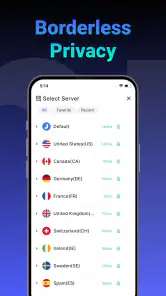
- Wide server variety
- Unlimited bandwidth
Cons
- Limited free version
- Ads in free version
- Occasional connection drops
- Not available in all regions
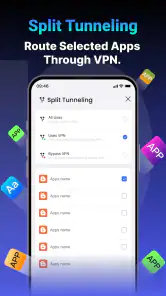
- No advanced settings
- Category
- Tools
- Version
- 2.3.6









