Voice Recorder
- 124.20K
- 4.9
- Installs
- 50.00M
- Price
- Free

Screenshots
Analysis by Reviewed
I usually reach for a phone recorder when stopping to type would make me miss something: a quick reminder, a question after a meeting, or an idea that turns up while I’m out. Voice Recorder is aimed at exactly that kind of use. It belongs to the music and audio category, and its straightforward purpose is appealing: open it, capture sound, and return to what I was doing. The developer is quality apps (recorder, weather, music), and the app is free to install, with in-app purchases listed at $6.99 per item.
Where recording can go wrong
The simplest recording apps can still catch people out, not because the main button is hard to find, but because the result depends on the moment around it. A rushed tap, a phone left too far from the speaker, or a crowded room can produce a recording that exists but is difficult to use. I’d treat this as a dependable capture tool for nearby speech, not a way to make a distant voice sound close or to erase a noisy setting.
My practical habit is to make a brief test before a class, interview, or important conversation. Listen back for a few seconds, check that the speaker is clear, then start the real recording. That small check is more useful than assuming any app can rescue poor placement later. If you’re recording someone else, ask first and keep the phone somewhere stable rather than handling it throughout the conversation.
Setup checks that save a second take
Before relying on a recording, I’d check the basics: enough battery for the session, enough free space for a long file, and a quiet enough position for the phone. If the app does not begin capturing sound, close and reopen it, then try a short test again. Also check the phone’s general sound and app settings if something seems blocked; menus differ between devices, so I wouldn’t assume every Android phone presents them in the same place.
The app is free and marked for Everyone, which makes it easy to try without a purchase decision. It has a 4.9 average from around 1.2 million ratings, and more than 50 million installs. It first appeared on November 4, 2016; version 85.1 supports Android 5.0 and newer. Those figures suggest broad use, but they don’t guarantee that every phone records identically. I’d still test it on the device and in the room where I plan to use it.
Using a phone recorder with fewer surprises
For everyday use, the real question is less “Can it record?” and more “Can I find and use the recording afterward?” Give files names that make sense while the details are fresh, such as a meeting topic or class subject, rather than leaving a collection of vague entries to sort through later. If you need a clip for someone else, play it back before sharing so you can catch a cut-off beginning or a section with distracting noise.
Recovering a workflow when a take disappoints
If a recording stops unexpectedly or sounds wrong, don’t immediately delete it. Listen from the beginning and check whether any useful portion remains. Then make a short new test and confirm that it plays before repeating a long session. This is a simple way to separate a one-off interruption from a continuing setup issue, and it avoids losing the only usable take while troubleshooting.
More From Our News Desk

Weather by Xiaomi Review: Clear at a Glance, Less Clear Up Close

X Under Pressure: Can It Recover When Posting Goes Wrong?

Clash of Clans Is Won Between the Battles

Android Auto Makes the Case for Quieter Car Software

MobiOffice: Transforming Mobile Productivity with Seamless Integration

EA SPORTS FC™ Mobile Soccer: Redefining Mobile Sports Gaming
For an everyday example, imagine an idea arriving on the walk home. I’d stop somewhere safe, record the thought in a short note, and give it a clear name later when I’m settled. For a longer lecture or interview, I’d place the phone close to the main speaker, avoid covering it, and make a test recording first. In either case, a quick playback is the best check that the audio is intelligible; a recording indicator alone can’t tell you whether the room was too loud.
What the app can’t fix for you
A phone recorder is not a substitute for a dedicated microphone when you need controlled sound, nor is it the right choice if you need a full editing workspace or a carefully managed recording setup. Compared with using a phone’s built-in recorder, a separate app can be convenient when its controls and file handling suit your routine; compared with more advanced audio tools, simplicity comes at the cost of deeper production options. I’d choose according to the job rather than expecting one recorder to cover every situation.
There are also ordinary limits outside the app itself. A weak or distant voice, handling noise, interruptions, and a nearly full phone can all affect the result. If a file is hard to hear, try moving closer and recording a short sample in the same environment before the important session. For sensitive conversations, think about consent and where the audio will be kept before pressing record.
Choosing a recorder for the job
I’d put this app on the shortlist for people who want a quick way to capture spoken notes, reminders, or nearby conversation without turning the phone into a production studio. It is especially useful when the alternative is trying to type while walking between tasks, or hoping to remember a detail after a meeting. A student could use it to preserve a short spoken revision prompt; someone planning a project could talk through a rough idea before it disappears. In both cases, the value is speed and a low-effort first capture, not polished sound.
The trade-off becomes clearer when comparing it with the recorder already on a phone. A built-in tool may be enough if it is easy to find and its saving routine already fits your habits. I’d consider a separate recorder when I want a dedicated place for voice captures or prefer its particular interface, but I wouldn’t install another app just for the sake of having one. For music making, interviews that require reliable production quality, or work that needs detailed editing and organization, a more specialized audio app or external microphone is the more sensible choice.
A routine that makes recordings easier to use
One small workflow improvement is to decide what a recording is for before pressing the button. A reminder can be brief and direct; a meeting note may need the topic and the next action spoken aloud at the end. That closing recap gives me a useful handle when I return to the file later, without requiring sophisticated editing. If the recording is meant to support written notes, I’d capture only the parts I genuinely need and write a short summary soon afterward rather than relying on a long audio file as my sole record.
For recurring tasks, I’d use a consistent naming pattern that sorts naturally, such as the project or course first and the subject second. I would avoid including private details in a filename if the phone might be seen by other people. The useful point is not any particular naming system; it is making the file recognizable without opening several recordings to guess what each one contains. This matters most once voice notes become part of a routine rather than occasional one-off captures.
Handling interruptions and uncertain playback
If a recording is unexpectedly short, I’d check the file itself before trying several settings at random. Play it from the beginning, note where it ends, then make another brief test while the phone is still in the same position. If that test works, the first take may have been interrupted; if it fails in the same way, restarting the app and reviewing the device’s general settings is a more useful next step. I’d also avoid multitasking during a critical capture until I know how my phone behaves, since different devices can handle app switching and interruptions differently.
Playback is its own test, not just a formality. A speaker may sound clear when the phone is beside me but muddy through a small speaker or in a noisy place. When a recording matters, I’d listen with headphones if available and check the beginning, a middle section, and the ending. That quick spot-check can reveal a misplaced phone, an accidental pause, or a clipped final thought while there is still time to record again.
Privacy, sharing, and keeping the useful copy
Voice captures can contain more than the sentence I meant to save: names, surrounding conversations, or details spoken after I thought I had finished. Before sharing a file, I’d listen through the whole thing and consider whether everyone recorded knows about it. If the recording is only for me, I’d still think about who can access the phone and whether I want to keep the file after its purpose has passed. Those habits are especially worthwhile for workplace discussions, classes, and personal reminders that mention other people.
If I need to send a recording, I’d first confirm that the copy I’m sharing plays and contains the intended section. I would not assume that a file has been backed up simply because it appears in the app, so for anything important I’d keep a second copy using a method I already trust. That is a general precaution rather than a special feature claim: a recorder is useful only if the audio remains available when I need it. For a casual thought, keeping one local copy may be enough; for work that matters, I’d plan how to preserve it.
Easy Peasy Recording
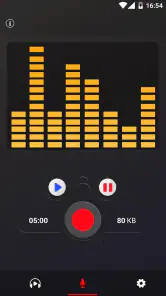
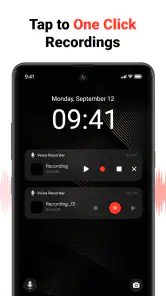
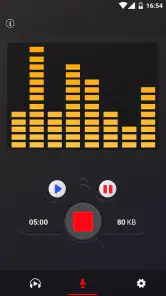
First off, using Voice Recorder is as easy as pie. The interface is super intuitive, so you won't find yourself scratching your head trying to figure out how to start recording. It's literally a one-tap operation. You hit the big red button, and bam, you're recording. Whether you're capturing a lecture, an interview, or your own random thoughts, this app has got your back.
Feature-Packed Goodness
Now, let's talk features because that's where the magic happens. One of the coolest things about this app is its ability to record in different formats. Need a high-quality WAV file? No problem. Just want a quick MP3 for easy sharing? Done and done. Plus, there's a neat feature that lets you trim unwanted parts of your recordings right within the app. No more need for third-party editing tools. How cool is that?
Another standout feature is the cloud integration. You can sync your recordings directly to your favorite cloud service, be it Google Drive, Dropbox, or what have you. This means you can access your recordings from anywhere, anytime. Trust me, this is a lifesaver if you're working on multiple devices or need to share files with colleagues or friends.
Quality that Speaks Volumes
Let's not forget about the audio quality, which is honestly top-notch. The app does a great job of picking up clear and crisp audio, even in less-than-ideal conditions. I've used it in a noisy cafe, and it still managed to capture my voice without too much background noise. This makes it perfect for podcasting or any situation where clarity is key.
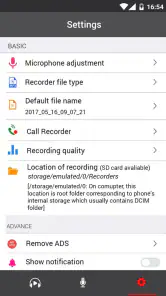
And speaking of clarity, there's an option to adjust the recording quality settings. So, if you're a bit of an audiophile, you can tweak things to your liking. From my experience, even the default settings are pretty darn impressive.
Practical verdict: who should keep it
For an ordinary day, I can see the app fitting into a simple routine: I reach the office with a thought for a project, record a quick note before another task takes over, then replay it when I’m ready to turn it into an action. That is where a phone recorder earns its place. It lowers the effort of capturing a thought, but the recording still needs a little follow-through—an intelligible take, a useful name, and a decision about whether to keep or share it.
I would skip it if my main need were studio-style sound, dependable recording from across a large room, or a complete system for editing and cataloging many hours of audio. I’d also choose another option if my built-in recorder already does everything I need and I have no reason to change my routine. A simple app can be the right tool precisely because it asks little of me, but simplicity should not be mistaken for professional capture or automatic organization.
The app’s current version is 85.1, and its long history and broad adoption make it easy to consider for a basic voice-recording role. Still, I’d judge it by one practical test on my own phone: record a short sample in the place I expect to use it, play it back, and see whether saving and finding that file feels straightforward. That check answers the questions that matter most—whether the sound is usable, whether my device behaves as expected, and whether the workflow suits me—before I trust it with something I cannot repeat.
Final Thoughts
So, there you have it. The Voice Recorder app is a fantastic tool for anyone needing to capture audio quickly and efficiently. Its ease of use, combined with robust features and excellent audio quality, make it a must-have app for both casual users and professionals alike. If you haven't tried it yet, give it a whirl. You might just wonder how you ever lived without it!
In a world where we constantly juggle tasks and need to capture information on the fly, having a reliable voice recording app on your phone is a game changer. With this app, you're not just downloading an app; you're investing in a tool that will make your life a little bit easier. Happy recording!
Voice Recorder Frequently Asked Questions
What should I check before recording a long interview or lecture?
Before relying on Voice Recorder for an important session, check that your device has enough available storage and that the microphone is not blocked by a case or your hand. Make a short test recording, then play it back to confirm the sound is clear and the volume is suitable. For longer sessions, keep the device steady and avoid interruptions that could stop a recording.
Can I use Voice Recorder for meetings, classes, or personal notes?
Voice Recorder is intended for capturing audio, so it can be useful for spoken notes, conversations, classes, or meetings when recording is appropriate. The app is in the Music & Audio category, and its straightforward recording controls can suit everyday use. Always consider the preferences and privacy of anyone being recorded, and follow any rules that apply in your setting.
How do I find and listen to recordings after saving them?
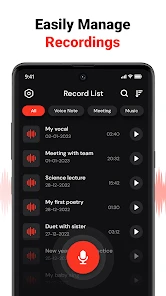
The app includes file-management and playback features, so you can return to saved audio and listen to it within the app. After recording, look through the available recording list and select the clip you want to play. Keeping recordings clearly identifiable can make them easier to find later, especially if you use the app for several different tasks.
Is Voice Recorder free to download, and are there any optional purchases?
Voice Recorder is free to download, so you can try it without paying upfront. The app also offers in-app purchases, with items priced at $6.99 each. If you prefer not to make purchases, check the options shown in the app before confirming anything; the free download and optional purchases make it useful to understand the cost before you begin.
Will Voice Recorder work on my Android device?
Voice Recorder requires Android 5.0 or later, which covers a broad range of devices running that version or newer. Before downloading, check your phone or tablet’s Android version in its settings. The app is rated for Everyone, making its age classification suitable for a general audience, though individual recording needs and device settings can still vary.
Pros
- Clear and easy-to-use interface.
- High-quality audio recording.
- Supports multiple audio formats.
- Allows background recording.
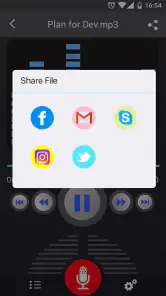
- Simple sharing options.
Cons
- Contains ads in the free version.
- Limited editing features.
- Exporting can be slow sometimes.
- Not all formats are supported.
- No cloud sync option.
- Category
- Music & Audio
- Version
- 85.1











