Voice Recorder Plus: Rec Sound
- 1.90K
- 4.6
- Installs
- 5.00M
- Price
- Free
Screenshots
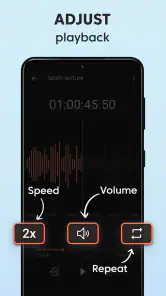
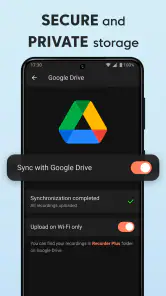
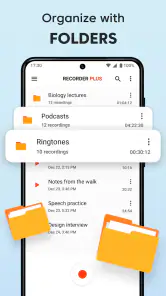
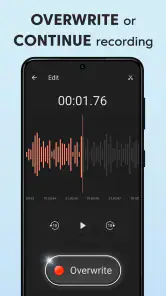
Analysis by Reviewed
I found Voice Recorder Plus most useful when I treated it as a practical household tool rather than a full music-production studio. It is a free Music & Audio app from Digitalchemy, LLC, built around recording voice memos and making basic sound edits. That focus makes it easy to understand: open it when you need to capture a thought, a reminder, a lesson, an interview note, or a short piece of music before the idea disappears.
My first impression was that the app fits naturally into shared-device situations. A family tablet, a spare phone in the kitchen, or a personal handset used by several people can all become a convenient place for quick recordings. The important distinction is that the app helps with recording and editing; it is not a household planner, shared inbox, or account-management system. I would use it as a simple audio workspace, while keeping the responsibility for naming, organizing, and sharing recordings with the people using the device.
Its store presence is strong for a focused utility: it holds a 4.6 average from around 33 thousand ratings, with more than five million installs. Those figures suggest that the straightforward recording concept has found a broad audience. The app is free to install, although in-app purchases range from $1.99 to $14.99 per item, so I would check the purchase screen carefully before treating it as a completely cost-free experience.
How Voice Recorder Plus fits into everyday shared use
When several people use one phone or tablet, I’d treat Voice Recorder Plus as a shared capture point, not a shared archive: agree on clear names and decide who will move or remove each clip. That simple handoff helps prevent useful recordings from getting lost among temporary notes, especially when a family member or guest records something. It also makes the next step—choosing what deserves to be kept—much easier.
A useful recorder for one device and several people
Imagine a household where one person needs to remember a repair appointment, another wants to record a child practicing a speech, and someone else is trying to save a melody idea. A basic voice recorder can handle all three jobs, and this app is appealing because it does not force those situations into a more complicated workflow. Each person can open it, record what matters, and move on.
I especially like this kind of app for moments when typing is inconvenient. If my hands are busy cooking, walking between rooms, or sorting papers, speaking a note is faster than opening a keyboard. A student can record a pronunciation exercise, a parent can capture an instruction for later, and a hobby musician can preserve a tune before it is forgotten. These are small tasks, but they are exactly where a dedicated recorder earns its place.
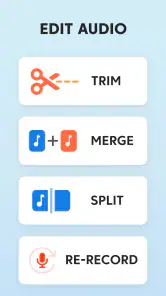
The editing side also changes how I would use it. A raw recording is often more useful after removing the beginning where someone is adjusting the phone or the ending where the conversation has already finished. Even modest trimming can make a clip easier to replay or send. That is a more practical benefit than decorative effects: the recording becomes less awkward without requiring a separate audio editor.
More From Our News Desk

Weather by Xiaomi Review: Clear at a Glance, Less Clear Up Close

X Under Pressure: Can It Recover When Posting Goes Wrong?

Clash of Clans Is Won Between the Battles

Android Auto Makes the Case for Quieter Car Software

MobiOffice: Transforming Mobile Productivity with Seamless Integration

EA SPORTS FC™ Mobile Soccer: Redefining Mobile Sports Gaming
The strongest household advantage is the short path from idea to usable clip. You do not need to build a project, arrange tracks, or learn a production interface just to save a spoken reminder. For a shared device, that simplicity matters because different users can have different levels of technical confidence.
Where shared use needs a little discipline
The app should not be mistaken for a collaborative family archive. If several people record on the same phone, the real organization work happens outside the recording button. I would agree on a naming habit before the device becomes crowded: include the person’s name and the purpose in the title, such as “Maya speech practice” or “kitchen measurement reminder.” That small step prevents the common problem of opening several unnamed clips and guessing which one is important.
I would also avoid using one shared device for sensitive recordings unless everyone understands who can access it. A voice memo may contain an address, a medical detail, a school conversation, or private family plans. The app’s usefulness does not remove the need for ordinary device privacy. A household should decide whether a recording belongs on a shared tablet at all, especially if guests or children regularly use that tablet.
Another practical boundary is storage behavior. Short memos are easy to manage, but repeated recordings of lessons, rehearsals, or long conversations can accumulate. I would periodically review old clips, keep the ones that still matter, and remove duplicates after confirming that an important copy exists elsewhere. That is not exciting maintenance, but it keeps a recorder from turning into an audio junk drawer.
Setting up a sensible routine without overcomplicating it
Because the app is aimed at recording voice and editing sound, I would begin with a small test rather than immediately relying on it for something important. Record a few seconds from the usual position, play it back, and check whether the voice is clear enough for the intended use. A phone on a table can sound different from a phone held near the speaker, and a quiet room can produce a more useful result than trying to fix a noisy recording afterward.
For a shared household phone, I would create a simple routine: one person records, gives the clip a descriptive name, and tells the next user whether it is temporary or worth keeping. This avoids a subtle but common problem with shared tools: everyone assumes somebody else will organize the results. The app can capture the audio, but people still need to coordinate what happens next.
I also recommend separating “capture now” from “edit later.” When a thought is urgent, stopping to perfect the recording can make you lose the idea. I would record first, then trim the clip when I have a quiet minute. This is particularly useful for music sketches and spoken reminders, where speed matters more than polish at the moment of capture.
What editing is good for, and what it is not
The built-in editing purpose is best understood as cleanup. I would use it to make a memo shorter and easier to listen to, not to turn a phone recording into a finished studio track. If you need multitrack arranging, detailed mixing, advanced noise restoration, or a large production workflow, a dedicated audio workstation will be a better match.
That limitation is actually helpful for casual users. A family member who only wants to remove an accidental pause does not need a screen full of sliders. The trade-off is that experienced musicians may find the toolset narrow. The app’s value depends on whether “good enough to replay or share” is your goal, rather than “ready for a professional release.”
A useful trick is to keep the original until you are certain the edited version works. If a clip contains an important instruction or a musical idea, I would listen to the shortened copy from beginning to end before deleting anything. Editing mistakes are easy to make when a pause seems unnecessary but actually separates two thoughts. Keeping a temporary original gives you a safety net during that process.
Coordination between adults, children, and guests
For adults sharing a device, a spoken rule is usually enough: do not rename or delete another person’s recording without asking. The app can support a cooperative routine, but it does not replace trust. If several people need long-term access to the same recordings, I would move finished files into the household’s preferred storage or messaging workflow rather than treating the recorder itself as a permanent filing cabinet.
Children can use a voice recorder for reading practice, language exercises, creative storytelling, or remembering instructions. The Everyone content rating makes the app suitable for a broad audience, but an age rating is not the same as supervision. I would still show a child how to stop a recording, how to identify the clip afterward, and why they should ask before recording another person.
That last point is important in a home. A microphone makes it easy to capture conversations accidentally, and a child may not understand why a private discussion should not be recorded. I would explain the difference between recording your own practice and recording someone else. The app is neutral; responsible use comes from the people around it.
Guests create a different issue. If someone borrows the device to record a note, I would make sure they know where the file will remain and who may hear it later. A quick recording can outlive the moment if nobody checks it afterward. This is another reason descriptive names and a short cleanup routine are more valuable than they first appear.
Account boundaries and purchase awareness
The app is free, which makes it easy to try on a personal phone or a shared household device. However, the presence of optional purchases means I would not hand a shared device to a child without first understanding how purchases are handled on that device. I would also avoid assuming that one person’s purchase decisions should automatically apply to everyone who uses the phone.
In a household, the cleanest boundary is to decide who is responsible for purchases before anyone explores extra options. A parent or device owner can review the available purchase choices, while other users can stay within the free experience unless permission is given. This is less about the recorder itself and more about preventing an innocent tap from becoming an unexpected account discussion.
I would also keep expectations realistic about access. A recording saved on a shared phone is not automatically a private personal file just because one person made it. If privacy matters, use an individually controlled device and follow the normal protection available on that device. The app works best when its role is clear: it captures audio, while device ownership and household agreements define who can reach it.
Compatibility and practical expectations
The current version is 1.14.10, and the app supports devices running Android 7.0 or later. That makes it accessible on many older Android phones, which is useful if a household has a spare handset rather than a recent flagship. I would still test it on the exact device intended for regular use, particularly if that phone has limited storage or an older microphone.
Digitalchemy, LLC has kept the product positioned as a focused sound utility rather than a broad creative suite. That makes the learning curve less intimidating, but it also means users should choose it for recording and straightforward editing rather than expecting every feature found in specialized music apps. The right question is not whether it replaces every alternative; it is whether it removes enough friction from your particular audio task.
Compared with the voice recorder already included on many phones, the attraction here is the combination of memo capture and sound editing in one focused app. If your built-in recorder already gives you the trimming and organization you need, switching may not change much. On the other hand, if the default tool feels too bare or you want a dedicated place for voice notes, this app is easier to justify.
Compared with a full music-making application, Voice Recorder Plus is much less demanding. That is a benefit for spoken notes and quick sketches, but a disadvantage for anyone who wants layered instruments, detailed effects, or a production timeline. Compared with a messaging app’s voice-message feature, it is better suited to recordings you want to review and edit before sending, rather than audio that disappears into a conversation thread.
Everyday scenarios where I would recommend it
I would recommend it to a student who wants to hear a presentation rehearsal. The useful workflow is simple: record the complete attempt, listen for unclear sections, then make a shorter practice clip containing the parts that need work. This turns the phone into a feedback tool without requiring another person to be present.
I would also recommend it to someone who regularly has ideas while away from a desk. A melody, a line of dialogue, or a reminder can be captured immediately and cleaned up later. The key is to label the recording while the context is still fresh. A week later, “recording 12” tells you almost nothing, while “chorus idea after walk” gives the clip a chance of being found again.
For household coordination, I would use it for temporary audio instructions: how to pronounce a name, how to practice a speech, or what needs to be remembered during a task. I would not use it as the only place for urgent information. A recording is easy to overlook, so important appointments and safety instructions should also appear in a more visible shared system.
For older relatives who find complex apps tiring, the focused purpose can be reassuring. A family member could record a reminder or a question for a later conversation. Still, I would demonstrate the complete cycle—start, stop, replay, rename, and remove—rather than assuming that a simple interface makes every step obvious.
Who should choose another tool
I would skip this app if your main goal is professional audio production. Musicians who need extensive control over tracks, effects, timing, or final mastering should begin with a dedicated workstation. A recorder can preserve an idea, but it is not automatically the right environment for developing that idea into a polished project.
I would also look elsewhere if your priority is automatic team coordination. A household, classroom, or work group that needs comments, shared folders, revision history, and clear ownership will probably be better served by a collaboration platform alongside, or instead of, a recorder. This app can create the audio material, but it does not turn that material into a managed group project.
It may also be the wrong choice for people who dislike manual organization. The more recordings you create, the more important naming and cleanup become. If you want every clip automatically sorted by project, speaker, or topic, a highly structured note-taking system may feel more comfortable. I prefer the freedom here, but that freedom comes with a small amount of personal housekeeping.
My household verdict after using it
Voice Recorder Plus: Rec Sound is a sensible choice when you want a free, approachable way to capture voice memos and perform basic sound cleanup. I like it most for short, purposeful recordings: practice sessions, reminders, spoken ideas, and household notes that need to be replayed later. Its broad Everyone rating and support for Android 7.0 or later make it a practical candidate for both personal phones and older shared devices.
The app earns its place through convenience rather than ambition. It does not try to be a full studio, a family organizer, or a private vault. That honesty is useful when deciding where it belongs in your routine. Use it to capture audio quickly, edit away unnecessary material, and then give the finished clip a clear home.
My final recommendation is positive for casual recording, especially if you want something more purposeful than a built-in recorder but less intimidating than a music-production suite. I would install it for a household that understands its boundaries: recordings need names, private conversations need consent, shared devices need care, and optional purchases deserve attention. With those habits in place, it becomes a dependable little audio notebook rather than another app that quietly fills up with forgotten files.
Voice Recorder Plus: Rec Sound Frequently Asked Questions
Who develops Voice Recorder Plus: Rec Sound?
Voice Recorder Plus: Rec Sound is developed by Digitalchemy, LLC. Knowing the developer can be useful when comparing recording apps, especially if you already use other apps from the same company. The app is focused on capturing voice memos and editing sound, making it a straightforward option to consider for everyday audio tasks.
What does the app’s name and description suggest it can do?
Voice Recorder Plus: Rec Sound is presented as a voice memo and sound-recording app. Its description highlights capturing voice memos and editing sound, so it may suit people who want a mobile tool for recording and working with audio. If you need a full professional production suite, consider whether a focused recorder is enough for your workflow.
Is Voice Recorder Plus: Rec Sound free to download?
Voice Recorder Plus: Rec Sound is free to download, so you can try its core recording experience without an upfront purchase. It also offers in-app purchases, with individual items priced from $1.99 to $14.99. If you are deciding whether it suits your needs, you can begin with the free app and review any purchase options shown before choosing to buy something.
What devices and operating systems can run the app?
Voice Recorder Plus: Rec Sound is available for Android devices, and its minimum operating-system requirement is Android 7.0. Before downloading, check your device’s software version and available storage, as these can affect installation and day-to-day use. The app is a music and audio tool from Digitalchemy, LLC, intended for people who want a convenient way to capture voice recordings on a mobile device.
What is Voice Recorder Plus: Rec Sound used for?
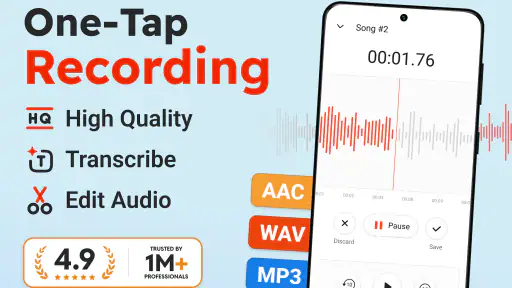
Voice Recorder Plus: Rec Sound is designed for recording spoken audio, meetings, lectures, interviews, personal notes, and other everyday sounds. After testing the app, its main appeal is the straightforward recording process: open it, tap the record button, and save the result for later playback. It is especially useful when you need a simple recorder without the complexity of professional audio software.
Pros
- Simple interface makes recording quick for beginners.
- Supports high-quality audio for clearer voice recordings.
- Useful pause and resume controls during active recordings.
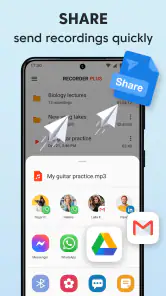
- Easy sharing options for sending files to other apps.
- Suitable for lectures
- meetings
- interviews
- and personal notes.
Cons
- Some advanced editing tools may require in-app purchases.
- Background recording can increase battery consumption.
- Recording quality depends heavily on the device microphone.
- Large
- high-quality files may use considerable storage space.
- Privacy depends on how recordings are stored and shared.
- Category
- Music & Audio
- Version
- 1.14.10













