Mirror Plus - HD Mirror app
- 31.15K
- 4.8
- Installs
- 10.00M
- Price
- Free
Screenshots
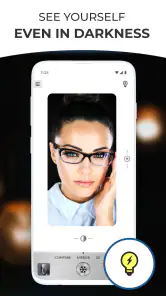
Analysis by Reviewed
I rarely think about a mirror app until I’m away from home and need to check a detail before walking into a meeting or heading out for the evening. That is where Mirror Plus - HD Mirror makes an immediate case for itself: it turns a phone into a handy reflection for a quick appearance check. The appeal is obvious during the first few days, but the more useful question is whether it earns a place on your phone once the novelty wears off.
Useful in the moments a compact mirror is missing
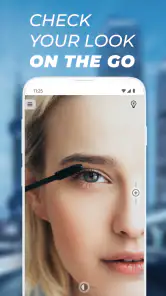
A phone mirror is most helpful for small checks, not for replacing a proper bathroom mirror. I’d use it to see whether lipstick has smudged after lunch, check an eyelash before a photo, or tidy my hair before leaving a train station restroom. Since the phone is already with me, there’s no extra compact to remember or carry.
It suits people who regularly travel light, touch up makeup away from home, or want a quick look while shaving. It is less compelling if you already keep a small mirror in your bag or need a clear view of your whole face and hair at once. A physical mirror can be easier to position and doesn’t depend on keeping a phone steady.
First-week appeal: quick to understand
Ever found yourself in a situation where you need a quick mirror check but there's none in sight? Enter the Mirror Plus - HD Mirror app. This handy little app transforms your phone into a high-quality mirror, making it perfect for those quick touch-ups or face-checks on the go. But is it really worth the download? Let's dive in and find out!
First Impressions: Sleek and User-Friendly
Upon launching the Mirror Plus - HD Mirror app, I was immediately impressed by its sleek and straightforward interface. The developers have clearly prioritized user-experience, ensuring that the app is intuitive and easy to navigate. With just a tap, your screen transforms into a crystal-clear mirror. And trust me, it's as simple as it sounds!
Features That Shine
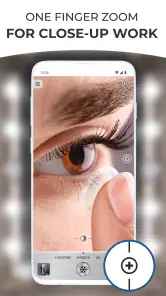
The app offers a variety of features that make it more than just a basic mirror. For starters, there's a zoom function that allows you to get a closer look at those pesky details. Ever had a stubborn eyelash or a smudge of lipstick that needed fixing? This zoom function is your savior.
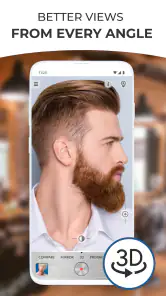
Another standout feature is the freeze image option. This lets you pause your reflection, allowing you to check your appearance from different angles without having to hold the phone in awkward positions. It's like having a personal assistant without the extra cost!
More From Our News Desk

Weather by Xiaomi Review: Clear at a Glance, Less Clear Up Close

X Under Pressure: Can It Recover When Posting Goes Wrong?

Clash of Clans Is Won Between the Battles

Android Auto Makes the Case for Quieter Car Software

MobiOffice: Transforming Mobile Productivity with Seamless Integration

EA SPORTS FC™ Mobile Soccer: Redefining Mobile Sports Gaming
Getting a more useful check
For precision work, I’d start with the wider view to spot the general issue, then zoom in only to fix a small detail. That order matters: a close-up can make a tiny mark feel more noticeable than it looks at normal distance. The freeze option is useful when I need both hands briefly, though it cannot replace repositioning the phone if the angle itself is wrong.
Brightness adjustments are best treated as a visibility aid, not a promise that the reflection matches how I look in every room. If I’m checking makeup for daylight, I’d still try to look near a window or another neutral light source before deciding a color is blended. A brighter screen can make details easier to see, but it may also change how shades appear.
Lighting Options
Lighting can make or break your mirror experience, and the app has a nifty solution for that. With adjustable brightness levels, you can ensure your reflection is always well-lit, whether you're in a dimly lit restaurant or under the harsh lighting of a bathroom.
What it replaces—and what it doesn’t
Compared with opening the phone’s regular camera, a dedicated mirror app is appealing because the task is clear and immediate: I’m looking at myself, not composing a picture. A camera can be better when I need to step back and judge an outfit or capture a view from farther away, while a pocket mirror may be more dependable when I don’t want to handle my phone with makeup on my fingers.
A realistic routine is to check my face after lunch, use zoom to inspect a small smudge, then freeze the image if I need to free a hand while fixing it. I would avoid doing that over a sink or in a crowded doorway, where a dropped phone or blocking other people would turn a tiny convenience into needless trouble.
Month-to-month value and upkeep
The recurring value is modest but practical: this is not an app I expect to open every day, yet it can be useful whenever a compact mirror is unavailable. That low-frequency pattern is also why it should not demand much attention. Digitalchemy, LLC makes the app, which is free to install and rated for Everyone. Its 4.8 average from around 396,000 ratings and more than 10 million installs suggest that many people find the simple utility worthwhile, although popularity alone cannot guarantee it will fit your habits.
The current version is 4.4.11, and the app dates back to January 8, 2012. It runs on Android 6.0 or later, with in-app purchases priced at $2.99 per item. I’d check the purchase details before paying for anything; for occasional mirror checks, I would first see whether the free experience already covers my needs. The app’s value comes from being ready when needed, not from building a new daily routine around it.
A small workflow that saves awkward fumbling
One useful way to make this tool feel less fiddly is to decide what you’re checking before opening it. If I’m only inspecting a lipstick edge, I can hold the phone at a comfortable distance, frame that area, and zoom briefly rather than repeatedly moving closer and farther away. For a hair check, I’d use the wider view first and turn my head slowly; a close crop can hide the overall shape I’m trying to judge.
The freeze option has a practical limit: a still view helps me inspect what was visible at that moment, but it cannot show whether a touch-up has improved the result. I’d use it as a reference while freeing a hand, then return to the live reflection for a final check. That simple sequence is more reliable than trusting a paused image after making a change.
Where the camera or a real mirror wins
People often ask whether a dedicated mirror app is better than the camera already on their phone. For a fast face check, I find the mirror-style approach more direct because I don’t need to think about taking or keeping a photo. The camera is the better choice when I need to see more of my outfit, ask someone else to review a look, or inspect something from farther away. A compact mirror wins when I want a lightweight, steady surface and don’t want to handle my phone during a messy makeup touch-up.
There is also a useful difference between visibility and accuracy. The screen can make a feature easier to inspect, but the result still depends on the angle, surrounding light, and how the phone is held. If I’m deciding whether a foundation shade looks right outside, I would check it in the actual daylight rather than relying on a brightened screen indoors. The app helps me notice a detail; it does not remove the need for good judgment.
When convenience creates friction
The phone is not always the easiest object to hold near your face. If your hands are wet, covered in product, or occupied with grooming, a dedicated mirror may be less stressful and safer to handle. I’d also avoid relying on the screen when I’m moving quickly through a station or standing somewhere crowded: trying to frame a close-up can distract me from what is around me.
For shaving, the same distinction matters. A quick check of one small area can be handy, but a full shave calls for a stable, broader view and enough room to move safely. If I can’t keep the phone steady without straining, I’d stop and use a fixed mirror instead. Convenience is only a benefit when the setup remains comfortable.
Who will keep it installed
I can see this earning a place on the phone of someone who commutes, travels, attends events, or regularly does small touch-ups away from home. It is especially useful when the need is occasional and unpredictable: you may not want to carry another item every day, but you appreciate having a quick option when a mirror is unavailable. For those users, its value is less about frequent use than about being ready at the right moment.
I would skip it if I rarely check my appearance on the go, already carry a compact mirror, or need a broad and stable view for detailed grooming. It is also a poor fit for anyone expecting a phone screen to behave like a professional makeup mirror in every lighting condition. The app makes a basic task more convenient; it doesn’t turn a phone into a complete grooming station.
When the convenience wears thin
The main trade-off is using a phone as a reflective surface: fingerprints, glare, a low battery, or an awkward camera position can make a dedicated mirror more comfortable. Zoom is helpful for fine details but narrows the view, and a paused image can’t show how a moving expression or a newly adjusted area looks afterward. For shaving or makeup that needs a full, steady view, a real mirror remains the better tool.
Mirror Plus - HD Mirror has an average of 4.8 across around 31,000 reviews, and its beauty focus makes sense for quick grooming rather than elaborate routines. I would skip it if I rarely need an on-the-go check, already carry a mirror, or expect it to provide professional lighting or a full-face setup. The phone’s screen is also not a substitute for checking how makeup looks in the light where I’ll actually spend the day.
Perfect for On-the-Go
One of the biggest perks of the Mirror Plus - HD Mirror app is its portability. No more carrying around bulky mirrors in your bag. With just your smartphone, you have access to a high-quality mirror anytime, anywhere. It's a game-changer for those busy mornings or spontaneous nights out.
Keeping it ready without making it a habit
For me, the sensible approach is to keep it available for occasional checks rather than treating it as a must-open beauty tool. A quick test in the places I actually use it—such as a dim hallway and a bright window—can show whether the brightness and angle are comfortable on my phone. Wiping the screen and camera area when the reflection looks hazy is a simple fix; it is also worth remembering that zoom can magnify smears and dust as readily as facial details.
What to expect after the first few weeks
Once the novelty fades, I would judge the app by whether it solves a real inconvenience often enough to justify keeping it installed. If I use a mirror on most commutes or before meetings, opening a familiar tool for a short check can become an easy part of leaving the restroom or stepping out of a rideshare. If those moments happen only rarely, I would not force a routine around it; the app can simply remain an occasional backup.
For upkeep, I would keep expectations modest. The main practical maintenance is making sure the phone’s screen is clean enough to view comfortably and remembering that the battery and the physical condition of the phone still matter. If I’m already trying to conserve power, or the screen is difficult to see in bright surroundings, a small physical mirror is the more dependable choice. There is no benefit in keeping an app “ready” if the phone itself is not a sensible tool for that moment.
Final Verdict: A Must-Have Tool
In a world where convenience is key, the Mirror Plus - HD Mirror app stands out as a must-have tool for anyone constantly on the move. Its user-friendly interface, combined with useful features like zoom and adjustable lighting, make it more than just a novelty app. It's practical, easy to use, and quite frankly, a lifesaver in more ways than one.
So, if you're someone who values convenience and functionality, give this app a try. You might just find yourself wondering how you ever lived without it!
Long-term verdict
I’d keep it installed if I often need quick grooming checks and prefer not to carry another object. Its strongest point is how little effort it takes to open and use when the moment arrives; its limitation is that it remains a phone-based reflection, with all the handling and viewing compromises that implies. For occasional touch-ups, that trade feels fair. For detailed makeup, a full shave, or judging an outfit from a distance, I’d reach for a proper mirror or the camera instead.
Mirror Plus - HD Mirror app Frequently Asked Questions
Can Mirror Plus - HD Mirror help me check my appearance while traveling?
Yes. Mirror Plus - HD Mirror is designed to turn your phone into a portable mirror, which can be handy when you are away from a regular bathroom or vanity mirror. You can use it for a quick appearance check, makeup, or shaving. The phone’s camera and screen provide the viewing experience, so the result depends on your device and the available lighting.
Is Mirror Plus - HD Mirror appropriate for children and family devices?
The app has an Everyone content rating, so it is intended for a general audience. Its purpose is practical grooming, such as checking your appearance, applying makeup, or shaving, rather than entertainment aimed at a particular age group. If a child uses a shared device, it is still sensible to review the phone’s purchase settings, since the app offers optional in-app purchases.
What is Mirror Plus - HD Mirror, and who is it for?
Mirror Plus - HD Mirror is a beauty app by Digitalchemy, LLC that turns a phone into a mirror for everyday grooming. It may suit people who want a quick way to check their appearance, apply makeup, or shave without carrying a separate mirror. Its store summary highlights a makeup mirror, shaving mirror, and magnifying mirror with light.
What features does Mirror Plus - HD Mirror offer?
Mirror Plus - HD Mirror provides users with a high-definition mirror experience right on their smartphone. It includes features such as zoom, exposure controls, and light adjustments to enhance visibility in low-light conditions. Users can also freeze the image to capture a still picture and even share it with friends. Its intuitive interface ensures ease of use for everyone.
Is Mirror Plus - HD Mirror free to use?
Yes, Mirror Plus - HD Mirror is free to download, with in-app purchases offered at $2.99 per item. The app is rated for Everyone, and its popularity is reflected in an average rating of 4.8 from around 396,000 ratings. Users can decide whether the free experience meets their needs before choosing to make an optional purchase.
Pros
- Sharp and clear image quality
- Real-time zoom and exposure control
- Simple
- user-friendly interface
- Supports both front and rear cameras
- Low battery consumption
Cons
- Limited features in free version
- Requires camera access permission
- Ads may disrupt user experience
- No option for video recording
- In-app purchases can be pricey
- Category
- Beauty
- Version
- 4.4.11