Universal Orlando Resort
- 2.23K
- 3.0
- Installs
- 5.00M
- Price
- Free

Screenshots

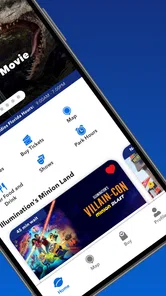
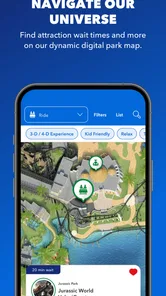
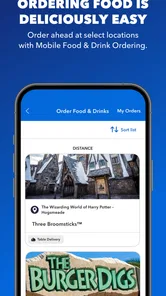

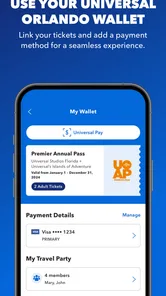
Analysis by Reviewed
I treat the Universal Orlando Resort app as a practical companion for a park day, rather than a reason on its own to plan a trip. Its strongest role is bringing useful visit information together: checking what is happening, finding your way around, and deciding what to do next without constantly switching between separate sources. That matters most when the day is busy and plans need to change quickly.
Free to download, with value tied to your visit
The app is free, so trying it before a visit does not require a purchase. It is made by NBCUniversal Media, LLC, and sits in the travel and local category. The current version is 7.10.0, and it is rated for everyone. I see the no-cost access as a useful planning aid, not a promise that every part of a theme-park visit is free; the app’s price and the cost of a trip are separate things.
Its audience is substantial: it has passed five million installs and has an average rating of 3.0 from around 8,900 ratings, with roughly 2,200 written reviews. That mixed rating is a reason to keep expectations practical. I would install it because park-specific tools can save time and confusion, while still having a backup plan if a screen or update is less helpful than expected.
Making a park day easier to manage
Hey there, fellow thrill-seekers! So, I recently got the chance to dive into the world of Universal Orlando Resort, and let me tell you, it was a wild ride! I've put together a little something to give you all the juicy details about this app that's like having a personal theme park guide right in your pocket.
Your All-Access Pass to Adventure
First things first, the Universal Orlando Resort app is your ultimate companion for exploring the park. It's got everything you need to make the most out of your visit. From checking out wait times for rides to finding the nearest butterbeer stand (a must-try, by the way), this app has got you covered. It's like having a theme park wizard guiding you through every twist and turn.
Features That Make Magic Happen
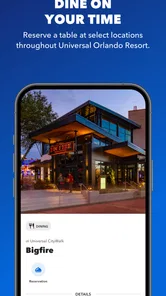
Let's talk features, shall we? One of the standout aspects of this app is its ability to provide real-time updates. You can get the latest info on ride wait times, show schedules, and even dining options. No more wandering around aimlessly or missing out on your favorite attractions. It's all about maximizing your fun factor!
Another cool feature is the interactive map. Seriously, it's a lifesaver. You can easily navigate the park and locate everything from restrooms to roller coasters. Plus, with the GPS-enabled feature, you'll never have to worry about losing your way in the sea of excited visitors.
More From Our News Desk

Weather by Xiaomi Review: Clear at a Glance, Less Clear Up Close

X Under Pressure: Can It Recover When Posting Goes Wrong?

Clash of Clans Is Won Between the Battles

Android Auto Makes the Case for Quieter Car Software

MobiOffice: Transforming Mobile Productivity with Seamless Integration

EA SPORTS FC™ Mobile Soccer: Redefining Mobile Sports Gaming
To make those tools work harder, I’d use the map to orient myself before walking, then check the relevant wait or schedule information again when I reach the next area. That small habit is more useful than trying to plan every move from the other side of the park: conditions change, and a flexible route is easier to follow than a minute-by-minute script. For a group, agreeing on a nearby map landmark as a regrouping point can also be more reliable than relying on everyone to interpret directions the same way.
Plan, Play, and Repeat
Planning your day has never been easier. With the app's itinerary planning tool, you can map out your day down to the minute. Choose your must-see attractions, schedule breaks, and make reservations at your favorite restaurants all in one place. It's like having a personal assistant dedicated to making your Universal adventure absolutely epic.
I’d treat that itinerary as a shortlist, not a contract. Put the attractions that matter most near the top, leave room for meals and rest, and be ready to swap the order if a wait changes or someone in your group needs a slower stretch. This is especially helpful for families and first-time visitors, who may otherwise spend valuable time negotiating every next step while already in the park.
Photos, practical limits, and alternatives
And hey, if you're a fan of snapping pics (who isn't?), the app lets you access your photos from various rides and attractions. So, you can relive those heart-pounding moments or just show off to your friends back home. The memories are yours to keep!
For photos, I’d check the app when there is a natural pause rather than repeatedly opening it between attractions. It gives the visit a simple rhythm: enjoy the ride first, then see whether its photos are available. That is a more useful expectation than assuming every moment will automatically be captured or that the app replaces a camera and personal photo backup.
Compared with a general maps app or a paper plan, this one is more focused on Universal-specific details such as attraction waits and show schedules. A general map can still be handy for getting to the resort or planning the wider trip, while a paper note is a sensible fallback for a short list of priorities if your phone battery is low. I would use the resort app for decisions inside the park and keep those broader tools for the parts of the day they handle better.
There is a trade-off to putting so much of the plan on a phone: checking updates can interrupt the outing, and a tightly packed itinerary can become frustrating when the day does not follow it. I’d keep the essential details easy to find, avoid treating every displayed time as a guarantee, and make sure the group knows the next meeting point. The app can help organize a visit, but it cannot make every wait or change disappear.
Making decisions without overplanning
A useful way to approach the app is to separate decisions into “before we leave” and “while we’re there.” Before the visit, I’d use the map and itinerary tools to identify a few priorities and notice how the resort is laid out. Once inside, I’d check only the information that could change the next decision: whether to head toward an attraction, pause for a show, or take a meal break. That keeps the phone useful without making it the center of the day.
For example, imagine arriving with children who each have a different must-do attraction. Rather than trying to settle the entire schedule at the entrance, I’d agree on one early priority, a nearby place to regroup, and a flexible second choice. After that first stop, the current wait and schedule information can help the group decide what makes sense next. The benefit is not a perfectly optimized route; it is reducing the number of decisions made under pressure.
Another small but practical habit is to make sure everyone in the group knows the plan even if only one person is checking the app. A quick verbal summary—where you are heading next and where to meet if separated—can prevent the common problem of one person following the map while the rest are unsure. The app supports coordination, but it works best when it does not become the only place the plan exists.
Where the app fits among travel tools
In the wider travel-and-local category, Universal Orlando Resort is deliberately narrower than a general trip organizer. It is not the tool I’d reach for to manage flights, hotels, or a multi-city itinerary; a broader travel app or a standard map is better suited to those jobs. Its advantage begins when the visit is specifically about the resort and you need destination-focused information rather than general directions.
That distinction also explains why a paper note can still be useful alongside it. A short list of priorities and a meeting point remain easy to consult without navigating screens, while the app is better for information that can change during the day. I would not treat those options as competitors: they solve different problems, and combining them can make the plan less fragile.
If you are visiting with someone who prefers not to use a smartphone, the app can still be useful to the person coordinating the day, but it should not be the group’s entire communication plan. Share the next stop aloud and choose recognizable places to regroup. For a visitor who wants all plans kept offline or dislikes checking a phone in a crowded outing, a paper itinerary and a regular map may feel more comfortable, even if they are less tailored to the resort.
Who gets the most from it?
I’d recommend it most to people who are actually visiting Universal Orlando, especially first-timers, families coordinating different priorities, and returning guests who want to check changing park information. It is less compelling if you are only looking for a general travel planner, or if you do not expect to visit the resort: its usefulness is tied to this destination rather than everyday navigation elsewhere.
If you are deciding whether to install it before arrival, I would do so while you have time to get comfortable with the map and planning tools. On the day itself, use it to answer specific questions—where to go, what is coming up, and whether to adjust the next stop—rather than staring at the screen throughout the visit. The app is available for devices running Android 9 or later, so checking compatibility before relying on it is a sensible last step.
It is also a better fit for visitors who are comfortable adapting plans than for anyone expecting an app to guarantee a smooth sequence from morning to evening. A park day involves changing conditions and the needs of the people with you; the useful part is having relevant information to support a choice, not being told that one fixed route is always best. I’d skip it if the resort is only a distant possibility and you have no reason to use destination-specific tools yet.
Wrapping It Up
In a nutshell, the Universal Orlando Resort app is a must-have for anyone planning a trip to this iconic destination. It's like having a backstage pass to all the action, ensuring you don't miss a beat. Whether you're a first-timer or a seasoned park-goer, this app will elevate your experience to a whole new level.
So, next time you find yourself heading to Universal Orlando, make sure to download the app, grab your sunscreen, and get ready for an unforgettable adventure. Trust me, you'll be glad you did!
My verdict is straightforward: because the app is free, I’d try it if Universal Orlando is on your itinerary, but I wouldn’t install it expecting a universal travel tool or a substitute for flexible planning. Its best value is practical and specific—helping you make decisions during a resort visit. If that is what you need, it is worth having ready; if not, a regular map or no extra app at all may suit you better.
Universal Orlando Resort Frequently Asked Questions
Is the Universal Orlando Resort app free, and which devices can use it?
The Universal Orlando Resort app is free to download and belongs to the Travel & Local category. It is designed for Android devices running version 9 or later. The app is developed by NBCUniversal Media, LLC, and its Everyone content rating makes it suitable for a broad audience. You can install it before your visit to explore its planning and park features.
Do I need an account or an internet connection to use the app at the parks?
The app is intended to support a visit to Universal Orlando Resort, including access to maps, ride information, and other park tools. For features that display current information or manage purchases, plan to have an internet connection available and sign in if prompted. Having the app ready on your phone before arriving can make it easier to get started when you are planning your day.
What are the main features of the Universal Orlando Resort app?
The Universal Orlando Resort app is designed to enhance your theme park experience by offering features like real-time wait times for rides, interactive maps, and notifications for special events. It also provides mobile food and drink ordering, allowing you to skip the lines at restaurants, and facilitates easy ticket purchasing and management directly within the app.
How does the app help with planning my visit to Universal Orlando Resort?
The app is an invaluable tool for planning your visit to Universal Orlando Resort. It helps you navigate the parks with interactive maps and provides up-to-date information on ride wait times and show schedules. You can create a personalized itinerary, set reminders for shows, and receive notifications about special events, ensuring you make the most of your visit.
Can I purchase tickets through the Universal Orlando Resort app?
Yes, you can easily purchase tickets through the Universal Orlando Resort app. It allows you to buy tickets for theme parks, special events, and even express passes to skip lines. The app securely stores your tickets digitally, so you don’t have to worry about losing them, and you can access them directly from your smartphone during your visit.
Pros
- Comprehensive park info and maps.
- Easy ride wait time tracking.
- Convenient mobile ticketing.
- Event and show time alerts.
- Personalized itinerary planning.
Cons
- Occasional app crashes reported.
- Drains phone battery quickly.
- Requires constant internet access.
- Limited customization options.
- Some features behind paywall.













