Telemundo: Series y TV en vivo
- 25.09K
- 4.7
- Installs
- 5.00M
- Price
- Free

Screenshots

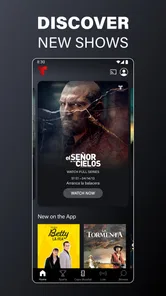
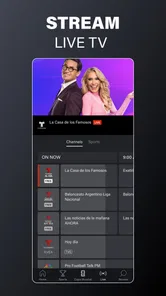

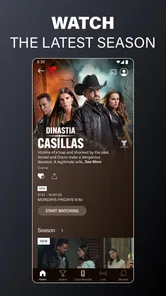
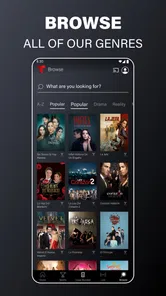
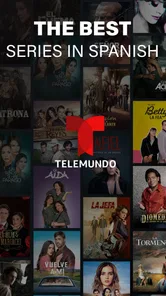
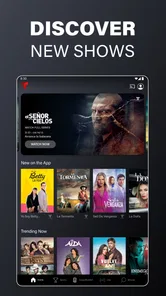
Analysis by Reviewed
Before I choose a streaming app, I ask a practical question: will it help me find something worth watching without turning a quiet evening into a troubleshooting session? Telemundo: Series y TV en vivo is aimed at people who want Spanish-language television, with series and novelas alongside live programming. I see its strongest case in that clear focus: if Telemundo’s shows are already part of your routine, having them in one entertainment app can be more convenient than searching across general-purpose services.
Where viewing can get frustrating
Even a straightforward app can feel less convenient when a programme is difficult to locate or a stream does not start as expected. I’d first check that I have selected the right episode or live option, then give the page a moment to load before repeatedly tapping controls. With live television, timing matters more than it does with an episode I can watch later, so a short delay can be especially noticeable when I’m trying to tune in to a particular moment.
One useful distinction is whether I’m trying to resume a particular story or simply fill a short break. For the first, I’d look for the episode I mean and check its title before pressing play; for the second, live programming can be a quicker route if I’m happy to watch what is on. That choice matters because searching for an exact episode while a live moment is passing can make the app feel slower than it really is.
The app is free, which makes it easy to try, but free access should not be confused with a guarantee that every title or live programme will suit every viewer. I’d treat it as a focused way to explore Telemundo entertainment rather than as a complete replacement for every channel or streaming service. If I mainly watch English-language films, or want one app covering a broad range of unrelated networks, a general streaming service is likely a better fit.
Simple checks before you settle in
For a smoother start, I’d confirm that my device’s operating system is compatible, that the app is up to date, and that the internet connection is working reliably. The current version is 9.24.0, and the minimum supported Android version is 7.0. If video stalls, I’d try another programme or return to the app’s main screen before assuming the whole service is down. That quick comparison can help distinguish a problem with one stream from a wider connection issue.
I’d also decide what I want to watch before opening the app when I have only a few minutes. Live TV works best when I’m ready to tune in, while an on-demand episode is the more flexible choice when interruptions are likely. That small habit avoids spending the viewing window browsing and makes the app easier to fit around a busy day.
Making a viewing plan that fits real life
For a busy evening, I’d treat the app as two different viewing tools rather than one continuous channel guide: live programming for a planned moment, and series or novelas for viewing when I can choose the pace. If dinner runs late or someone needs my attention, an episode is usually the less stressful choice because I’m not trying to catch a particular broadcast at exactly the right time. If I have a short, uninterrupted window, live TV can make it easier to settle in without spending that whole window deciding what to start.
More From Our News Desk

Weather by Xiaomi Review: Clear at a Glance, Less Clear Up Close

X Under Pressure: Can It Recover When Posting Goes Wrong?

Clash of Clans Is Won Between the Battles

Android Auto Makes the Case for Quieter Car Software

MobiOffice: Transforming Mobile Productivity with Seamless Integration

EA SPORTS FC™ Mobile Soccer: Redefining Mobile Sports Gaming
A practical routine is to make a mental note of a show I want to explore, then open the app when I can give it enough attention to find the right programme. When I’m watching with family, I’d agree on whether we want a shared episode or whatever is live before browsing. That simple decision can save the familiar back-and-forth of scrolling while everyone waits, and it makes the app’s Spanish-language focus a benefit rather than a limitation.
A World of Entertainment at Your Fingertips
If there's one thing I love about Telemundo: Series y TV en vivo, it's the sheer variety of content available. Whether you're into gripping dramas, hilarious comedies, or intense reality shows, Telemundo has got you covered. The app offers a seamless blend of live TV and on-demand content, which means you can catch up on your favorite shows anytime you want. Plus, the live TV feature is perfect for those who don't want to miss out on their daily dose of news or sports.
Choosing between live and on-demand viewing
The main advantage of having live viewing alongside episodes is choice of timing. I’d use live programming when I want the experience of tuning in as something is happening, and choose a series or novela when I want to watch at a pace that suits my day. That doesn’t mean the two options are interchangeable: live TV is less forgiving if I arrive late, while an episode is a better match for a stop-and-start evening.
One small trade-off is that live viewing can feel more immediate but leaves less room to browse. If I’m unsure what I want, I’d take a moment to look for a programme first rather than opening live TV and expecting it to solve the choice for me. Conversely, when I already know I want to tune in, starting with the live option avoids turning a planned viewing moment into an extended search.
User Experience: Smooth Sailing
Now, let's talk about the user interface. I downloaded the app expecting to navigate through a maze of confusing menus, but to my pleasant surprise, it was incredibly intuitive. Everything is neatly categorized, making it extremely easy to find what you're looking for. The streaming quality is top-notch too—no more annoying buffering just when you’re about to find out who did it in your favorite telenovela!
In practice, I’d still avoid judging the entire experience from one slow start. A single stream can behave differently from another, and the connection available at that moment can affect playback. If a video pauses, I’d wait briefly, then try a different programme; if that works, I’d return to the original once rather than repeatedly tapping play. This keeps the troubleshooting simple and helps me tell the difference between a temporary interruption and a broader issue.
Features That Stand Out
One of the best features has to be the personalized recommendations. It's like the app gets smarter the more you use it, suggesting shows that align perfectly with your tastes. And let's not forget the "Watch Later" list—an absolute lifesaver for someone like me who’s always juggling between tasks. You can simply add shows to your list and binge-watch them over the weekend.
For me, a useful way to make that queue earn its keep is to add a programme when I spot it, rather than trying to remember its name later. I can then choose an episode when I have time, instead of treating live viewing as the only option. The trade-off is that recommendations and a saved list help with discovery and organisation; they don’t remove the need to browse when I’m in the mood for something outside my usual picks.
I’d also use recommendations as a starting point, not as a promise that the first suggestion will be right for me. If I’m exploring a new kind of programme, I’d give a title a fair look before deciding whether it belongs in my regular rotation. For someone who watches the same kinds of shows often, recommendations may reduce repeated searching; for someone who likes to choose from a wide range of unrelated genres, they may be less useful than browsing a broader catalogue.
Sharing and choosing the right service
Another cool feature is the social sharing option. Found something binge-worthy? Share it directly with your friends and family! It’s a great way to stay connected with loved ones over shared entertainment interests.
That makes the app especially appealing in a household where people enjoy Spanish-language series and can pass recommendations around. Compared with a broad streaming catalogue, its appeal is less about covering every taste and more about giving Telemundo-focused viewing a home. I’d choose a general service instead if my priority were a wide mix of studios, languages, and genres; I’d choose this one when I specifically want Telemundo shows or live programming.
There is also a difference between sharing a title and sharing the viewing experience. Sending someone a recommendation can be useful even if they watch at another time, while a live programme asks both people to be available together. I’d keep that in mind when suggesting something to a friend: an episode is a more flexible recommendation for different schedules, and live viewing is better when the timing itself is part of the appeal.
When another option makes more sense
I wouldn’t choose this as my only entertainment app if my viewing habits jump between many languages, channels, and unrelated types of content. A broad streaming service is better for that kind of variety, and a service built around a different network makes more sense if its shows are what I follow most. The appeal here is specific: it puts Telemundo-oriented viewing at the center rather than trying to be everything to everyone.
It also may not suit someone who wants every viewing session to be completely effortless. Even a focused app asks me to choose between live programming and a particular episode, and a live stream is naturally less convenient if I keep getting interrupted. I’d recommend it most confidently to someone who already seeks out Spanish-language TV; casual viewers who rarely watch it may find that a general catalogue is easier to return to.
Who will get the most from it
A realistic use is opening the app after work, checking what is available, and saving a series for the weekend while using live TV when I want to watch in the moment. It may also suit someone who wants Spanish-language entertainment as part of a regular routine, rather than an occasional search. The app is from NBCUniversal Media, LLC, is rated Teen, and has a 4.7 average from around 71,000 ratings; its 5 million-plus installs suggest that many people have made room for it on their devices.
The Teen age rating is worth considering when choosing what to watch with younger family members. I’d still make the programme choice myself rather than treating an app-level age label as a decision about every individual title. For adults sharing a screen with teenagers, that means thinking about the specific show and the family’s preferences before settling on a selection.
When playback trouble is outside the app
At the same time, the app is not the cause of every playback hiccup. If several video services struggle on the same connection, I’d check the network first; if only one title has trouble, I’d try a different programme and reopen the app before drawing conclusions. The service is currently on version 9.24.0, and Telemundo first arrived on September 10, 2013. Its 25,000 reviews give prospective viewers plenty of user feedback to weigh alongside the strong rating.
If the problem continues, I’d make one change at a time: check whether other internet activity is working, close and reopen the app, and then try a different stream. Changing several things at once makes it harder to tell what helped. I’d also avoid assuming that a temporary issue with one programme means the whole app is unusable; a quick comparison with another title gives a more useful clue.
On a shared or busy connection, I’d choose a time when other video use is lighter if playback has been inconsistent. If the issue appears only on one device, checking compatibility and installing the current app version are sensible first steps. These checks are straightforward, but they prevent an evening of repeatedly restarting the same video without learning whether the cause is the connection, the device, or that particular stream.
Ending Thoughts
Overall, if you're a fan of Spanish-language television, Telemundo: Series y TV en vivo is a must-have. It's packed with a diverse range of content and has user-friendly features that make your viewing experience delightful. So, why not give it a try? You might just find your next favorite series!
My practical verdict is more measured: I’d start here if Telemundo’s novelas, series, or live programming match what I want to watch, especially because the app is free to try. I’d skip it if I rarely watch Spanish-language TV or need a single service to cover every kind of entertainment. For the right viewer, its focused catalogue and mix of live and on-demand viewing make it a useful companion; just keep the app updated and check the connection before blaming a stream for a rough evening.
Telemundo: Series y TV en vivo Frequently Asked Questions
Is Telemundo: Series y TV en vivo designed for viewers who prefer Spanish-language entertainment?
Yes. The app centers on Spanish-language entertainment, including series, novelas, and television shows. That makes it a natural fit if you want to watch familiar Spanish-language programming or explore Telemundo’s shows in one place. Before downloading, consider whether this focus matches what you want to watch, since the app is built around Telemundo content rather than being a general-purpose streaming service.
What age rating does Telemundo: Series y TV en vivo have?
Telemundo: Series y TV en vivo has a Teen content rating, so it may be more appropriate for teenagers and adults than for younger children. Parents and caregivers should consider that rating when deciding whether the app suits a particular viewer. Its Spanish-language series, novelas, and TV programming can vary in subject matter, so it is sensible to use your own judgment about what is suitable.
Will I need an internet connection to use Telemundo: Series y TV en vivo?
Yes, plan to have an internet connection when watching content in Telemundo: Series y TV en vivo. The app streams live television and on-demand programming, so a connection is needed for playback. A stable connection can help reduce buffering and interruptions, especially when watching a live broadcast. If you expect to watch while traveling or somewhere with limited access, keep in mind that the app does not support downloading shows for offline viewing.
What devices and operating systems can I use with Telemundo: Series y TV en vivo?
Telemundo: Series y TV en vivo is an entertainment app from NBCUniversal Media, LLC, available for Android and iOS. On Android, it requires version 7.0 or later, so checking your device’s operating system before downloading can help you avoid compatibility issues. The app is free to download, and its Teen content rating is worth keeping in mind when choosing entertainment for younger viewers.
What content can I watch on Telemundo: Series y TV en vivo?
Telemundo: Series y TV en vivo offers a wide range of content primarily in Spanish, including popular series, telenovelas, and live TV broadcasts. Users can enjoy hit shows, exclusive premieres, and special events. The app is perfect for those interested in Hispanic culture and entertainment, providing a vast library of both current and classic content.
Pros
- Wide variety of shows available.
- High-quality streaming experience.
- User-friendly interface design.
- Free access to some content.
- Option to watch live TV.
Cons
- Ads can be intrusive.
- Requires a stable internet connection.
- Limited content for non-Spanish speakers.
- Some features require subscription.
- Occasional streaming lags.













