The NBC App - Stream TV Shows
- 49.09K
- 4.2
- Installs
- 10.00M
- Price
- Free

Screenshots
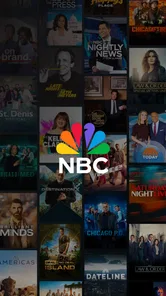
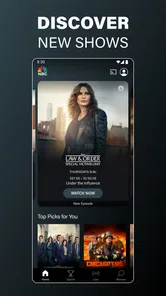
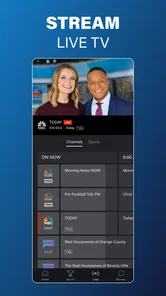
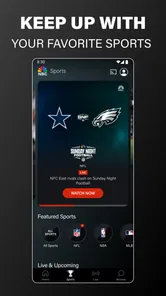
Analysis by Reviewed
I judge a streaming app’s trustworthiness less by its polished screens than by the choices I can actually see and use. The NBC App is an entertainment app from NBCUniversal Media, LLC, and its appeal is clear if you already follow NBC programming or want to catch live sports. I’d still approach it as a focused broadcaster app, not as a complete replacement for every TV service. Its Teen age rating is also worth keeping in mind when deciding whether it suits a shared family device.
What I would check before settling in
For me, a sensible first step with any streaming app is to review the access and account choices it presents during setup, then revisit the app’s visible settings before watching. I wouldn’t assume that installing it means I have to share more than I’m comfortable with; I’d read each prompt and make an informed choice. The practical point is simple: pause at sign-in or permission requests rather than tapping through automatically, especially if I’m setting it up on a device other people use.
That matters most when viewing habits are personal or a phone is shared. I’d also consider whether I want an account connected to my viewing and whether I’m comfortable watching on a device away from home. Those are decisions I can make deliberately, rather than reasons to avoid the app outright. I would not treat a familiar network name as a substitute for checking the controls the app actually shows.
Who gets the most from it
This is most useful for someone who follows NBC shows and wants a convenient place to check for episodes, or for a viewer who values the possibility of live sports coverage. It’s less compelling if your main goal is a broad catalogue spanning many networks, or if you mostly watch films and series from unrelated services. In that case, a general streaming service or the TV provider’s own app may fit your routine better.
A realistic use is opening it after work to see whether there’s something from NBC to catch up on, then saving a promising option for later if the app’s available controls support that workflow. For a live game, I’d check the viewing options before kickoff rather than assume every event is available in every situation. That small habit helps avoid making the app your only plan when timing matters.
As a free app, it’s easy to try without making an upfront purchase, but free does not automatically mean every program or viewing route will be available without conditions. I’d pay attention to any access choices shown for a particular stream and decide whether they suit me. That’s a more useful expectation than treating the app as an unlimited library simply because there is no purchase price.
The NBC App has an average rating of 4.2 from around 137,000 ratings, and it has been installed over 10 million times. It first appeared in 2013; version 9.24.0 supports devices running Android 7.0 or later. Those details suggest an established app, but they don’t tell me whether a specific show, live broadcast, or device setup will suit my needs, so I’d judge it by the content and controls I can access myself.
More From Our News Desk

Weather by Xiaomi Review: Clear at a Glance, Less Clear Up Close

X Under Pressure: Can It Recover When Posting Goes Wrong?

Clash of Clans Is Won Between the Battles

Android Auto Makes the Case for Quieter Car Software

MobiOffice: Transforming Mobile Productivity with Seamless Integration

EA SPORTS FC™ Mobile Soccer: Redefining Mobile Sports Gaming
Making it work with your viewing routine
I’d use this as a targeted stop in a larger viewing routine rather than expect it to replace every app on my home screen. If I already know I want an NBC program, opening the broadcaster’s app can be more direct than searching a broad streaming catalogue where the same title may not be available. If I’m undecided and want to browse across studios, genres, or services, a general streaming app is usually the better starting point.
That distinction is useful when deciding whether to install it on a phone, tablet, or television. On a phone, it can be handy for checking what’s available while I have a spare moment, but I’d save longer viewing for a screen and connection that suit video. On a shared television, I’d first consider who can access the device and what account or sign-in choices appear, instead of assuming that a personal phone setup transfers neatly to a household screen.
For a live sports evening, I’d open the app early enough to confirm the event is actually accessible to me and that the stream begins as expected. The practical trade-off is that a broadcaster app can be a useful place to look for its own coverage, but it is not a guarantee that every game or broadcast I care about will be there. If the event is the main reason I’m watching, I’d keep another legitimate viewing option in mind rather than discover a restriction at kickoff.
Small decisions that make a difference
One non-obvious tip is to separate “I want to watch this now” from “I want this app to remember or connect my activity.” When the app presents account or access prompts, I’d take a moment to understand what each choice enables before proceeding. That keeps the setup intentional, especially on a device shared with family or roommates. If I’m unsure about a prompt, I’d pause and inspect the wording instead of treating every request as a routine step.
I’d also test the app with a short viewing session before relying on it for a planned evening. That gives me a chance to see how it behaves on my own connection and device, and to learn where the available episode or live options appear. Streaming quality depends on real-world conditions, so a good experience one evening should not be taken as a promise about every network or location. The useful takeaway is to check beforehand when missing a program would matter.
Another sensible habit is to decide what “catching up” means for me. If I’m looking for one specific episode, I can check directly for that title rather than spend time browsing the app as though it were a complete entertainment library. If I want a wide range of movies and shows, I’d turn to a service built around a broader catalogue. This simple distinction prevents the app’s focused role from becoming a disappointment.
Where the limits matter
The app’s strongest reason to exist is its connection to NBC programming and live viewing possibilities; that focus is also its main limitation. I wouldn’t choose it as my sole service if I regularly watch content from many unrelated networks. Nor would I recommend it as the first choice for someone who mostly wants films, international titles, or a large all-purpose catalogue. Those viewers are likely to get more value from a broader service or a provider app that matches their existing TV package.
There is also a difference between having a free app and having effortless access to every stream. I’d treat the no-upfront-cost entry as a low-risk way to see whether the available content fits my routine, not as a promise that all viewing paths are open without conditions. When an episode or event matters to me, checking its access details in advance is more reliable than assuming the same rules apply to every title.
For parents or anyone setting up a shared device, the Teen rating is a useful prompt to think about household expectations, but I would not treat a rating as a substitute for checking the actual viewing choices and device controls. I’d make those decisions with the people who use the screen. That is especially worthwhile when a phone or television is left available to others, because the most comfortable setup for one adult may not suit everyone in the home.
Your Gateway to NBC's Finest
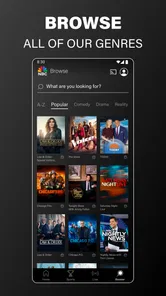
Imagine having a treasure chest of TV shows and live broadcasts right at your fingertips. Well, that’s exactly what the NBC App offers. From beloved classics to the latest dramas, it’s like having the best of NBC in your pocket. The app is designed to keep you connected with your favorite shows, anytime and anywhere. I’ve spent countless evenings lost in the rich content it offers. Whether it's the nail-biting suspense of "This Is Us" or the comedic brilliance of "The Office", the app never disappoints.
Seamless Streaming Experience
One of the first things I noticed was how user-friendly the app is. The interface is sleek and intuitive, making navigation a breeze. It’s like NBC took all my streaming dreams and packed them into one app. The video quality is top-notch, and I experienced little to no buffering, even on my less-than-stellar Wi-Fi connection. Plus, the option to watch live TV is such a game-changer! I no longer feel the FOMO when I miss an episode of "Saturday Night Live" because I can catch up right away.
Features That Stand Out
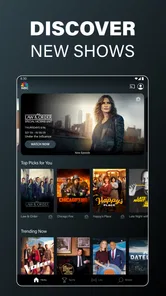
What really sets the NBC App apart are its unique features. The "Watchlist" function is a lifesaver for organizing what to watch next. It’s like having a personal TV guide that’s tailored just for me. The app also provides access to exclusive clips and highlights that you won’t find anywhere else, giving you that extra behind-the-scenes feel. Another neat feature is the ability to start watching on one device and continue on another, which is perfect for those of us always on the move.
Final Thoughts
All in all, the NBC App - Stream TV Shows is a must-have for any TV enthusiast. It’s not just an app; it’s a portal to endless entertainment, keeping you connected to the shows you love. Whether you’re a fan of drama, comedy, or live sports, this app has something for everyone. So, grab your popcorn, find a comfy spot, and dive into the wonderful world of NBC. Trust me, you won’t regret it!
My cautious recommendation
I’d recommend giving it a try if NBC shows are already part of your week, or if you want a direct way to check for the broadcaster’s live programming. Its free entry makes that trial straightforward, and the app’s established audience suggests it has become a familiar option for many viewers. Still, popularity alone doesn’t tell me whether a particular stream, account setup, or household arrangement will work for you, so I’d base the decision on your own needs.
If you’re deciding whether to install it, ask yourself what you expect it to do. For a focused NBC catch-up session, it makes sense to have it available. For an evening when you want to compare many services or browse a large mix of unrelated titles, I’d start elsewhere. And if account or permission choices feel unclear during setup, it’s perfectly reasonable to stop and review them before watching. That balance—useful access without rushing through choices—is how I’d get the most from it.
The NBC App - Stream TV Shows Frequently Asked Questions
Can I use The NBC App on a phone or tablet?
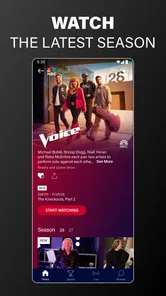
Yes. The NBC App is designed for mobile viewing, and it is available for Android and iOS devices. On Android, check that your device is running Android 7.0 or later before installing. Once installed, you can use the app to watch NBC programming on your device, including the latest episodes of The Voice and live-streamed NFL games.
Do I need an NBC account to watch shows in The NBC App?
Access can depend on the content you want to watch. The app provides a selection of content without a subscription, while some episodes and live TV may require you to sign in with a participating TV provider account. It’s a good idea to have your provider details available if you plan to watch programming that asks you to authenticate.
Can I watch The NBC App while I’m away from home?
The NBC App lets you watch NBC programming on a mobile device, which can be convenient when you are away from your television. Streaming still depends on having a suitable internet connection, and access to particular shows or live broadcasts may require a participating TV provider sign-in. Check the program you want to watch in the app to see what access it requires.
Is The NBC App suitable for children?
The NBC App has a Teen content rating, so parents and caregivers may want to review that rating before letting younger viewers use it. The app includes entertainment and television programming, and what appears may vary by show. Consider supervising children’s viewing and using the device’s family settings where appropriate.
What should I know about The NBC App before downloading it?
The NBC App is an entertainment app from NBCUniversal Media, LLC, built around watching NBC programming on a mobile device. Its store summary highlights recent episodes of The Voice and live streaming of NFL games. It is free to download, and its content rating is Teen, so it may be worth checking whether that age rating suits everyone who will use the device.
Pros
- User-friendly interface for all ages
- High-quality streaming without buffering
- Wide variety of shows and movies
- Easy access to live TV
- Regular updates with new content
Cons
- Ads can be intrusive
- Limited offline viewing options
- Requires stable internet connection
- Some content is region-locked
- Subscription required for full access













