Ultimate Guitar: Chords & Tabs
- 68.87K
- 4.3
- Installs
- 10.00M
- Price
- Free

Screenshots
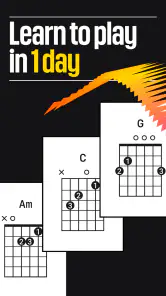

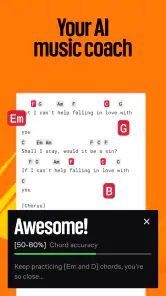
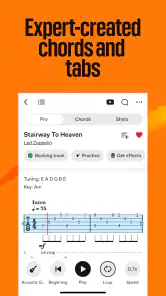



Analysis by Reviewed
I think Ultimate Guitar: Chords & Tabs works best as a practical song-finding companion, not as a substitute for lessons or careful listening. Its great appeal is the breadth of material: when I want to work out a familiar song, I can often find several arrangements to compare rather than relying on one version. That choice is useful, but it also means I need to judge what fits my instrument and skill level instead of assuming every tab is authoritative.
How I’d use it in a real practice session
Picture having twenty minutes before friends arrive and wanting to get a chorus ready. I’d search for the song, check a chord-based arrangement first, then try a tab if the riff is what makes the track recognizable. I’d play along slowly, isolate the awkward measure, and repeat it until my fingers settle. That’s a more productive routine than scrolling through arrangements without picking up the instrument.
A useful habit is to compare alternate versions when something sounds wrong. Community submissions can differ in tuning, capo position, or how they simplify a passage, so I treat the written part as a starting point and listen for whether its shape matches the recording. For a beginner, a simpler chord chart may be the better practice choice even when a more detailed tab looks impressive. For a player preparing a faithful cover, the extra comparison can reveal where an arrangement takes shortcuts.
Where it fits among music-learning tools
Compared with a conventional sheet-music library, the app is more immediately approachable for guitarists who read chord names or tablature. Compared with a video lesson, it gives me a compact reference I can return to while playing, but it won’t necessarily explain the hand movement or technique behind a difficult phrase. I’d use a lesson when I need to understand how to execute a passage, and use tabs when I mainly need a map of the notes and chords.
The range is not limited to guitar: the app is aimed at players of instruments including ukulele and bass, which makes it handy when a group wants to adapt a song around different parts. Still, an arrangement’s presence doesn’t guarantee it will suit every instrument or playing level. I’d check the instrument and tuning before practicing, especially if I’m switching from my usual setup.
Who will get the most from it
It’s a strong fit for curious players who learn by trying songs, returning to passages, and comparing arrangements. Beginners can use chord material to build a repertoire, while experienced players may appreciate having a quick reference for riffs and alternate tunings. It may be less satisfying for someone who wants a structured course with a planned sequence of lessons, or for a musician who needs professionally checked notation for performance work.
The app is free to download, with optional in-app purchases ranging from under a dollar to over a hundred dollars per item. I’d start with the free experience and decide whether any paid option addresses a specific need rather than paying simply because a feature sounds appealing. It’s rated for teens, and Ultimate Guitar USA LLC develops it. The app has been around since 2010, and version 7.2.2 is the current release; it requires iOS 7.1 or later. It has a 4.3 average from around 608,000 ratings, with more than 10 million installs and around 69,000 written reviews. Those figures suggest a well-established audience, though they don’t tell me whether a particular arrangement is accurate.
More From Our News Desk

Weather by Xiaomi Review: Clear at a Glance, Less Clear Up Close

X Under Pressure: Can It Recover When Posting Goes Wrong?

Clash of Clans Is Won Between the Battles

Android Auto Makes the Case for Quieter Car Software

MobiOffice: Transforming Mobile Productivity with Seamless Integration

EA SPORTS FC™ Mobile Soccer: Redefining Mobile Sports Gaming
If I’m practicing quietly, I’d use the written arrangement as a guide and keep the original recording nearby for timing and feel. That small extra step matters: tabs show a route through a song, but they can’t make the musical decisions for me. With that expectation, I find the app most valuable as a flexible, community-built reference that gets me playing sooner.
If you're like me, you've probably spent countless hours trying to learn your favorite songs on the guitar. This is where Ultimate Guitar: Chords & Tabs comes into play. This app is like a treasure trove for music enthusiasts, offering a massive collection of guitar tabs and chords that cater to every taste imaginable.
Unleashing Your Inner Rock Star
When I first downloaded Ultimate Guitar: Chords & Tabs, I was blown away by the sheer volume of content. You can find tabs for everything from the latest pop hits to classic rock anthems. It’s like having a personal music library at your fingertips. The app is incredibly user-friendly, with a clean interface that makes navigation a breeze. Even if you're a newbie, you'll find your way around in no time.
Features That Make You Go Wow!
One of the coolest features is the interactive tab player. You can slow down the tempo, loop sections, and even change the pitch to suit your vocal range. It’s perfect for those tricky solos that require a bit more practice. Another gem is the ability to create your own tabs and share them with the community. This means you’re not just consuming content; you’re contributing to it as well!
Let’s talk about the Custom Tuning feature. Ever wanted to play a song in drop D or open G? The app allows you to do just that. It’s a lifesaver for those who love experimenting with different sounds. Plus, the built-in metronome and tuner ensure you’re always in rhythm and in tune.
Community Vibes
What truly sets this app apart is its vibrant community. The user-generated content is both impressive and inspiring. You can rate tabs, leave comments, and even request new ones. It’s like being part of a global jam session where everyone shares the same passion for music.
However, it’s not all sunshine and rainbows. Some tabs are better quality than others, and you might find a few inaccuracies here and there. But hey, perfection is a journey, not a destination, right?
Final Thoughts
So, is Ultimate Guitar: Chords & Tabs worth your time? Absolutely. Whether you’re a seasoned guitarist or just starting out, this app is a must-have. It’s a comprehensive tool that not only helps you learn songs but also encourages creativity and community interaction. Trust me, once you start using it, you’ll wonder how you ever managed without it. Ready to rock?
Ultimate Guitar: Chords & Tabs Frequently Asked Questions
Can I find songs in different genres?
Ultimate Guitar: Chords & Tabs is made for browsing song material, with an extensive range of songs across various genres. That variety can make it easier to look for music that suits your taste and gives you options to work on as your interests change. If you have a particular song or style in mind, the app’s library is the place to start exploring.
Is the app intended for guitar players only?
No. Although guitar is central to the app, its music tabs and chords also cover ukulele, bass, and more. This makes it useful if you play more than one instrument or want to explore arrangements beyond guitar. When choosing material, pay attention to the instrument and notation that suit how you play, since the app is designed around finding song parts to learn and practice.
Which instruments can I learn songs for in Ultimate Guitar: Chords & Tabs?
Ultimate Guitar: Chords & Tabs is not limited to standard guitar parts. Its library includes music tabs and chords for guitar, ukulele, bass, and more, so players can look for arrangements suited to different instruments. Before downloading, consider which instrument you play and whether you prefer chord-based songs or tab notation; the app is built around browsing a broad range of song material.
What is Ultimate Guitar: Chords & Tabs?
Ultimate Guitar: Chords & Tabs is a comprehensive app designed for musicians of all levels to access a vast library of guitar chords, tabs, and lyrics. It provides an extensive range of songs across various genres, making it a valuable tool for both beginners and experienced guitar players looking to learn and practice new music. The app focuses on helping players find song material to learn and play, with support for several instruments beyond guitar.
Is Ultimate Guitar: Chords & Tabs free to use?
While Ultimate Guitar: Chords & Tabs offers a free version with access to a wide array of chords and tabs, it also provides a premium subscription known as UG Pro. The Pro version unlocks additional features such as interactive tabs, ad-free experience, and access to all content without restrictions, enhancing the learning experience. The app is free to download, with in-app purchases available, so check the purchase options in the app before deciding whether to upgrade.
Pros
- Extensive song library available.
- User-friendly interface.
- Offline mode for learning anywhere.
- Interactive lessons enhance skills.
- Regular updates with new features.
Cons
- Some features require a subscription.
- Ads can be intrusive.
- Limited free content.
- Occasional app crashes.
- High battery usage.
- Category
- Music & Audio
- Version
- 7.2.2











