Tuya Smart
- 6.62K
- 4.5
- Installs
- 10.00M
- Price
- Free

Screenshots

Analysis by Reviewed
I like smart-home apps most when they remove small daily decisions rather than add another screen to check. Tuya Smart is built around that idea: it brings compatible home devices together so you can manage them in one place. Its most useful promise is automation, because a routine can make devices respond to a chosen condition instead of waiting for you to open the app and tap a control.
Automation is the real draw
With Tuya Smart, automation can be based on time, location, or weather. That gives routines more flexibility than a simple timer. A schedule is helpful when your habits are predictable; a location-based trigger can suit an irregular commute; and a weather condition may make sense for a device whose use depends on the day outside. The practical benefit is fewer repetitive taps, not a home that somehow knows every preference without setup.
I would start with one small, easy-to-check routine, such as turning a compatible light on at a regular time. Once you know it behaves as expected, you can decide whether a more conditional setup is worthwhile. This is a useful way to avoid building a tangle of automations that are hard to remember or troubleshoot. For anyone wondering whether routines replace manual control, I see them as a convenience layer: you can still use the app when you want to make a one-off change.
How it fits into everyday home control
In a realistic evening routine, a scheduled light could make a room more welcoming around the time you usually get home, while manual controls remain available when your plans change. That small distinction matters: automation works best when it handles the predictable part of a day and leaves exceptions easy to manage. Before relying on a routine, I’d check that the device itself is compatible and that the trigger matches the way I actually live.
Getting started with a mixed setup
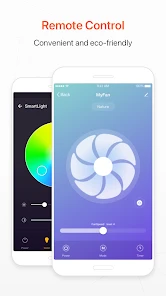
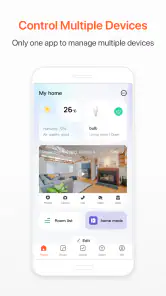
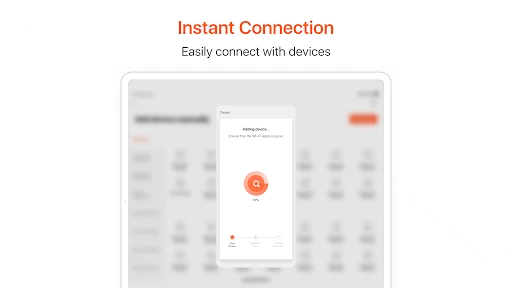
First things first, let's talk about what Tuya Smart is all about. Essentially, it’s an app that allows you to manage all your smart home devices from a single platform. Whether you’ve got smart lights, cameras, or even a smart toaster, Tuya Smart integrates seamlessly with a wide variety of devices to ensure everything runs smoothly.
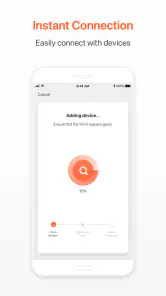
Installation is a breeze. Simply download the app from the Play Store or App Store, sign up, and you’re ready to go. The user interface is sleek and intuitive, which means you won’t be fumbling around trying to figure out where everything is. Plus, it’s compatible with both Android and iOS, making it accessible to everyone.
The biggest practical question is whether your existing devices will work with it. Tuya Smart is intended to bring a range of compatible products into one interface, but I would check each device’s compatibility before building a setup around the app. If you only own products designed to work inside another maker’s ecosystem, that brand’s own app may offer a more direct experience. Tuya’s appeal is strongest when your compatible devices would otherwise leave you juggling separate controls.
More From Our News Desk

Weather by Xiaomi Review: Clear at a Glance, Less Clear Up Close

X Under Pressure: Can It Recover When Posting Goes Wrong?

Clash of Clans Is Won Between the Battles

Android Auto Makes the Case for Quieter Car Software

MobiOffice: Transforming Mobile Productivity with Seamless Integration

EA SPORTS FC™ Mobile Soccer: Redefining Mobile Sports Gaming
Routines, voice, and useful limits
One of the coolest things about Tuya Smart is its automation capabilities. You can set up routines to automate your devices based on time, location, or even the weather. Imagine walking into your house and having the lights turn on automatically or the thermostat adjusting to your preferred setting without lifting a finger. Sounds like magic, right?
Another standout feature is the app’s ability to work with voice assistants such as Alexa and Google Assistant. This means you can control your devices using voice commands, adding an extra layer of convenience. Just say the word, and Tuya Smart has got you covered.
Voice control is handy when your phone is across the room, but it is not a substitute for checking how a device is set up in the app. I’d use spoken commands for straightforward actions and keep more specific adjustments in the app, where the available controls are easier to inspect. Likewise, I would avoid making a routine depend on several conditions until I had tested each part; a simpler automation is easier to understand when plans change or a trigger does not behave as expected.
Making routines useful instead of complicated
A good automation should be easy to explain in one sentence: “At this time, turn this light on.” If I cannot quickly remember what a routine is meant to do, it is probably carrying too many exceptions for the benefit it provides. I’d name routines by their purpose and keep their triggers distinct, so a small change to one part of the day does not leave me wondering which rule is responsible for a device’s behavior.
Location-based triggers deserve a little extra thought. They can be useful when arrival times vary, but they are not automatically better than a schedule: the routine depends on your location being a meaningful cue for the action. If a light should come on every evening whether you are home or not, a time-based rule is clearer. If the desired action only makes sense when you are approaching home, location may fit better. Choosing the simplest trigger that matches the intention makes the setup easier to trust.
Weather conditions can also be more useful as a specific nudge than as a reason to automate everything. I would reserve them for a device whose purpose genuinely changes with outdoor conditions, then check that the result is sensible on ordinary days as well as unusual ones. The point is not to use every available trigger; it is to select the one that removes a decision without creating a new one.
Security and privacy
In today’s world, security is a top priority, and Tuya Smart doesn’t disappoint. The app ensures that all your data is encrypted, and they have a solid privacy policy in place to protect your information. It’s comforting to know that your smart home setup is as secure as it is convenient.
Moreover, the app supports two-factor authentication, which adds an extra layer of security. It’s little things like these that give you peace of mind when managing your smart devices.
Because this app can sit at the center of several connected devices, I would treat account security as part of the setup, not an afterthought. Two-factor authentication is worth enabling, and a quick review of which devices are connected can help keep the home screen useful rather than cluttered. If you prefer to keep every device in its manufacturer’s own app, or you do not want a connected-home account at all, a simpler standalone control may suit you better.
A realistic routine, with room for exceptions
Imagine an evening when I normally arrive home around the same part of the day, but my plans sometimes shift. A scheduled light can cover the predictable pattern; if that schedule would be inconvenient on nights away, I would consider whether a location trigger better matches the job. Either way, I would test the routine while I am home and able to check the result, rather than assuming the first setup is perfect. That first test is a small effort that can prevent a routine from becoming an unexplained annoyance.
I would also keep a manual fallback in mind. A routine is most valuable when it handles a repeated action, but there will be evenings when I want a different result. Being able to make a one-off adjustment is part of what makes automation practical rather than rigid. If a device does not respond as expected, I would first separate the question of whether the device works manually from whether the trigger is configured correctly. That distinction makes troubleshooting less frustrating than changing several settings at once.
Who will get the most from it
Tuya Smart is a free lifestyle app from Tuya Smart Inc. It has an average rating of 4.5 from around 468,000 ratings, and has been installed over 10 million times. It is rated for everyone, with version 7.0.5 currently available for Android 6.0 and newer. Optional in-app purchases range from about 49 cents to $259.99 per item, so I would check what a purchase applies to rather than assume the core app requires payment.
For someone combining compatible devices from different parts of a home, the single-control approach can be more convenient than switching between several apps. It is also a sensible fit for people who enjoy adjusting routines and are willing to test them. If you only need to switch one device occasionally, the extra setup may not be worth it; a device’s own controls or app could be quicker. The app first appeared on November 11, 2015, and its current version reflects an established product rather than a brand-new experiment, though the value still depends on the particular devices you own.
When another approach makes more sense
Compared with relying on each manufacturer’s app, a shared control point can reduce the hassle of remembering where a particular device lives. That advantage is strongest in a mixed setup, but it does not mean a single app is automatically the best home for every product. A manufacturer’s own app may be preferable if you mainly use one brand or want to stay close to that device’s dedicated controls. I would choose based on the devices already in the home, not on the appeal of having everything in one place in theory.
There is also a difference between occasional control and routine building. If your main need is to switch one lamp on and off, learning a new app and setting up automations may add more work than it saves. On the other hand, if several compatible devices are involved in repeated tasks, the value of keeping those controls together grows. The useful question is not whether smart-home automation sounds impressive, but whether it eliminates a task you actually repeat.
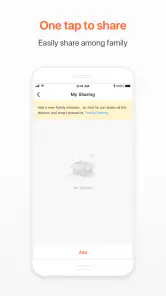
For a household with more than one person, I would think through which routines everyone can understand and live with. A predictable light schedule is easy to explain; a collection of location and weather conditions may be harder to anticipate if someone else is using the same space. Starting with one visible, low-stakes action gives everyone a chance to see what the app is doing before more routines are added. This is a practical way to keep automation from feeling like a mysterious layer operating in the background.
The app is also a less obvious fit for someone who likes gradual smart-home changes. You do not need to automate an entire home at once to get value from it. A single compatible device can be a test case: use a basic control first, then add a routine only if the repeated action is genuinely inconvenient. That staged approach helps you judge whether the shared app is useful for your particular mix of devices without making a large commitment upfront.
Final thoughts
All in all, the Tuya Smart app is a fantastic tool for anyone looking to streamline their smart home experience. Its ease of use, impressive range of compatible devices, and robust security features make it a must-have for tech-savvy individuals. Whether you’re just starting out with smart home technology or you’re a seasoned pro, this app is definitely worth checking out.
So, if you’re ready to take control of your home like never before, give Tuya Smart a try. It might just be the upgrade you didn’t know you needed. Happy automating!
Tuya Smart Frequently Asked Questions
Can Tuya Smart help me organize several connected devices in one place?
Tuya Smart is intended to bring compatible smart-home gadgets together in a single app, which can make everyday control feel more organized than switching between separate controls. It is a Lifestyle app from Tuya Smart Inc. Your experience will depend on the devices you have and whether they are designed to work with Tuya, so it is worth checking compatibility before getting started.
Can I create routines or automate connected devices with Tuya Smart?
Tuya Smart is designed for managing connected devices and automation, letting users set up ways for compatible gadgets to work with less direct input. This can be useful for shaping how devices fit into a daily routine. The options available depend on the particular device and its support in the app, so check that your equipment is Tuya-compatible before planning around a specific automation.
Is Tuya Smart available for both Android and iOS?
Tuya Smart is an app for mobile devices, and the Android version requires Android 6.0 or later. It is categorized as Lifestyle and has an Everyone content rating. Before downloading, check that your phone’s operating system meets the requirement for the version you intend to install, and use the relevant app store for your device.
What devices do I need before setting up Tuya Smart?
Before downloading Tuya Smart, consider which smart devices you want to manage and check that each one is designed to work with Tuya. The app is intended to bring compatible gadgets into one place, so having a device ready can help you understand whether it fits your home and routine. You will also need a compatible phone to install and use the app.
Can I control my smart home when I am away?
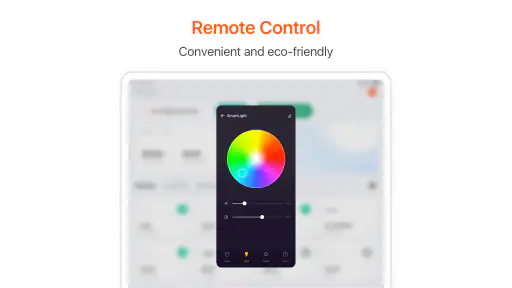
Tuya Smart is designed to let you manage connected devices remotely through its cloud-based service. Once a compatible device has been connected to the app, you can use its controls while away from home, rather than needing to operate it directly. This is useful for checking or adjusting devices from elsewhere, though the experience depends on having the devices set up and accessible through the app.
Pros
- User-friendly interface
- Wide device compatibility
- Custom automation features
- Remote control capability
- Regular updates
Cons
- Occasional connectivity issues
- Limited customer support
- Requires stable internet
- Complex setup for beginners
- Privacy concerns with data
- Category
- Lifestyle
- Version
- 7.0.5











