Tuner & Metronome
- 3.73K
- 4.6
- Installs
- 10.00M
- Price
- Free

Screenshots
Analysis by Reviewed
I judge a music app partly by what it lets me do and partly by how much I can reasonably trust it. Tuner & Metronome is a practical tool from Soundcorset Tuner, designed around tuning and keeping time, with additional functions aimed at making practice more convenient. It is free to install, though it offers in-app purchases priced from $0.99 to $39.99 per item. Its audience rating is 4.6 from around 165,000 ratings, and it has passed 10 million installs. Those figures suggest broad use, but they do not tell me how it handles anyone’s information, so I separate popularity from privacy when deciding whether to rely on it.
What I can judge, and what I cannot assume
The app sits in the music and audio category and is rated Teen. It has been available since December 8, 2012, giving it a long history as a musician’s utility rather than a new experimental product. The experience described for it brings together a tuner, metronome, automatic page turning and A.I. tutoring. That breadth can make it useful as a practice companion, but I would not treat a list of functions as proof of a particular privacy standard or permission setup. I look for the choices shown on the device itself, and I avoid assuming that an audio-related tool necessarily records or stores anything in a particular way.
That distinction matters in ordinary use. A tuner needs to respond to sound to do its job, while a page-turning or tutoring workflow may involve different interactions. I would pay attention to the permission prompts that appear when I first use relevant functions, read their wording carefully, and grant only what makes sense for the task. If a request seems unrelated to what I am trying to do, I would pause rather than accept it automatically. That is a sensible habit with any utility that works alongside a musical instrument and a phone.
Practical controls before a practice session
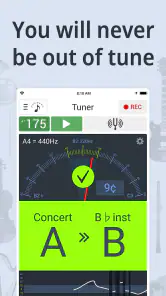
My first test would be a simple one: open the tuner, play a clear note, and see whether the on-screen guidance is easy to understand in the room where I practice. A phone microphone can be affected by nearby voices, a television, or other instruments, so I would test in a quieter corner before blaming the app for an uncertain reading. This is also a useful way to learn how much input the tuner needs without granting permissions or changing settings in a hurry. For a loud rehearsal, I would consider whether the phone can be positioned close enough to the instrument to distinguish its sound.
The metronome makes the app more useful after tuning, but it does not remove the need to choose a tempo thoughtfully. I would start with a passage I can nearly play cleanly, set a pace that leaves room for accurate notes, and raise it only when the rhythm stays steady. If I am learning a part from sheet music, the automatic page-turning function could reduce interruptions, while the A.I. tutoring feature gives the app another possible role in a practice routine. I would try each function separately at first. That makes it easier to tell which tools genuinely help and which ones I do not need.
Making an informed choice as you use it
Because the app is free to install but has paid items, I would explore the basic workflow before spending anything. An in-app purchase may make sense for someone who has used the relevant feature enough to know it fits their routine; it is less compelling if all they need is a quick reference pitch and a steady beat. I would check the purchase screen carefully before confirming a transaction, especially if I were handing the phone to a younger musician. The Teen content rating is useful context for families, but it does not replace a parent’s own review of purchases and device settings.
For data-sensitive practice, I would also think about where and when I use the phone. In a lesson, I might keep it on the music stand and use only the function needed at that moment. In a shared rehearsal space, I would avoid leaving the device open and unattended, and I would close screens I am not using before passing it to someone else. These are basic choices, not claims about hidden app behavior; they help keep control in the user’s hands regardless of which music tool is installed.
More From Our News Desk

Weather by Xiaomi Review: Clear at a Glance, Less Clear Up Close

X Under Pressure: Can It Recover When Posting Goes Wrong?

Clash of Clans Is Won Between the Battles

Android Auto Makes the Case for Quieter Car Software

MobiOffice: Transforming Mobile Productivity with Seamless Integration

EA SPORTS FC™ Mobile Soccer: Redefining Mobile Sports Gaming
A Perfect Pitch Companion
Have you ever found yourself fumbling through your practice session, trying to tune your instrument or keep time? Well, fret no more, because Tuner & Metronome is here to save the day! This app is the Swiss Army knife for musicians, combining a precise tuner and a reliable metronome into one handy package. Let's dive into what makes this app a must-have for musicians of all levels.
Before treating it as an all-purpose solution, I would match its features to the way I actually practice. Someone who alternates between tuning and rhythm drills may appreciate having both tasks nearby, while a player who only needs a metronome could prefer a simpler, dedicated option with fewer screens to navigate. A physical clip-on tuner may be more dependable in a noisy room or useful when a phone microphone is poorly placed. On the other hand, a phone-based tool is convenient when I want to move from tuning to tempo work without carrying separate devices.
One useful habit is to check tuning in the same quiet spot where I will begin playing, then move the phone only if the instrument’s sound is being masked. I would tune each string or note with a deliberate, clean attack rather than strumming loudly across the instrument; a crowded burst of sound can make it harder to identify a single pitch. After tuning, I would switch to a short metronome drill rather than jump straight into a full piece. This separates setup from practice and makes it easier to notice whether the tempo, not the tuning, is causing trouble.
Keeping in Time
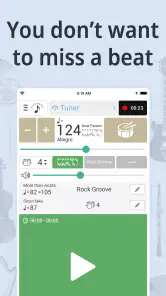
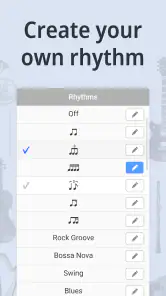
Now, let's talk about the metronome feature. As any musician knows, keeping time is just as important as hitting the right notes. The metronome in this app is rock-solid and highly customizable. You can adjust the tempo to match your practice needs, and it even supports different time signatures. Whether you're practicing a complex jazz rhythm or a straightforward rock beat, this metronome won't let you down. Plus, it has a tap tempo feature, allowing you to set the tempo by tapping along to your desired speed, which is a lifesaver when you're trying to nail those tricky sections.
Tap tempo is particularly handy when I have a recording or a teacher’s example in mind and want to find a workable starting pace without guessing a number. I would tap a few times in a consistent pulse, then listen to the resulting beat against the passage before committing to it. If the tapping is uneven, the chosen tempo may be misleading, so I treat it as a shortcut for setting a starting point rather than a measurement of musical accuracy. For a tricky rhythm, I also like to count aloud or subdivide the beat; a metronome can mark the pulse, but it cannot decide how I should interpret the phrase.
For a realistic after-school practice session, I might first check a guitar’s tuning, then use a slow beat to work through one difficult transition. I would repeat it cleanly several times before increasing the tempo, and use a time signature that matches the exercise rather than forcing every passage into a simple pulse. If I lose the beat, I would lower the tempo and focus on the subdivision instead of tapping faster in frustration. The benefit is not that the app makes practice effortless; it gives me a consistent reference so I can identify where my own timing slips.
There is a trade-off in keeping several practice tools on one phone. It is convenient to have a tuner and metronome together, but switching screens can interrupt concentration, and phone notifications can pull attention away from a short exercise. I would silence distractions and set up the next task before playing. If I need to follow printed music at the same time, I would check that the screen arrangement and page-turning workflow suit the instrument and stand position I use. A dedicated metronome or a paper score may still be the calmer choice for someone who wants a phone-free session.
Extra Features Worth Noting
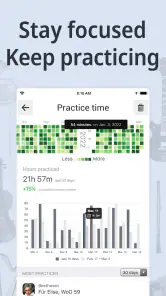
Beyond the basics, Tuner & Metronome offers a few extra goodies that musicians will appreciate. There's a recording feature, so you can capture your practice sessions and listen back to track your progress. Additionally, there's a practice mode that allows you to set goals and track your improvements over time. It's like having a personal coach right in your pocket!
For me, recording is most valuable when I listen with a specific question in mind: did the rhythm stay even, did the phrase get cleaner, or did I rush the ending? Listening back immediately after a take can reveal habits that are easy to miss while playing. I would keep recordings focused on a short passage rather than capture a long session without a reason; a small clip is easier to compare and review. Since recording involves sound, I would be especially attentive to the app’s permission prompts and to the setting I am in, particularly if other people are rehearsing nearby.
The practice mode can help turn a vague intention into a concrete task, but I would keep goals modest and measurable in musical terms. For example, I might aim to play a short section evenly at a comfortable pace before attempting it faster. A progress feature is only useful if I return to it consistently; it cannot tell me whether a performance feels expressive or whether I am using good technique. I see it as a way to structure repetition, not as a substitute for a teacher’s feedback or my own listening.
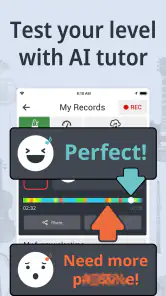
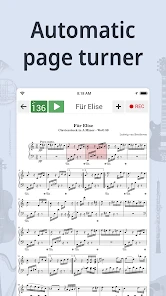
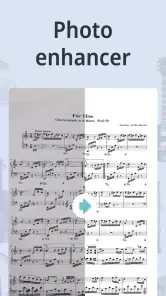
The A.I. tutoring and automatic page turning broaden the app beyond the usual tuner-and-metronome pairing. I would approach tutoring as an aid to practice rather than assume it can replace instruction tailored to my technique, instrument, or musical goals. Page turning is most useful when the phone is positioned where I can interact with it without changing posture or risking a missed entrance. I would test the workflow on a short passage before relying on it in a lesson or performance, since even a helpful convenience can become distracting if it does not fit how I read music.
Compared with separate specialist apps, the advantage here is having several kinds of practice support together. The compromise is that a musician who wants only one exceptionally focused tool may find a dedicated tuner, metronome, recorder, or sheet-music reader easier to operate. I would not install every companion feature simply because it is available. Starting with tuning and tempo, then adding recording or page turning only when a real need appears, keeps the experience manageable and helps me judge the value of any optional purchase.
One thing that really stands out is the app's ability to handle transpositions. If you're playing an instrument that requires transposing, like a trumpet or clarinet, the app makes it a breeze. Just set your transposition and tune away. It's these little touches that make this app feel like it was designed with real musicians in mind.
That transposition support is especially relevant when I move between instruments or work from parts written for a transposing instrument. I would confirm the selected setting before tuning, because a useful adjustment becomes a source of confusion if I forget it is active when I switch back to a concert-pitch instrument. A simple routine helps: check the instrument, check the transposition, then play a steady note. That small pause is more reliable than assuming the app has guessed which instrument is in my hands.
There are clear situations where I would choose something else. A player rehearsing in a loud ensemble may get better results from a dedicated hardware tuner placed directly on the instrument, while someone who wants to keep a phone out of the practice room may prefer a standalone metronome. A student who needs detailed, personalized feedback should not rely on automated tutoring alone. And a musician who only wants to read printed music may find the extra practice functions unnecessary. The app’s range is a strength when I use several of its tools; it is not a reason to make every musician’s setup more complicated.
The Verdict
In conclusion, Tuner & Metronome is an indispensable tool for any musician. Whether you're a beginner struggling to keep your instrument in tune or a seasoned pro looking to fine-tune your timing, this app has something to offer. It's intuitive, reliable, and packed with features that make practicing more productive and enjoyable. So, the next time you pick up your instrument, make sure you've got this app ready to go. Trust me, your future self will thank you!
My more cautious recommendation is that it is worth trying if you want a single phone app for pitch checks and timed practice, especially if recording, practice goals, transposition, page turning, or tutoring fit your routine. I would begin with the tuner and metronome, assess whether they work comfortably in my room, and only then explore the extra tools. The free starting point lowers the barrier to trying it, while the range of in-app purchase prices makes it sensible to check exactly what a paid item includes before buying.
In the end, I would trust the app as a convenient practice aid only to the extent that its visible controls and prompts make sense to me. I would review permissions when they appear, use audio-related functions deliberately, and avoid making assumptions about information handling that I cannot verify from the choices on my device. That is a reasonable approach for any music utility, and it leaves the decision with the person using it. If you want a versatile practice companion and are comfortable keeping your phone involved, this is a compelling option; if quiet focus, hardware reliability, or one narrowly defined task matters more, a dedicated alternative may suit you better.
Tuner & Metronome Frequently Asked Questions
Does Tuner & Metronome need access to my microphone?
A tuner needs to hear the notes you play, so microphone access is relevant when using that feature. This lets the app listen to your instrument and help you tune it. If you are comfortable granting that permission for tuning, it can be a practical tool for practice; the metronome is a separate part of the app for keeping time.
Can Tuner & Metronome help me keep time while practicing?
Yes. The app includes a metronome intended to support rhythm and timing practice. You can use it alongside the tuner as part of a focused session, whether you are working on a passage or building steadier playing habits. Its appeal is having these music-practice tools together rather than needing to switch between separate apps.
Is Tuner & Metronome aimed only at professional musicians?
No. Tuner & Metronome is intended for musicians at different experience levels, including people who are just beginning. Its tuner and metronome can be useful for everyday practice, while the app’s broader toolkit also includes an auto page turner and A.I. tutoring. Whether those tools suit you depends on what you want from a music practice app.
Can I use the app as a replacement for a physical tuner or metronome?
The app brings tuning and rhythm tools together in a convenient format, which may make it a useful alternative for practice when you have your phone or tablet nearby. Some musicians may still prefer dedicated equipment for particular situations, but Tuner & Metronome offers a practical way to access a tuner and metronome in one app.
Is Tuner & Metronome free to download, and does it include in-app purchases?
Tuner & Metronome is free to download, so you can try its music tools without paying upfront. It also offers in-app purchases, with individual items priced from $0.99 to $39.99. That gives you the option to explore the app first and decide whether any paid extras are worth it for the way you practice.
Pros
- Easy-to-use interface for beginners.
- Accurate tuning and metronome features.
- Supports various instrument tunings.
- Customizable metronome settings.
- Integrated with recording features.
Cons
- Contains ads in the free version.
- Limited features without premium.
- Occasional app freezes reported.
- Requires internet for full functionality.
- Battery consumption can be high.
- Category
- Music & Audio
- Version
- Varies with device











