TP-LINK tpCamera
- 260.00
- 4.2
- Installs
- 1.00M
- Price
- Free

Screenshots
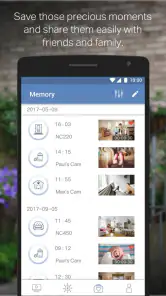
Analysis by Reviewed
I find network-dependent camera apps most useful when they answer a narrow, practical question: is the front door clear, or has the dog settled down? TP-LINK tpCamera is built around checking compatible TP-LINK camera feeds from a phone, so its appeal is convenience rather than a full security-control system. It is a free app from TP-LINK SYSTEMS INC. in the Libraries & Demo category, and its straightforward purpose makes sense if you already use the company’s cameras.
When the connection is part of the experience
A live camera view depends on a working path between the camera, the network, and your phone. In practice, that means a slow or unstable connection can make checking the feed less immediate than the app’s simple premise suggests. I’d treat the view as a quick visual check, not a guarantee that every moment will load instantly. If you are deciding whether to rely on it while away, test it from the places you commonly use your phone, rather than only while connected to home Wi-Fi.
Alerts can also change how much you depend on the app. A movement notification may prompt a useful look, but a busy street, shifting light, or activity in a camera’s view can make alerts feel less meaningful. I’d spend time observing what triggers them in your own space before treating every alert as urgent. For a camera facing a quiet entryway, notifications may be more useful than for one pointed at a lively window.
Useful in the situations your phone can handle
The strongest fit is someone who already has a TP-LINK camera and wants a simple way to check its view while out. A realistic routine might be checking the hallway after a delivery alert or taking a quick look at a pet between errands. Those are short, purposeful visits to the feed; they make better use of a live-view app than keeping video open all day.
Mobile data is another consideration. Video viewing can use more data than a brief text-based check, so I would avoid leaving a live feed running when I only need a quick glance. If you have a limited data plan, use Wi-Fi when convenient and close the view when you have answered your question. That small habit helps keep camera checking intentional rather than turning it into constant background streaming.
What happens when something goes wrong
If a feed will not load, I would first check whether the phone has a usable internet connection, then try again on a different network if one is available. A problem may be with the phone’s connection, the camera’s connection, or the route between them; restarting the app alone will not fix every cause. This is a useful distinction because it keeps you from repeatedly tapping the same screen when the issue is outside the app.
For a household that needs dependable monitoring, a phone app should not be the only part of the plan. A camera view is helpful for checking what is happening, but it is not a substitute for a local check or another arrangement when the network is unavailable. I’d also make sure the camera is positioned so that the view answers a specific question; a carefully aimed entryway feed can be more useful than several poorly framed views.
More From Our News Desk

Clash of Clans Is Won Between the Battles

Android Auto Makes the Case for Quieter Car Software

MobiOffice: Transforming Mobile Productivity with Seamless Integration

EA SPORTS FC™ Mobile Soccer: Redefining Mobile Sports Gaming

How Microsoft OneDrive Became a Mobile Productivity Giant

How Google Translate Breaks Language Barriers Effortlessly
Setting Up and First Impressions
When I first downloaded the TP-LINK tpCamera app, I was pleasantly surprised by how easy it was to set up. The app guides you through the process with clear instructions, so even if you’re not particularly tech-savvy, you won’t feel lost. Just a few taps, and I had my camera connected and ready to go. The interface is pretty intuitive; everything is laid out logically, which makes navigation a breeze.
Features that Stand Out
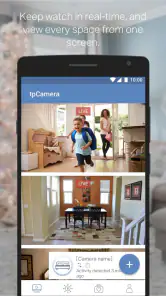
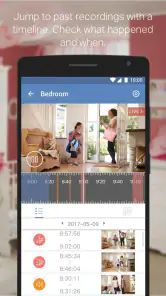
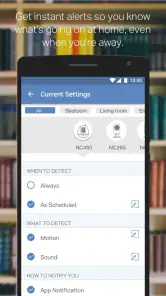
One of the features I absolutely love is the app’s ability to send real-time notifications. If the camera detects any movement, you get an instant alert on your phone. This is especially handy if you’re like me, always wanting to know what’s happening at home when you’re out. Another cool feature is the two-way audio. You can actually talk through the camera! So, if you spot your pet doing something hilarious or your delivery guy at the door, you can communicate directly. The video quality is also top-notch, offering clear and crisp visuals that make you feel like you’re right there.
Using the App Daily
On a day-to-day basis, the app proves itself to be incredibly reliable. I use it every day to check on my house, and I’ve never experienced any major glitches or crashes. The live feed is consistent, and there’s minimal lag time, which is essential for real-time monitoring. Plus, the app’s design is sleek and modern, making the whole experience feel premium.
Another aspect I appreciate is how the app supports multiple cameras. If you’ve got several TP-LINK cameras around your property, you can easily switch between feeds with just a swipe. This multi-camera support is a huge plus for anyone wanting comprehensive home surveillance.
Where It Could Improve
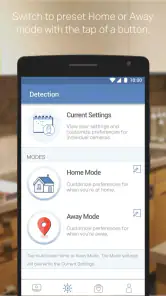
While I’m generally happy with the app, it’s not without its quirks. Sometimes, the notifications can be a bit too sensitive, alerting you for the smallest movements, like a shadow or a passing car. It would be nice to have more control over sensitivity settings to fine-tune the alerts to your preference. Additionally, although the app is pretty stable, it could benefit from more frequent updates to improve performance and add new features.
Who will get the most from it
Its best audience is someone who owns a compatible TP-LINK camera and values quick remote viewing over a broad dashboard for unrelated smart-home devices. If you are still choosing a camera system, compare the app experience alongside the camera itself: a polished phone interface cannot compensate for a camera that does not suit your room, mounting position, or network. People who want one place to manage equipment from several brands may find a wider smart-home platform a better match.
There is also a practical difference between checking a view and managing a security system. The app’s camera-focused approach is appealing when you want to see what is happening and, where supported by the camera, speak through it. If you need a more comprehensive setup, such as a dedicated monitoring service or a system designed around broader automation, I would compare those options rather than assume a camera viewer covers every need.
Compatibility and everyday expectations
The app is rated for Everyone and is listed as free. It has a 4.2 average from around 21 thousand ratings, with more than a million installs. It first appeared in November 2014, and version 3.2.16 requires Android 7.0 or later. Those details make it worth checking your device’s Android version before installing, while camera compatibility is just as important: the app is intended for TP-LINK camera use, not as a general viewer for any camera you happen to own.
One small workflow improvement is to decide in advance what each camera is meant to tell you. Give an entryway camera the job of checking arrivals, for example, and use a pet camera for brief wellbeing checks. That makes it easier to judge whether a notification deserves attention and helps avoid opening several feeds without a clear reason. It also makes the app’s multiple-camera switching more useful, because each view has a purpose.
For a connection problem, I would separate the checks instead of changing several things at once: confirm the phone can reach the internet, retry the feed, and then consider whether the camera’s own network connection may be the issue. If one network works and another does not, that points toward a connectivity route rather than a camera-view setting. This simple process cannot prevent every interruption, but it can make troubleshooting less frustrating.
A measured choice for remote viewing
For context, many alternatives in this space are either camera-brand apps or broader smart-home apps. A dedicated TP-LINK viewer can feel more direct if your cameras are already from that ecosystem; a multi-brand platform may be preferable if your home is built around devices from several manufacturers. I would choose based on the equipment you actually own and the controls you need, not on the assumption that every camera app offers the same compatibility.
The app has an average rating of 4.2 and around 21 thousand ratings, while its 260 reviews offer another place to see what users have found. I see those figures as context, not a promise that every setup will behave identically: camera placement, home internet, and mobile reception all shape the experience. The useful test is whether the feed and alerts work reliably in your own routine.
Making remote checks more useful
A camera feed is most valuable when it settles a question quickly. I’d decide what I need to see before opening the app, then close the view once I have the answer. That simple habit keeps a brief check from becoming a long session, especially when I’m away from home and using mobile data. It also helps me notice when the camera angle is not doing its job: if I regularly have to guess what is happening just outside the frame, repositioning the camera is likely more useful than repeatedly refreshing the feed.
For a household with more than one person checking cameras, it is worth agreeing on what counts as an urgent alert and who should respond. A notification can be a prompt to look, not proof that something important has happened. For example, if a pet moves through the room or sunlight shifts across a window, a family member can check the live view before sending everyone else into a needless scramble. This kind of shared expectation makes movement alerts easier to live with, even when they are not perfectly selective.
Choosing the right kind of camera app
If you are comparing this with a general smart-home dashboard, think about how often you actually need controls for devices beyond cameras. A broader platform may be convenient when you want to bring several brands into one place, but that convenience matters less if your main task is simply opening a TP-LINK camera feed. On the other hand, someone assembling a mixed-brand setup should check compatibility carefully before committing to a viewing routine. The practical trade-off is focus versus breadth: a camera-specific app suits a narrower job, while an all-in-one option is only better if it supports the equipment and controls you rely on.
I would also avoid treating a phone view as a replacement for a camera system that fits the space. A camera pointed at a bright window, an obstructed doorway, or a place with unreliable network access can leave you with a less useful view regardless of how straightforward the app feels. Before adding more cameras, I’d first ask whether the existing angle answers the question that prompted me to check it. Better placement can reduce unnecessary checking and make each alert easier to interpret.
What to check before relying on it
Before making remote viewing part of a daily routine, I’d test it in the actual conditions I expect to use: away from home, on the connection available to my phone, and at a time when I genuinely need to see the camera. That gives a more realistic sense of how quickly the feed opens than testing only beside the router. It also helps identify whether an interruption appears tied to the phone’s connection or to the camera’s connection, so I can respond more methodically instead of assuming the app itself is at fault.
For anyone asking whether it is suitable for a first camera, my answer depends on the camera they plan to use: the app is a sensible companion for compatible TP-LINK equipment, but it is not a universal viewer. If your priority is managing devices from different manufacturers in a single interface, compare that requirement before choosing. And if you need dependable awareness during a network outage, plan for that separately; a remote phone feed depends on connectivity and should not be your only way to check on a property.
A measured choice for remote viewing
For context, many alternatives in this space are either camera-brand apps or broader smart-home apps. A dedicated TP-LINK viewer can feel more direct if your cameras are already from that ecosystem; a multi-brand platform may be preferable if your home is built around devices from several manufacturers. I would choose based on the equipment you actually own and the controls you need, not on the assumption that every camera app offers the same compatibility.
The app has an average rating of 4.2 and around 21 thousand ratings, while its 260 reviews offer another place to see what users have found. I see those figures as context, not a promise that every setup will behave identically: camera placement, home internet, and mobile reception all shape the experience. The useful test is whether the feed and alerts work reliably in your own routine.
My connectivity verdict
In conclusion, the TP-LINK tpCamera app is a solid choice for anyone looking to keep an eye on their home remotely. It’s easy to use, packed with useful features, and provides peace of mind when you’re away. Despite a few minor improvements needed, it’s a reliable companion for home security. So, if you’re thinking about enhancing your home surveillance, this app is definitely worth a shot!
TP-LINK tpCamera Frequently Asked Questions
Do I need a TP-LINK camera to use TP-LINK tpCamera?
TP-LINK tpCamera is intended to help people view compatible TP-LINK Cloud Cameras remotely, so the app is most useful if you already own a supported camera. Before downloading, check that your particular camera model works with tpCamera. The app is a camera-viewing tool, not a standalone security camera, and its usefulness depends on having a compatible camera set up.
Can I view my camera when I am away from home?
Yes. TP-LINK tpCamera is designed to let you view compatible cameras remotely, including when you are away from the place where the camera is installed. It provides live video streaming through the app over Wi-Fi or a cellular network. A reliable connection on both the phone and camera side helps make remote viewing more practical.
What devices and operating systems can run TP-LINK tpCamera?
TP-LINK tpCamera is available for mobile devices, and it requires Android 7.0 or later. Before downloading, check that your device meets this requirement and has enough available space for the app. The app is developed by TP-LINK SYSTEMS INC. and is intended to help users view compatible cameras remotely, so having a supported camera is also important.
What is TP-LINK tpCamera and how does it work?
TP-LINK tpCamera is a surveillance app designed to work seamlessly with TP-LINK Cloud Cameras. It allows users to remotely view live footage from their cameras on their smartphones. The app connects to your TP-LINK account and provides real-time video streaming over Wi-Fi or cellular networks, offering a convenient way to monitor your home or office security from anywhere.
Is TP-LINK tpCamera compatible with all TP-LINK cameras?
TP-LINK tpCamera is primarily designed to work with TP-LINK Cloud Cameras. While it supports a wide range of models, it's important to check compatibility with your specific camera model before downloading. To ensure optimal performance, you should verify that your camera's firmware is up-to-date and that it supports the app's features.
Pros
- Easy setup process
- High-quality video streaming
- Remote access via mobile app
- Multiple device support
- Motion detection alerts
Cons
- Requires stable internet
- Subscription for cloud storage
- Occasional app crashes
- Limited free features
- No desktop application
- Category
- Libraries & Demo
- Version
- 3.2.16











