TP-Link Tapo
- 7.76K
- 4.6
- Installs
- 10.00M
- Price
- Free

Screenshots
Analysis by Reviewed
I find that smart-home apps are easiest to judge when something goes slightly wrong: a device does not appear, a control takes longer than expected, or I cannot remember which setting I changed. TP-Link Tapo is built for managing compatible Tapo devices from a phone, and its appeal is that common tasks can sit in one place rather than being scattered across separate controls. That convenience is real, but it depends on the devices and home connection working together. I would think of it as a practical control hub, not a magic fix for every smart-home problem.
Where setup and control can get stuck
The first point of friction is often not the app’s layout but the relationship between the phone, the home network, and the device being added. A setup flow can feel straightforward and still stall if the device is not ready to pair or the phone has lost a dependable connection. When that happens, I would avoid tapping through the same step repeatedly. I check that the device is powered, that the phone is online, and that I am following the prompts for the specific product rather than assuming every Tapo device behaves identically.
It also helps to separate two different problems: adding a device and controlling one that is already in the app. If a new device does not appear, I focus on its setup state and the connection used during pairing. If an existing device appears but does not respond, I first check whether the phone and device can reach the network. This small distinction saves time because reinstalling the app is unlikely to help when the device itself has lost power or the home connection is unavailable.
Small checks before changing everything
Before resetting anything, I look for the simplest explanation. Is the device switched on? Is the router working for other devices? Is the phone connected to the intended home network? If the app shows a device but its status seems stale, I give the connection a moment to recover and then try one control again. I would not remove a device from the account as a first response: doing so can turn a brief connection hiccup into another setup session.
For a household with several products, I also recommend adding and checking them one at a time. That makes it easier to identify which device or setup step is causing trouble. Once a device is connected, give it a clear name that makes sense in daily life, such as a room or a particular lamp. That is a modest organizational habit, but it becomes valuable when a list grows and you are trying to act quickly from outside the home.
A practical control hub, with a few conditions
I would describe the experience as convenient rather than effortless. The app can bring compatible Tapo products together, but it cannot make an unreliable home network reliable, and remote control depends on the relevant devices being connected. If you are choosing a first smart-home setup, start with the task you actually want to simplify, then check that the specific Tapo device you plan to use fits it. Buying several products before testing one is a less useful way to discover whether the arrangement suits your home.
Recovering a routine without making a mess
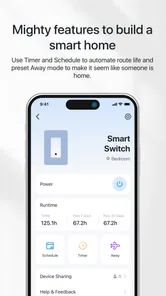
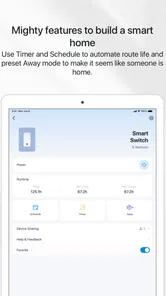
If a schedule or scene does not behave as expected, I would inspect the individual device control first, then review the routine rather than deleting everything. A useful test is to activate the device manually and see whether it responds before relying on a timed action. If manual control works but a schedule does not, the issue is more likely to be in how that routine is configured than in the basic connection. Keeping scenes focused also makes them easier to troubleshoot: a simple group action is clearer than a long chain of changes whose effects are hard to isolate.
More From Our News Desk

Weather by Xiaomi Review: Clear at a Glance, Less Clear Up Close

X Under Pressure: Can It Recover When Posting Goes Wrong?

Clash of Clans Is Won Between the Battles

Android Auto Makes the Case for Quieter Car Software

MobiOffice: Transforming Mobile Productivity with Seamless Integration

EA SPORTS FC™ Mobile Soccer: Redefining Mobile Sports Gaming
There is a similar advantage to changing one setting at a time. If I edit several device states and a scene together, I may not know which change caused the unexpected result. For a recurring action, I check that the selected device and intended state are correct, then test the routine in a low-stakes moment. This is especially sensible for lights or other convenience controls. I would not treat an app routine as a substitute for a safety-critical action that needs to happen without fail.
When the app may not be the problem
Smart-home control relies on more than the screen in front of you. Power, the router, internet access, and the device itself can all affect whether a command completes. If several devices stop responding at once, I would look at the shared connection before troubleshooting each product separately. If only one device is affected, checking that product’s power and placement is a more focused first step. This is ordinary troubleshooting, but it prevents an unnecessary reset of a whole setup.
For someone comparing options, the main choice is between keeping compatible products in their manufacturer’s app and using a broader smart-home platform as the central interface. Tapo is a sensible starting point if the devices you want are Tapo products and you prefer one dedicated place to manage them. A broader platform may be a better fit if your priority is bringing products from several brands into one routine. I would compare the exact devices and the controls you need before choosing, rather than assuming that any one app will cover every product at home.
Who will get the most from it
The app is most appealing to people who want to check or adjust compatible devices without walking around the house, and to households where straightforward schedules or grouped controls would remove small daily hassles. A realistic example is leaving for work and wanting to check a connected light or plug, then making a simple adjustment from the phone. It can also be handy at bedtime when a few lights need to be changed together. The benefit is less about novelty than reducing repeated little tasks.
I would be more cautious if you do not own compatible products, dislike managing devices through a dedicated ecosystem, or expect an app to keep working independently of the home network and device power. People who want a single control surface for a mixed collection of brands should investigate whether their chosen devices work well with the platform they already use. It is also worth considering who else in the home will use the controls: clear device names and a small number of sensible scenes are easier for everyone than a complicated collection of options.
What the app is, and what it costs to try
TP-Link Systems Inc. makes this free lifestyle app. It has an average rating of 4.6 from around 433,000 ratings, and has been installed over 10 million times. Its age rating is Everyone, and the current version is 3.15.112, with Android 7.0 as the minimum system requirement. Those figures suggest that it has broad reach, but I would still judge it by whether the particular Tapo devices you plan to use meet your needs. The app itself is free; some in-app purchase options are listed from $2.49 to $114.99 per item, so I would check what an optional purchase covers before deciding it is relevant to my setup.
Everyday habits that make it easier to live with
One useful approach is to make the first scene deliberately boring: group only the devices you regularly want to change together. After using it for a while, you can tell whether another device belongs there or whether it is clearer to keep the controls separate. I also avoid naming devices after temporary jobs or vague labels. A room plus a specific object is easier to recognize later, especially when more than one person uses the app.
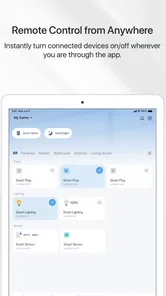
For remote use, I treat the app as a way to check and adjust, not as proof that a device has completed an important task. If I am away and a control does not respond, I first consider whether the device is powered and connected rather than repeatedly sending commands. That approach is more useful than assuming the first tap failed because the app is poorly designed. It also keeps expectations realistic: a phone interface cannot reach a product that is offline.
Living with the ecosystem
The practical trade-off is that a dedicated manufacturer’s app can make compatible devices easier to organize, while tying the experience more closely to one product family. That is not automatically a drawback. If most of the devices you want are Tapo products, a focused app may be simpler than spreading controls across several places. If you already rely on a different smart-home platform, though, I would decide which interface should be the everyday home base before building elaborate routines in more than one system.
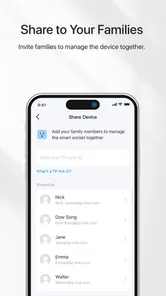
I would also keep the setup easy to understand for other household members. A small number of clear scenes is usually easier to hand over than a collection of near-duplicates. If someone else needs to control a device, naming and grouping matter as much as the initial pairing. Those choices do not add new capabilities, but they reduce the everyday confusion that can make a smart-home setup feel more complicated than the manual alternative.
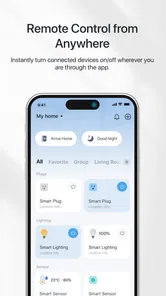
Ever been in a situation where you're halfway across town and can't remember if you turned off your lights? Or perhaps you’re just too comfy on the couch to get up and adjust your smart devices? If these sound like familiar scenarios, then let me introduce you to the TP-Link Tapo app. This nifty little app has been my go-to for managing all things smart in my home, and I can't wait to spill the beans on why it’s a game-changer!
The Ultimate Smart Home Command Center
First things first, the TP-Link Tapo app is your ultimate smart home command center. It seamlessly connects with a range of smart devices, from plugs and bulbs to cameras and more. The moment I installed it, I was impressed by how intuitive the interface was. Honestly, even if you’re not a tech whiz, you’ll find navigating this app a piece of cake. With just a few taps, I was able to control multiple devices and even set schedules for them to turn on and off. It’s like having a personal assistant who never gets tired!
Setting Up and Customizing
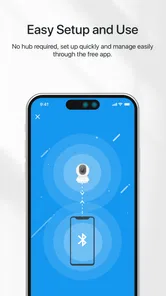
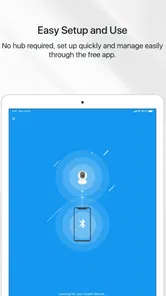
Setting up the app was surprisingly simple. I was half-expecting a tech marathon, but to my delight, it was more like a sprint. After downloading the app, it guided me step-by-step through the setup process. The best part? I didn’t need any additional hardware – just my phone and a stable internet connection. Once everything was set up, I dived into customizing my settings. The app lets you create scenes, which are essentially customized settings for groups of devices. For instance, I created a "Movie Night" scene that dims the lights and turns on my smart speaker with one tap. Talk about setting the mood!
Security and Notifications
One of the standout features of the app is its focus on security. With smart cameras linked to the app, I can monitor my home from anywhere. The real-time notifications are a lifesaver, especially when I’m out and about. I get instant alerts whenever motion is detected, so I’m always in the loop. Plus, with the ability to store footage in the cloud, I have peace of mind knowing that I can access it anytime.
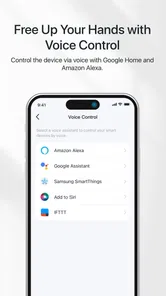
It’s also worth mentioning that the app supports voice control. Yep, you heard that right! If you’ve got a virtual assistant like Alexa or Google Assistant, you can link it up and control your devices with just your voice. I’ve lost count of how many times I’ve asked Alexa to turn off the lights from the comfort of my bed!
Final Thoughts
In a nutshell, the TP-Link Tapo app has transformed how I manage my smart devices. It's intuitive, reliable, and packed with features that make life a whole lot easier. Whether you’re a seasoned smart home enthusiast or just dipping your toes into the world of smart living, this app is a must-have. Trust me, once you start using it, you’ll wonder how you ever lived without it. So, go ahead, give it a whirl, and unlock the full potential of your smart home!
TP-Link Tapo Frequently Asked Questions
What should I check before downloading TP-Link Tapo?
TP-Link Tapo is most useful if you own, or plan to use, compatible Tapo smart devices. It is designed as the control point for those products, rather than as a standalone home automation service. Before downloading, consider whether you want to manage Tapo devices from a phone or tablet and whether your device meets the app’s operating system requirements.
Can I use TP-Link Tapo without owning Tapo smart devices?
You can download and open TP-Link Tapo, but its main purpose is to control Tapo smart devices, so much of its value depends on having compatible products to manage. If you do not own any, the app may have limited practical use for you. It is worth deciding what devices you want to control before making it part of your smart home setup.
Who develops TP-Link Tapo, and how popular is the app?
TP-Link Tapo is developed by TP-LINK SYSTEMS INC. It has a 4.6 average rating from around 433,000 ratings, with roughly 5,200 written reviews, and has been installed over 10 million times. Those figures suggest it is widely used, but your experience will still depend on the Tapo devices you own and the features you choose to use.
Is TP-Link Tapo free to download, and are there optional purchases?
TP-Link Tapo is a free lifestyle app from TP-LINK SYSTEMS INC. for controlling Tapo smart devices. The app also offers in-app purchases, so some optional features or services may involve an extra cost. If you are deciding whether to download it, consider which Tapo devices and features you plan to use, since the app’s usefulness depends on having compatible smart devices to manage.
What operating systems and age groups is TP-Link Tapo suitable for?
TP-Link Tapo is suitable for everyone and is available for Android and iOS. The Android version requires Android 7.0 or later, so it is worth checking your device’s operating system before installing. The app is intended for managing Tapo smart devices, making it most relevant to people who want to control those devices from a phone or tablet.
Pros
- Easy setup and installation process.
- Compatible with various smart home systems.
- Affordable price compared to competitors.
- User-friendly interface design.
- Offers remote control and automation features.
Cons
- Limited third-party integrations.
- Occasional connectivity issues.
- Lacks advanced scheduling options.
- No backup battery in case of power failure.
- Requires a stable internet connection.













