Kasa Smart
- 38.14K
- 4.7
- Installs
- 5.00M
- Price
- Free

Screenshots
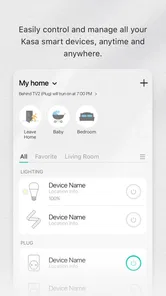
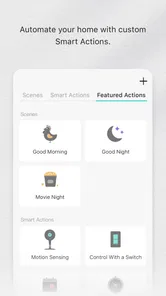
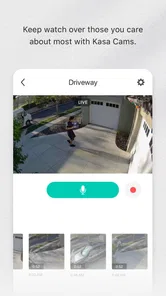
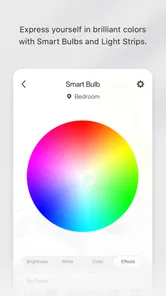
Analysis by Reviewed
What makes Kasa Smart useful to me is the way it puts everyday control of compatible Kasa devices in one place. It is a lifestyle app from TP-LINK SYSTEMS INC., but its real value is practical rather than flashy: I can check a device, make a quick change, or set a recurring action without treating every small household task as a project. That focus works best when the home already has Kasa gear, and it matters less if you are looking for one universal app for every brand.
Why control and scheduling matter
The central appeal is having direct app control alongside schedules. Those two ways of managing a device serve different needs: a tap is useful for an exception, while a schedule handles a routine that repeats. I find that distinction more useful than trying to automate everything. A lamp that usually comes on in the evening is a good scheduling candidate; a device whose use changes unpredictably is better left to manual control.
This is also a sensible starting point for someone who is curious about a connected home but does not want to begin with complicated rules. You can add a small amount of convenience without reorganizing the whole household. The key is choosing a device and routine that already have a clear purpose, then judging whether the app saves effort in that particular situation.
How a routine holds up on an ordinary day
Imagine leaving home in the morning and realizing later that a lamp may still be on. A schedule can handle a predictable shutoff without requiring you to remember it at the exact moment you leave. If your plans change, the app also gives you a way to make an adjustment remotely. I would think of that remote option as a useful backup, not a guarantee of an instant response, especially because I have noticed delays when controlling devices away from home.
A useful habit is to give each schedule a plain purpose and check it when your routine changes. A setting that made sense during a workweek can become confusing when your hours shift or you are away. Starting with one recurring action makes it easier to notice whether the timing is right; adding several overlapping schedules at once makes it harder to work out which one is responsible when a device behaves unexpectedly.
There is a trade-off here: scheduled control reduces the number of small decisions you make, but it also assumes that the routine remains stable. For irregular tasks, a manual tap or voice command may be more natural. I would not rely on a schedule as the only way to manage something essential or safety-related. Keeping the ordinary physical control available is a sensible safeguard and makes the app an added convenience rather than a point of failure.
Where voice control fits
The app can also work alongside Alexa and Google Assistant, which gives you another way to control compatible devices. I like voice control most when my hands are busy or the phone is across the room. It is less useful when I need to choose between devices carefully or check what is currently set; in those moments, opening the app gives me a more direct view of the controls I need.
More From Our News Desk

Weather by Xiaomi Review: Clear at a Glance, Less Clear Up Close

X Under Pressure: Can It Recover When Posting Goes Wrong?

Clash of Clans Is Won Between the Battles

Android Auto Makes the Case for Quieter Car Software

MobiOffice: Transforming Mobile Productivity with Seamless Integration

EA SPORTS FC™ Mobile Soccer: Redefining Mobile Sports Gaming
Rather than choosing between app and voice, I would use them for different situations. The app is handy for deliberate adjustments and checking schedules, while a voice assistant can make a simple command more convenient. If you do not already use either assistant, that integration is a bonus, not a reason on its own to choose Kasa.
Setting it up without overcomplicating things
The first setup felt straightforward to me: I installed the app, followed the device setup, and was soon using controls for compatible Kasa products. If you are choosing a new device, I would check its compatibility before buying rather than assuming that any connected bulb, plug, or camera will appear in the app. The experience is clearest when the product and app belong to the same ecosystem.
Once everything is working, I would keep the first few changes modest. Give devices names that make sense to everyone at home, test one schedule through its normal cycle, and make sure the manual control still feels easy to find. Those small checks are especially helpful in a shared household: a label that is obvious to the person who set it up may not be obvious to someone else.
Where the limits show
Kasa Smart is not the strongest choice if your main goal is to combine many unrelated brands in one place. In that case, a broader smart-home platform may be a better hub, even if using it means giving up some of the directness of a manufacturer’s own app. I would also be cautious about depending on a remote tap for a time-sensitive action, since a short delay can make that kind of control feel less immediate than a wall switch.
Another practical question is whether app control will add much to your routine. If you mostly use physical switches and rarely need remote access or schedules, installing another app may not make daily life simpler. On the other hand, if you repeatedly manage a few compatible devices from different rooms or while away, keeping those controls together can be worthwhile without requiring a more elaborate smart-home setup.
What to consider before choosing it
The app is free, carries an Everyone age rating, and has a 4.7 average from around 139,000 ratings, with over 5 million installs. Those figures suggest that many people use it, but they do not answer the more personal question: whether the Kasa devices you own, or intend to buy, fit the way you want to manage your home. I would decide based on that match, not on popularity alone.
If you are starting from scratch, ask yourself whether you want a straightforward way to control Kasa products or a neutral center for equipment from several manufacturers. If you already own compatible devices, the app is a natural place to begin. If you are still shopping, check that the specific products you have in mind suit the routines you want to automate; choosing a device first and hoping an app will make it useful can lead to a setup that adds clutter instead of convenience.
For a household with different preferences, it is worth considering how each person will interact with the devices. One person may prefer schedules, another may reach for a switch, and someone else may use a voice assistant. Kasa’s app control can complement those habits, but it should not force everyone into the same method. I would keep the everyday option obvious and use automation only where the household agrees on the routine.
There is also a useful distinction between a device being controllable and a device being a good candidate for automation. A lamp with a predictable evening use is easy to understand; a plug serving equipment that must remain on should not be switched off casually by a schedule. Think through what is connected before setting a recurring action. That bit of care is more valuable than adding extra routines simply because the controls are available.
If something does not respond as quickly as expected, I would first separate a timing issue from a setup issue. A delayed response when away from home may be different from a schedule that is incorrectly timed or a device that has not been set up as intended. Checking the schedule and trying a manual control helps clarify what needs attention, rather than piling on additional automations. Keeping the first setup simple makes these checks much easier.
My experience with Kasa Smart
If you're like me, always looking for ways to make life more convenient, then you'll definitely want to check out the Kasa Smart app. This nifty little tool is all about giving you seamless control over your smart home devices. Let me take you through my experience with it!
Getting Started with Kasa Smart
First things first, setting up the app is a breeze. Available on both Android and iOS, all you need to do is download it from the app store, and you're ready to roll. The installation process is straightforward, and I found the user interface to be quite intuitive. The app quickly found my Kasa devices, and within minutes, I was toggling lights and adjusting settings like a pro.
Features That Stand Out
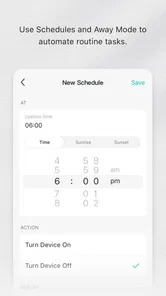
One of the standout features of this app is its ability to control a variety of devices remotely. Whether I'm lounging on the couch or out and about, I can manage my smart plugs, bulbs, and cameras with just a few taps. The scheduling feature is particularly handy, allowing me to automate my devices so they turn on or off at specific times. No more worrying about whether I left the lights on!
Another feature that I absolutely love is the integration with voice assistants like Alexa and Google Assistant. Being able to control my home with just my voice is a game-changer. "Alexa, turn off the bedroom light," and voila, it's done without lifting a finger.
Making Schedules Work for You
Scheduling is most useful when it follows a routine you already have, rather than trying to automate every small action. I’d start with one predictable task, such as switching a lamp on in the evening or turning a plug off at bedtime, then see whether the timing genuinely helps. This keeps the setup easy to understand and makes it simpler to spot a schedule that no longer fits your day.
A practical benefit is that a schedule can take care of a repeated action even when you are busy or away. For example, if I usually leave a light on when heading out, setting it to turn off later can remove that small daily uncertainty. I would still treat schedules as convenience tools, not a substitute for checking anything where safety or essential equipment is involved.
A Few Quirks
Now, no app is perfect, and Kasa Smart is no exception. On a couple of occasions, I've noticed a slight delay in device response times, especially when I'm using the app outside of my home network. It's not a dealbreaker, but something to keep in mind if you're expecting instantaneous reactions.
That delay matters most when you are trying to make a change at exactly the right moment, rather than using a routine that can run on its own. If a light needs to come on as soon as you tap, remote control may feel less dependable than a local switch. I’d keep the physical controls easy to reach and use the app for adjustments that can tolerate a brief wait.
Also, while the app supports a wide range of Kasa devices, it would be nice to see more third-party integrations. As someone who loves to mix and match different brands, having a more universal control hub would be fantastic.
How It Fits Into a Smart Home
The app makes the most sense if your household already uses compatible Kasa products or plans to build around them. In that situation, one place for remote adjustments and schedules can be more straightforward than opening separate apps for each device. If your lights, plugs, and other equipment come from a mix of brands, a broader smart-home platform may be a better everyday hub, though you may lose some of the directness of managing Kasa devices in their own app.
Before choosing it, I’d check that the particular devices you want to manage are part of the Kasa range and think about how you expect to control them: by schedule, by voice, or with a quick manual tap. The app is free, from TP-LINK SYSTEMS INC., and is rated for Everyone. Its 4.7 average across around 139,000 ratings and more than 5 million installs suggests broad appeal, but those figures cannot tell you whether its device ecosystem matches your home.
Who Gets the Most From It
I’d recommend it to someone who wants a simple starting point for controlling Kasa smart-home gear without turning household routines into a technical project. It can also suit people who already use Alexa or Google Assistant and want app control as another way to manage compatible devices. The strongest case is a home where a few repeatable tasks—like switching a lamp on at a familiar time—are more useful than elaborate automation.
On the other hand, I’d skip it as a main control center if you need one app to bring many unrelated brands together. It is also a less compelling fit if you rarely adjust devices remotely and prefer using physical switches. In those cases, the extra app may add little, while a more brand-neutral hub could be a better match for a mixed setup.
Final Thoughts
Overall, the app is a reliable and user-friendly solution for managing your smart home devices. Its array of features, coupled with an easy setup process, makes it a great choice for both tech enthusiasts and beginners alike. Despite a few minor quirks, it’s a solid app that adds a lot of convenience to daily life. The current version is 3.4.402, and the app has been available since November 7, 2015; I’d still make the final decision based on the Kasa devices you actually own and the way you want to use them.
So, if you're ready to take control of your smart home, give the app a try. You may just wonder how you ever lived without it!
Kasa Smart Frequently Asked Questions
Can I set up Kasa Smart if I do not own any compatible devices yet?
You can download Kasa Smart before purchasing a device, but the app is most useful when paired with compatible TP-LINK smart-home products. Its purpose is to provide a portal for managing that connected setup, rather than replace the devices themselves. If you are still deciding what to buy, check that the products you are considering work with Kasa Smart so the app can serve your needs.
Is Kasa Smart free to download, and is it suitable for the whole family?
Kasa Smart is free to download and is classified for Everyone, making it suitable for a broad audience. The app is in the Lifestyle category and is designed to help users manage a TP-LINK smart home. Keep in mind that using it to control devices requires compatible smart-home hardware, which may involve a separate purchase.
Who develops Kasa Smart, and what devices is it intended for?
Kasa Smart is developed by TP-LINK SYSTEMS INC. and serves as a portal to a TP-LINK smart home. It is designed for people who want to manage compatible smart-home devices from a mobile app. Before downloading, consider whether you already use or plan to use devices that work with Kasa Smart, since the app is most useful as part of that connected setup.
What is Kasa Smart and how does it work?
Kasa Smart is a home automation app that allows users to control a variety of smart devices, such as smart plugs, lights, cameras, and more, directly from their smartphone or tablet. The app connects to the devices via Wi-Fi, enabling users to monitor and manage their home environment remotely. It offers features like scheduling, voice control with compatible devices, and energy monitoring, making home management more efficient and convenient.
Is Kasa Smart compatible with other smart home systems?
Yes, Kasa Smart is compatible with several popular smart home systems. It works seamlessly with Amazon Alexa, Google Assistant, and Microsoft Cortana, allowing users to control their Kasa devices using voice commands. However, it is essential to check the compatibility of specific devices with Kasa Smart, as not all devices may support integration with other systems.
Pros
- Easy to set up and use interface.
- Supports multiple smart home devices.
- Highly reliable remote control.
- Seamless integration with voice assistants.
- Energy monitoring feature available.
Cons
- Limited to TP-Link devices only.
- Occasional connectivity issues.
- No advanced automation features.
- Privacy concerns due to data sharing.
- Requires stable internet connection.













