Tor Browser
- 8.07K
- 4.5
- Installs
- 10.00M
- Price
- Free

Screenshots

Analysis by Reviewed
Ever felt like you’re being watched while surfing the web? Well, you’re not alone! That’s why I recently strapped on my metaphorical explorer boots and went on a digital adventure with the Tor Browser. Let me tell you, it’s quite the ride!
The first few sessions make the appeal easy to understand: the app gives privacy-conscious browsing its own place on your phone, rather than asking you to change every habit in your usual browser. I’d keep it for moments when I want a different route to the web, not as a magic switch that makes every online activity anonymous.
When the first week feels useful
Tor’s strongest first impression is that it gives a specific job to a separate browser. I don’t have to rebuild my usual setup or move every saved routine over; I can open it when a search feels personal, when I want to read without carrying the same trail of ordinary browsing habits, or when access to a site is restricted. That clear purpose makes the app easier to understand than a vague promise of privacy.
A realistic routine might be checking a health topic during a lunch break, then returning to a regular browser for work email and everyday accounts. I would avoid signing into an account that identifies me if the point is to keep that browsing separate. Tor can change the path a connection takes, but an account still connects activity to the person using it. That distinction is more useful than thinking of privacy as an on/off switch.
For a new user, I’d begin with one low-stakes task rather than moving all browsing into Tor on day one. Notice how the sites you actually use behave, and whether the extra wait is acceptable for that task. This small trial answers a practical question quickly: does the app solve a recurring problem for you, or does it mainly feel interesting because it is new?
Sneak Peek into the World of Tor
So, what’s the deal with Tor? In a nutshell, it’s a browser designed to give people a different way to reach the web. It’s like having a cloak of invisibility in the digital realm. When you fire up Tor, your internet traffic gets bounced through a network of relays, making it super hard for anyone to trace your activity back to you. Think of it as sending your data on a globe-trotting vacation!
There is an important distinction behind that privacy benefit: Tor changes how your browsing traffic reaches websites, but it cannot make every action on the internet private. If I sign in to an account that identifies me, the site still knows which account is being used. I treat Tor as a way to reduce some forms of tracking and make access harder to censor, not as a promise that I can never be recognized.
Setup and First Impressions
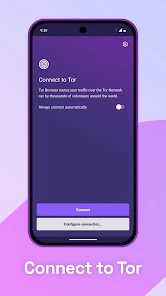
Getting started with Tor is as easy as pie. You just download it from their official website and boom, you’re good to go. The interface is pretty straightforward. If you’ve ever used a web browser before, you’ll feel right at home. The homepage gives you a warm welcome with a “Connect” button that launches you into the Tor network. It’s got that familiar browser-y look, but with the promise of added security.
It is a communication app from The Tor Project, and its focus is the browser rather than messaging or calls. The app is free, rated for Everyone, and has an average rating of 4.5 from around 267,000 ratings, with over 10 million installs. It first arrived on May 21, 2019, and the current version is 15.0.2 (140.5.0esr), for Android 5.0 and newer. Those details make it approachable to try, but the real question is whether I would keep opening it once the novelty wears off.
For a realistic everyday use, imagine checking a sensitive topic while connected to public Wi-Fi, or researching a subject you would rather not have folded into the advertising profile built by ordinary browsing. I would open Tor for that focused task, then use my regular browser for familiar accounts, quick searches, and sites where speed or saved sessions matter more. Keeping those jobs separate is a practical habit, not a claim that one browser can solve every privacy concern.
Browsing Experience
Here’s where things get interesting. With Tor, you might notice that some websites take a tad longer to load. That’s the trade-off for privacy, my friends. You see, because your data is hopping through multiple relays, it takes a little longer to reach its destination. But hey, if it means my browsing habits are shielded from prying eyes, I’m all for it. I’ve even found myself using it to explore parts of the web I wouldn’t normally venture into.
Compared with the usual mobile browsers, Tor is a deliberate choice rather than the smoothest all-purpose option. A conventional browser is generally more convenient when I need a familiar account, fast media playback, or a well-established routine. Tor earns its place when the route and privacy trade-off matter more than instant loading. A useful approach is to decide what you need before opening it: if a page is slow, avoid repeatedly refreshing it, since that can add frustration without making the connection feel faster.
One thing to note is that Tor doesn’t support plugins like Flash, so some media-heavy sites might not work as expected. But honestly, it’s a small price to pay for the peace of mind that comes with knowing my online activity isn’t being tracked.
That limitation is most noticeable when I expect a browser to behave like a complete entertainment or shopping hub. A video page, embedded media, or sign-in flow may be less cooperative than in my everyday browser. If a site will not load properly, I would first ask whether I truly need that page in this privacy-focused session; switching to a different browser may be sensible for convenience, but it also changes the privacy trade-off.
Choosing the right browser for the job
I would not treat Tor as a direct replacement for every browser on a phone. The usual browser is often the better tool when I need a saved login, a familiar payment flow, smooth media, or continuity with tabs I use throughout the day. Tor makes more sense when I want a separate browsing context and can accept that some pages may take longer or behave differently. The choice is less about declaring one browser universally safer and more about matching the tool to the task.
One useful boundary is to decide before opening a session whether I need to identify myself. If I need to access a personal account, I should assume the service can associate that activity with the account, regardless of the route used to reach it. If the purpose is simply to read or research without that account, keeping the session focused helps preserve the separation I wanted in the first place.
On a shared or public connection, Tor can be a reasonable option for a reading task, but it does not make every risk disappear. I would still avoid entering sensitive information on a page I do not trust and would think carefully before downloading unfamiliar files. The app helps with some parts of browsing privacy; it is not a substitute for judging the page, the account, or the information I choose to share.
Security Features
Tor is built on the foundation of security. It’s like having a digital bodyguard walk with you every step of the way. It blocks trackers, defends against surveillance, and even helps you access blocked sites. It’s particularly handy if you’re in a location where internet censorship is an issue.
For someone facing blocked access, the value is not only the possibility of reaching a page; it is having a browser designed with that kind of restriction in mind. I would still be cautious about what I share once a site opens. A browser can help with the connection, but it cannot make careless disclosure, a recognizable account, or a risky download harmless.
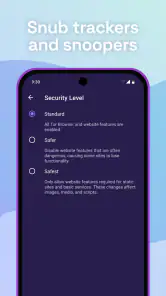
For the tech-savvy folks out there, Tor also offers some advanced settings to tinker with. You can adjust your security levels, manage your cookie settings, and even switch up your network settings if you’re feeling adventurous.
My practical tip is to leave those controls alone until I have a specific reason to change them. Experimenting without understanding the effect can make browsing less predictable, while a simple, consistent setup is easier to maintain. I also avoid treating a private session as a place to collect lots of open tabs and forgotten sign-ins; a focused session is easier to manage and less likely to blur the line between anonymous browsing and ordinary account use.
What to expect from a focused session
A small workflow can make the app less tiring: open Tor for the particular search or page you want, complete that task, and close or leave the session rather than letting it become a second pile of half-finished tabs. This is not a technical guarantee; it is a habit that helps me remember why I chose Tor and reduces accidental mixing with routine account use.
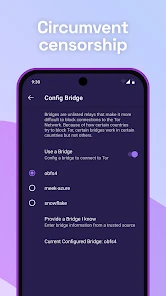
If access is blocked, I would try the relevant connection options only when I have a reason to do so, rather than changing several settings at once. Changing one thing at a time makes it easier to tell whether the adjustment helped. If a page still fails, I would not assume that repeated retries will solve the problem; the site itself may be incompatible with the browsing setup, and a different tool may be more practical for that task.
People often wonder whether they can keep Tor open all day and use it like any other mobile browser. They can choose to, but I would not recommend that routine to everyone. The slower response and occasional site friction become more noticeable when every quick task goes through the same route. For me, its value is clearest when I choose it deliberately, not when I expect it to make all browsing effortless.
Keeping It in the Routine
After the first week, the question is whether Tor becomes a useful habit or just an app I opened out of curiosity. For me, its recurring value depends on having a clear trigger: use it for research, sensitive reading, or trying to reach a blocked site, and use another browser when the task depends on speed or persistent account access. That rule makes the extra loading time easier to accept because I am choosing it for a reason.
Maintenance is not the same as constant tweaking. I would keep the app current, use its security controls intentionally, and remember that a browser session is not a substitute for safe judgment. If I find myself annoyed by every delay, repeatedly switching browsers mid-task, or needing sites that rely on unsupported media, that is a sign it should not be my default. It can still be worthwhile as a specialist tool without being open all day.
Who will keep reaching for it?
Tor is a better fit for someone who has a recurring reason to separate browsing from ordinary account-based habits: a reader researching personal subjects, a person trying to access pages that are restricted where they are, or anyone who values a different route enough to accept some inconvenience. It may also be useful to someone who wants to learn how privacy-conscious browsing feels in daily practice rather than relying on a browser’s default routine.
I would suggest skipping it as a main browser if nearly every task depends on quick loading, persistent sign-ins, media-heavy pages, or a seamless handoff between phone and other devices. That is not a failure of the app; it is a mismatch between its purpose and the way that person browses. A regular browser can be the sensible choice for convenience, while Tor can remain installed for specific moments when its approach is more important.
Its maintenance burden is modest if I resist unnecessary tinkering: keep it updated and learn the few controls that matter to my own use. The larger burden is behavioral. I need to remember which browser I opened and what I am trying to protect, especially if I move between Tor and a personal account in the middle of a task. A simple rule—Tor for focused reading, regular browser for identity-linked tasks—does more for consistency than constantly adjusting settings.
Final Thoughts
All in all, the Tor Browser is a solid choice for anyone looking to boost their online privacy. It’s not about hiding anything shady; it’s about reclaiming your right to browse the internet without a surveillance camera lurking over your shoulder. While it might not be my go-to for everyday browsing due to the slower speeds, it’s definitely my top pick for those times when privacy is a must.
I would recommend it to people who understand why they want a privacy-focused browser and are willing to accept occasional friction in return. I would not recommend relying on it as the only browser if your day revolves around fast media, saved logins, or sites that behave better in a conventional browser. A separate browser can be the better choice for those tasks, while Tor remains available for the moments when its particular approach matters.
So, if you’re ready to take control of your digital footprint, give Tor a whirl. Who knows? You might just fall in love with the idea of surfing the web with your invisibility cloak on!
Tor Browser Frequently Asked Questions
Who develops Tor Browser, and what is it designed for?
Tor Browser is developed by The Tor Project and is intended for people who want to browse the web with more privacy. Its focus is private browsing rather than messaging or calls, even though it is listed in the communication category. It may suit users concerned about tracking, surveillance, or censorship, but the added privacy protections can affect speed and how some websites behave.
Is Tor Browser free, and what should I know before downloading it?
Tor Browser is free to download and use, and it is developed by The Tor Project. It is a communication app for people who want to browse with greater privacy, rather than a general-purpose service for messaging or calls. Before downloading, consider whether its privacy-focused approach suits your needs: routing traffic through Tor can affect browsing speed, and some websites may restrict access.
What is Tor Browser and how does it work?
Tor Browser is a specialized web browser that enables anonymous internet browsing by routing your connection through multiple servers around the world. This process, known as onion routing, masks your IP address, making it difficult for websites and third parties to track your online activity. It's a vital tool for privacy-conscious users and those in regions with strict internet censorship.
Is Tor Browser safe to use on Android and iOS devices?
Yes, Tor Browser is designed with strong privacy and security features, making it safe to use on both Android and iOS devices. It blocks trackers, defends against surveillance, and allows you to access the internet without revealing your identity. However, users should always ensure they download the app from trusted sources like the Google Play Store or Apple App Store.
Can I access any website using Tor Browser?
While Tor Browser allows access to most websites, it might not work perfectly with all. Some sites block traffic from Tor for security reasons. Additionally, Tor doesn't bypass paywalls or geo-restrictions, so while you can browse anonymously, content availability might still be limited based on your virtual location or site restrictions.
Pros
- Exceptional privacy features
- Blocks trackers automatically
- Access to .onion sites
- User-friendly interface
- Regular updates
Cons
- Slower browsing speed
- Not all sites are accessible
- Limited support for plugins
- Requires some technical knowledge
- Potential legal concerns

- Category
- Communication
- Version
- 15.0.2 (140.5.0esr)












