Time Warp Scan - Face Scan
- 1.24K
- 4.4
- Installs
- 10.00M
- Price
- Free

Screenshots
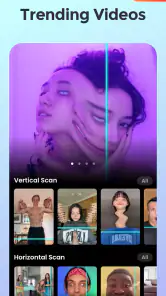
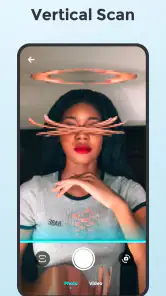
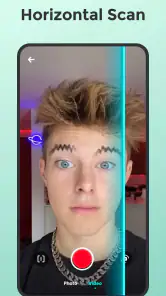
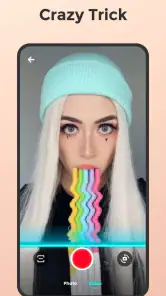
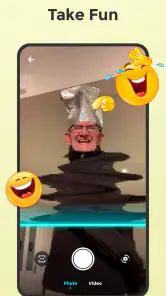

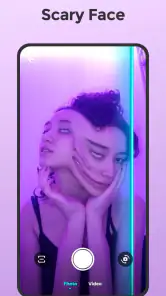
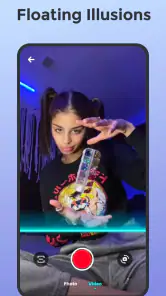
Analysis by Reviewed
I find Time Warp Scan - Face Scan most appealing when I want a quick visual joke rather than a polished portrait. It is a free photography app from Photo Collage & Grid - Foto Grid, built around a scan effect that can make a face or object look stretched, frozen, or oddly reshaped. That narrow purpose is also its main selling point: I can open it with a silly idea in mind and see what happens without needing to learn a full editing suite.
What the free option is worth
The app is free to download, and its age rating is Everyone, so it is easy to try as a casual creative tool. Optional in-app purchases range from $2.49 to $38.99 per item. I would start with the free experience and decide whether I actually need any paid extras before spending money; those price points alone do not tell me what a particular purchase adds or whether it suits my use.
For a playful effect, free access can be enough to answer the important question: do I enjoy making these images, and do I have someone to share them with? If I only want a one-off gag, paying is hard to justify. If I keep returning to the app and find a specific paid option useful, then I can weigh that value for myself rather than treating every purchase as necessary.
Where the effect earns its place
The best results depend on a little planning, not just swiping randomly. I would keep the phone steady, choose a clear subject, and try both scan directions before changing the pose. A small movement during the scan can produce a more readable distortion than an exaggerated gesture, especially when I want the face to remain recognizable enough for the joke to land.
It also works well as a tiny group activity. Imagine waiting with friends before dinner: one person makes a straight-faced pose, another tries to move only their eyebrows or mouth, and everyone compares the resulting odd portraits. That gives the app a purpose beyond endlessly testing filters, and it helps avoid the same stretched-face result every time.
For social posts, I would make the scan effect the focal point rather than layering on every available filter. The effect is already visually loud, so extra decoration can compete with it. A useful workflow is to capture a few variations, pick the clearest one, and then share that single image or clip. It keeps the joke easy to understand on a small screen.
How it compares with regular photo editors
Compared with a general photo editor, this app is much more specialized. A conventional editor is the better choice when I need careful retouching, precise color adjustments, or a finished image for a professional purpose. Here, the appeal is the scan-based distortion and the quick surprise it creates. I would not choose it to fix lighting or prepare a serious portrait, but I would choose it when an ordinary selfie feels too plain.
More From Our News Desk

Weather by Xiaomi Review: Clear at a Glance, Less Clear Up Close

X Under Pressure: Can It Recover When Posting Goes Wrong?

Clash of Clans Is Won Between the Battles

Android Auto Makes the Case for Quieter Car Software

MobiOffice: Transforming Mobile Productivity with Seamless Integration

EA SPORTS FC™ Mobile Soccer: Redefining Mobile Sports Gaming
That difference also sets expectations. The result is meant to look strange, not natural, and a funny capture can depend on timing and pose. If the first attempt looks underwhelming, changing the scan direction or simplifying the movement is more useful than expecting the app to behave like a complete editing workstation.
Getting Started with Time Warp Scan
First things first, downloading the app was a breeze. It is available on Android and iOS; on Android, the current version is 2.8.2 and requires Android 8.0 or later. Once you fire it up, you're greeted with a simple interface that's as straightforward as it gets. A quick tutorial guides you through the basics, so even if you're not tech-savvy, you'll be distorting faces in no time!
Features That Stand Out
So, what exactly does this app do? The core feature is the warp scan effect, which freezes part of your face or any object while the rest remains in motion. It's like having a magic wand that can elongate, squish, or stretch anything to your heart's content. The results are often hilarious and sometimes downright bizarre!
One cool aspect is the horizontal and vertical scan options, giving you different ways to create your masterpiece. Plus, the app offers various filters and effects to add that extra touch of creativity. It's all about experimenting and finding out which combination gives you the most giggles.
Why You'll Love It
Honestly, the best part about Time Warp Scan is the sheer fun of it. Whether you're alone or with friends, it's an instant ice-breaker and sure to bring a smile to anyone's face. The app is perfect for social media enthusiasts who love sharing quirky photos on platforms like Instagram and TikTok. It's a surefire way to get those likes rolling in!
Moreover, it's a great way to unleash your creativity. With endless possibilities, you can spend hours coming up with the most outrageous distortions. It's like having a mini photo booth in your pocket, ready to entertain at a moment's notice.
The numbers suggest that this simple idea has found a broad audience: it has a 4.4 average from around 34,000 ratings and more than 10 million installs. I take that as a sign that the effect is easy to understand, not as a promise that every capture will be a hit. The developer has also published more than 1,000 written reviews, so there is plenty of user feedback to browse if you want another perspective before trying it.
A Few Things to Keep in Mind
While the app is a blast, it's worth noting that it's primarily designed for entertainment purposes. Don't expect high-quality photo editing features here. It's all about having fun, so embrace the silliness and let your imagination run wild.
Also, keep in mind that while the app is free, there are in-app purchases available. These can unlock additional features and remove ads, but even without them, you can enjoy plenty of laughs without spending a dime.
I would skip it if I need dependable editing controls, a refined headshot, or a tool for work where consistency matters. The scan effect is inherently playful, and its appeal is strongest when an imperfect result is part of the fun. I would also think twice before sharing someone else's distorted face publicly; it is better to make sure the person is comfortable with the joke.
If I were deciding whether to install it, I would ask myself one practical question: do I want a dedicated novelty effect, or do I need an all-purpose camera and editor? For the first, this app makes sense as a low-commitment experiment. For the second, a broader photography app is a better fit. I can try the free option, explore the horizontal and vertical scans, and only consider a purchase if I find a specific reason to pay.
Making a better scan, one attempt at a time
A practical way to get more from the effect is to treat each capture like a tiny experiment. Keep the camera position and lighting steady, then change just one thing: scan direction, pose, or the movement you make. If I change everything at once, it is harder to tell why one result reads clearly and another turns into visual noise. This simple comparison makes retries feel purposeful rather than like random tapping.
For a face, I would begin with a neutral expression and a still head, then try a small movement in just one feature. A grin or eyebrow lift can create a more legible contrast than moving the whole face. For an object, choose a shape with a clear outline and avoid placing it against a visually busy background. The scan distortion is the point, but a recognizable starting subject helps viewers understand what has changed.
There is also a useful distinction between making a funny result and making a shareable one. The most extreme distortion may be amusing to the person holding the phone, yet difficult to read when viewed quickly in a social feed. I would keep a few takes, then choose the version where the subject is still identifiable and the oddity is obvious at a glance. That is often a better payoff than chasing the strangest possible shape.
When a quick novelty app is the right tool
This is a good fit for people who enjoy making informal content, especially when the goal is a reaction rather than a carefully composed photograph. It suits a spare few minutes at home, a low-key gathering, or a playful post between more polished pictures. It can also give someone who is shy about posing a simple prompt: hold still, make one small movement, and see what the scan does. The effect supplies the idea, so there is no need to invent a complicated setup.
For example, if I have a few minutes before meeting friends, I can make a quick set of contrasting expressions and ask the group to pick the clearest result. That is a more satisfying use than taking dozens of nearly identical captures with no plan. It also makes the app easier to put away once the joke has landed, rather than turning a short social moment into a long session of editing.
It is less suitable for someone who wants a dependable library of finished photos. A dedicated editor gives more control over details such as tone and retouching, while a standard camera app is the sensible option for ordinary memories where people should look as they did. This app makes a different promise through its distinctive distortion, not through broad photographic control. Choosing it for the effect is sensible; expecting it to replace those tools is not.
Small tradeoffs that affect the result
Because the scan effect depends on the subject and the timing of movement, results can vary from one try to the next. I would not plan an important post around a single capture. Instead, leave room for several attempts and use the clearest take. That is not a reason to avoid the app; it is part of the playful trial-and-error that makes a successful distortion feel earned. It does mean the tool is better for spontaneous experiments than for a deadline or a precise visual brief.
Filters can add variety, but they can also make the central effect harder to read. My preference is to get a strong scan first and add a filter only if it supports the look rather than competing with it. If I am comparing two results, I would keep the framing consistent so the difference comes from the scan or the chosen treatment, not from several changes layered together. That small bit of restraint usually makes the finished image feel more intentional.
Another tradeoff is audience. A warped portrait that makes a close friend laugh may not make sense to strangers without context. Before posting, I would consider whether the joke is clear on its own and whether the person in the image is comfortable being shown that way. For private sharing, an imperfect result can be part of the fun; for a public post, a recognizable, considerate image is often the better choice.
What I would check before paying
The free download is the sensible starting point because the app’s main appeal is easy to judge through trying the scan effect. Paid items cost from $2.49 to $38.99 each, but that range does not tell me which option is worthwhile for a particular person. I would read the purchase details shown in the app and decide whether a specific benefit solves a problem I actually have, rather than assuming payment is needed to enjoy the basic idea.
If I use it only now and then, a one-off novelty may be all I need, and a purchase could bring little extra value. If I find myself returning often and a clearly described paid option matters to my workflow, then I can compare its cost with how much I expect to use it. The key is to separate “I like the effect” from “I need this extra”; those are not the same reason to spend.
People choosing an app for a child may also appreciate that its content rating is Everyone, but I would still make purchase decisions deliberately and keep an eye on any optional spending. The rating describes the intended content audience; it does not decide whether an add-on is good value for a household. As with any free app that offers paid items, I would check the purchase screen before confirming anything.
In conclusion, this is the kind of app that makes me laugh and gets my creative juices flowing. It's simple, fun, and a handy way to kill some time or give a social post an unexpected twist. I would recommend it to anyone who enjoys quick visual experiments, while keeping expectations firmly in the realm of entertainment. Try it for free first; if the odd results are not your kind of humor, you have not lost anything, and if they are, you have a playful tool ready for the next casual get-together.
Time Warp Scan - Face Scan Frequently Asked Questions
Can I use Time Warp Scan - Face Scan without an internet connection?
The app’s main appeal is its time warp scan effect, which is used to create distinctive photos and videos. Whether you can capture and save creations offline may depend on how the app works on your device, so check its available controls after installing it. The app is free to download, making it easy to try the basic experience.
Will Time Warp Scan - Face Scan work on my Android device?
Time Warp Scan - Face Scan is an Android photography app, and its listed minimum operating system is Android 8.0. Check your device’s software version before downloading to make sure it meets that requirement. The app is free to install, though it also offers in-app purchases for users who want to explore paid options.
Is Time Warp Scan - Face Scan suitable for creating short-form social content?
Yes. Time Warp Scan - Face Scan is a photography app focused on making distinctive photos and videos with a time warp scan effect. Its playful look suits short-form social content, whether you want to make a funny clip or experiment with an artistic image. The app’s store summary describes it as a filter app for creating unique photos and videos.
What is the main purpose of the Time Warp Scan - Face Scan app?
The Time Warp Scan - Face Scan app is designed to create unique, entertaining videos and photos by using a warp effect that distorts images in real-time. This app allows users to explore their creativity by generating funny and artistic images, which can be shared on social media platforms. It's particularly popular for creating viral content.
Is Time Warp Scan - Face Scan app free to use, or does it require a purchase?
Time Warp Scan - Face Scan offers both free and premium features. The basic version is available for free and includes essential functionality to create time warp effects. However, for an ad-free experience and access to additional tools and features, users may opt for in-app purchases or a subscription model to unlock the premium version.
Pros
- Easy to use interface for quick scans.
- Produces fun and creative image effects.
- Offers both photo and video scan modes.
- No need for professional skills to operate.
- Regular updates with new features.
Cons
- Limited editing tools for adjustments.
- May lag on older devices.
- Ads can be intrusive at times.
- Watermark on free version scans.
- Requires good lighting for best results.
- Category
- Photography
- Version
- 2.8.2












