FacePic Face Editor, Hair, Age
- 476.00
- 4.7
- Installs
- 5.00M
- Price
- Free

Screenshots




Analysis by Reviewed
I find FacePic most convincing when I treat it as a quick way to play with a portrait, not as a complete photo-editing studio. It brings face adjustments, hair changes, age effects, and filters together in a photography app, which makes it handy when I want to explore a different look without committing to it. The main trade-off is straightforward: quick experiments are enjoyable, but anyone who wants exact, repeatable retouching may prefer a more specialized editor.
A useful test before sharing
Beauty edits can look convincing on the editing screen and less natural in a message or social feed. I keep the original photo and compare it with the edited version at ordinary viewing size before deciding whether to share. If an adjustment draws attention away from the person in the picture, I dial back the overall effect or return to the source. This small habit helps keep a playful change from becoming a portrait I no longer recognize.
Transform Your Selfies
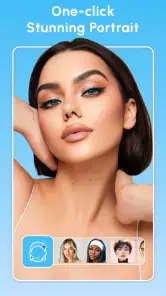
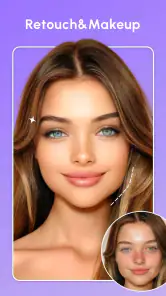
First things first, the FacePic Face Editor is all about giving your selfies that extra oomph. Whether you're looking to smooth out those pesky blemishes or give yourself a complete makeover, this app has got you covered. The interface is super user-friendly, making it easy for even the most tech-challenged among us to navigate through its features.
Feature-Packed Fun
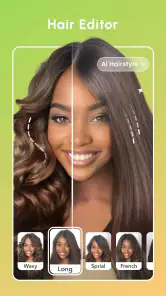
What really sets this app apart is its plethora of features. From facial enhancements to hair transformations, you can play around with a variety of looks. Want to see yourself with a different hair color or style? No problem! The hair editor feature lets you experiment with a rainbow of colors and styles without a trip to the salon.
For a more useful hair test, I would start with a clear, front-facing portrait and treat the result as inspiration rather than a salon preview. Hair color can look different under indoor and outdoor lighting, and a digital change cannot tell you how a shade will behave with your real hair. Still, trying a dramatic option first can help narrow down what you like before making a real-world decision.
One of the coolest features is the age progression tool. Ever wondered what you might look like in a few decades? This app gives you a sneak peek into the future, and it's both fascinating and a little bit terrifying in the best way possible!
When a quick edit is the right tool
Picture taking a casual selfie before meeting friends: I might try a small facial adjustment, test a hairstyle for a laugh, then save a version that feels fun without turning the moment into a full editing session. That is where this app makes sense. It also suits people making lighthearted before-and-after images or trying out a new profile-photo mood. For a polished portrait with exact control over every detail, I would choose a more specialist photo editor instead.
More From Our News Desk

Weather by Xiaomi Review: Clear at a Glance, Less Clear Up Close

X Under Pressure: Can It Recover When Posting Goes Wrong?

Clash of Clans Is Won Between the Battles

Android Auto Makes the Case for Quieter Car Software

MobiOffice: Transforming Mobile Productivity with Seamless Integration

EA SPORTS FC™ Mobile Soccer: Redefining Mobile Sports Gaming
The app is free to install, with optional in-app purchases ranging from $0.99 to $49.99 per item. I would explore the available editing options before paying for anything, especially if I only want occasional novelty edits. The range of possible purchase prices is broad, so it is sensible to check what an individual option costs rather than assume every tool is included at no charge.
Easy Sharing
Once you've perfected your new look, sharing it with friends and family is a breeze. The app integrates seamlessly with social media platforms, allowing you to post your transformations directly from the app. Show off your creativity and maybe even inspire others to try out their own transformations!
And let's not forget about the filters. With a wide array of filters to choose from, you can add those finishing touches to your photos, ensuring you get just the right vibe before hitting that share button.
My practical tip is to settle the main edit before choosing a filter. A filter can change the feel of skin tones and hair colors, so applying it at the end makes it easier to see whether the original transformation still works. I would also keep a copy of the unedited photo: it gives me a clean fallback and makes comparisons less guesswork.
Who will get the most from it
FacePic is a better fit for casual creators, selfie fans, and anyone curious about appearance changes without committing to them. It is rated for Everyone, and its broad mix of portrait-style effects makes it easy to approach without learning a professional editing interface. People who routinely retouch client portraits, need precise layer-based control, or want a consistent look across a large batch of photos may find a more advanced editor less limiting.
Compared with the usual choices in photography, this app leans toward quick face and appearance experiments rather than comprehensive image work. A general-purpose editor is the stronger pick when you need exact color correction or detailed adjustments across the whole frame; a basic collage app is more suitable when the layout matters more than changing a face. FacePic's niche is the quick, personal transformation, so I would choose it when that is the point of the edit.
A small workflow that saves time
For a group chat or a new profile picture, I would choose one photo with a clear view of the face, make one change at a time, and pause between changes to judge the result. That makes it easier to tell whether a hairstyle, facial adjustment, or filter is doing what I want. If I stack several dramatic changes at once, I may enjoy the novelty but lose track of which edit actually improved the image.
There is also a useful distinction between experimenting and deciding. A hair effect can help me discover whether I like the idea of a warmer or bolder color, but it cannot stand in for seeing that color in real light or discussing a cut with a stylist. Likewise, an age effect is entertainment, not a prediction. I would use both to spark ideas or share a joke, not as evidence about how I will really look.
What its popularity and version suggest
Photo Collage & Grid - Foto Grid develops the app, which has a 4.7 average from around 27,000 ratings and over 5 million installs. It was released on September 6, 2023, and version 3.2.4 requires Android 9 or later. Those figures suggest an established audience, though popularity alone cannot tell me whether a particular effect will suit my photo or taste.
Before installing, I would check that my device meets the minimum Android requirement. If I am choosing between this and a more technical editor, the deciding question is whether I want fast experimentation or careful, repeatable control. For the former, FacePic has a clear purpose; for the latter, I would look elsewhere.
Where I would draw the line
The app’s quick, appearance-focused approach is also its main limitation. A person looking for detailed control over small retouching choices or a dependable process for a whole set of portraits may find it restrictive compared with a dedicated editor. It is also not my choice when the job is to correct a whole image, such as carefully balancing color across a landscape or preparing a polished photograph for professional use. Those tasks call for a tool built around broader editing control.
I would also avoid judging a result only by how striking it looks. A strong transformation can be entertaining, but it may not suit a work profile or a family photo where I want everyone to look recognizable. For those pictures, a light touch—or no face edit at all—usually serves me better. FacePic is most useful when I choose the image and purpose to match its playful strengths.
Who should skip it, and who should try it
If you want a fast portrait makeover, enjoy testing possible hairstyles, or like making humorous age transformations, this app has a clear appeal. It is especially suited to someone who edits one selfie at a time and values convenience over a long list of fine adjustments. The Everyone content rating also makes its intended audience broad, though individual users should still decide whether appearance-editing apps fit their own preferences.
I would skip it if I needed precise professional retouching, batch consistency, or a tool primarily for assembling photos into designed layouts. A general photo editor gives more room for whole-image corrections, while a collage-focused app better serves a page or grid arrangement. The right choice depends less on which app has more effects and more on whether the task is changing a portrait, correcting a photograph, or arranging several images.
Why You’ll Love It
Using the FacePic Face Editor, Hair, Age app feels like having a mini makeover session in your pocket. It's fun, it's creative, and it's a fantastic way to experiment with your look without any permanent changes. Plus, it's perfect for those days when you just want to play around with your appearance without lifting a finger.
In conclusion, if you're in search of a fun and easy-to-use app that lets you explore different looks and even ages, this app is a must-try. So go ahead, download it, and get ready to see yourself in a whole new light!
My verdict
FacePic earns its place for quick, lighthearted portrait experiments rather than for demanding photo work. I like the mix of face, hair, age, and filter options because it gives a casual selfie session several directions to take without turning it into a technical project. The main caution is to approach effects as creative possibilities, not realistic forecasts or professional results.
It is free to install, with optional purchases, so I would start by seeing whether the available experience matches the occasional edits I actually want. If you enjoy trying a new look, making a playful image for friends, or refreshing a casual portrait, it is worth considering. If your priority is exact control and consistent results, another kind of editor will be a better fit.
FacePic Face Editor, Hair, Age Frequently Asked Questions
What kind of photos can I edit with FacePic Face Editor?
FacePic is a photography app focused on portrait editing, so it is suited to selfies and other photos where facial details are easy to see. Its tools are intended for changes such as retouching, reshaping, enhancing, and applying filters or effects. For the most natural-looking result, start with a clear photo and make adjustments gradually.
Can I change my hairstyle or hair color in FacePic Face Editor?
Yes. FacePic includes hair color alteration, making it possible to experiment with a different look in a portrait without changing your actual hair. The result depends on the photo and how the effect fits its lighting and details, so it is worth trying more than one option and checking the finished image before saving or sharing it.
What devices and operating systems can run FacePic Face Editor?
FacePic Face Editor is a photography app for mobile devices, and it requires Android 9 or later. Before downloading, check that your device meets this minimum operating-system requirement and has enough available storage for the app and the photos you plan to edit. Compatibility is worth checking first if you use an older phone or tablet.
What features does FacePic Face Editor offer for photo editing?
FacePic Face Editor provides a wide range of photo editing features, including face retouching, hair color alteration, and aging effects. Users can enhance their selfies with advanced tools like blemish removal, teeth whitening, and eye color changes. The app also offers filters and effects to give your photos a professional look without any prior editing experience.
How does the age progression feature work in FacePic?
The age progression feature in FacePic uses advanced artificial intelligence to simulate how you might look as you age. By analyzing facial features, the app can generate images depicting you at different ages, from younger to older. This fun and engaging tool allows users to see potential future appearances with realistic and convincing results.
Pros
- Intuitive interface for easy navigation.
- Wide variety of editing tools available.
- Quick processing for instant results.
- Supports high-resolution photo saving.
- Regular updates with new features.
Cons
- Contains ads which can be distracting.
- Some features require in-app purchases.
- May lag on older devices.
- Limited free version functionalities.
- Requires internet for full feature access.
- Category
- Photography
- Version
- 3.2.4












