Tide Charts
- 363.00
- 4.0
- Installs
- 1.00M
- Price
- Free

Screenshots
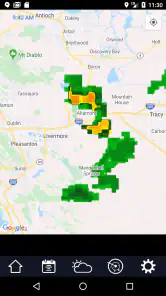
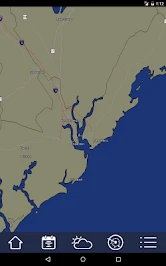
Analysis by Reviewed
I judge a tide app less by how impressive it feels on day one than by whether I still remember to open it before heading out weeks later. Tide Charts is aimed at a practical routine: checking the water’s timing before fishing, boating, exploring a shore, or choosing when to visit the beach. Its focus is narrow, which is useful if tides are the detail you need, but it won’t replace a broader forecast when rain, wind, or changing weather is the main concern.
The first week: quick checks before heading out
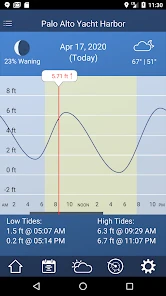
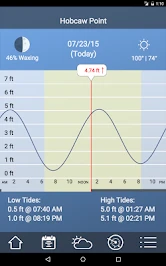
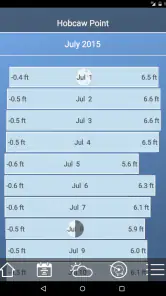
During an early trial, the appeal is easy to understand: open the app, look up a tide location, and get a prediction without turning the task into a research project. The charts make the rise and fall of the water easier to interpret than a list of times alone. I’d use that view to compare a planned arrival with the tide’s direction, rather than treating one high- or low-water time as a complete picture of conditions.
A useful habit is to check the relevant location while you still have a connection, then keep the prediction available for the trip. Tide predictions work offline, so a weak signal at a beach or harbor needn’t prevent a basic timing check. That makes this especially handy for a familiar destination where I already know which place to select. It is less reassuring if I’m choosing an unfamiliar stretch of coast and need current local context as well as a tide schedule.
For a first visit, I’d treat the chart as a planning aid rather than an answer to every coastal question. I can use it to decide whether an earlier or later arrival makes sense, then check weather and local notices separately. That small division of labor prevents a common mistake: seeing a promising tide window and assuming the whole outing must therefore be suitable. The app helps with timing the water; my route, the weather, and the conditions on arrival still matter.
Getting to Know Tide Charts
So, what exactly does Tide Charts offer? Well, it's an easy-to-use application that provides detailed tide predictions and current tide information for thousands of locations worldwide. I was pleasantly surprised by how intuitive the interface is, making it accessible even for those who aren't tech-savvy. You simply open the app, and boom, all the info you need is right there at your fingertips.
Features That Stand Out
One of the features I love about this app is the ability to track tides in real time. This is particularly useful if you’re planning activities like fishing trips or beach outings. Additionally, you can set alerts for high or low tides, ensuring you’re never caught off guard by Mother Nature.
Another cool feature is the app's offline capabilities. Yes, you read that right! You can access tide information even without an internet connection, which is perfect for those remote beach spots with spotty service.
I’d be careful not to interpret “real time” as a safety guarantee. A prediction gives me a reference for tidal timing, not a live assessment of currents, surf, obstacles, or changing local conditions. For a familiar fishing spot, that reference can make it easier to plan when to arrive or when to check the water again. For a new route by boat or kayak, I’d still want local knowledge and suitable safety information rather than relying on one chart.
The offline feature is most useful when I prepare before leaving, not as a reason to skip preparation. I’d select the location and review the relevant chart while I have service, then avoid making last-minute assumptions about whether a different nearby station is interchangeable. A short check at home can prevent an annoying moment on the shore when a saved prediction is for the wrong place.
Making the information useful outdoors
For a realistic weekend plan, I’d check the tide before leaving home, choose a suitable window for a shoreline walk or fishing stop, and set an alert if I’m likely to lose track of time. The alert is a reminder to look again, not a substitute for watching the water or following local guidance. A tide chart can help me plan when to arrive; it cannot tell me whether a particular beach, inlet, or route is safe under the conditions I encounter.
That distinction matters for kayaking, boating, and exploring tidal flats. I’d pair the prediction with a weather forecast and local knowledge, especially somewhere new. A general weather app is usually better for rain, wind, and temperature; Tide Charts is more useful when the timing of the water itself is the question. If I only need a quick chance-of-rain check, keeping a dedicated tide tool may add little value.
One practical workflow is to decide what the tide information will change before opening the chart. If I’m fishing, I might be comparing possible arrival times; if I’m walking a shore, I might be thinking about how much space will remain along the route. Then I can check the relevant prediction and set a reminder only if there is a real chance I’ll lose track of time. This keeps the app from becoming another stream of notifications that I dismiss without reading.
For a family beach visit, the same information can help me think through when to arrive and when to reassess the plan, but it shouldn’t dictate how long everyone stays or imply that a beach is safe. I’d still pay attention to posted guidance and conditions on the day. This is where a focused tide tool is genuinely helpful: it adds a piece of planning context that a standard weather screen may not put front and center, without pretending to replace judgment.
User Experience
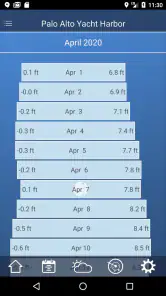
In terms of user experience, Tide Charts scores high marks. The app is smooth, with minimal lag, and the data is presented in a visually appealing way. I particularly like the use of graphs and charts that make it easy to understand the tidal patterns at a glance. Plus, the app doesn’t bombard you with ads, so you can focus on planning your day without distractions.
Another thing that stands out is the app’s customization options. You can tailor the settings to fit your needs, whether it’s choosing your preferred unit of measurement or setting up notifications. This level of personalization definitely enhances the user experience.
The chart view is valuable because it encourages me to read a stretch of change, not just memorize a single event time. That matters when my plans have some flexibility: I can compare a potential departure or arrival with the broader movement of the water. Still, a visual curve is only useful if I understand what location it represents, so I would make the station check part of the routine rather than treating the graph as self-explanatory.
Custom settings are most worthwhile when they reduce small bits of friction. If I use alerts, I’d keep them tied to outings where a reminder genuinely changes what I do, rather than enabling every possible prompt. If I check tides only now and then, manually opening the chart may be simpler than maintaining notification preferences. The best setup is the one I can keep using without having to constantly adjust it.
Month-to-month value and maintenance
The longer-term value depends on whether tides shape plans you make repeatedly. Anglers, coastal walkers, and people who visit the same harbor can build a simple routine: check the location before setting off, note the useful part of the curve, and rely on offline predictions once they are away from service. That is more likely to earn a place on my phone than a novelty app I open once and forget. If I visit the coast only occasionally, a general-purpose weather app plus a one-off tide lookup may be enough.
There is little upkeep in that routine, but location choice deserves attention. Before relying on an offline chart, I’d confirm that I have selected the intended station and checked its predictions while connected. For a new destination, I would verify that the available location represents the stretch of coast I plan to visit rather than assuming the nearest name is automatically the right one. Tide timing is local, so a convenient chart is only useful when it matches the outing.
That makes the app a better fit for a repeat destination than for someone who wants a single tool to plan every kind of trip. When I return to the same area, I can spend less time deciding what to look up and more time using the chart to plan the outing. When the destination changes, I need to give location selection extra attention. A tide prediction that is easy to open is not automatically the right prediction for a different harbor or stretch of coast.
For maintenance, I’d keep the routine deliberately light: check the place, review the curve, and confirm the plan against weather and local conditions. I wouldn’t make a complicated system of saved reminders unless I had recurring outings that justified it. The app earns lasting space through repeated usefulness, not through the amount of time I spend configuring it. That is a good sign for anyone who wants a practical reference rather than another hobby to manage.
Where fatigue can set in
The narrow focus is also the main reason someone might stop opening it. Tide predictions are valuable when they affect a decision; on a day when weather is the priority, a broader forecast offers more relevant information in one place. Alerts can help prevent me from overlooking a chosen tide time, but too many reminders would turn a useful prompt into noise, so I’d reserve them for outings where timing matters.
The app is free, developed by 7th Gear, and its current version is 2.44. It has a 4.0 average from around 17,000 ratings, with more than a million installs. In-app purchases are available at $1.99 per item, and the age rating is Everyone. It runs on Android 5.0 or later. Those details make it approachable to try, though I’d decide whether it deserves permanent space based on how often I actually plan around the tides.
Compared with an all-purpose weather app, this one asks me to accept a narrower home screen in exchange for more direct tide planning. Compared with checking a tide table in a browser, its chart-led presentation and offline predictions are convenient when I want to consult the information outdoors. But if I rarely visit the coast, or if I mainly need forecasts for rain and wind, those advantages may not justify keeping a separate app installed. The right comparison is not which app has more screens; it is which one answers the question I ask most often.
There is also a small but important trade-off in planning offline. Having a prediction available when reception drops is useful, but it can make the information feel more definitive than it is. I’d check it before setting out, then treat it as one input rather than an assurance that conditions remain unchanged. If my plans depend on an unfamiliar location or a difficult route, I’d favor current local guidance over the convenience of a chart I already have on my phone.
Newcomers may wonder whether they need to pay before they can try it. The app is free to download, with optional in-app purchases listed at $1.99 per item, so I can test whether its tide-focused approach fits my routine before deciding whether any purchase is useful to me. I’d avoid paying simply because I expect a tide app to replace weather or navigation tools; its lasting value comes from the tide information and the habits it supports.
Final Thoughts
All in all, Tide Charts is a solid app for anyone who needs accurate and reliable tidal information. It’s user-friendly, packed with useful features, and offers a seamless experience. Whether you’re a seasoned sailor or just someone who loves the ocean, this app is a worthwhile addition to your smartphone. Trust me, once you start using it, you’ll wonder how you ever managed without it.
So, if you’re planning your next seaside adventure, make sure to download Tide Charts and let it guide you with the best tide predictions available. Happy beaching!
My lasting verdict is more measured: it earns its space when I regularly fish, boat, or plan coastal visits around the water, and the offline predictions make that routine practical in places with poor reception. If my trips are rare, or I need a complete picture of conditions rather than tide timing, I’d choose a broader forecast as my everyday tool and use a tide chart only when the outing calls for one. For regular coastal plans, though, keeping this focused reference close at hand is a sensible choice.
Tide Charts Frequently Asked Questions
Can Tide Charts show conditions for a location I’m visiting?
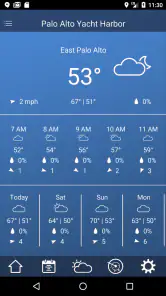
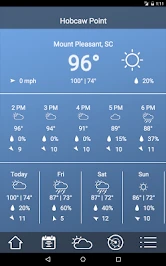
Tide Charts is intended to help you see ocean tides and nearby weather, which can be useful when checking conditions around a coastal destination. Before relying on it for a trip, make sure you are viewing the place relevant to your plans and review the information in context. It is a practical planning aid, but local conditions can change, so use your judgment.
Is Tide Charts suitable for occasional users as well as regular coastal visitors?
Tide Charts can be useful whether you spend a lot of time by the coast or only need to check tides before an occasional outing. Its focus is straightforward: ocean tide predictions and nearby weather. The ability to view tide predictions without internet access may also help when you do not have reliable coverage. Consider whether those core tools match what you want from a weather app.
Can Tide Charts help me plan a day on the water?
Tide Charts is a weather app for checking ocean tides and nearby weather, so it can be useful when you are planning time along the coast or on the water. You can consult tide predictions before heading out, then consider them alongside local conditions and your own plans. As with any forecast tool, use sensible judgment when making decisions that affect safety.
Who makes Tide Charts, and is it free to download?
Tide Charts is developed by 7th Gear and is free to download. The app also offers in-app purchases, so some optional items may cost extra. If you prefer to avoid spending, check the purchase options before confirming any transaction. Its age rating is Everyone, making it suitable for a broad audience, though parents may still wish to review app use with younger children.
What are Tide Charts and how do they work?
Tide Charts are tools that provide information about tidal movements, including high and low tides, for specific locations around the world. They work by using astronomical data and historical tidal records to predict future tidal patterns. This information is crucial for marine activities such as fishing, boating, and coastal navigation. The app often includes features like real-time updates, alerts, and detailed maps to help users plan their activities effectively.
Articles Related to Tide Charts
Clash of Clans Is Won Between the Battles
Its raids are quick; its community is a long-term project of coordination, teaching, rivalry, and shared responsibility—with all the friction that entails.
Android Auto Makes the Case for Quieter Car Software
The car interface is no longer judged by how much it can do, but by how quietly it helps. Android Auto shows what drivers now expect—and what still gets in the way.
MobiOffice: Transforming Mobile Productivity with Seamless Integration
MobiOffice: Word, Sheets, PDF is redefining mobile productivity with a surprising blend of functionality and innovation.
EA SPORTS FC™ Mobile Soccer: Redefining Mobile Sports Gaming
Dive into EA SPORTS FC™ Mobile Soccer, where immersive gameplay and strategic depth transform mobile sports gaming.
Pros
- Accurate tide predictions for multiple locations.
- User-friendly interface with easy navigation.
- Offline access to tide charts available.
- Customizable alerts for high and low tides.
- Supports both metric and imperial units.
Cons
- Limited features in free version.
- Occasional syncing issues with data.
- Ads can be intrusive at times.
- Battery usage is relatively high.
- Lack of support for some remote locations.

- Category
- Weather
- Version
- 2.44