TIDAL Music: HiFi sound
- 59.33K
- 4.1
- Installs
- 10.00M
- Price
- Free

Screenshots

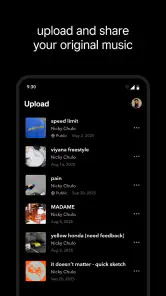

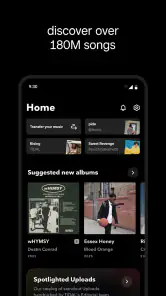
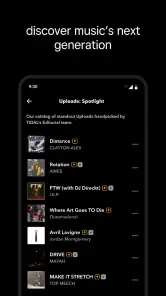
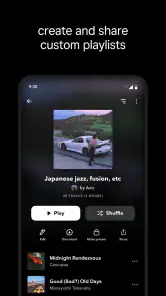
Analysis by Reviewed
My best advice for getting a fair impression of TIDAL Music is to treat listening as a small routine rather than a quick sound-quality test. I choose an album I know well, use the same headphones or speakers I normally use, and listen somewhere quiet enough to notice details. That helps me decide whether the extra clarity matters in my everyday setup, not just in an ideal listening room.
Build a listening routine that fits your day
A practical starting point is to save a few reliable albums or playlists for different moments: familiar tracks for a commute, something low-key for focused work, and a more varied mix for cooking or exercising. I also like to keep a new-music playlist separate from albums I already know. That makes it easier to tell whether recommendations are genuinely broadening my listening or simply repeating the same mood.
Offline listening is most useful when I plan ahead. Before leaving home, I can pick the music I expect to need and download it while I have a dependable connection. For a long trip, I would prioritize a few albums and a compact playlist rather than trying to save everything I might possibly want. This makes the offline library easier to browse and avoids relying on a signal at the moment I want to press play.
Check the settings before judging the sound
Audio quality is only one part of the result: the connection, playback device, and listening environment all shape what I hear. I check the app’s available quality choices and consider whether I am listening on headphones, a speaker, or a car system before settling on a setup. If I am away from Wi-Fi, choosing a more practical streaming option can be a sensible trade-off; at home, I can focus on the highest quality that suits my connection and equipment.
There is a useful reality check here: a higher-quality stream does not automatically make every song sound dramatically different. The recording itself, the headphones, and background noise can matter more than the label attached to a setting. I use tracks with clear vocals, layered instruments, or subtle percussion when comparing, then keep the setting that sounds good without making everyday listening cumbersome.
I also avoid changing several things at once. If I switch headphones, playback quality, and listening location together, I cannot tell which change made a difference. A simple comparison works better: keep the same track and device, listen at a comfortable volume, and change only one setting. This is a practical way to decide whether a higher-quality option is worth using regularly rather than assuming that the most demanding setting must always sound best.
Use a repeatable shortcut, not endless browsing
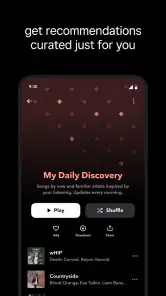
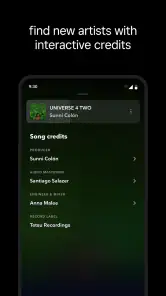
When I find an album or playlist that works, I save it and return to it instead of rebuilding the same queue from scratch. I also give recommendations a little time: listening across different artists and styles gives the app more useful signals than repeatedly playing one narrow set of tracks. For discovery, I follow a promising recommendation into an artist’s albums or related playlists, then save only the finds I expect to revisit.
More From Our News Desk

Weather by Xiaomi Review: Clear at a Glance, Less Clear Up Close

X Under Pressure: Can It Recover When Posting Goes Wrong?

Clash of Clans Is Won Between the Battles

Android Auto Makes the Case for Quieter Car Software

MobiOffice: Transforming Mobile Productivity with Seamless Integration

EA SPORTS FC™ Mobile Soccer: Redefining Mobile Sports Gaming
This is where the app can suit listeners who enjoy exploring music as much as pressing play. It is less compelling if you only want a familiar radio-style stream with minimal choices, or if you are happy with a basic free service and do not care about listening quality. Compared with common music-streaming alternatives, TIDAL’s clearest appeal is its focus on high-quality audio and an ad-free listening experience; another service may be a better fit if its particular library, existing subscriptions, or established playlists matter more to you.
One useful habit is to separate discovery from listening on autopilot. When I have time to browse, I can explore a recommendation, check whether an artist has an album I want to hear in full, and save a few promising finds. When I am busy, I can go straight to a familiar playlist. That distinction keeps music discovery enjoyable instead of turning every quick listening session into another search task.
Sound Quality Like No Other
The first thing that caught my ear with TIDAL was its HiFi sound quality. If you're an audiophile like me, you know the difference that high-fidelity audio can make. TIDAL offers FLAC-based quality, which means you're getting audio that’s crisp, clear, and full of depth. I played some of my all-time favorites, and it was like listening to them for the first time again. The layers in the music are more discernible, making every beat and note pop.
That kind of close listening is most rewarding when I can give an album my attention, rather than treating the quality setting as a guarantee that every session will feel special. For example, a quiet evening with headphones gives me a fairer chance to notice separation between instruments than a loud commute. I would not use a quick first impression in a noisy place as the only test of what the service can offer.
Music Library and Playlists
Beyond sound quality, the app hosts a vast library of over 70 million tracks. Whether you’re into the latest chart-toppers or underground indie hits, chances are you’ll find what you’re looking for. I particularly enjoyed the curated playlists. They feel very personalized, almost as if a friend who knows my taste handpicked them for me. Plus, the app’s recommendation algorithm is on point, introducing me to artists and songs I wouldn't have discovered otherwise.
For listeners who mostly play complete albums, a broad catalog matters in a different way than it does for someone who wants a nonstop mix. I like being able to move from a familiar record to an unfamiliar artist without making a separate trip to another app. Still, I would judge the selection by the music I actually return to: a large catalog is useful, but it does not guarantee that every favorite, niche release, or version will be available in the way I want.
User Interface and Experience
Navigating through TIDAL is a breeze, thanks to its intuitive design. The dark theme is easy on the eyes and I found the layout to be quite user-friendly. Everything is where you expect it to be, which is a big plus when you’re trying to find music quickly. I also appreciated the offline mode, which lets you download tracks for those times when you’re off the grid but still want your music fix.
A useful everyday test is whether the app helps me get to music quickly when my hands and attention are elsewhere. Before leaving, I can make offline listening part of packing up: choose the album or playlist I will actually use, download it on a dependable connection, and check that it appears in my offline collection. This small routine is more reliable than remembering a download only after a train or walk has already begun.
Exclusive Content and Features
Another highlight is TIDAL's exclusive content. From early releases to unique interviews and concerts, there's a treasure trove of material that you won’t find elsewhere. It’s like having a backstage pass to the music world. Moreover, the app offers video content, adding another dimension to the music experience. I found myself diving into music documentaries and live performances that were both entertaining and informative.
That material is a bonus rather than the main reason I would choose a music service. I would first ask whether its everyday music experience fits my habits, then treat interviews, performances, and video as something extra to explore when I have time. If I rarely watch music-related video or prefer to keep my listening focused on albums and playlists, those extras may not change my decision much.
While TIDAL is a paid service, the HiFi quality and exclusive content justify the price tag. If music is a big part of your life, investing in a service that prioritizes quality is worth considering. In the end, TIDAL delivers an immersive experience that transforms how you listen to music.
The app itself is free to install, while optional in-app purchases range from $0.99 to $35.50 per item. I would look at the offer presented in the app and consider it alongside how much I actually use its listening and discovery features, rather than treating sound quality alone as a reason to spend. The practical question is whether the service earns a place in my regular routine: if I mainly listen casually, a different option may be enough.
So, if you're on the hunt for a streaming service that provides top-notch audio and a plethora of exclusive content, give TIDAL Music a shot. It’s a game-changer for anyone who takes their tunes seriously.
My recommendation is more specific than that: try it if you are curious about listening closely, value uninterrupted sessions, and enjoy exploring music as well as revisiting favorites. If you are choosing for a household, the Teen age rating is also worth keeping in mind. For someone whose priority is simply getting a familiar playlist on in the background, an alternative that already fits their subscriptions and habits could be the more sensible choice.
Where it fits among music apps
TIDAL is a free app to install, developed by TIDAL, with in-app purchases ranging from $0.99 to $35.50 per item. Its Teen age rating is worth noting for families choosing a music app together. It has a 4.1 average from around 354,000 ratings, and over 10 million installs; those figures suggest a well-established service, though they do not tell me whether its sound or discovery style will suit a particular listener. The app has been available since October 28, 2014.
For a normal weekday, I might start an album on the way to work, save a new artist I like, then switch to a downloaded playlist when I know the connection may be unreliable. That simple pattern is more useful than chasing the highest setting at all times. If you are comparing it with another streaming app, try the same familiar album on the same device before deciding: otherwise, a different master, volume, or pair of headphones can make the comparison misleading.
That comparison is especially helpful if you already pay for another service. I would not move an entire music routine just because one track sounds impressive in a short demonstration. I would compare a few kinds of listening I genuinely do: an album I know well, a playlist for routine tasks, and a discovery session. If the new app improves the parts I care about and does not make everyday navigation or offline planning harder, the switch has a clearer case.
Know what the quality upgrade can and cannot do
The main trade-off is that listening in the highest available quality is not equally worthwhile in every situation. On a noisy bus, the environment may hide the fine details that stand out at home. If mobile data or storage is a concern, I would make offline selections deliberately and use a less demanding setup when convenience matters more than close listening. Ad-free listening is a meaningful benefit for uninterrupted sessions, but it does not replace the need to choose music that fits your own habits.
There is also a difference between wanting better sound and being able to make use of it. Listeners using suitable headphones or speakers in a quieter space are more likely to appreciate the distinction than people who mostly listen through a noisy environment or keep music low in the background. I would not buy new equipment solely because an app offers a higher-quality stream; first I would see whether my current setup and favorite recordings already make the difference noticeable.
Offline use has its own small trade-off: downloads are most helpful when they are chosen with a purpose. A few dependable albums for a trip, plus a playlist for variety, are easier to manage than a sprawling offline collection that is hard to browse. If my plans change, I can refresh what I have saved when I am back on a reliable connection. That approach keeps offline listening useful without making it another library-management chore.
My verdict after making it a habit
My verdict is that TIDAL Music makes the most sense for people who regularly listen on decent headphones or speakers, care about album-focused listening, and enjoy discovering artists beyond their usual rotation. It is less persuasive for someone who mainly wants background audio, rarely notices differences in sound, or already has another service whose playlists and library fit perfectly. I would try it with a few familiar albums, set up offline listening for a real commute, and keep it only if those everyday benefits are clear to me.
For me, the best way to decide is to give the app a fair, ordinary trial rather than judge it by a feature label. Pick music you know, test it in the places where you normally listen, and pay attention to whether the app makes it easy to return to albums and playlists you enjoy. If that routine feels natural and the sound is a genuine benefit on your equipment, TIDAL is a strong fit. If not, choosing a service that better matches your listening style is a reasonable conclusion, not a failure to appreciate high-quality audio.
TIDAL Music: HiFi sound Frequently Asked Questions
Can I use TIDAL Music with a limited internet connection?
TIDAL Music is designed for streaming, so a reliable connection helps when browsing and playing music online. If your connection is limited or inconsistent, downloading tracks and playlists in advance can make listening more dependable. This is especially useful for travel or places where coverage drops. Save the music you want while connected, then use the offline feature when needed.
Does TIDAL Music include music videos as well as audio?
TIDAL Music is centered on music listening and also offers video content, giving users another way to engage with artists and releases. The experience is therefore not limited to playing audio tracks. If videos are part of what you enjoy, they can complement playlists and albums, while the app’s focus on sound quality remains central for listeners who primarily want to stream music.
Can I listen without advertisements?
TIDAL Music is described as always ad-free, which means its listening experience is intended to avoid interruptions from advertising. It also supports offline listening, so saved tracks can be played without an internet connection. The app is free to download, but some listening options may involve an in-app purchase, so review the available choices before deciding how you want to use it.
Is TIDAL Music suitable for someone who cares about sound quality?
Sound quality is one of TIDAL Music’s main attractions. The service focuses on high-fidelity listening and offers streams in the highest quality available, making it appealing to listeners who want more than basic music playback. The quality you experience can depend on your chosen listening option and setup, so consider how you listen before deciding whether its HiFi-oriented approach is right for you.
Can I use TIDAL Music without an internet connection?
TIDAL Music supports offline listening by letting you download tracks and playlists in advance. Once downloaded, your selections can be played when you are without an internet connection, which is useful on trips or in places with unreliable coverage. You will need to plan ahead and save the music you want to hear before going offline.
Pros
- High-fidelity sound quality.
- Extensive music library.
- Offline listening available.
- Curated playlists by experts.
- Ad-free experience.
Cons
- Requires subscription for full features.
- Limited free version options.
- High data usage for HiFi streaming.
- App interface can be complex.
- Not all music available in HiFi.
- Category
- Music & Audio
- Version
- Varies with device











