ThemeKit - Themes & Widgets
- 3.56K
- 4.7
- Installs
- 50.00M
- Price
- Free

Screenshots

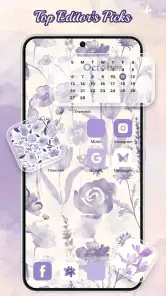
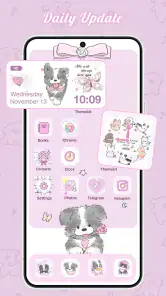
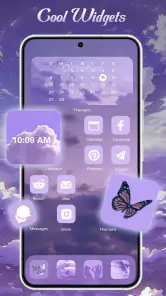
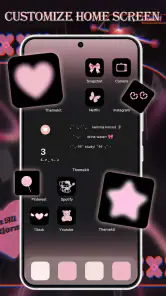


Analysis by Reviewed
I use a home screen dozens of times a day, so even a modest visual change can make a phone feel more personal. The trick is keeping that change useful: a striking wallpaper is no help if it makes app names hard to read, and a row of decorative widgets can get in the way of the things I open most. ThemeKit - Themes & Widgets is best approached as a collection of parts to arrange thoughtfully, rather than a one-tap makeover that must replace your whole setup.
Start with a baseline you can return to
Before browsing, I’d take note of the home screen I already rely on: which apps I reach for without thinking, where they sit, and whether I use a widget for anything important. That baseline makes it easier to experiment without losing the layout that works. I would choose a single visual direction first—perhaps muted colors or a brighter palette—then try a wallpaper and a few matching icons instead of changing everything at once.
This is a useful distinction between ThemeKit and simply changing a background in the phone’s own settings. The built-in option is quicker if all I want is a new image. ThemeKit is more relevant when I want several visual elements to feel coordinated, while a dedicated design tool may suit someone who wants to create every detail themselves. It occupies a practical middle ground: more choice than a wallpaper picker, less hands-on work than building a complete design from scratch.
Build a look one layer at a time
ThemeKit is a free personalization app from ThemeKit, with themes, icons, widgets, and wallpapers as its main building blocks. I find it most useful when I decide what I want the screen to feel like before browsing. A matching wallpaper can set the palette; icons can carry that palette across the apps I see most; a widget can add a practical accent. Changing one layer at a time also makes it easier to spot what is not working and undo that choice without starting over.
This gradual approach matters if you rely on familiar app positions. A full visual makeover can make a phone look great while making routine taps less automatic. I’d keep the apps I use every day in their usual places, then experiment with the look around them. That gives you a personal screen without turning a quick check of your calendar or messages into a search.
A realistic first session might happen while waiting for an appointment: choose a wallpaper that appeals, check whether it leaves enough contrast behind the app grid, and only then consider changing icons. I would stop as soon as the screen feels more like mine and still works at a glance. There is no benefit in completing every available customization if the result makes routine use slower.
Settings and choices worth a second look
Before settling on a theme, check how its wallpaper, icons, and widgets look together on your actual home screen. A preview can help, but a design that looks balanced by itself may feel crowded beside your app grid. I also recommend thinking about readability: high-contrast icons and an uncluttered background are often easier to live with than a beautiful design that makes labels hard to see.
More From Our News Desk

Weather by Xiaomi Review: Clear at a Glance, Less Clear Up Close

X Under Pressure: Can It Recover When Posting Goes Wrong?

Clash of Clans Is Won Between the Battles

Android Auto Makes the Case for Quieter Car Software

MobiOffice: Transforming Mobile Productivity with Seamless Integration

EA SPORTS FC™ Mobile Soccer: Redefining Mobile Sports Gaming
ThemeKit is rated for Teens, has a 4.7 average from around 585,000 ratings, and has been installed over 50 million times. It runs on Android 6.0 and later, and version 19.1 is its current release. The app is free to download, with optional in-app purchases ranging from $0.99 to $34.99 per item. I’d browse with a particular style in mind and check any purchase choice carefully rather than assuming every customization is included at no cost.
I would also treat the phone’s own display and layout settings as part of the design, not as an afterthought. If text or icons already feel small, a busy theme may make the screen harder to scan; if the wallpaper is visually active, simpler icons can help restore balance. A useful check is to view the home screen from the distance you normally hold the phone, then try a quick glance rather than studying it up close. That tests whether the design works as a tool, not just as a picture.
Make the routine easier, not busier
Widgets work best when they earn their space. I’d choose one that helps with something I genuinely check, rather than filling the screen just because the design offers room. For example, on a weekday morning, a calendar widget can make the day’s plans visible while a coordinated wallpaper keeps the screen tidy. If the widget becomes visual clutter or repeats information you already get elsewhere, remove it; a cleaner layout is often the better customization.
For a faster repeatable workflow, I’d keep a short personal checklist: choose the wallpaper, check readability, add only the icons that matter most, and finish with one useful widget if it fits. That order prevents me from spending time coordinating a detail that I later cover with another element. It also makes future refreshes less disruptive, because I can change the palette while preserving the positions and habits that already work.
Compared with changing a wallpaper through the phone’s built-in settings, ThemeKit brings more design elements into one personalization experience. That can save browsing time when you want coordinated visuals. The trade-off is that people who only want a single new background may find the broader choice unnecessary; the built-in option is simpler. Likewise, someone who wants to build every icon or widget from scratch may prefer a dedicated design tool, while ThemeKit is better suited to choosing and arranging ready-made styles.
The same principle helps when comparing themes: judge them against your daily apps, not only against their preview. A style may look cohesive but leave one frequently used app with an icon that is difficult to recognize. If that happens, keeping the original icon for that app is a sensible compromise. A consistent screen does not need every element to match perfectly; it needs to remain recognizable when you are moving quickly.
Design Your Digital Canvas
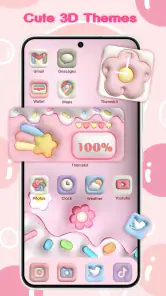
So, what exactly is ThemeKit - Themes & Widgets all about? Imagine having the power to customize your phone’s aesthetic without needing a degree in graphic design. With a few taps, you can choose from a plethora of themes, each more stunning than the last. The app offers a rich variety of customization options that cater to different tastes, whether you're into minimalistic vibes or vibrant explosions of color.
Widgets Galore
Widgets are all the rage these days, and for good reason. They provide quick access to information and actions right from your home screen. ThemeKit doesn’t disappoint here. The app features an extensive collection of widgets that are not only functional but also add a touch of sophistication to your screen. Whether you need a calendar at a glance or a music player widget, ThemeKit has got you covered.
Plus, the widgets are super easy to set up. Even if you’re not tech-savvy, the app guides you through the process with simple instructions. It's like having a friend walk you through it, step by step, ensuring you get the most out of your customization experience.
For experienced users, the useful skill is restraint rather than complexity: treat a widget as a substitute for a repeated check, not as another decoration to maintain. A calendar that earns a place because you consult it each morning has a clear job. If the information is already easy to reach elsewhere, leaving that space open can make the screen calmer and the important elements easier to spot.
Easy to Use Interface
One of the standout features of ThemeKit is its user-friendly interface. You don’t need to be a tech guru to navigate through the app. Everything is laid out clearly, making it easy for anyone to dive in and start creating their perfect home screen. The app is designed with the user in mind, ensuring that every feature is easily accessible and simple to use.
And let’s not forget about the regular updates. ThemeKit is constantly evolving, with new themes and widgets being added frequently. This means you’ll never run out of options to keep your phone looking fresh and exciting.
Easy browsing is most valuable when I give it a stopping point. I’d pick a look that fits my priorities, apply it, and use the phone normally before searching for another option. Otherwise, an abundance of visual choices can turn a quick refresh into an endless comparison exercise. If the first arrangement is readable and comfortable, living with it for a while is a better test than immediately replacing it with another theme.
Final Thoughts
In a world where personal expression is key, ThemeKit - Themes & Widgets offers a fantastic way to make your phone truly yours. It’s like a breath of fresh air for those of us who are tired of the standard, drab phone interfaces. Whether you want to impress your friends with a sleek new look or simply enjoy a more personalized experience, ThemeKit is definitely worth a shot.
So, what are you waiting for? Dive into the world of customization and let your phone reflect your unique style. Trust me, once you start using ThemeKit, there's no going back to the boring default themes!
Who will get the most from it
I’d recommend ThemeKit to someone who enjoys tweaking a phone’s appearance but doesn’t want to create every asset themselves. It suits people who like changing styles with the seasons, matching a home screen to a favorite color, or making a new device feel personal. If you rarely look at your home screen and only want a plain background, its wider collection may be more choice than you need.
It is also a sensible fit for someone who enjoys a coordinated look but wants to preserve familiar routines. You can focus on the parts you notice—such as a wallpaper and selected icons—without making every app or screen follow one strict visual scheme. On the other hand, if precise control over every graphic is the main goal, or if a phone’s default appearance already feels right, the extra browsing and setup may not be worthwhile.
One useful habit is to take a quick mental note of the current layout before changing it: where your most-used apps sit, which widget you actually consult, and what visual details matter to you. Then make a single change and live with it for a day. That gives you a fair test of whether the design is comfortable in real use, not just appealing while you browse.
Keep the setup comfortable over time
Frequent customization can become its own chore. I’d save the urge to rebuild the screen for moments when you genuinely want a change, and keep a simple baseline that remains readable and familiar. If a theme encourages you to add more widgets, ask whether each one replaces a separate step in your routine. A glanceable calendar may be useful; a row of decorative elements that pushes essential apps away is a trade-off I would avoid.
Another practical check is to try the look in the lighting and context where you use your phone most. A wallpaper that feels subtle indoors may compete with icons outdoors, while a busy background can make the screen harder to scan when you are in a hurry. Choosing contrast and spacing for everyday use, rather than judging only by a preview, is a small step that makes a customization feel considered.
There is also a useful boundary between a home-screen refresh and a change to how the phone behaves. ThemeKit is a personalization choice; I would not assume that a visual theme will make apps easier to use or replace the phone’s usual settings. Keep expectations focused on appearance and convenient at-a-glance elements. That makes it easier to decide whether a particular design is worth keeping, and avoids chasing a theme for benefits it is not meant to provide.
Where another approach may suit you better
ThemeKit’s appeal is the combination of visual components and an approachable setup. It is not the right choice for everyone: if you prefer the phone maker’s default interface and prioritize consistency over appearance, leaving the home screen alone may be more satisfying. If you want highly specific artwork or carefully constructed layouts, a dedicated editing workflow gives you more control, but also asks for more time and effort.
For a first try, I’d pick one theme, apply only the parts that fit my routine, and check whether the result still feels easy to navigate after a few days. That gives you a low-pressure way to judge the experience before paying for any optional items. ThemeKit is at its best when the customization serves your habits rather than asking you to reorganize your day around a pretty screen.
A practical way to decide
If you are unsure whether the wider toolkit is for you, begin with the smallest change that would make a noticeable difference. Try a wallpaper-led refresh, then ask whether matching icons or a widget would solve a real problem or simply add another decision. This keeps the experience approachable for a first-time user and gives a regular customizer a repeatable way to refresh the phone without rebuilding it from scratch.
My overall recommendation is for people who value a personal, coordinated home screen and are willing to make a few considered choices. The free download makes it easy to explore, but optional purchases are worth checking before committing to anything. For a single background, the built-in picker is likely enough; for original artwork, a more hands-on design tool is a better fit. For the space between those needs, ThemeKit offers a practical way to make a phone feel more like your own while keeping everyday use at the center.
ThemeKit - Themes & Widgets Frequently Asked Questions
What can I personalize with ThemeKit?
ThemeKit is a phone-personalization app that brings themes, app icons, widgets, and wallpapers together. It is intended for people who want to give their device a coordinated look rather than changing only one element at a time. You can explore its customization options and choose the designs that suit your preferences, then use them to refresh the appearance of your phone.
Who makes ThemeKit, and when was it released?
ThemeKit is developed by ThemeKit and was released on September 9, 2022. It focuses on phone personalization, with themes, icons, widgets, and wallpapers as its central offerings. Knowing the developer and release date can help you identify the app when browsing the store, while its current version is 19.1. The app is free to download, with optional in-app purchases for selected content.
Does ThemeKit work on Android and iPhone?
ThemeKit is a personalization app for Android and iOS, so it can be considered by users of either platform. The available version and compatibility depend on the operating system: the Android release requires Android 6.0 or later. Before downloading, check that your device meets the requirement and that the app is available for your phone through its app store.
Is ThemeKit free to download, and can it include extra costs?
ThemeKit is free to download, and it offers both free and premium content. While there is a generous selection of free themes and widgets available, some exclusive designs might require a purchase or subscription. In-app purchases range from $0.99 to $34.99 per item, so review any purchase details in the app before choosing paid content.
What is ThemeKit - Themes & Widgets?
ThemeKit - Themes & Widgets is a versatile application designed to enhance your smartphone's aesthetic appeal. It offers a wide variety of themes and widgets that users can customize to give their device a unique and personalized look. With an easy-to-use interface, users can effortlessly change the appearance of their home screen and app icons to match their style preferences. Its focus is phone personalization, bringing themes, icons, widgets, and wallpapers together in one app.
Pros
- Highly customizable themes.
- Wide range of widgets available.
- User-friendly interface.
- Regular updates with new features.
- Supports both Android and iOS.
Cons
- Some features require in-app purchases.
- Occasional bugs reported by users.
- May consume more battery life.
- Limited free themes available.
- Requires internet for updates.
- Category
- Personalization
- Version
- 19.1













