

ThemePro - Widget & Wallpaper
- 1.49K
- 4.7
- Installs
- 10.00M
- Price
- Free

Screenshots
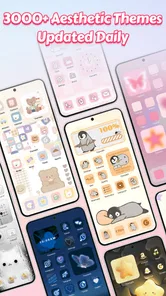
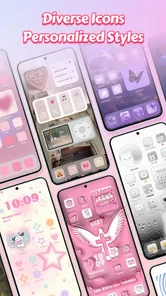
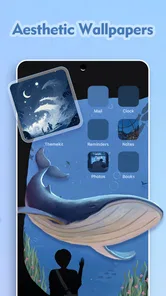
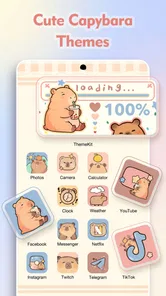
Analysis by Reviewed
I judge a phone-customization app less by how many designs it can show me and more by whether I can find a look I enjoy using after the novelty wears off. ThemePro - Widget & Wallpaper is aimed at people who want several visual parts of their screen to feel related: its collection brings themes, icons, widgets and wallpapers together. For me, that makes it more appealing as a way to rethink a whole home screen than as a tool for one quick wallpaper swap.
What the free price does—and doesn’t—tell you
The app is free to install, while optional in-app purchases range from $0.99 to $34.99 per item. That makes it easy to try before spending, but I would treat the free access and paid options as separate decisions: explore what is available to you first, then decide whether a particular purchase is worth it. The listed range is broad, so I wouldn’t assume every theme or customization requires payment, or that every item costs the same.
ThemePro is a personalization app from ThemeKit. It has a 4.8 average from around 199,000 ratings and over 10 million installs, which suggests it has found a sizable audience, though those numbers alone can’t tell you whether its style suits yours. It is rated for Everyone, and version 7.4 supports Android 6.0 and later. If you are on iOS, check the version and compatibility details in the relevant app store before installing rather than assuming Android requirements apply.
Making a phone feel more like yours
I use this section to frame ThemePro as a choice about the feel of an everyday home screen, not just a way to collect attractive images. The useful question is what you want to notice first when you unlock your phone: a favorite visual style, information you check often, or the apps you need to reach quickly. That starting point makes the customization choices that follow easier to judge.
First Impressions: A Seamless Experience
Upon launching ThemePro - Widget & Wallpaper, I was immediately impressed with its sleek and intuitive interface. Navigating through the app is a breeze, even for those who aren't tech-savvy. The developers have clearly put a lot of thought into making sure you can easily find exactly what you’re looking for, whether it’s a new widget or a stunning wallpaper.
Customization Galore
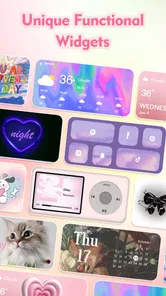
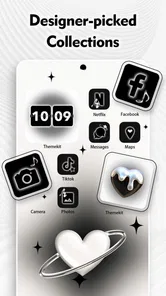
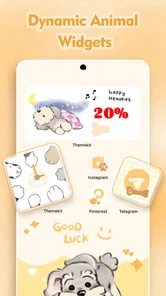
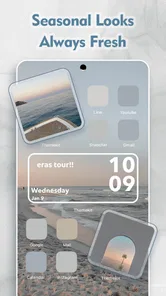
One of the things that sets ThemePro apart is the sheer variety of customization options it offers. You can choose from an array of widgets that range from practical, like clock and weather widgets, to fun and quirky ones. Plus, the wallpapers are nothing short of breathtaking. From minimalistic designs to vibrant, eye-catching art, there’s something to suit every taste.
What’s more, the app keeps things fresh by regularly updating its collection. So if you’re someone who likes to switch things up frequently, you’ll never run out of new looks to try. And let’s not forget about the keyword: personalization. You can tweak and tinker with themes to your heart’s content, ensuring your phone is a perfect reflection of your personality.
More From Our News Desk

 Gmail
GmailGmail in a Busy Inbox: Who Benefits Most?
From first account to crowded workday, Gmail earns its place through dependable search and flexible sorting—but its best fit depends on how much inbox maintenance you can tolerate.

 Prime Video
Switching to Prime Video: What Changes in Your Viewing Routine
Prime Video can make a compelling second home for streaming, but switching means learning a different catalog, rental layer, and route from browsing to playback.

 Universal TV Remote Control
Universal TV Remote Control Works Best as a Reliable Backup
A phone remote earns its place through quick setup and reliable habits. Here is how to get more from Universal TV Remote Control—and where its limits show.

 Weather - By Xiaomi
Weather by Xiaomi Review: Clear at a Glance, Less Clear Up Close
Xiaomi’s weather app makes everyday forecasts quick to scan, but its calm surface can leave useful details and recovery paths harder to find than they should be.

 X
XX Under Pressure: Can It Recover When Posting Goes Wrong?
A resilience-focused review of X, examining setup, mistaken posts, interruptions, weak connections, and the gaps that matter when recovery needs to be dependable.

 Clash of Clans
Clash of Clans Is Won Between the Battles
Its raids are quick; its community is a long-term project of coordination, teaching, rivalry, and shared responsibility—with all the friction that entails.
Latest News



Getting a coherent look without extra fuss
A useful way to approach a theme is to start with one visual anchor rather than changing everything at once. I would pick a wallpaper first, then choose icons and a widget style that don’t compete with it. This helps avoid the common problem of a home screen that feels busy because every element is trying to be the centerpiece. If the result is hard to read, keep the decorative choices for a secondary screen and leave the main screen simple.
There is also a practical difference between a full theme and a handful of individual changes. If you enjoy matching details, the app’s collection can save browsing across separate wallpaper and widget tools. If you only want a new background, a dedicated wallpaper app or your phone’s built-in settings may be quicker and less distracting. ThemePro makes most sense when you want several parts of the screen to share a style, not when you are looking for one isolated tweak.
A small everyday test
Imagine wanting a calmer home screen before a busy work or school week. I’d choose a subdued background, keep the most-used apps easy to spot, and add a widget only if it makes information I check often more convenient. Then I’d use the phone normally for a day before making further changes. That quick test reveals whether the design is genuinely comfortable or merely attractive in a preview. A theme should make the phone pleasant to use, not make familiar icons harder to find.
For anime fans and people who enjoy expressive, coordinated screens, the app’s focus is a natural fit. It may be less appealing if you prefer a plain interface, need very specific controls over each element, or don’t want to browse visual options. In those cases, a built-in launcher or a single-purpose tool may give you more direct control with less decoration. I would also check how a chosen design looks on your own device before committing to a paid item, since personal taste and screen readability matter more than a polished preview.
Choosing designs with daily use in mind
One useful detail to decide before browsing is what you actually want to see at a glance. A clock widget can earn its space if you check the time often, while a decorative element that duplicates information elsewhere may simply crowd the screen. I’d treat each widget as a small trade: it should either help me find something faster or make the home screen more enjoyable without obscuring the apps I use. That simple test keeps customization from becoming decoration for decoration’s sake.
It is also worth thinking about how much of your phone you want to restyle. If you enjoy a complete visual change, browsing coordinated themes is likely to be satisfying. If you are attached to your current layout, try changing only the wallpaper or one widget first. This makes it easier to tell which part of the new look you actually like, and avoids spending time rebuilding a screen that was already working well.
Where it sits beside other customization options
Compared with using the phone’s built-in wallpaper settings, ThemePro is the more exploratory choice: it brings a wider visual idea into the process rather than keeping the task to choosing a background. Compared with separate wallpaper, icon and widget apps, its appeal is convenience when you want those pieces to feel coordinated. The trade-off is that a broad collection can invite more browsing than a focused tool, and people who want precise control over every layout detail may be happier with a launcher designed around that kind of adjustment.
I would not assume that applying a theme changes every part of the interface in exactly the same way on every device. The practical result can depend on the phone and its home-screen setup. Before investing time in a full redesign, I’d try one change, confirm that it appears as expected, and then build from there. That is a more reliable workflow than choosing a complete look first and only afterward discovering that one element does not fit the way you use your screen.
When browsing is part of the fun—and when it isn’t
ThemePro is at its best for someone who likes looking through visual options and comparing styles. A person who changes their screen with the seasons, follows anime aesthetics, or enjoys making a phone feel distinct from its default setup has a clear reason to explore it. On the other hand, if you want to make one small change and move on, the selection may feel like unnecessary choice. In that case, your phone’s existing settings are probably the more efficient place to start.
A practical way to avoid endless tweaking is to decide on a mood before opening the catalog: for example, quiet and readable, bright and playful, or built around a favorite visual style. Then shortlist a wallpaper and only the supporting elements that make sense with it. This keeps the process intentional, helps prevent clashing colors and shapes, and makes it easier to judge whether a paid item adds something you genuinely want rather than merely catching your eye during browsing.
Performance and Usability
Now, I know what you’re thinking – does all this customization slow down your phone? I’m happy to report that the app runs smoothly without any noticeable lag. It’s optimized for both Android and iOS, so no matter what device you’re on, you’ll enjoy a seamless experience. The developers have done a stellar job at balancing aesthetic appeal with functionality, ensuring that even the most decked-out themes don’t become a burden on your phone’s performance.
Before paying, make the result earn its place
Because the app can be tried without an upfront purchase, I’d use that opportunity to check the actual look and fit before spending. A design that seems appealing while browsing should also work with the icons and information I need to see every day. I would ask myself whether the item improves the overall screen, whether I would keep using it beyond the first few days, and whether a free alternative already gets me close enough. Those questions are especially helpful when considering an item at the higher end of the in-app purchase range.
The free install does not mean every option is free, and the purchase range does not tell me what any particular design costs. I would check the price shown for the exact item before confirming a purchase and avoid treating a broad range as a promise about value. For someone who enjoys changing themes often, a paid design may feel worthwhile if it becomes part of a look they keep. For someone who usually settles on one background and leaves it alone, even a small purchase may be hard to justify.
Final Thoughts: A Must-Try for Personalization Lovers
In conclusion, if you’re looking to breathe new life into your smartphone, ThemePro - Widget & Wallpaper is definitely worth checking out. It’s user-friendly, offers a wide range of customization options, and doesn’t compromise on performance. Whether you’re a seasoned personalization pro or a newbie just dipping your toes into the world of themes and widgets, this app has something for everyone.
So go ahead, give it a try and let your device reflect who you are. Happy customizing!
My buy-or-skip verdict
I’d recommend trying ThemePro if you want to shape a coordinated screen, especially if anime-inspired or expressive visuals are part of your taste. Its free-to-install model gives you a chance to explore before deciding whether any optional purchase is worthwhile. I would not pay simply because a design looks polished in a preview; I’d first check that it suits my device, remains readable, and works with the apps I reach for most.
I’d skip it if you prefer a nearly untouched home screen, want granular layout control above all else, or only need a background and have no interest in widgets or icons. A phone’s built-in settings or a focused single-purpose alternative can be a better fit in those situations. For everyone else, my advice is to start with one visual change, use it through an ordinary day, and expand only if it makes the phone feel more personal without making it less convenient.
ThemePro - Widget & Wallpaper Frequently Asked Questions
Can I preview a theme before applying it to my phone?
Previewing a design can help you decide whether its colors and overall style suit your home screen before you commit to a change. ThemePro offers anime themes, 3D icons, aesthetic widgets, and wallpapers, giving you different visual elements to consider together. Browse the available choices and review how each option is presented in the app before applying a look you want to use.
Can I use ThemePro to customize more than just my wallpaper?
Yes. ThemePro is designed for broader phone personalization rather than wallpaper changes alone. Its offerings include anime themes, 3D icons, aesthetic widgets, and wallpapers, so you can explore several kinds of visual customization for your device. The exact combination you choose depends on the styles and items available in the app, but its focus is on helping you shape the appearance of your home screen.
What kind of themes and visual styles can I find in ThemePro?
ThemePro focuses on phone customization, with anime themes, 3D icons, aesthetic widgets, and wallpapers. These options give you several ways to change the look of your home screen and create a style that feels personal. The app is listed in the Personalization category, so its main purpose is to help users adjust the appearance of their device.
What should I check before installing ThemePro - Widget & Wallpaper?
Before downloading, check that your device runs Android 6.0 or later and that you are comfortable with the app’s Everyone content rating. ThemePro is free to download, but it also offers in-app purchases, so some content or options may involve additional spending. Consider whether its focus on themes, icons, widgets, and wallpapers matches the kind of customization you want.
What is ThemePro - Widget & Wallpaper and what does it offer?
ThemePro - Widget & Wallpaper is a mobile app designed to enhance your device's appearance by offering a variety of customizable widgets and high-quality wallpapers. The app provides users with a unique way to personalize their home screens, allowing them to choose from a plethora of themes, styles, and designs, making their device truly their own. Its collection includes anime themes, 3D icons, and aesthetic widgets.
Pros
- Wide variety of themes available.
- Highly customizable widgets.
- Easy to navigate interface.
- Regular updates with new content.
- Supports both Android and iOS.
Cons
- Some themes are premium only.
- Occasional ads disrupt experience.
- Widgets can slow down the device.
- Limited free content options.
- Requires internet for full functionality.













