WidgetKit-OS18 Themes & Icons
- 771.00
- 4.6
- Installs
- 10.00M
- Price
- Free
Screenshots

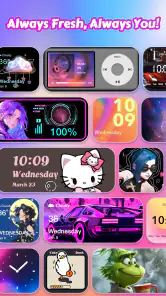

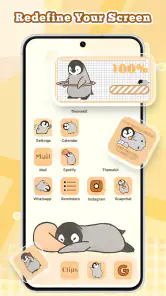
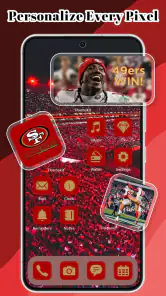
Analysis by Reviewed
When more than one person shares a phone or tablet, its home screen can feel like common space: useful, but not quite anyone’s own. I see WidgetKit-OS18 Themes & Icons as a way to make that screen feel more personal through themes, icons, and widgets. It’s a personalization app from ThemeKit, and its appeal is straightforward: change the look of a device without turning the process into a technical project.
Making a shared screen feel more personal
In a household, different people may care about different things on the same device. One person might prefer a calmer layout, while another enjoys brighter colors and decorative icons. A visual refresh can help a shared device feel less anonymous, but it works best when everyone who uses the phone agrees on the change. I’d treat a theme as a shared choice rather than assuming one person’s preferred style should become the default for everyone.
A practical moment for trying it is when a family member hands over a device for everyday use and the screen feels cluttered or dated. Instead of changing everything at once, I’d start with one visual element, such as a widget, and see whether the new look remains easy to use. That small trial makes it easier to tell whether the style is helping or simply adding decoration.
Where customization meets household boundaries
The app makes the most sense when the person changing the screen is also the person who will use it. On a shared device, I’d agree on a look first and avoid treating personalization as a substitute for separate accounts or individual privacy settings. A themed screen changes appearance; it should not be mistaken for a way to separate people’s content or manage who can access the device.
This distinction is useful when adults and teens share a phone or tablet. A visual style can make the device feel more welcoming, but household rules about access, purchases, and personal information still need to be handled through the device’s own settings and family agreements. WidgetKit is rated Teen, so I’d keep the age context in mind when deciding whether it suits a younger user, rather than assuming that a decorative app automatically fits every child.
A Whole New World of Customization
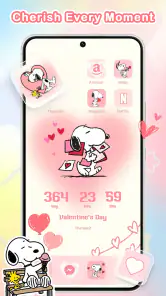
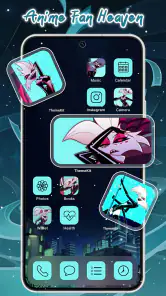
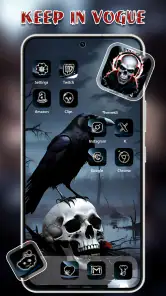
First off, WidgetKit-OS18 Themes & Icons offers a plethora of themes and icons that can transform your home screen into something straight out of a design magazine. It’s like having a personal stylist for your phone! From minimalist designs to vibrant pop art themes, there’s something for everyone. The app is super intuitive, so even if you’re not the most tech-savvy person, you’ll find it a breeze to navigate.
Why I Fell in Love with It
One of the things I absolutely adore about this app is its seamless integration with iOS. You don’t have to jump through hoops to apply the themes or icons. Just a few taps and voila! Your phone looks brand new. Plus, the developers are constantly updating the app with new themes and icons, so there’s always something fresh to try.
More From Our News Desk

Clash of Clans Is Won Between the Battles

Android Auto Makes the Case for Quieter Car Software

MobiOffice: Transforming Mobile Productivity with Seamless Integration

EA SPORTS FC™ Mobile Soccer: Redefining Mobile Sports Gaming

How Microsoft OneDrive Became a Mobile Productivity Giant

How Google Translate Breaks Language Barriers Effortlessly
Another highlight is the ability to customize widgets. I mean, widgets have become essential, right? Whether it’s keeping track of your daily schedule or just flaunting the weather forecast, having the ability to customize them is a game-changer. The app offers a range of widget sizes and styles, so you can mix and match them to your heart’s content.
Putting a shared setup into practice
For a household, I’d make a small plan before anyone starts changing the screen. Pick a visual direction together, then keep the most-used apps in familiar places while trying the decorative parts around them. This lets someone enjoy a new look without making another person hunt for the camera or messages. It also gives the household an easy way to reverse course: if the new arrangement feels awkward during ordinary use, restore the familiar layout rather than forcing everyone to adapt.
Imagine a teen using a family tablet after school to check the day’s schedule, while an adult also reaches for it to handle a quick call. A widget can make useful information visible at a glance, but the screen still needs to be legible and predictable for both users. I’d favor clarity over a perfectly matched aesthetic in that situation. The best shared arrangement is not necessarily the most elaborate one; it is the one that lets different people find what they need without confusion.
Planning a change instead of chasing one
I’d use the range of widget styles with a little restraint. Before applying a full theme, decide what needs to stay easy to spot—perhaps the apps used for calls, messages, or appointments—and build the visual choices around that. This is a small but useful trade-off: a coordinated screen can look polished, yet a layout that hides familiar app positions may slow someone down, especially if several people rely on the same device.
Compared with the usual alternative of changing a wallpaper and leaving everything else as it is, WidgetKit gives you more pieces to coordinate. That is a real advantage if you enjoy shaping the whole home screen, but it also asks for more time and attention than a quick background swap. If you want a subtle refresh with no interest in icons or widgets, your phone’s built-in wallpaper options may be the simpler choice. If you enjoy matching details, this app gives you more room to experiment.
Making customization easier to live with
One useful approach is to treat the first setup as a trial rather than a permanent makeover. I’d begin with one widget and a small number of visual changes, then use the device normally for a day before deciding whether to continue. That reveals practical problems a preview may not: a design can look balanced while making labels harder to read, or a newly styled screen can feel unfamiliar when someone is in a hurry.
It can also help to agree on which parts of the screen are personal and which are shared. If one person wants decorative icons but another depends on muscle memory, preserve the familiar positions and limit the experiment to areas that do not disrupt routine. This is a better compromise than repeatedly rebuilding the whole screen. It keeps personalization enjoyable and reduces the chance that a shared device becomes a source of small daily irritations.
What’s the Catch?
Okay, let’s be real for a second. While the app is fabulous, it’s not entirely free. There are some premium themes and icons that require in-app purchases. But you know what? Given the quality and the sheer number of options available, it feels like a small price to pay for the magic it brings to your device.
Also, while the app runs smoothly for the most part, there were a couple of times when I noticed a slight lag during theme application. But hey, nothing’s perfect, right? And these minor hiccups are far outweighed by the app’s benefits.
Costs, compatibility, and choosing with care
The app is free to install, while optional in-app purchases range from $0.49 to $34.99 per item. I’d browse and decide on a look before buying anything, particularly if someone else pays for the shared device. That keeps a visual experiment from becoming an unexpected household expense. WidgetKit has a 4.6 average from around 293,000 ratings and more than 10 million installs, which suggests it has found a broad audience, though popularity alone cannot tell you whether its style will suit your screen.
It is currently at version 13.1 and requires Android 6.0 or later; the listed age rating is Teen. Those details make it worth checking compatibility and age suitability before setting it up, especially when a device is used by more than one person. I’d also take a moment to consider whether everyone wants a coordinated look or whether a simple, familiar home screen matters more to them.
What I’d weigh before installing
The app is a good fit if you enjoy choosing visual details and want more control than a wallpaper change provides. It is less appealing if you want the phone to remain untouched, or if the person using the device values a consistent layout more than a coordinated style. That distinction matters in a household: one person may see icon changes as a fun refresh, while another sees them as extra steps to relearn.
For a shared device, I’d also make the purchase decision with the account holder rather than assuming that “free” covers every option. The app costs nothing to install, but individual themes or icons may involve a purchase. Taking a moment to review the choice together keeps spending expectations clear and prevents a casual design experiment from turning into an awkward surprise.
Final Thoughts
To sum it up, WidgetKit-OS18 Themes & Icons is a must-have for anyone looking to breathe new life into their iOS device. It’s fun, it’s stylish, and it’s just a cool way to express your personality through your phone. So, if you’re ready to turn your home screen into a masterpiece, give this app a shot. Trust me, you won’t regret it!
My household verdict
I’d recommend WidgetKit to someone who likes visual customization and is happy to spend a little time choosing a consistent look. It can also be a fun shared activity: agree on a theme, try a widget, and see whether the result works for everyone who reaches for the device. I’d skip it if you want a hands-off phone, need strict separation between users, or prefer every app to stay exactly where you expect it. For me, its best use is as a creative layer on top of a familiar, practical home screen—not a replacement for clear household boundaries or the device’s ordinary settings.
WidgetKit-OS18 Themes & Icons Frequently Asked Questions
What does WidgetKit-OS18 Themes & Icons include for customizing my screen?
WidgetKit-OS18 is designed to transform a phone screen with widgets, themes, and wallpapers. These options let you explore different visual styles and bring related elements together for a more personal home-screen appearance. If you enjoy changing how your phone looks, the app offers several kinds of customization to consider, rather than focusing on just one screen element.
Is WidgetKit-OS18 suitable for someone who has never customized a phone before?
The app is intended to help users personalize their phone screen, and its theme and icon setup includes step-by-step instructions after you make a selection. That can make the process approachable if you are new to customization. You can start by exploring the available choices and follow the guidance provided as you apply a look, then try other options if you want a different result.
Can I use WidgetKit-OS18 Themes & Icons on my phone?
WidgetKit-OS18 Themes & Icons is a personalization app for transforming a phone screen with widgets, themes, and wallpapers. It is available for Android devices running version 6.0 or later. The app is rated for Teen audiences, so it is worth checking that rating before downloading if the device is used by a younger person.
What is WidgetKit-OS18 Themes & Icons?
WidgetKit-OS18 Themes & Icons is an application designed to enhance the visual aesthetics of your smartphone. It allows users to customize their home screens with a variety of themes, icons, and widgets, giving their device a unique and personalized look. The app is compatible with both Android and iOS platforms, ensuring a seamless experience across devices. It is developed by ThemeKit and focuses on making the phone screen feel more personal through visual customization.
Is WidgetKit-OS18 Themes & Icons free to use?
The app is free to download, so you can try it without an upfront purchase. Some content or features may involve in-app purchases, with items priced from $0.49 to $34.99. If you prefer to avoid spending, check the purchase details in the app before selecting paid content. The free download gives you a way to explore WidgetKit-OS18, while optional purchases can add to the customization experience.
Pros
- Highly customizable themes
- Wide variety of icons
- User-friendly interface
- Regular updates
- Compatible with iOS 18
Cons
- Limited free options
- Occasional bugs
- Requires iOS 18
- Subscription needed for full access
- May drain battery faster

- Category
- Personalization
- Version
- 13.1













