stats.fm for Spotify
- 2.94K
- 4.4
- Installs
- 5.00M
- Price
- Free

Screenshots
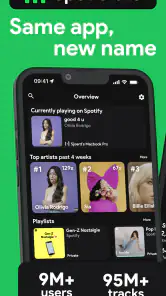
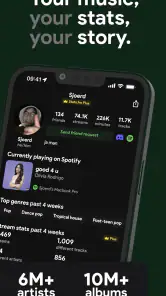
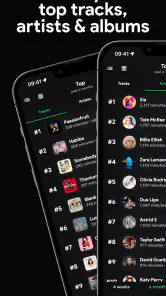
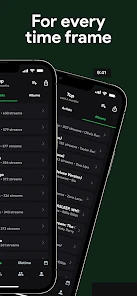
Analysis by Reviewed
I like music apps that help me notice patterns I would otherwise miss, and that is the main appeal of stats.fm for Spotify. It turns Spotify listening into something you can look back on: which tracks keep returning, which artists have become regulars, and how your preferences shift over time. I’d recommend it most to curious listeners who enjoy reflecting on their habits, rather than people who only want a player that gets out of the way.
What the app is useful for day to day
In an ordinary week, I might open it after a commute or while deciding what to play next. Seeing a familiar artist near the top can explain why a particular album feels like the soundtrack to that stretch of life; spotting a track I had forgotten can send me back to it. That small act of looking back is more valuable than a single ranking, because it gives context to the music I actually choose rather than the music I think I listen to.
The app is made by StatsFM B.V. and sits in the music-and-audio category. It is free to install, has a Teen age rating, and offers in-app purchases ranging from $0.99 to $434.99 per item. Its current version is 1.12.4, and it runs on Android 7.0 or later. I’d treat the purchase options as something to inspect for yourself before paying: the free experience may be enough if you only want an occasional snapshot, while people who regularly dig into their listening may have more reason to explore paid access.
Reading patterns instead of chasing rankings
A useful way to get more from your listening history is to compare different time windows rather than taking one “top tracks” list as a complete portrait of your taste. A song high on a recent list may reflect a short-lived obsession, while an artist who stays visible across longer periods is probably part of your musical routine. I find that distinction helpful when I’m making a playlist: recent repeats suit a mood-based mix, while long-running favorites make a better starting point for something I’ll keep around.
There’s also a practical social use. If a friend and I are trying to choose music for a drive, comparing tastes can uncover overlap we might not think to play on our own. It can also reveal where our preferences differ, which is useful if we want to take turns choosing rather than letting one person’s usual rotation dominate. I would use those comparisons as conversation starters, not as a verdict on whose taste is better.
Where it fits among music apps
Spotify itself is the natural place to press play, manage a queue, and browse its own listening experience. stats.fm has a different job: it puts the emphasis on examining and revisiting listening patterns. Compared with a basic music player or a general-purpose streaming interface, that focus makes it more useful for reflection, but less suitable as an everyday replacement for playback. If you want songs to listen to immediately, stay in Spotify; if you want to understand what has been filling your headphones, this companion app is the more relevant tool.
That distinction also sets a sensible expectation for discovery. Exploring music through listening patterns can give you a starting point connected to your own taste, but it is not the same as deliberately browsing a genre you know little about or asking a friend for a recommendation. I’d use it to follow a thread from an artist or track I already enjoy, then switch back to Spotify to listen and decide whether anything new belongs in my library.
More From Our News Desk

Weather by Xiaomi Review: Clear at a Glance, Less Clear Up Close

X Under Pressure: Can It Recover When Posting Goes Wrong?

Clash of Clans Is Won Between the Battles

Android Auto Makes the Case for Quieter Car Software

MobiOffice: Transforming Mobile Productivity with Seamless Integration

EA SPORTS FC™ Mobile Soccer: Redefining Mobile Sports Gaming
Unlocking Insights into Your Music World
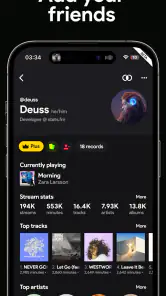
First things first, stats.fm for Spotify offers a deep dive into your Spotify data. We're talking about stats you probably never even thought about. Ever curious about what your top songs are over the last month, or even the past year? This app has got you covered. It provides a comprehensive analysis of your music taste, which feels like having a personalized music journal.
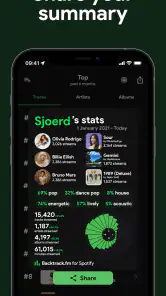
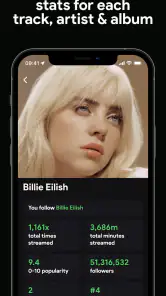
One of the coolest features is the ability to see your listening history in a way that's visually appealing and easy to understand. The app lays out your most played tracks, artists, and genres, giving you a new perspective on your musical journey. I found it particularly fascinating to see how my taste shifts over time, and it's all presented in a way that's both engaging and intuitive.
Features That Make Life Easier
Aside from the basic stats, the app comes packed with some nifty features. You can compare your musical taste with friends, which is perfect for sparking those “who's got better taste” debates. There's also a feature that lets you explore new music based on your listening habits, which has been a game-changer for discovering new artists.
Moreover, stats.fm offers a premium version that unlocks even more detailed analytics. While the free version is plenty robust, the premium features offer a deeper dive for those who want to take their music analysis to the next level. As someone who's always curious about the "why" behind my music choices, this was a great addition.
Turn a chart into a listening plan
One practical habit I’d recommend is checking a chart before making a playlist, then moving straight into Spotify to act on what you noticed. If several tracks from one artist keep appearing, I might make a focused playlist around that artist; if my recent listening is scattered, I might build a mix around a mood instead. The useful step is choosing a purpose for the list first. Otherwise, it is easy to save a pile of rankings without creating anything I will actually play.
This also makes the app handy for a small everyday reset. Imagine finishing a busy week, opening your listening history, and finding a song you played repeatedly during a long commute. Rather than treating that frequency as proof it is your favorite forever, I’d use it as a cue to revisit the album and decide whether it still fits my mood. That turns statistics into a prompt for listening, not another screen to scroll through.
Using your history without overreading it
One trade-off with any listening-statistics app is that numbers can flatten context. A track may rise because you played it repeatedly during one work project, not because it has become your lasting favorite. I try to treat the charts as prompts for remembering what was going on, rather than as definitive judgments about my identity or taste. That makes the app more enjoyable and keeps a temporary phase from feeling like a permanent label.
If a chart seems incomplete or doesn’t match what you remember, I would first check whether the account connection and the time period I’m viewing make sense. Spotify is still where I would confirm what is playable and manage my library; stats.fm is best approached as a companion for analysis. This division of labor avoids expecting a history-focused tool to handle every listening task.
Seamless Integration and Smooth User Experience
Integrating stats.fm for Spotify with your Spotify account is a breeze. The app's UI is clean and user-friendly, making the experience smooth even for those who might not be the most tech-savvy. The setup process was straightforward, and in just a few clicks, I was all set to explore my musical universe.
The app's design deserves a special mention. It's sleek, modern, and does a great job of presenting complex data in an easily digestible format. I can't stress enough how much I appreciated the visual elements that made my stats not just data points, but a story of my listening habits.
A sensible way to explore without losing your own taste
When I use listening patterns to look for something new, I prefer following one clue at a time. An artist that repeatedly appears can lead me to an album I have not explored, while a familiar track can remind me of a collaboration or neighboring style worth investigating. I would not treat the app’s suggestions as a complete discovery system, though: a history-based path naturally reflects what I already play, so it can keep me close to familiar sounds unless I deliberately branch out.
That limitation is also a useful trade-off. A streaming service’s recommendations may be better when I want a steady flow of unfamiliar music with minimal effort; stats.fm is more valuable when I want to understand the listening that shaped a recommendation or choose a starting point myself. For deliberate exploration, I might use both in sequence: inspect a pattern here, then search and listen in Spotify, where I can judge the music directly.
Who should try it—and who might not need it
I think it suits regular Spotify listeners who enjoy comparing eras, revisiting forgotten favorites, or sharing music-related observations with friends. It can also be useful when you are building a personal playlist and want a quick reminder of what has genuinely been in rotation. The app is less compelling if you rarely look back at what you play, prefer to keep listening private, or simply want a straightforward place to stream music. In those cases, Spotify alone may be all you need.
For someone wondering whether to pay, I’d start with the free app and see how often I return to its charts. If I only check once in a while, paying for deeper analysis may not change my routine. If I keep using the history to compare periods or explore my habits, then I can decide whether the extra detail is worth the in-app purchase to me. The important question is not whether more stats exist, but whether I’ll actually use them.
What setup and access mean in practice
A common question is whether this replaces Spotify or works as a separate music library. I would think of it as a companion: the point is to examine listening, while Spotify remains the place I use for playback and library decisions. That separation matters if you are choosing one app to do everything. stats.fm makes most sense alongside the streaming app you already use, not as a new player to switch to for everyday listening.
Another practical consideration is how much you want to share. Comparing listening with friends can make a drive or playlist session more fun, but people who regard their habits as personal may prefer to keep the app as a private journal. I’d decide how social I want the experience to be before connecting or comparing, and avoid turning a casual chart into a scorecard. The app is most enjoyable when the numbers support conversation rather than pressure anyone to explain their taste.
What its version tells me—and what I’d watch next
The app was released on August 9, 2020, and its current version is 1.12.4. That gives me a clear sense that stats.fm has existed as a product for several years, but a version number by itself does not tell me which features changed or how a particular update affected my account. I wouldn’t assume a specific redesign or new capability from that number alone. Existing users should judge the current experience by the charts and tools they can actually access, while new users can begin with the core idea of reviewing Spotify listening.
With a 4.4 average from around 103,000 ratings, more than 5 million installs, and roughly 2,900 written reviews, the app has attracted a substantial audience. I still think personal fit matters more than popularity: its value depends on whether looking back at listening adds something to your relationship with music. I’d keep an eye on how future versions handle the balance between useful detail and easy-to-read summaries, since that is what makes a stats companion pleasant rather than overwhelming.
What I would watch for as it evolves
For existing users, the most meaningful change is not a bigger version number on its own but whether the everyday workflow stays clear: can I find the period I want to review, understand what a chart is showing, and move from an interesting pattern to music I actually want to hear? Those are the details that determine whether I return after the novelty of seeing my first rankings has passed. If future changes add depth, I’d hope they keep the quick, readable overview intact.
I’d also judge any new detail by whether it changes a decision. More breakdowns can be appealing to people who enjoy analysis, but they can make a casual check feel like homework if the main takeaways are buried. The best direction, in my view, is not simply more numbers: it is clearer context, useful ways to compare listening periods, and an easy path back to Spotify when I want to play something. Those are expectations, not claims about what the app currently promises.
Final Thoughts
In a nutshell, if you're a Spotify user who loves data and music equally, stats.fm for Spotify is a must-have. It's not just an app; it's a tool that transforms your listening habits into a narrative, providing insights you never knew you needed. Whether you're using it to reminisce about your all-time favorite songs or to find new music that fits your vibe, this app does it all with style and precision.
So, next time you're curious about your music stats, give this app a whirl. Trust me, you'll be hooked in no time!
stats.fm for Spotify Frequently Asked Questions
Can stats.fm for Spotify show my listening history over time?
stats.fm focuses on turning Spotify activity into music statistics, helping you revisit what you listen to and explore patterns in your listening. Its main appeal is the chance to look beyond a current playlist and see which tracks, artists, and albums stand out in your habits. If you enjoy reflecting on how your tastes shift, the app is designed for that kind of browsing.
Will stats.fm for Spotify change or control anything in my Spotify account?
The app is intended for exploring statistics about your Spotify listening, rather than replacing Spotify as your music player. Its purpose is to help you view your top tracks, artists, albums, and other insights. Before connecting any music service account, it is sensible to review the permissions requested during setup and make sure you are comfortable with the access involved.
Is stats.fm for Spotify suitable for casual listeners, or mainly for statistics fans?
You do not need to be a dedicated data enthusiast to get something out of stats.fm. Its focus on familiar categories such as favorite tracks, artists, and albums makes the results approachable, while people who enjoy comparing patterns can spend more time exploring their listening insights. It is most appealing if you are curious about what your Spotify habits reveal about your music taste.
Does stats.fm for Spotify work on older Android devices?
The Android version requires Android 7.0 or later, so it can work on devices that meet that minimum requirement. Before downloading, check your phone’s Android version and make sure there is enough room and a reliable connection for installation and account setup. If your device runs an earlier version, it will not meet the stated minimum system requirement.
Can I use stats.fm for Spotify without paying?
The app is free to download, and it also includes in-app purchases. That gives you a way to try its core experience before deciding whether you want to spend money on optional extras. The listed purchase amounts range from $0.99 to $434.99 per item, so check the purchase details in the app before confirming anything and consider whether the available features fit your needs.
Pros
- Detailed listening stats
- Customizable time range
- User-friendly interface
- Playlist creation
- Social sharing features
Cons
- Limited free features
- Ads in free version
- Requires Spotify login
- Occasional syncing issues
- No offline access
- Category
- Music & Audio
- Version
- 1.12.4











