Sonos
- 20.42K
- 4.1
- Installs
- 10.00M
- Price
- Free

Screenshots
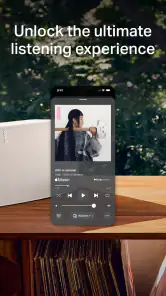
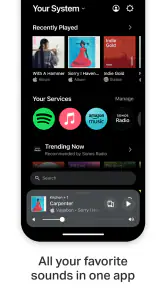
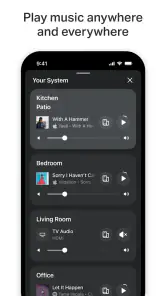
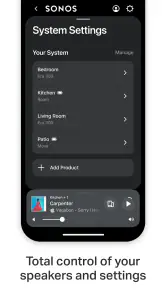
Analysis by Reviewed
I look at the Sonos app as the control point for a home listening setup, rather than as another music player to download and forget. The important question is what you want your audio to do: if you simply play music through headphones or one Bluetooth speaker, your current music app may be enough. If you want speakers in different rooms to work together, or to be managed from one place, this app has a clearer purpose. I find that distinction makes it easier to decide whether the extra system is worth the effort.
From first setup to everyday listening
The Sonos app is a free music and audio app from Sonos, Inc, and its purpose is to help you set up and manage a Sonos listening system. I’d consider it most useful when you already own compatible Sonos speakers or are planning a multi-room setup. If you mainly listen through headphones or a single Bluetooth speaker, your phone’s regular music app may be all you need; this one makes more sense when there’s a home system to control.
Setting Up: Easier Than You’d Think!
First off, the setup process was a breeze. I’m not exactly a tech wizard, but the Sonos app made everything straightforward. Just download the app, and it guides you step-by-step in connecting your speakers to your Wi-Fi. No tangled wires, no complex instructions – just a seamless experience. It’s like having a personal tech assistant right in your phone. And trust me, the app is not just a pretty interface; it’s packed with features that make managing your audio system a cinch.
In practice, I’d do the initial setup where I plan to use the speaker, with my phone connected to the home Wi-Fi I want the system to use. Before starting, it helps to know which room each speaker belongs in; clear room names make later control less confusing, especially if several are installed. The useful distinction is that setup is only the first handoff: after the speakers are on the network, the app becomes the place I return to choose what plays and where.
Making the room layout work for you
For a home with more than one speaker, I’d decide on room names before inviting other people to use the controls. Names such as “Kitchen” and “Living Room” are easier to understand at a glance than labels based on model or purchase order. This is a small setup choice with a lasting effect: when someone wants to move music, they can select the place they mean instead of guessing which device is which. It also makes it easier to notice when a room has accidentally been left out of a group.
A useful way to start is with one speaker in the room where you listen most, then add other rooms only when there is a real reason for them. That keeps the first experience manageable and helps you learn the app’s room controls before the system gets more complicated. If you are setting up several speakers at once, I’d check each room’s name as it appears in the app rather than assuming the placement will be obvious later. The app can coordinate a system, but the household still benefits from a clear map of that system.
Sound Quality: Music to My Ears
Now, let’s talk about sound quality. The audio clarity is nothing short of spectacular. Whether it’s the deep bass or the crisp highs, Sonos delivers a sound experience that’s rich and immersive. It’s like having a concert in your living room. I tried everything from rock to classical, and it handled all genres with finesse. This isn’t just about volume; it’s about delivering a full-bodied sound that fills every corner of the room. And for those who love a good party, you can pair multiple speakers for a surround sound experience that’ll have your friends asking where you got your setup.
More From Our News Desk

Weather by Xiaomi Review: Clear at a Glance, Less Clear Up Close

X Under Pressure: Can It Recover When Posting Goes Wrong?

Clash of Clans Is Won Between the Battles

Android Auto Makes the Case for Quieter Car Software

MobiOffice: Transforming Mobile Productivity with Seamless Integration

EA SPORTS FC™ Mobile Soccer: Redefining Mobile Sports Gaming
A practical way to judge a multi-room system is to think about how you actually move through the day, not just how loud it can play. I might want music in the kitchen while preparing dinner, then carry the listening into the living room without starting over. The app’s room controls are valuable in that moment because they make the speakers feel like one home setup rather than separate devices. For a gathering, grouping rooms can make music easier to manage; for quiet hours, keeping playback in one room avoids filling the whole home with sound.
App Features: More Than Just a Remote
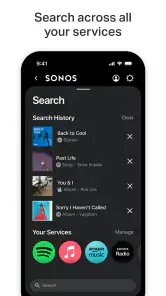
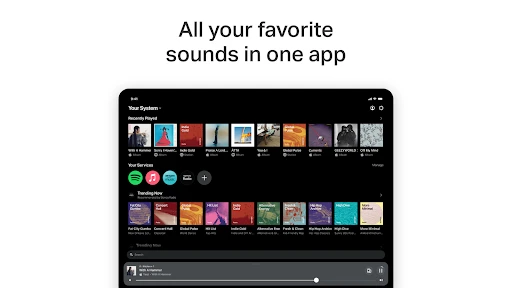
Speaking of the app, it’s packed with smart features. You can control your entire sound system right from your phone. Want to play different tunes in separate rooms? Easy peasy! The app lets you customize your sound experience, whether it’s adjusting the bass for a little extra thump or setting up a playlist for each room. Plus, it integrates with various streaming services, so you’re never short of options. It’s like having a DJ booth in your pocket.
The main convenience is having playback and room choices together, rather than switching between a speaker control app and a separate music service for every small change. I’d still keep my preferred streaming service in mind: listening options depend on the services I use and their own accounts, while the Sonos app is the control point for the system. If someone else in the household usually chooses the music, the simplest routine is to agree on room names and show them the basic play and room controls once; that saves repeated troubleshooting later.
When music passes between people and rooms
One everyday handoff is from the person who starts the music to the person who wants to change it. In a shared home, I’d make sure everyone knows how to pick a room and how to tell whether playback is limited to that room or grouped elsewhere. That avoids an awkward surprise when a quiet kitchen playlist suddenly plays through other speakers. It also makes the system less dependent on one person being available to manage it.
There is another handoff between the Sonos app and the music service itself. I’d choose the service I normally use, then think of the Sonos app as the place to direct audio around the home rather than as a replacement for every service’s own browsing tools. That distinction matters if you like exploring a service’s recommendations or managing its library in its own interface. For routine listening and room changes, central control is convenient; for service-specific discovery, opening the service directly may feel more familiar.
Design and Aesthetics: Sleek and Stylish
Let’s not forget about the design. Sonos speakers are sleek and modern, fitting seamlessly into any room decor. They’re not just functional; they’re a stylish addition to your home. Whether you’re going for a minimalist look or something more extravagant, there’s a Sonos speaker that’ll fit right in. And they come in different sizes, so whether it’s a small room or a large living space, there’s a speaker that’s just right for you.
That flexibility is appealing, but it also points to the main trade-off: this app is most rewarding as part of a Sonos system, not as a general-purpose music player that can replace every audio device in the house. Compared with using a streaming app directly on one speaker, Sonos gives more attention to managing several rooms together. The direct approach is simpler if all I want is one source playing in one place; the Sonos approach makes more sense when the handoff between rooms and speakers matters.
Choosing between a home system and simpler alternatives
If you are deciding between Sonos and an ordinary Bluetooth speaker, I’d ask whether you regularly listen in more than one place at home. Bluetooth is hard to beat for a quick, single-room session, especially when portability matters more than coordinating playback. A Sonos setup is more appealing when the speakers have a fixed place and you want to manage them as parts of one home system. The app’s extra room controls are useful only if you expect to use them; otherwise, they can feel like unnecessary steps.
Compared with using only the app for a streaming service, the Sonos approach is less about replacing the service and more about controlling where sound comes from. The service app may be the more comfortable choice for browsing, while Sonos is the more relevant tool for deciding which room plays. I would not choose this setup just because I want another music catalogue on my phone. I’d choose it because I want a more deliberate way to route listening around a home.
Who will get the most from it
I’d recommend it to someone setting up home audio room by room, or to a household that wants a straightforward way to control music in shared spaces. A realistic everyday use is starting a playlist while making breakfast, leaving it in the kitchen, then grouping another room when family or friends gather. The useful habit is to treat room selection as part of choosing playback, rather than assuming every speaker should always play together. That little bit of attention helps avoid the common annoyance of music coming from rooms nobody intended to include.
Someone deciding whether to get started should also separate the app from the hardware decision. The app is free, but its value depends on having Sonos speakers to set up and control; it is not a standalone shortcut to turning an ordinary speaker into a Sonos system. If you are comparing it with basic Bluetooth playback, Bluetooth is often the less involved choice for a single room and a device you already own. If you want audio coordinated across rooms, this app’s system-focused approach is the more compelling reason to choose it.
Where the flow can feel less smooth
Setup felt simple in my experience, but a home network and several speakers still introduce more moving parts than playing audio on a phone. If a speaker is assigned to the wrong room, or the household uses unclear room names, the convenience of multi-room control can become a source of confusion. I’d give each speaker a name that matches its actual location and check the selected room before pressing play, especially when moving between separate listening zones.
There is also a difference between controlling a service and subscribing to it: the app’s streaming-service integration does not mean every listener automatically has access to every catalogue. I’d check that the services I already use work for my listening routine and keep their own apps available when I want service-specific browsing. That is a reasonable compromise, but anyone who wants one universal app for every brand of speaker and every audio source may prefer a more open, device-agnostic setup.
What to expect from day-to-day control
After the initial setup, the most useful test is whether the controls make ordinary changes feel quick: start playback, choose the room, adjust the sound, and decide whether another space should join. If those are the changes you make often, having them tied to a home system can reduce the small bits of device juggling that build up over a day. I’d also get comfortable checking the active room before changing playback, particularly when someone else has already been listening elsewhere.
If a speaker does not appear where you expect, I’d first check the room selection and the names rather than immediately rebuilding the setup. Those are easy details to overlook when several people share the system. If the problem seems tied to a particular music service, I’d also distinguish between a service-account issue and a speaker-control issue. Thinking through those separate handoffs can make troubleshooting less frustrating than treating every playback problem as one big app failure.
A grounded recommendation
The app has an average rating of 4.1 from around 297,000 ratings, and it has been installed over 10 million times. It is rated for Everyone and was released on June 1, 2020. Those figures suggest it is widely used, but what matters to me is the fit: it is a practical control centre when Sonos speakers are already part of the plan, not a must-have music app for every phone owner.
Its best result is a home where music feels easy to direct: one room for a quiet moment, several rooms when people are together, and clear controls that other household members can use too. The trade-off is that the app makes the most sense alongside Sonos hardware and a compatible listening routine. If you want portable, one-speaker simplicity, another option may suit you better. If you want a system built around room-to-room listening, this app gives that setup a practical centre.
In conclusion, if you’re in the market for a new sound system, Sonos should definitely be on your radar. With its easy setup, outstanding sound quality, and sleek design, it’s a game-changer in the world of home audio. So go ahead, give your ears the treat they deserve!
Sonos Frequently Asked Questions
Is the Sonos app free to download, and are there any related costs?
The Sonos app is free to download and use. It serves as a control hub for Sonos equipment, while subscriptions or charges for music content may depend on the services you choose to connect. If you already pay for a music service, you can use that account through the app where supported; the app itself does not replace the terms of a separate service.
Who develops the Sonos app, and what is it for?
Sonos, Inc develops the official Sonos app, which is designed to help you set up and manage a Sonos sound system from a mobile device. It brings speaker controls, playback, and audio preferences together in one place. The app is intended for people who want to control Sonos equipment, rather than serve as a general-purpose music player on its own.
Do I need a Sonos speaker or sound system to use the Sonos app?
The Sonos app is the official companion for controlling a Sonos sound system, so its main purpose is to set up and manage Sonos speakers rather than act as a standalone music player. Before downloading, consider whether you have Sonos equipment you want to control. The app can then bring playback and audio settings together on your phone.
What is the Sonos app and how does it work?
The Sonos app is a versatile tool that allows you to control your Sonos sound system directly from your smartphone. It enables you to stream music, set up speakers, and manage your audio preferences with ease. The app integrates with various music services, allowing for seamless playback across different rooms in your home. It’s compatible with both Android and iOS devices, ensuring everyone can access their music library effortlessly.
Is the Sonos app free to use?
Yes, the Sonos app is free to download and use. However, while the app itself does not incur any charges, streaming music services that integrate with Sonos, like Spotify or Apple Music, may require a separate subscription. The app provides a platform to control your Sonos devices and stream music, but the cost of content depends on the specific service you choose to use.
Pros
- High-quality sound output
- User-friendly interface
- Seamless multi-room audio
- Wide range of streaming services
- Reliable customer support
Cons
- Expensive compared to competitors
- Requires stable Wi-Fi connection
- Limited Bluetooth functionality
- Setup can be complex for some
- No voice control offline
- Category
- Music & Audio
- Version
- Varies with device











