Smart Noter - AI Note Taker
- 325.00
- 4.1
- Installs
- 5.00M
- Price
- Free

Screenshots

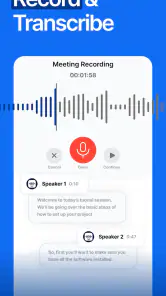
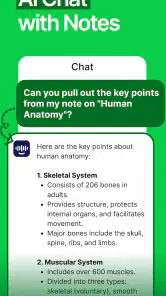

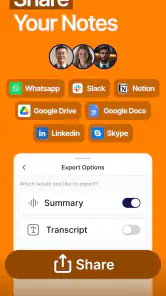

Analysis by Reviewed
I find audio note-taking most useful when it removes a specific distraction: trying to listen and write at the same time. Smart Noter - AI Note Taker is an education app from Codespace Dijital that turns spoken material into text and can produce summaries and next steps. That makes it appealing for lectures, work discussions, and personal reminders, though it works best when I treat its output as a first draft rather than a perfect record.
Where setup and expectations can trip you up
The first thing I would check is the recording situation, not the summary. A phone placed far from a speaker, overlapping voices, room echo, or people talking over one another can make any transcription less useful. Before an important session, I’d try a short sample in the same room and listen back to the source if a phrase looks doubtful. That small test is more dependable than assuming a polished-looking transcript is necessarily accurate.
I’d also decide in advance what I want from a session. If I need a searchable record, transcription is the priority; if I only need decisions and follow-ups, a summary may be enough. Those are different jobs, and checking the transcript against the original audio is worthwhile before sharing names, figures, deadlines, or commitments. AI can make information easier to scan, but it can also smooth over uncertainty or leave out context.
A practical workflow for lectures and meetings
For a class, I’d start the recording before the main explanation, keep the phone somewhere stable and close enough to the speaker, then review the generated notes soon afterward while the topic is still fresh. I’d add a few personal labels—such as the lesson topic or the question I still have—rather than expecting an automated summary to replace my own understanding. That turns the transcript into a study aid instead of a substitute for paying attention.
For a meeting, I’d use the transcript to locate the section where a decision was discussed, then confirm the exact wording before turning it into an action item. A useful habit is to separate “what was decided” from “what I need to do”; a summary can help surface both, but the distinction still needs a human check. If a recording or note appears incomplete, I’d first reopen the relevant item and check whether the source itself contains the missing passage before repeating the whole process.
This is also where the app differs from the usual alternatives. Manual notes are faster for capturing only selected points and keep you actively involved, while a basic voice recorder preserves the sound but leaves all the listening and organizing to you. Smart Noter sits between those approaches: it can reduce the work of turning speech into readable notes, but it cannot make a noisy recording clear or decide which detail matters to your particular task.
What is Smart Noter - AI Note Taker?
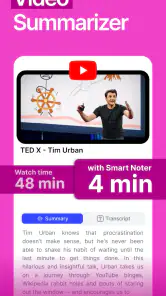
At its core, Smart Noter - AI Note Taker is designed to make note-taking effortless and efficient. Imagine having an app that not only records your meetings and lectures but also summarizes them into concise, easy-to-digest notes. It's like magic! The app uses advanced AI algorithms to understand and prioritize the information, ensuring you never miss out on the crucial bits.
More From Our News Desk

Clash of Clans Is Won Between the Battles

Android Auto Makes the Case for Quieter Car Software

MobiOffice: Transforming Mobile Productivity with Seamless Integration

EA SPORTS FC™ Mobile Soccer: Redefining Mobile Sports Gaming

How Microsoft OneDrive Became a Mobile Productivity Giant

How Google Translate Breaks Language Barriers Effortlessly
Features that Stand Out
First off, the voice recognition feature is incredibly accurate. I tried it in a bustling cafe, and it picked up my voice perfectly. Plus, it supports multiple languages, which is a huge plus for multilingual users. The app also offers seamless integration with cloud services like Google Drive and Dropbox, so you can easily sync your notes across all devices.
Another nifty feature is the ability to organize notes into folders and subfolders. This is particularly handy for students or professionals handling multiple projects. And let's not forget the search functionality – it's super fast and helps you find specific notes in seconds.
Choosing the right kind of recording
For a long lecture, I’d make the recording serve as a backup to active study rather than the whole study plan. While listening, I would jot down a few questions or mark the topics I want to revisit. Later, I can use the transcript to find the relevant passage, then write a shorter explanation in my own words. That final step matters: an automatically generated summary can make a chapter feel familiar without proving that I can explain it myself.
For a short personal reminder, the balance changes. A quick spoken note may be easier than typing while walking or carrying something, but it still needs a clear subject if I expect to find it later. I’d say the topic aloud at the beginning and make the follow-up specific, such as “buy the ingredients before Friday,” rather than relying on a vague sentence like “remember to do that.” This simple habit makes any later search more useful without requiring a complicated filing routine.
My Personal Experience
I decided to give Smart Noter - AI Note Taker a whirl during a week packed with meetings and deadlines. The ability to quickly jot down notes without typing was liberating. More importantly, the app's AI did a stellar job summarizing the key points, saving me a ton of time I would have otherwise spent reviewing hours of recordings.
One thing I particularly loved was the app's user-friendly interface. It’s intuitive, making it easy even for those who aren’t tech-savvy. Plus, the lightweight design ensures it doesn’t hog my phone’s resources, which is a big win.
My most useful practical check is to compare a small passage of generated text with what I remember hearing, especially when the speaker changes topic quickly. If the wording looks clean but the meaning seems off, I would not try to repair the summary by guessing. I’d return to the relevant audio, identify what was actually said, and edit my own notes accordingly. That keeps the app in the role where it is strongest: helping me locate and organize material, not making the final call for me.
When to use it—and when another method is better
I’d recommend it most to students who want to revisit spoken explanations, and to people whose work involves recurring conversations they need to review. A realistic example: after a project meeting, I could scan the summary for decisions, use search to find the relevant discussion, then check the transcript before sending a follow-up. That is more practical than replaying an entire recording, but it still leaves me responsible for verifying the details.
It is less suited to someone who needs a verbatim legal or medical record, or who cannot risk an incorrect name or instruction. In those cases, a human note-taker, an approved recording process, or a dedicated professional transcription workflow is a safer choice. I’d also avoid relying on it as the only record when the conversation is sensitive; I would first check that recording is appropriate and permitted in that setting.
It may also be the wrong pick if you prefer to keep a conversation entirely offline or do not want the extra review step that comes with AI-generated notes. A notebook is often better for capturing a diagram, a quick calculation, or a personal reaction that spoken words alone do not convey. Likewise, someone who only needs to preserve a conversation’s sound may be happier with a straightforward recorder, while someone who needs carefully edited, speaker-attributed text should consider a specialist transcription process. The useful question is not whether AI notes are always better, but whether they remove enough listening and typing to justify checking the result.
Cost, compatibility, and a sensible first test
The app is free to install and is rated for everyone, while optional in-app purchases range from $6.99 to $99.99 per item. I’d begin with a short, low-stakes recording before deciding whether any paid option is worthwhile. Smart Noter has a 4.1 average from around 58 thousand ratings and has passed over 5 million installs, so it has attracted a substantial audience, but those figures do not guarantee that its transcription will suit every accent, room, or workflow.
It was released on December 26, 2024, and version 2.1.1 requires Android 7.0 or later. If a result seems wrong, I’d check the recording itself, the phone’s placement, and whether the speaker was clear before troubleshooting the app. For everyday use, the strongest test is simple: record a short clip, compare the text with what was actually said, and see whether the summary saves time without hiding details you need.
That first test can answer several practical questions at once: whether the phone captures the speaker clearly from the place you plan to use it, whether the transcript handles the way people speak in your setting, and whether the summary keeps the points you care about. I’d choose a low-stakes passage with a couple of names or topic changes, then check those details against the source. If it struggles, try a quieter spot or move the phone closer before deciding the app itself is unsuitable. Changing one condition at a time makes it easier to learn what is causing the problem.
When a note seems to have disappeared or a passage looks incomplete, I’d avoid immediately recording the entire session again. First, I’d reopen the item, check that I’m looking at the right note, and compare the apparent gap with the original audio. If the sound is missing too, the issue likely began during capture; if the sound is present but the wording is wrong, I’d treat it as a transcription problem and correct only what I can verify. This approach saves time and avoids building a second, confusing copy of the same material.
Before recording other people, I’d also make the social side part of the setup. A useful note is not worth creating an awkward or inappropriate recording, so I’d consider whether everyone involved is comfortable and whether the setting permits it. For sensitive conversations, I’d choose an approved method or take notes by hand instead. That is not a limitation unique to this app; it is a basic responsibility that becomes easy to overlook when recording feels as simple as taking out a phone.
Final Thoughts
If you’re someone who struggles with keeping up with note-taking or simply wants to enhance productivity, Smart Noter - AI Note Taker is worth checking out. It’s a reliable companion that turns the chaos of scattered notes into organized insights. Whether you're a student, a professional, or just someone who likes to keep track of their thoughts, this app is a must-have. Give it a try, and you might just wonder how you ever managed without it!
Smart Noter - AI Note Taker Frequently Asked Questions
Can Smart Noter turn a recording into a summary and action list?
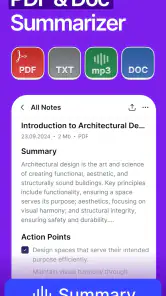
Yes. Smart Noter is described as an audio-to-text transcriber that can generate notes, AI summaries, and next actions. That combination can help you move from a spoken recording to a written version and a more compact outline of what matters. It may be useful for reviewing a class session or meeting, though you should check the resulting text and summary for accuracy.
Does Smart Noter work offline, or does it need an internet connection?
Whether you can use every feature without an internet connection depends on the feature and how the app processes audio. Transcription and AI-generated summaries may involve online processing, while viewing notes already saved on your device may work differently. If offline access is important to you, check the app’s current behavior before relying on it for travel, a lecture, or another situation with limited connectivity.
Is Smart Noter free to download, and does it include paid features?
Smart Noter is free to download, so you can try its audio-to-text and note-making tools without paying upfront. It also offers in-app purchases, with items priced from $6.99 to $99.99, so some features or options may require payment. Check the purchase details in the app before buying, and make sure any paid option suits your needs.
Who makes Smart Noter, and is it intended for general use?
Smart Noter is an education app developed by Codespace Dijital. It is rated for Everyone, making it suitable for a broad audience, including learners who want help turning spoken material into text and organized notes. The app has an average rating of 4.1 from around 58,000 ratings, offering prospective users a useful snapshot of how it has been received.
What is Smart Noter - AI Note Taker?
Smart Noter - AI Note Taker is an innovative application designed to enhance your note-taking experience. By leveraging artificial intelligence, it helps to organize, analyze, and optimize your notes for better productivity. Available on both Android and iOS platforms, it offers features like voice-to-text, automatic categorization, and cloud synchronization, making it ideal for students and professionals alike.
Pros
- Intuitive interface for easy navigation
- AI-powered note organization
- Seamless sync across devices
- Customizable themes and fonts
- Efficient voice-to-text conversion
Cons
- Limited offline functionality
- Occasional lag in AI processing
- Subscription needed for premium features
- No direct cloud storage integration
- Limited export options
- Category
- Education
- Version
- 2.1.1