Shopify: Sell. Run a business.
- 5.02K
- 4.2
- Installs
- 10.00M
- Price
- Free

Screenshots




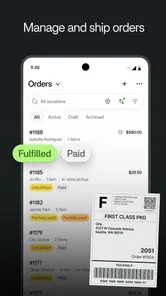

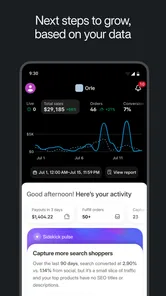
Analysis by Reviewed
I’d treat Shopify as a business control panel rather than a simple way to make a product page. The Android app comes from Shopify Inc., and its 10-million-plus installs suggest it has reached a broad range of sellers. That popularity is useful context, but it doesn’t tell me whether a particular shop will suit my needs; the important question is how much I’m comfortable managing through one account and one mobile interface.
Trust starts with what you can check
When I’m deciding whether to run business tasks from a phone, I look for clear choices and sensible account habits, not blanket promises. I’d use a strong, unique password, keep access to the account limited to people who need it, and review any connected apps before adding them. Those steps matter because a store account can bring together customer orders, product details, and day-to-day business decisions.
I also wouldn’t treat a security label as a substitute for my own checks. Before entering payment or customer information, I’d confirm I’m signed into the right account and understand which task I’m approving. For a small seller, this careful routine is more useful than assuming that convenience alone makes every workflow safe.
Where mobile access helps—and where it needs care
A realistic use for the app is checking an order while away from a desk, then deciding whether a product detail or stock record needs attention before replying to a customer. That can save a trip back to a computer, especially for someone who handles sales alongside another job. I’d still reserve sensitive account changes and complicated setup work for a quiet moment, when it’s easier to review each screen rather than tap through in a rush.
The app is free to download, is rated for Everyone, and has a 4.2 average from around 61,000 ratings. Those figures offer a quick sense of its reach and reception, but they aren’t a guarantee that every feature or workflow will feel simple to every seller. Shopify is most appealing when you want a central place to keep an online shop moving; someone who only needs a basic product page may find a simpler website builder less demanding.
For me, that makes the central question less about whether a phone can run a shop and more about which decisions belong on a phone. Short checks can fit naturally between other tasks, while choices that affect customer-facing information deserve a slower review. I’d use the app as a convenient working surface, not as a reason to rush through decisions that need context.
Keeping account access deliberate
Trust also depends on how a business handles access as it grows. If another person helps pack orders or maintain products, I’d decide what they actually need to do before sharing account access. I would avoid passing around a single login casually, and I’d periodically revisit who can reach the store. That is a practical habit for any service holding business information, not a claim that a particular control is available in every setup.
More From Our News Desk

Weather by Xiaomi Review: Clear at a Glance, Less Clear Up Close

X Under Pressure: Can It Recover When Posting Goes Wrong?

Clash of Clans Is Won Between the Battles

Android Auto Makes the Case for Quieter Car Software

MobiOffice: Transforming Mobile Productivity with Seamless Integration

EA SPORTS FC™ Mobile Soccer: Redefining Mobile Sports Gaming
When reviewing connected tools, I’d ask whether each one solves a current problem and what information it needs to do so. A small catalog may not need several add-ons at all. Starting lean makes it easier to understand the shop’s basic workflow and to notice when a new connection changes how information is handled. If I couldn’t explain why an integration was useful, I’d wait rather than add it by default.
What I’d check before making changes
Mobile convenience can blur the line between looking and editing. Before changing an item’s details or availability, I’d check that I have the right product selected and consider what a shopper will see afterward. This is especially important when products have similar names or options: a quick tap on the wrong entry can create avoidable confusion. A brief review of the storefront after an update is a simple way to catch a mistake before it becomes a customer question.
I’d also be thoughtful when looking at customer or order information in public. A phone is easy to open while commuting or waiting in a queue, but that doesn’t make every setting a suitable place to handle private business details. My own rule would be to use quick glances for non-sensitive checks and leave anything involving a careful response or account decision until I can focus.
Good fit for an active small shop
Shopify is most compelling for someone who is actively selling and wants product, order, and store tasks to feel connected rather than scattered across unrelated tools. A maker who ships orders a few times a week, for instance, could check what needs packing, update availability after preparing a parcel, and then verify the listing before moving on. That is a more meaningful benefit than simply being able to open a dashboard on a phone.
It can also suit a seller who is testing whether a small business deserves more attention. The app gives a mobile route into managing a store, while the free download lowers the barrier to exploring the interface. I would still separate trying the app from committing to every business expense or process: building a working shop involves decisions beyond installing software, and the right setup depends on what and how you sell.
On the other hand, I would skip it if my goal were only to post a few details about a service, publish a portfolio, or list an occasional item without maintaining a real catalog. A general website builder can be a calmer choice for a mostly informational site. A marketplace may be preferable if I want to reach shoppers through an existing venue and do not want to manage a standalone store. Shopify’s broader commerce orientation is useful only when I expect to use that breadth.
How I’d judge the mobile workflow
I wouldn’t decide whether the app is enough by browsing its menus once. I’d run through a small, realistic test: find a product, inspect its customer-facing details, locate an order, and check the information I rely on to decide what to do next. The point is not to force every task onto a phone; it is to learn which actions are clear at a glance and which become awkward on a smaller screen.
That test can answer a common practical question: can I manage the shop entirely from mobile? For a narrow routine, perhaps much of the day-to-day checking will work well, but I would not plan on a phone being equally comfortable for every setup or review. When a task involves comparing many products, carefully editing several details, or weighing performance over time, a computer gives me more room to see the whole picture. Keeping both options available is a sensible workflow, not a failure of the app.
Another useful check is to distinguish a signal from a conclusion. A change in sales activity may be a reason to investigate, not proof that a new price or product choice is needed. I’d use the app to notice what deserves attention, then look at a broader period and the circumstances around it before changing the store. This helps prevent a single unusual day from dictating a decision.
Hey there! So, I recently got my hands on Shopify and let me tell you, it's like unlocking the ultimate power-up for anyone looking to dive into the world of ecommerce. I mean, who wouldn't want to set up their own virtual store and start selling while chilling on the couch?
Getting Started with Shopify
First things first, let's talk about setting up. One of the things that immediately caught my attention was how user-friendly the whole process is. You don’t need to be a tech wizard to get your store up and running. Just sign up, pick a theme that suits your vibe, and boom! You're halfway there. The variety of themes is pretty impressive, catering to everything from fashion boutiques to tech gadgets.
Customization and Features
Now, here's where it gets interesting. Shopify allows you to customize your store to your heart's content. You can tweak the layouts, add cool features, and even integrate various apps to enhance your store's functionality. Whether it's setting up a blog, managing inventory, or dealing with shipping options, Shopify has got you covered. It's like having a Swiss Army knife for your online business.
One feature that I found particularly nifty is the analytics dashboard. It's packed with insights that can help you understand your customers better and tweak your strategy accordingly. Plus, the mobile app lets you manage everything on the go, which is a lifesaver if you're always on the move like me.
Payment and Security
No need to stress about payments either. Shopify supports multiple payment gateways, making it super easy for your customers to pay how they like. And yes, security is top-notch. They've got SSL certificates and PCI compliance to ensure all transactions are safe and sound.
Oh, and did I mention the customer support? Whether you hit a snag or just have a question, Shopify's support team is just a click away, ready to assist you 24/7. It's like having a personal ecommerce guru!
Making the App Work for Your Routine
The useful trick is to give the phone app a defined role instead of trying to do the entire business from it. I’d use it for quick checks: review a new order, spot a product that needs attention, or look at a sales trend before deciding what to investigate later. For a deeper review, I’d compare the same information over a longer period and make notes before changing prices or stock. That keeps a single busy day from driving a rushed decision.
For a small maker, a practical routine might be to update product availability after packing the day’s orders, then check the storefront from a customer’s point of view. This catches the mismatch that can happen when stock changes but a listing still suggests an item is available. I would also keep product names and options consistent as the catalog grows; clean records make later order checks easier, while an overbuilt set of customizations can make simple maintenance harder.
Choosing the right level of complexity
Compared with a basic site builder, Shopify makes more sense when selling and managing orders are central to the project, rather than occasional extras on a mostly informational website. Its broader toolkit is valuable if you expect to maintain products, shipping choices, and sales activity in one place. The trade-off is that more capability can mean more decisions: choosing a theme, configuring the store, and deciding which additions are genuinely useful all take attention.
I’d be cautious about installing extra apps just because they are available. Each one adds another thing to evaluate and maintain, so I’d start with the smallest setup that handles the actual workflow, then add something only when a real need appears. If you sell a handful of items occasionally and want the least setup possible, a marketplace or simpler page may be a better fit. If you’re building a shop you expect to actively run, Shopify’s connected approach is easier to justify.
Before committing to a workflow
Shopify’s current Android release is version 10.2545.1 and requires Android 8.0 or later. I’d check that requirement before planning to rely on an older phone. The app has been available since September 29, 2014, and has around 4,500 written reviews; it is free to install, but I’d distinguish that from the costs or commitments involved in operating a business rather than assuming every part of selling is cost-free.
One question worth asking is whether a phone-first routine will still work when the shop gets busier. I’d test the tasks I expect to do most—checking orders, updating products, and reviewing performance—before making the app my only way to manage the store. A phone is handy for short actions, but a larger screen is often more comfortable for comparing several details or making substantial changes. That division of labor is a practical safeguard against errors as well as a matter of comfort.
Final Thoughts
In a nutshell, if you're dreaming of running your own ecommerce store, Shopify is definitely worth considering. Its ease of use, extensive customization options, and robust features make it a go-to platform for both newbies and seasoned sellers. So why not give it a shot? Who knows, your online empire might just be a few clicks away!
Shopify: Sell. Run a business. Frequently Asked Questions
Can I build a store with Shopify even if I have little technical experience?
Shopify’s store summary highlights building a store in minutes with a suite of AI tools, making it appealing if you want help getting started without building everything from scratch. You can use the mobile app to work on your ecommerce business, but setting up a store still involves decisions about products, design, and how you plan to sell. It is a business tool rather than a general shopping app.
Is Shopify only for managing an existing store, or can I start a new one in the app?
The app is intended for both getting an ecommerce business started and managing a store from a mobile device. Shopify’s store summary invites users to build a store with AI tools and start for free, so it can be relevant even if you are still at the setup stage. Before downloading, consider whether you want a business management app rather than an app for browsing other retailers.
What Android version do I need to use the Shopify app?
Shopify is available for Android devices running version 8.0 or later. If your phone or tablet uses an older Android version, check compatibility before downloading so you can avoid installing an app your device cannot run. The app is designed for business owners who want to build and manage an ecommerce store, so it is worth considering whether that purpose fits your needs as well.
Is the Shopify app free to download, and what should I consider about costs?
Shopify is free to download, and its store summary invites users to start for free. Downloading the app is only one part of setting up an online business, so consider the costs of any plan, payment processing, or optional services you choose before committing. The app is for business owners who want to build and manage a store, rather than a general shopping app for browsing other retailers.
Can I manage my store from an iPhone or Android device?
Shopify is a mobile app for business, and it is available for devices running Android 8.0 or later. Its purpose is to help you build and manage an ecommerce store from a mobile device, with a summary that highlights a suite of AI tools for creating a store. If you use an older Android version, check your device’s compatibility before downloading.
Pros
- User-friendly interface for easy setup.
- Extensive app integrations for flexibility.
- Reliable customer support available 24/7.
- Secure payment gateway options.
- Scalable for small to large businesses.
Cons
- Monthly fees can be expensive.
- Limited customization without coding.
- Transaction fees on some plans.
- May require third-party apps for features.
- Design templates can be repetitive.