Shop: All your favorite brands
- 192.97K
- 4.5
- Installs
- 50.00M
- Price
- Free

Screenshots
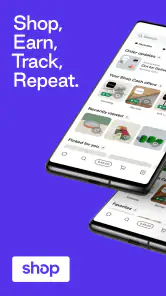

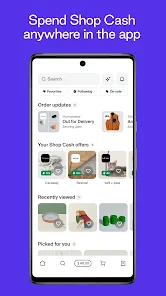



Analysis by Reviewed
When I’m trying to replace something I need or browse for a gift, my shopping usually starts with a few open tabs and a vague idea of what I want. Shop offers a different starting point: a single place to explore products from brands I already follow, alongside recommendations that may help me discover something new. It is a free shopping app from Shopify Inc., and I find it most useful when I want to browse across stores without beginning every search from scratch.
A useful starting point, not a shopping plan
I get the best results when I arrive with at least a loose purpose: a type of item, a budget in mind, or a person I’m buying for. That gives me a way to judge the suggestions instead of scrolling simply because more products keep appearing. If I’m only browsing for entertainment, the app can still be enjoyable, but it is also easier to lose track of what I actually intended to find.
For a practical purchase, I’d write down the must-haves before opening the app. With clothing, that might mean fit and material; for a household item, dimensions and how it will be used; for electronics, compatibility. These checks make discovery more focused and reduce the chance of choosing a good-looking option that does not solve the original problem. I treat the feed as a way to surface candidates, not as a substitute for knowing what I need.
From browsing to a decision
My practical approach is to decide what I’m shopping for before opening the app, then use the product and brand discovery to narrow the field. That small step matters: recommendations are easier to judge when I have a real need in mind, rather than treating every appealing suggestion as a reason to buy. I also check the product details and the seller’s information before moving toward checkout, especially when an item has a particular size, material, or compatibility requirement.
For example, if I need a replacement cable, I might use Shop to look across brands and compare the options I find. The useful outcome is not simply seeing more products; it is having a clearer shortlist before I commit. I still make the final call by checking that the item suits my device and that the purchase makes sense for my budget. Shop works best as a discovery and shopping companion, not as a substitute for paying attention to the details of a specific product.
Making recommendations work for you
A recommendation is most useful when I can explain why it belongs on my shortlist. I check the product page against the requirements I set earlier, and I look for details that might rule it out rather than focusing only on the photos or general appeal. If a key specification is unclear, I pause and seek the information before buying. That extra moment is worthwhile for anything where size, fit, material, or compatibility could make the difference between a good purchase and a return.
I also find it helpful to separate discovery from checkout. I can browse, compare a few plausible choices, and then step away long enough to decide whether I still want the item. That is a simple guard against impulse buying in any product feed, especially when recommendations make browsing feel effortless. Shop can help me find options, but my own list of needs and budget should still set the boundaries.
More From Our News Desk

Weather by Xiaomi Review: Clear at a Glance, Less Clear Up Close

X Under Pressure: Can It Recover When Posting Goes Wrong?

Clash of Clans Is Won Between the Battles

Android Auto Makes the Case for Quieter Car Software

MobiOffice: Transforming Mobile Productivity with Seamless Integration

EA SPORTS FC™ Mobile Soccer: Redefining Mobile Sports Gaming
Where it fits in a shopping routine
The app is a good fit for people who already enjoy browsing from several brands and want a more consolidated place to start. It may also suit someone shopping casually for a present, when inspiration matters as much as searching for one exact item. Compared with opening each retailer’s app or website individually, Shop can make discovery feel less scattered. On the other hand, if I know exactly which store I want, that retailer’s own site may be the more direct route for checking its complete range and policies.
For a gift, I’d use the app to gather ideas rather than assume that the first appealing recommendation is the right answer. A broad browse can help when I know the recipient’s interests but not the exact product. If I don’t know their preferences or sizing, though, a gift card or a direct conversation may be safer than guessing. Discovery is a strength here, but it cannot supply personal information I do not have.
Shop Cash and the purchase handoff
Shop also brings Shop Cash into the experience, giving users a balance they can earn and spend. I’d treat that as a useful extra rather than the main reason to choose a product: first decide whether the item and its terms work for you, then consider how the balance fits into the purchase. Because shopping spans different brands, I pay attention to where an order is being placed and what information applies to that particular purchase rather than assuming every seller works identically.
That distinction matters when I move from browsing to buying. A product discovery app can make the beginning of a purchase feel unified, but the order still belongs to a specific seller and item. Before I commit, I check the checkout details shown for that purchase and keep the confirmation afterward. If I’m comparing two options, I compare the actual order terms as well as the products; a balance or appealing suggestion should not distract me from whether the item and purchase conditions suit me.
A shopping companion with a clear role
When I first downloaded Shop, I was a bit skeptical. I mean, how many apps promise the world and deliver a small town, right? But this app genuinely surprised me. It’s like having a personal shopper who knows exactly what you like and where to find it. With a sleek interface, it feels like flipping through a digital magazine where every page is tailored to your taste.
Features That Stand Out
One of the standout features for me was the personalized recommendations. As I browsed through, the app started suggesting brands and products that were spot-on with my style. It's like the app was reading my mind! Plus, the seamless integration with various payment gateways means checking out is a breeze. No more fumbling around for card details or worrying about security.
Another cool feature is the real-time order tracking. I could easily keep tabs on my purchases, from the moment I hit 'buy' to the second it landed on my doorstep. It’s these small touches that make Shop feel like more than just an ordinary app.
Following an order without losing the details
Tracking gives me a convenient place to check how an order is progressing, which is especially useful when I have several purchases on the go. I still keep the order confirmation and any seller-specific information somewhere I can find it. A progress view helps answer where a parcel is in its journey; it does not tell me whether an item will fit, whether it matches the listing, or what I should do if something goes wrong.
That’s why I see tracking as one part of the handoff, not the end of it. If a purchase needs attention, I start with the details tied to that order rather than assuming every seller follows the same process. This habit is useful in a multi-brand shopping routine: Shop can make it easier to keep an eye on activity, while the individual purchase still deserves its own records and checks.
Why You’ll Love It
If you're a shopaholic like me, then you're going to love the Shop app. It not only curates a personalized shopping experience but also offers deals and discounts that are hard to resist. Whether you're into high fashion or tech gadgets, there's something for everyone. And the best part? You don’t have to hop from one website to another. Everything’s right there at your fingertips.
In a world where time is of the essence, having an app that consolidates all your shopping needs is a game changer. It’s like having a mall in your pocket, without the hassle of parking or long queues. So, if you haven't tried it yet, give it a shot and thank me later!
A realistic everyday run-through
Say I notice that a kitchen item at home needs replacing while I’m making dinner. Instead of searching every retailer immediately, I open Shop with the basic requirements in mind: what the item needs to do, roughly how much space I have, and what I’m comfortable spending. I use the brands and product suggestions to find possibilities, then compare the details that matter. If nothing clearly meets those needs, I leave the decision for later rather than buying just to finish the search.
When I do find a suitable option, I check the seller and order details before moving ahead. If Shop Cash is relevant to that purchase, I consider it only after I’ve decided the product is worth buying on its own. Once the order is placed, I use tracking to follow its progress and keep the confirmation available. The practical benefit is a less scattered route from need to shortlist to delivery—not a guarantee that every choice will be perfect.
Useful checks before you buy
A detail I would not skip is keeping the browsing stage separate from the decision stage. If a recommendation catches my eye, I save the idea mentally, compare the product against what I originally needed, and only then proceed. This reduces the chance of letting a polished feed turn a casual browse into an unnecessary purchase. For gifts, I also check whether the recipient’s preferences are specific enough that browsing broadly is helpful—or whether asking them first is kinder than guessing.
After placing an order, tracking is handy for seeing how it progresses, but I still keep the confirmation and pay attention to the seller’s delivery and return information. Tracking answers “where is it now?”; it does not replace understanding what happens if the item is wrong or unsuitable. That distinction is especially useful when a shopping app brings together purchases from different brands.
Choosing between Shop and other routes
Compared with going directly to a retailer, Shop makes more sense when I want to browse across brands or turn a fuzzy idea into a shortlist. A retailer’s own website is often the cleaner choice when I know the exact store, want to focus on its whole catalogue, or need to review that seller’s policies in one place. A general search engine can be faster for a precise model or specification, while Shop feels more oriented toward discovery and the shopping journey around products.
Neither route is automatically better. If I’m replacing a specific accessory, a direct search for the model and compatibility details may be more efficient than exploring recommendations. If I’m looking for a present and only know the recipient’s general interests, a broader browse can be more helpful. I’d choose the path based on how clear my goal is: exact item, direct route; open-ended idea, discovery first.
Who should give it a try—and who may not need it
Shop has a 4.5 average from around 645,000 ratings and has been installed over 50 million times, so it is clearly familiar to a large audience. It is rated for Everyone, costs nothing to download, and its current version is 2.232.2, with Android 8.0 or later required. I’d recommend trying it if you like brand discovery, want to keep shopping activity in one place, or are curious about earning and spending Shop Cash. If your routine is built around one retailer, or you prefer to avoid personalized product suggestions, a direct store visit may feel simpler.
It is particularly appealing to someone who often switches between brands, enjoys exploring new products, and is willing to check purchase details before paying. It may be less useful for a shopper who wants a bare-bones search box, avoids browsing recommendations, or prefers every step to happen on one retailer’s own site. The app is free to download, but that does not make every purchase a good value; I still judge the item and its terms on their own merits.
Where the flow can break
The main trade-off is that a unified browsing experience does not make every purchase identical: products, sellers, and order details still deserve individual attention. I would not use a recommendation alone as proof that an item is right for me, and I would not assume that browsing across brands removes the need to review the terms attached to an order. Shopify Inc. develops the app, which sits between casual discovery and the more focused experience of shopping directly with a particular retailer.
There is also a small but important risk in letting convenience blur responsibility. A smooth path from product discovery to checkout can make it tempting to skip comparisons, overlook a specification, or forget to check the seller’s information. I avoid that by treating the app as a starting point and keeping a short mental checklist: does it meet the need, does the purchase make sense for my budget, and have I understood the order details? If I cannot answer those questions, I wait.
My take after using it
Shop is strongest when I arrive with a loose goal and want help turning it into a manageable set of options. It is less compelling when I already know the exact product and seller, because then a direct search can be quicker. I’d start with a need, use the recommendations to explore, check the product and order details, and treat Shop Cash as a bonus rather than a reason to spend. That makes the app a practical addition to a shopping routine without handing over the final decision to the feed.
Shop: All your favorite brands Frequently Asked Questions
Is Shop: All your favorite brands suitable for first-time users?
Shop is a shopping app from Shopify Inc. that brings product discovery and shopping experiences together in one mobile app. Its focus on finding products from brands you love, alongside Shop Cash, makes it approachable for people who want to explore before choosing what to buy. The app is rated for Everyone, so its stated content age category is broad.
How popular is Shop: All your favorite brands?
Shop has more than 50 million installs and an average rating of 4.5 from around 645,000 ratings. Those figures suggest that many shoppers have tried it, though individual experiences can differ depending on what they want from a shopping app. It has around 193,000 written reviews, which prospective users can read for a range of opinions.
Is Shop: All your favorite brands free to download?
Yes. Shop: All your favorite brands is free to download, so you can try its shopping features without paying for the app itself. You can browse products and explore the experience before deciding what to buy. Purchases made through the app are separate from the download and may have their own costs.
What is Shop: All your favorite brands?
Shop: All your favorite brands is a mobile application that aggregates various shopping experiences in one platform, allowing users to explore and purchase products from a wide range of popular brands. The app aims to simplify online shopping by providing a seamless interface and personalized recommendations based on your shopping habits and preferences. It also highlights Shop Cash and product discovery from brands you love.
Is Shop: All your favorite brands available on both Android and iOS?
Yes, Shop: All your favorite brands is available for download on both Android and iOS devices. You can easily find and install the app from the Google Play Store or the Apple App Store, ensuring a smooth shopping experience on your preferred mobile platform.
Pros
- Wide variety of brands available.
- User-friendly interface enhances shopping.
- Exclusive discounts for app users.
- Fast and secure checkout process.
- Easy order tracking and management.
Cons
- Limited customer service options.
- Occasional app crashes reported.
- Some items may be out of stock.
- Requires account creation to browse.
- In-app ads can be intrusive.
- Category
- Shopping
- Version
- 2.232.2













