Shopify Point of Sale (POS)
- 517.00
- 4.1
- Installs
- 1.00M
- Price
- Free

Screenshots
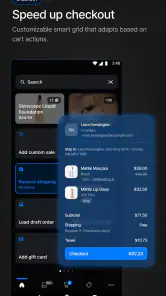

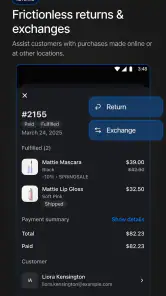
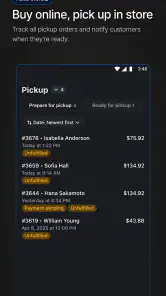
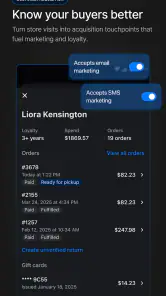


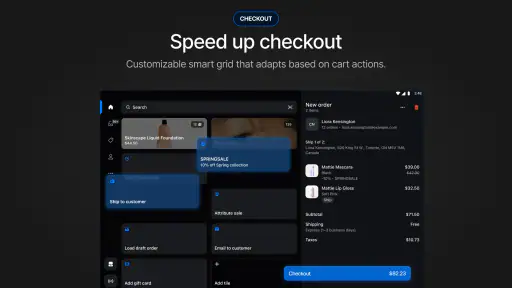
Analysis by Reviewed
When a busy home or small business shares a phone or tablet, a point-of-sale app is not just a till: it becomes a place where work, customer details, and staff tasks meet. I’d consider Shopify Point of Sale (POS) for a household running a shop, market stall, or side business, but I would treat it as a business tool rather than a general family app. Its usefulness depends on keeping the right people in the right account and making sure the person at the counter can act confidently without exposing more information than they need.
A shared counter, not a shared account
Picture a Saturday market: one person greets customers while another wraps orders and checks what is left in stock. A shared device can make that handoff practical, since the people working the same sale can use one counter setup instead of passing around separate notebooks or trying to reconcile sales later. The app is built for retail operations, so this sort of coordinated use is a more natural fit than asking several household members to use it for unrelated tasks.
I would still avoid treating a shared device as a reason to share one person’s sign-in casually. Before opening for the day, decide who is responsible for the device, who handles transactions, and who may look up customer or sales information. Shopify Inc. supports staff accounts with different permission levels, which gives a business a way to distinguish roles; it is worth assigning only the access each worker needs rather than making everyone an administrator by habit.
Set up the workflow before the first customer
The most useful preparation is not adding every product at once; it is checking the path from finding an item to completing a sale. I’d enter a small set of representative products first, confirm that names and prices are easy to recognize at the counter, and test how a discount is applied. That catches confusing labels before a queue forms. If the shop also sells online, keeping product records aligned can reduce duplicate entry, but someone still needs to own the task of correcting a product or stock change when the real-world shelf and the record disagree.
Hardware deserves a similar rehearsal. A card reader, scanner, or receipt printer can make checkout smoother, but only if the device is paired and the staff know what to do when a connection or paper issue interrupts the routine. I would test the full checkout sequence before relying on accessories during a busy shift. The app’s free price makes it approachable to try, though the overall setup may still involve business decisions and equipment beyond installing the app itself.
Coordinate shifts and protect trust
For a family-run shop, coordination often matters more than sophisticated reporting. Agree who updates inventory after a sale, who applies promotions, and who checks the day’s totals. A simple closing habit—review what sold, note discrepancies, and leave a clear handoff for the next person—helps prevent two workers from making conflicting changes. Reports can inform that conversation, but they do not replace a shared process for counting physical stock or explaining unusual transactions.
Customer profiles and past purchases can help a staff member give relevant service, but they also call for care. I’d keep customer details out of casual view when the device is sitting on a shared counter, and I would not let a child use a work account as a general-purpose tablet. The app has an Everyone content rating, yet that label is about content suitability; it should not be mistaken for guidance that children should handle payment workflows or business records. Adults should supervise any age-appropriate assistance and keep responsibility for transactions.
More From Our News Desk

Clash of Clans Is Won Between the Battles

Android Auto Makes the Case for Quieter Car Software

MobiOffice: Transforming Mobile Productivity with Seamless Integration

EA SPORTS FC™ Mobile Soccer: Redefining Mobile Sports Gaming

How Microsoft OneDrive Became a Mobile Productivity Giant

How Google Translate Breaks Language Barriers Effortlessly
How Shopify POS fits a real retail routine
In the Business category, Shopify POS is free and comes from Shopify Inc. It has a 4.1 average from around 3,000 ratings, with over 1 million installs. It first appeared on January 7, 2016, and version 10.15.2 requires Android 10 or newer. Those details make it a well-established option to consider, though a rating cannot tell you whether its workflow suits your own counter.
Where it earns its place
Let me take you on a journey through the wonderful world of Shopify Point of Sale (POS). If you’ve ever run a retail business, you know how crucial a reliable POS system is. Well, folks, Shopify POS might just be the lifeline you’ve been waiting for.
From the moment you install Shopify POS, you’ll notice its sleek interface. It’s intuitive, which means you can skip the dreaded manual reading and dive right into setting up your shop. The design is modern, straightforward, and feels like a breath of fresh air compared to some clunky systems I’ve used in the past.
Setting Up Shop
Setting up your inventory is a breeze. You can add products effortlessly, complete with images, descriptions, and pricing. What really stood out to me is the seamless integration with your online Shopify store. Your online and physical sales sync like magic, so there’s no annoying double entry.
And let’s talk about hardware compatibility. Whether you’re using an iPad, iPhone, or Android device, Shopify POS works like a charm. You can connect card readers, barcode scanners, and even receipt printers without breaking a sweat.
Sales and Customer Management
Running promotions or discounts? No problem. Shopify POS makes it super easy to apply discounts and run sales. Plus, you can manage customer profiles right from the app. I found it especially handy to pull up past purchases, so I can give personalized recommendations or rewards to loyal customers.
The app also supports multiple staff accounts with different permission levels. This is a game-changer if you have a team, as it helps keep things organized and secure.
Analytics and Reporting
Now, if you’re like me, you love a good data breakdown. Shopify POS delivers with its reporting capabilities. You can view daily, weekly, or monthly sales reports, and even track individual staff performance. It’s like having a personal business analyst right in your pocket.
And here’s a little golden nugget – the app allows you to keep track of your inventory in real-time. This means you’ll never be caught off guard with out-of-stock items again. Trust me, your customers will thank you for it.
As someone who values efficiency, I appreciate how Shopify POS helps streamline operations. It’s like having a trusty sidekick who’s always got your back.
Final Thoughts
If you’re in the market for a robust, user-friendly POS system, I’d say give Shopify POS a whirl. It ticks all the right boxes for me – from ease of use and seamless integration to powerful reporting tools. Whether you’re a small boutique or a bustling retail chain, this app is designed to scale with your business needs. So go ahead, make your life easier, and let Shopify POS be your retail wingman.
Choosing it over simpler tills
Compared with a basic standalone cash register or a lightweight checkout app, this is more compelling when you also need product records, customer history, staff roles, or a connection to a Shopify online shop. That wider workflow is the trade-off: a seller who only needs to ring up a few items may prefer a simpler till with less setup to manage. I would choose Shopify POS when the online and in-person sides of a shop genuinely need to stay in step, not simply because a phone can replace a cash drawer.
One practical question is whether it will work on the device already in the household. The listed Android minimum is version 10, and the app also supports iPhone and iPad. Before a shift, check the device is supported and that the chosen checkout hardware is ready; compatibility with a type of accessory does not remove the need to test the exact setup. I’d also keep a backup plan for a busy selling period, such as knowing how the team will record a sale if a device or accessory becomes unavailable.
Who should use it—and who should pass
I’d recommend it to a Shopify merchant who wants one routine for in-person sales, stock, and customer context, especially when more than one trusted worker takes a turn at the counter. It is less attractive for a household that wants a shared shopping app, for a seller with no need to manage products beyond a handful of cash sales, or for someone who does not want to maintain business records and staff access. The right choice is the one the team can operate carefully at its busiest moment, not the one with the longest feature list.
My household verdict is straightforward: Shopify POS can help a family-run retail operation coordinate a real business, but it should not turn a shared tablet into an open account for everyone at home. Set clear roles, rehearse the checkout, and keep customer and sales information in the hands of responsible workers. If your business already uses Shopify and needs a joined-up counter workflow, I’d give it a serious look; if you only need a basic register, I’d keep the setup simpler.
Making a shared-device shift less fragile
A useful routine is to treat the device like a piece of counter equipment, not somebody’s personal phone that happens to be nearby. Keep it in a predictable place, agree who takes charge of it at opening, and make sure the next worker knows whether a sale or stock adjustment still needs attention. That small handoff matters because two people can otherwise assume the other has corrected a product record or checked a discrepancy.
I would also separate product maintenance from the rush where possible. For example, if a market customer points out that a color or size is mislabeled, the person serving can note the correction and continue the queue, while the designated account holder reviews the catalog afterward. This avoids hurried edits that could affect how the next person recognizes an item. A shared workflow is strongest when the counter worker can finish ordinary sales without needing to solve every catalog problem on the spot.
What to check before relying on it
People often ask whether installing the app is enough to start taking payments. I would not assume so: the app is only one part of a retail setup. Before committing a busy selling day to it, confirm that the business account, products, chosen payment method, device, and any accessories work together in a complete practice transaction. A quiet test also gives staff a chance to learn where to find an item and how to recover from a mis-tap without a customer waiting.
Another worthwhile check is how the shop handles returns, exchanges, and corrections. These are the moments when a checkout process can become confusing, especially if the original sale was handled by a different worker. Decide who is allowed to resolve them and what information should be reviewed before changing a record. This is not extra bureaucracy for its own sake; it helps a small team give consistent answers and keeps a shared device from becoming a place where several people make competing fixes.
Where the wider system may feel like too much
For a maker who sells a few items occasionally, the appeal of one place for stock, customers, staff, and sales may be outweighed by the work of maintaining those records. A simple payment terminal or cash register can be a better fit when the main need is to complete a straightforward transaction and keep the process easy to teach. Likewise, a business that already uses another system for inventory should compare the effort of maintaining two records before adding another workflow.
The trade-off becomes more favorable when products move between an online shop and a physical counter, or when several workers need a common view of what has sold. Even then, synced records are only useful if the team agrees who corrects mistakes and how often stock is checked against what is actually on the shelf. I would judge the app by that day-to-day discipline, not by the convenience of seeing everything on one screen.
A sensible decision for a household business
For a family or housemates running a real retail operation, I’d start by naming one person responsible for account setup and product changes, then give counter workers only the access their jobs call for. Keep the device dedicated to selling during open hours, and do not treat an Everyone rating as permission for children to explore customer records or payment tasks. If a young person helps with low-risk work, an adult should remain in charge of the account and the actual sale.
My recommendation comes down to the shape of the business. If you need an organized counter that can sit alongside Shopify’s online shop, and your team is willing to rehearse the workflow and maintain clean records, this is a practical option to investigate. If you need only a quick, occasional way to ring up a few purchases—or if no one wants responsibility for access, inventory, and handoffs—I would choose a simpler till. For a shared household device, clarity about who does what is as important as the software itself.
Shopify Point of Sale (POS) Frequently Asked Questions
Is Shopify POS free to download, and what should I know about the app before installing it?
Shopify POS is a free business app from Shopify Inc., designed as a point-of-sale system, inventory tool, and cash register. Its store summary points to in-person selling and inventory management, while its connection with a Shopify online store helps keep sales and customer information together. It is rated for Everyone, so it is suitable for a general audience.
What is Shopify POS and how does it work?
Shopify POS is a versatile point of sale system that integrates seamlessly with your Shopify online store, allowing you to sell products in-person at brick-and-mortar locations, pop-up shops, and markets. It facilitates real-time syncing of inventory, sales, and customer data between your online and physical stores, enhancing overall efficiency and customer experience.
Is Shopify POS suitable for all types of businesses?
Shopify POS is designed to be flexible and can cater to various business models, from small boutiques to larger retail chains. It offers customizable features to suit different business needs. However, businesses should assess their specific requirements and compare them with Shopify POS’s offerings to determine if it’s the best fit.
What hardware do I need to use Shopify POS?
To use Shopify POS, you will need compatible hardware, which may include a tablet or smartphone for the app, a card reader for payments, and potentially a receipt printer and barcode scanner. Shopify offers different hardware kits depending on your business size and needs, but you can also use existing hardware if it's compatible.
How secure is Shopify POS in handling transactions and customer data?
Shopify POS is equipped with robust security measures to protect transactions and customer data. It complies with PCI standards, ensuring that all payment information is encrypted and securely processed. Regular updates and security patches are provided to maintain high levels of security and protect against potential breaches.
Pros
- Intuitive user interface
- Seamless integration with Shopify
- Customizable checkout options
- Real-time sales tracking
- Supports multiple payment methods
Cons
- Requires Shopify subscription
- Limited offline functionality
- High transaction fees
- Complex setup for beginners
- Limited third-party app support

- Category
- Business
- Version
- 10.15.2













