Room Temperature Thermometer
- 3.69K
- 4.4
- Installs
- 5.00M
- Price
- Free

Screenshots
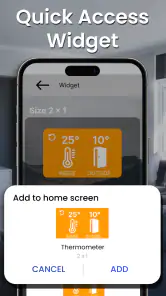
Analysis by Reviewed
I’d treat this as a quick way to get a sense of your room’s temperature, not as a substitute for a dedicated thermometer. That distinction makes the first use more reassuring: the app can help you notice whether a room feels warmer or cooler than expected, while the result still depends on what your phone can measure. Room Temperature Thermometer is a free weather app from Master Technologis, rated for Everyone, and it has an average rating of 4.4 from around 43,000 ratings. It has been available since July 8, 2017, and its current version is 38.0.5.
What to expect from a phone-based reading
The name may suggest a standalone measuring instrument, but I’d approach it as a convenient estimate on a device whose hardware affects the result. That matters if you are deciding whether to open a window, move a plant away from a draft, or simply check whether a room seems unusually warm. For a high-stakes decision about storage, health, or equipment, I would use a purpose-built thermometer instead.
Compared with a basic room thermometer, the app is easier to keep at hand and can make casual checks more convenient. Compared with a smart home temperature sensor, it is less suited to continuous monitoring: a phone reading is tied to where the phone is and the conditions around it. The app’s 5 million-plus installs suggest that many people want this kind of handy check, but popularity does not turn a phone into calibrated measuring gear.
It is a better fit for renters, students, or anyone who wants a rough indoor reference without buying another device. I’d skip it if you need dependable long-term records for a sensitive environment, or if you expect a phone to provide the same consistency as a dedicated sensor. That is not a flaw unique to this app; it is the practical trade-off of using a phone for this job.
One useful habit is to think about placement before interpreting a number. A phone that has just been in a pocket, sat in sunlight, or been charging near a warm surface may not represent the room well. I’d set it down away from windows, radiators, kitchen appliances, and direct sun, then allow it to settle before using the result as a comparison point. That simple routine is more helpful than repeatedly checking while carrying the phone around.
For a realistic example, imagine coming home on a warm afternoon and wondering whether the bedroom is actually hotter than the living room. I’d place the phone in each room under similar conditions and compare the readings as rough clues, rather than treating a small difference as exact. If the result seems surprising, repeat the check after the phone has rested; a consistent pattern is more useful than a single instant reading.
It can also help to keep your comparisons fair. Check at roughly the same time of day, use a similar spot in each room, and avoid holding the phone during the reading. Those steps do not improve the phone’s sensor, but they reduce avoidable differences caused by your routine. If you are deciding whether a room needs attention, combine the estimate with what you notice about airflow, sunlight, and comfort.
More From Our News Desk

Clash of Clans Is Won Between the Battles

Android Auto Makes the Case for Quieter Car Software

MobiOffice: Transforming Mobile Productivity with Seamless Integration

EA SPORTS FC™ Mobile Soccer: Redefining Mobile Sports Gaming

How Microsoft OneDrive Became a Mobile Productivity Giant

How Google Translate Breaks Language Barriers Effortlessly
Before installing, it helps to know what kind of success to expect: a quick, convenient reference rather than laboratory precision. The app is free, and it supports Android 4.4 and later. I’d start with a simple comparison in one familiar room and see whether the readings are useful on your particular phone. That is a low-pressure way to decide whether it belongs in your everyday toolkit.
Making the first check useful
For a first-time user, I would keep the goal modest and concrete: find out whether one room seems warmer than another, or whether the temperature estimate changes after you move the phone away from a sunny window. That gives you a practical test of the app without asking it to prove precision it cannot guarantee across different handsets. If you want a more useful reference, leave the phone in one place and compare again later under similar conditions.
A common question is whether the app can tell you the temperature outside as well as indoors. I would not assume that an indoor reading represents outdoor conditions; the phone’s immediate surroundings are what matter for this kind of check. For deciding whether to take a jacket, use a weather forecast. For comparing two places inside your home, a carefully repeated phone reading is the more relevant experiment.
Another useful distinction is between noticing a broad change and trusting a small numerical difference. A room that repeatedly reads warmer than another may be worth checking for sun exposure or poor airflow. A tiny difference on one quick check could just reflect where the phone was sitting or how warm it had become. I’d use the app to guide a second look, not to settle a close call.
People often ask whether they need an accessory before trying it. The appeal here is that the app is intended as a phone-based convenience, so you can begin with the handset you already own. That also defines the trade-off: if your device does not provide a useful basis for an ambient estimate, installing another version of the same idea will not turn it into a dedicated sensor. A separate thermometer is the sensible next step when consistency matters.
If your first result seems unreasonable, I would not immediately conclude that the room is strange or that the app is broken. Check whether the phone was recently handled, charging, near a warm device, or exposed to sunlight; then give it time in a more neutral spot and try once more. This simple troubleshooting sequence helps separate a bad reading condition from a genuinely surprising room.
When a phone is enough—and when it isn’t
The app makes the most sense for low-stakes decisions: checking whether a spare room is noticeably warmer, comparing a desk area with the rest of a room, or satisfying curiosity before adjusting a window or fan. These are situations where a rough indication can be helpful even if it is not a certified measurement. I would still consider comfort and the room itself rather than reacting to one displayed value.
For a plant, I’d use it to compare the spot near a window with a more sheltered corner, then pay attention to whether the same pattern appears on another check. For a pet’s resting area, it might prompt me to look for a draft or a warm patch of sunlight. In both cases, it is a screening aid—not a way to verify that a temperature stays within a narrow, safety-critical range.
That boundary matters even more for medication, food, delicate equipment, or health-related decisions. If the consequence of an inaccurate estimate could be serious, a purpose-built instrument is worth the extra step. A smart sensor is also a better choice if you need to monitor a room while you are away, because the phone-based approach depends on the handset being in the right place when you check it.
There is a convenience trade-off compared with a wall thermometer, too. A physical thermometer remains in the room and is easy to glance at, while the app means retrieving and positioning your phone. On the other hand, a phone is already with many people, so it can be handy for a quick comparison in a room without a thermometer. I’d choose based on whether portability or continuous visibility matters more to me.
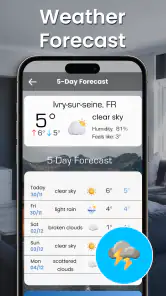
As a weather app, it occupies a narrower role than a full forecast service. I would reach for a forecast app to plan around rain or changing outdoor conditions, and use this one for a casual indoor reference. Keeping those jobs separate prevents a room estimate from being mistaken for a wider weather report and makes the app’s purpose clearer.
Small habits that improve comparisons
One non-obvious tip is to treat the phone like a shared measuring point rather than leaving it in different places for every check. If you are comparing rooms, use a similar height and avoid spots next to exterior walls, heaters, or windows. The point is not to find a theoretically perfect location; it is to make the conditions alike enough that the comparison means something.
For a daily routine, I would avoid checking every few minutes. Rapid readings can encourage you to chase normal fluctuations and overinterpret minor changes. A check before and after opening a window, with the phone resting in the same place, is more informative than carrying it around and watching the display. This turns the app into a simple observation tool rather than a source of constant noise.
If you are comparing how a room feels at different times, note what else changed: direct sun, cooking, a door left open, or a heating cycle. The reading alone cannot explain why the number moved. Pairing it with those everyday details helps you identify a likely cause, while keeping in mind that the phone’s own temperature can also influence the result.
It is also worth deciding in advance what you will do with the information. If the only question is whether a room is uncomfortable, your own comfort and a quick comparison may be enough. If you need to maintain a strict range, use a device designed for that job. That decision keeps a convenient estimate from becoming a false guarantee.
Getting comfortable with the app
Ever been curious about the actual temperature in your room without having to rely on your HVAC system's sometimes misleading thermostat reading? Well, the Room Temperature Thermometer app is here to save the day. This app has been a game-changer for me, and I'm excited to share my experience with it.
Getting Started with the App
When I first downloaded the Room Temperature Thermometer, I was pleasantly surprised by its user-friendly interface. Navigating through the app is a breeze, even if you're not particularly tech-savvy. The setup process is straightforward, with clear instructions guiding you to get the most accurate readings. It doesn’t require any external devices, which is a huge plus in my book.
Features that Stand Out
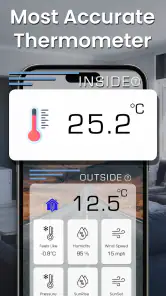
The app shines with its array of features. First off, it provides real-time temperature updates, which are incredibly accurate. It uses your device’s built-in sensors to determine the ambient temperature of your surroundings. I found this particularly handy during those sweltering summer days when I wanted to know if my room was cooler than outside.
Another feature I appreciate is the historical data tracking. The app logs temperature changes over time, allowing you to see patterns or anomalies in your environment. This can be especially useful if you're trying to maintain a consistent climate for things like plants or pets. Plus, the ability to switch between Celsius and Fahrenheit ensures that it caters to users worldwide.
A Few Things to Keep in Mind
While the app is fantastic, there are a couple of things to keep in mind. The accuracy of the temperature reading can sometimes be affected by your device’s hardware limitations. Older phones might not have the most precise sensors, so results may vary. Additionally, for the most accurate readings, make sure your phone isn’t in direct sunlight or near other heat sources.
Also, while the app does a great job at estimating room temperature, it’s not a replacement for professional HVAC equipment. It’s perfect for casual use and gives a good ballpark figure, but for critical temperature monitoring, you might want to invest in more specialized tools.
First check, then decide
A first useful check does not need a complicated setup: open the app in a room you know well, follow its on-screen guidance, and give the phone a stable place away from heat sources. I would use the result to answer a practical question—whether the room seems warmer than another space—not to make a precise adjustment to heating or cooling equipment. If a reading looks out of step with how the room feels, repeat it after the phone has rested before drawing a conclusion.
One point that can confuse first-time users is the difference between a room’s temperature and the temperature around the phone itself. A handset warmed by handling or nearby electronics can skew the impression, so I would avoid checking immediately after carrying it in a pocket or leaving it beside a laptop. For tracking a plant corner or pet area, consistency of placement matters more than frequent checks from different spots.
Who will get the most from it
I’d recommend trying it if you want a lightweight, free way to satisfy everyday curiosity, compare rooms, or get a rough reference before deciding whether to ventilate. It is also useful when you are away from your usual thermostat and want a quick indication of your immediate surroundings. If you need dependable records for a greenhouse, medication, a baby’s room, or another sensitive use, a dedicated thermometer or connected sensor is the more sensible choice.
My overall recommendation is to use the app for convenience while keeping its limits in view. The first meaningful result is not a perfect number; it is a repeatable clue that helps you understand your space. Once you know how your particular phone behaves, you can decide whether that clue is useful enough to keep the app around.
Final Thoughts
Overall, the Room Temperature Thermometer app is a nifty tool to have on your phone. It's practical, easy to use, and provides valuable insights into your immediate environment. Whether you're just curious or need to monitor conditions for specific reasons, this app delivers on its promises. Just remember to consider your device's limitations and use it as a supplementary tool rather than a primary source of temperature data.
In conclusion, if you're looking for a simple and effective way to keep tabs on your room's temperature, give this app a try. It's been a delightful addition to my app collection, and I’m sure you'll find it just as useful!
Room Temperature Thermometer Frequently Asked Questions
Can Room Temperature Thermometer replace a dedicated room thermometer?
Room Temperature Thermometer offers a convenient way to check ambient temperature using a phone, but it should not automatically be treated as a replacement for a dedicated thermometer. Readings depend on the device and its sensors, so use it as a general reference rather than for situations where precise measurements are important. Letting the phone rest before checking can help reduce the influence of its own warmth.
Is Room Temperature Thermometer useful when I am away from home?
The app may be handy when you want a quick temperature check in different surroundings, such as while traveling or spending time in an office. Its usefulness depends on whether your device can provide a suitable ambient reading; phones do not all have the same sensor capabilities. For a more dependable comparison, allow the device to sit idle for a few minutes before opening the app.
What should I check before installing Room Temperature Thermometer?
Room Temperature Thermometer is a weather app from Master Technologis, with the short description “Room Thermometer.” It is free to download and is rated for Everyone, making it straightforward to consider for everyday use. Before installing, check that your device runs Android 4.4 or later and that the app is the thermometer tool you are looking for.
What is the primary function of the Room Temperature Thermometer app?
The Room Temperature Thermometer app is designed to measure and display the current ambient temperature of your surroundings. It uses your device's built-in sensors to provide readings and is particularly useful for monitoring temperature indoors or outdoors. Users can rely on it to check whether their environment is at a comfortable level, whether at home, in the office, or while traveling.
How accurate are the temperature readings from the app?
The accuracy of the Room Temperature Thermometer app depends on the quality and sensitivity of your device's built-in sensors. Most modern smartphones are equipped with fairly accurate sensors; however, certain external factors like device warmth and environmental conditions might slightly affect readings. For optimal accuracy, it is recommended to use the app when the device has been idle for a few minutes.
Pros
- Accurate temperature readings
- User-friendly interface
- No external hardware needed
- Fast response time
- Supports multiple locations
Cons
- Ads can be intrusive
- Limited free features
- Requires internet for updates
- Battery consumption is high
- No offline mode available

- Category
- Weather
- Version
- 38.0.5