Roborock
- 2.58K
- 4.6
- Installs
- 5.00M
- Price
- Free

Screenshots
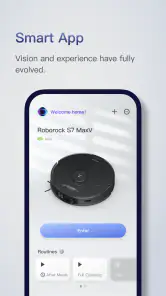
Analysis by Reviewed
For me, the most useful way to think about Roborock is as the control panel for a particular kind of household routine, not as a cleaning solution on its own. It connects a compatible Roborock vacuum to your phone, so you can check on cleaning and manage it without standing beside the machine. That distinction matters: the app can make a robot vacuum easier to fit into daily life, but it cannot make a non-Roborock cleaner work with it or handle the physical chores itself.
Where setup can get stuck
The first thing I’d keep in mind is that this isn’t a general-purpose home-cleaning app: its usefulness depends on having a Roborock cleaner to connect. The app is free, and Roborock is the developer, but downloading it by itself won’t make a regular vacuum smart. If you’re choosing between this and a manual cleaning routine, the real question is whether remote control and scheduled cleaning would make a difference in your home.
First things first, setting up Roborock is a breeze. After downloading the app, available on both Android and iOS, you’re greeted with a clean, user-friendly interface. It’s like the app developers knew exactly what we needed – simplicity. Connecting your Roborock vacuum to the app is straightforward, and before you know it, you’re ready to dive into the world of automated cleaning.
In practice, I’d treat setup as a short checklist rather than a test of patience. Have the vacuum ready, keep the phone close enough to follow the pairing steps, and take each instruction in order. If you’re setting it up in a busy room, pausing for a moment can help you avoid skipping a prompt while also trying to move furniture or keep a pet out of the way. The point is to establish a reliable connection first; experimenting with routines makes more sense once the basic link is working.
Checks before you start
If the connection doesn’t go smoothly, I’d check the basics before assuming the app is broken: make sure the vacuum is powered on, keep your phone nearby, and follow the pairing instructions shown in the app. A reliable home connection matters for a device you want to reach remotely. Roborock is a lifestyle app, rated for Everyone, and its minimum Android requirement is version 7.0; that helps set expectations before you install it on an older phone.
It’s also worth deciding where you want to do the first setup. A phone and vacuum in the same part of the home make it easier to notice whether the device is ready and whether the steps are progressing. If you later want to start a clean while you’re away, test the basic controls at home first. That simple trial helps distinguish an unfamiliar workflow from a genuine connection problem, and it gives you a chance to see how your own rooms and floor obstacles affect a run.
Controlling cleaning in everyday life
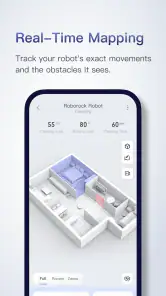
What’s really cool about the app is how it lets you control your vacuum remotely. Imagine lounging on your couch, coffee in hand, while your Roborock is busy tidying up the place – all with just a few taps on your smartphone. The app offers real-time mapping, so you can see where your vacuum has been and plan your cleaning schedule accordingly. It’s like having a personal cleaning assistant that never gets tired!
More From Our News Desk

Weather by Xiaomi Review: Clear at a Glance, Less Clear Up Close

X Under Pressure: Can It Recover When Posting Goes Wrong?

Clash of Clans Is Won Between the Battles

Android Auto Makes the Case for Quieter Car Software

MobiOffice: Transforming Mobile Productivity with Seamless Integration

EA SPORTS FC™ Mobile Soccer: Redefining Mobile Sports Gaming
A useful routine is to schedule a clean for a time when the rooms are usually clear, then use the map afterward to see whether the result matches what you expected. For example, before leaving for work, I’d pick a time when people and pets are less likely to cross the vacuum’s path. No-go zones can also help keep it away from cables or a pet’s play area. The trade-off is that maps and boundaries need to reflect the home as it is now: if the layout changes, it’s worth checking them rather than assuming yesterday’s setup still makes sense.
That map is most useful as a practical record, not a guarantee that every detail of a room is handled perfectly. If a clean misses a spot, I’d compare the area with the layout and the path the vacuum took before changing several settings at once. A moved chair, an open door, or a toy left in the usual route can change what the machine can reach. Making one small adjustment and checking the next run gives you a clearer idea of whether the issue was the room, the boundary, or the routine.
Recovering a routine when it falters
If a scheduled clean doesn’t happen as expected, I’d first look at the schedule and the vacuum’s state in the app, then check whether the cleaner is powered and able to move freely. For a map that no longer fits, reviewing the marked areas is more useful than repeatedly changing the same schedule. These small checks help separate a missed setup detail from a problem that needs attention on the vacuum itself.
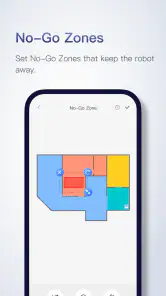
Another nifty feature is the ability to set no-go zones. Got a pile of cables in one corner or a pet’s play area that you’d rather keep untouched? Just mark these areas on the map, and your Roborock will steer clear. This level of customization really makes the cleaning experience feel tailor-made for my home.
I’d use boundaries selectively rather than drawing them around every awkward corner. They’re especially handy for a predictable hazard, such as a charging cable that cannot be moved before a scheduled run. But a boundary can also rule out a patch of floor you later want cleaned, so it’s sensible to revisit those markings when you rearrange a room or change where a pet eats and plays. A quick map review is less frustrating than wondering why a familiar area is being skipped.
For a realistic weekday example, imagine getting ready to leave and noticing crumbs around the dining area. I’d first clear anything loose that could tangle or block the vacuum, then use the app to fit cleaning around the household’s schedule. If a pet tends to settle in one corner, I’d keep that space out of the route rather than rely on the animal to move. Later, checking the map can help me decide whether the usual routine still suits the room or whether the furniture has shifted enough to merit a review.
What the app can and cannot solve
Remote controls, maps, schedules, and maintenance alerts make this more useful than a basic start-button companion app. Still, phone controls can’t remove clutter, untangle a cable, or make a vacuum reach a place it cannot physically access. If the machine is obstructed or needs care, I’d deal with that first rather than expecting another app command to fix the underlying issue. For someone who wants cleaning guidance without a Roborock vacuum, a general household checklist may be the better choice.
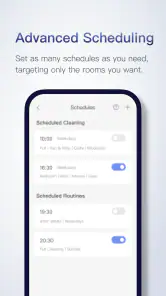
On the performance front, the app is pretty robust. I’ve noticed minimal lags, and the connection between the app and the vacuum is seamless. The scheduling feature is a lifesaver for those who love to come home to a tidy space without lifting a finger. You can set it to clean while you’re at work, ensuring you return to dust-free floors. Plus, the app provides maintenance alerts, so you’re always in the loop about when it’s time to clean the brushes or change the filters.
It helps to separate an app issue from a vacuum issue before repeating commands. If the machine cannot move, is not powered, or needs brush or filter care, the app may still be doing its job by showing controls or an alert; the underlying task is physical. I’d check the device and its path before deleting a routine or rebuilding a map. That order avoids turning a simple obstruction into extra setup work.
The maintenance reminders are useful as prompts, not as a replacement for looking at the machine. When one appears, I’d use it as a cue to inspect the relevant part and follow the care guidance for the vacuum, rather than assuming an alert alone restores performance. This is a small but important trade-off: app-based oversight reduces the need to remember every task, while the owner still has to do the hands-on cleaning and upkeep.
Compared with a basic remote control or a manual start button, the app’s advantage is that it brings schedules, map awareness, and selected-area boundaries into the same phone workflow. Compared with a general household organizer, it is much narrower: it cannot coordinate chores beyond the connected cleaner. And if you’re choosing between vacuum brands, the companion app should be judged alongside the particular machine, because a polished interface is not enough if the vacuum itself does not suit your floors, layout, or habits.
Who will get the most from it
I’d recommend it most to Roborock owners who want to start a clean while away, avoid selected areas, or build a routine around when their home is quiet. It’s less compelling if you prefer to operate the vacuum manually, don’t need schedules, or are still deciding which brand of cleaner to buy; in that case, compare the companion apps for the specific models you’re considering. Roborock has a 4.6 average from around 300,000 ratings, with over 5 million installs, which suggests it has reached a broad audience. It was released on May 23, 2019, and version 4.54.02 is the current version.
It is a particularly good fit for someone whose home has a repeatable daily rhythm: a household that is often empty during the day, a pet owner who wants to keep a certain area clear of cleaning, or a person who would rather check progress on a phone than walk over to the vacuum. A busy family can also benefit if everyone agrees to keep the main route clear before the scheduled run. The app adds value when it removes small coordination steps, not when the home changes unpredictably from hour to hour.
I’d be more cautious if you rarely use a smartphone for home devices, have no interest in schedules or maps, or expect the app to make a vacuum fully autonomous in every awkward space. Someone who prefers a simple, direct routine may be happier pressing the vacuum’s controls and skipping the extra phone layer. Likewise, a prospective buyer should compare the actual vacuum models and their companion apps together instead of installing this one before deciding which cleaner to own.
One practical question is whether you need to be at home to manage a cleaning run. The app is designed to let you control the vacuum remotely, so the point is that you can interact with it from elsewhere; the useful habit is to confirm the routine and clear the floor before leaving rather than relying on a last-minute rescue. If remote control is not part of your routine, the app may still offer convenient organization, but its main advantage will matter less.
Another question is what to do when a map or schedule seems wrong. I’d check the vacuum’s state and the relevant schedule first, then inspect the room and map boundaries. If the layout has changed, correct the map-related setup instead of repeatedly editing the time. If the vacuum is physically stuck or needs maintenance, address that directly. This sequence is more efficient than treating every missed clean as a software failure.
For homes with pets or children, I would not treat no-go zones as a substitute for tidying potentially troublesome objects. They’re useful for keeping the vacuum away from a known area, but movable items can appear in its route after a boundary is set. A quick floor check before an unattended run remains sensible, especially when the room has changed since the last clean. That combination—clear the route, use a boundary for the persistent hazard, then check the map—is more dependable than expecting one setting to cover every situation.
There’s also a choice between a fixed schedule and starting a run only when needed. A schedule suits a stable routine and saves repeated decisions; manual control makes more sense when guests, work hours, or room use vary from day to day. I’d begin with the approach that matches the household rather than scheduling every possible clean. If the routine becomes annoying or regularly conflicts with people using the room, it is a sign to simplify it, not to keep adding adjustments.
My practical verdict
In a world where time is precious, Roborock offers a convenient way to manage a compatible vacuum without being home. Whether you’re comfortable with smart-home tools or simply want fewer cleaning chores to coordinate, it’s worth considering if you own the right machine. I’d treat maps and schedules as helpful controls, not a substitute for keeping floors clear or maintaining the vacuum. For that specific job, it’s a useful companion; without a Roborock cleaner, it has little reason to stay on your phone.
My overall advice is to judge it by whether it makes your existing vacuum easier to live with. If you already own a compatible cleaner and can name a routine you want to improve—such as running it while the home is quiet, avoiding a pet’s corner, or checking where it has cleaned—the app has a clear purpose. If you want a general cleaning planner, a different brand’s vacuum, or a device that needs no attention at all, this is not the right tool. For the right owner, though, its strongest quality is practical: it puts useful controls in reach without pretending that a phone can do the vacuum’s physical work.
Roborock Frequently Asked Questions
What kind of app is Roborock, and who develops it?
Roborock is a Lifestyle app developed by Roborock. It is a companion for managing Roborock vacuum cleaners, with controls designed to make everyday use easier from a phone. If you are looking for a general home-cleaning guide or an app that operates without a Roborock cleaner, this is not its primary purpose. Its value is in connecting your phone with a compatible vacuum.
How popular is the Roborock app, and what do users think of it?
Roborock has an average rating of 4.6 from around 300,000 ratings, with roughly 2,600 written reviews and over 5 million installs. Those figures suggest that many people use it as a companion to their Roborock cleaners. Ratings can reflect different phones, cleaner models, and personal expectations, so it is helpful to consider whether its remote controls and cleaning-management features suit the way you plan to use your device.
Is the Roborock app free, and what devices can install it?
Roborock is a free Lifestyle app developed by Roborock for controlling compatible Roborock vacuum cleaners. It is available for Android and iOS, and the Android version requires Android 7.0 or later. Before downloading, make sure your phone meets that requirement and that you have a Roborock vacuum cleaner to connect; the app is designed to control the cleaner rather than work as a standalone cleaning tool.
What is Roborock and how does it work?
Roborock is a smart robotic vacuum cleaner designed to automate your home cleaning process. It uses advanced sensors and mapping technology to navigate through your home, avoiding obstacles and efficiently cleaning floors. The app allows you to control the vacuum, set cleaning schedules, and customize cleaning preferences, offering a hands-free cleaning experience. Its central role is to let you manage a Roborock cleaner remotely and access its controls through your phone.
Is the Roborock app compatible with both Android and iOS devices?
Yes, the Roborock app is available for both Android and iOS devices. You can download it from the Google Play Store for Android or the Apple App Store for iOS. The app provides a user-friendly interface to control your Roborock vacuum, monitor its cleaning progress, and access various settings and features. On Android, the current version is 4.54.02 and requires Android 7.0 or later; iOS users can find the app in Apple's App Store.
Pros
- User-friendly interface for easy navigation.
- Efficient cleaning algorithms enhance performance.
- Compatible with smart home systems.
- Long battery life for extended cleaning sessions.
- App updates improve functionality regularly.
Cons
- Occasional connectivity issues with Wi-Fi.
- High initial cost compared to competitors.
- Limited manual control in the app.
- Mapping errors in complex room layouts.
- Replacement parts can be expensive.
- Category
- Lifestyle
- Version
- 4.54.02











