Ringtone Maker: Music Cutter
- 3.11K
- 4.5
- Installs
- 10.00M
- Price
- Free
Screenshots
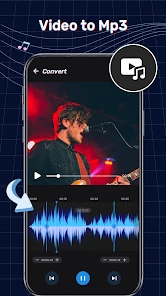
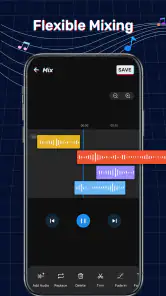
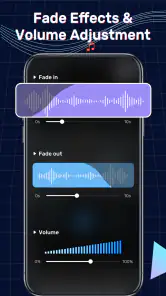
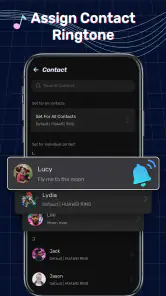
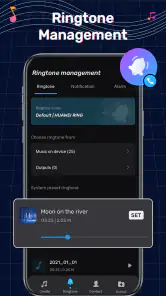
Analysis by Reviewed
I like the idea of shaping a small part of a song into something useful instead of treating a ringtone as an afterthought. Ringtone Maker: Music Cutter is a focused music-and-audio app for that job: it helps turn audio into a personal ringtone, alarm, or notification sound. The first appeal is immediate, but what matters more is whether making and keeping those clips feels worthwhile once the novelty wears off.
The first week: quick wins from familiar audio
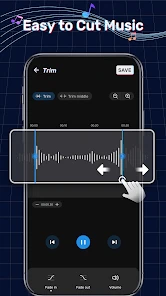
For a first project, I’d start with a song already saved on the phone, choose a short section that is easy to recognize, and listen to it before settling on the cut. That last check is useful: a snippet that sounds great in a full track may feel abrupt when it plays on its own. A little trimming can make the difference between a ringtone that feels intentional and one that starts halfway through a lyric or musical phrase.
The app’s appeal is practical rather than complicated. I can picture using it after hearing a favorite chorus and deciding it would make a more personal call alert, or recording a brief spoken reminder and turning that into an alarm. For everyday use, shorter clips are usually easier to live with than a long section that repeats while I’m trying to answer a call. The fade controls can also help soften the start or end, though I’d still preview the result at the volume and in the setting where I expect to hear it.
When it earns a place month after month
A ringtone editor is not an app I would expect to open every day. Its lasting value depends on whether the sounds I make remain useful: a distinctive tone for an important contact, a clear alarm, or a notification that I can recognize without checking the screen. I’d treat it as a small utility to revisit when my preferences change, rather than a music player or a full audio-production workspace.
That also makes it easier to judge against the usual alternatives. Built-in phone tones are quicker when I just want a sound and do not care about customizing it. A general audio editor makes more sense if I need detailed mixing or broader production tools. This app sits between those options: more personal than choosing a preset, but intended for straightforward cutting and ringtone creation rather than an elaborate editing session.
Unleashing Creativity with Ease
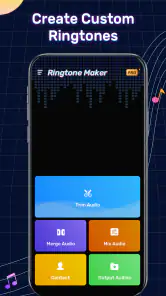
First things first, let's talk about the user interface. The Ringtone Maker: Music Cutter is super user-friendly. You don't need to be a tech wizard to navigate through it. The design is clean, intuitive, and everything is pretty much self-explanatory. I spent the first few minutes just exploring all the features, and it was a breeze.
So, what can you actually do with this app? Well, a lot! Whether you want to create custom ringtones, alarms, or notification sounds, this app has got you covered. The real magic happens when you start playing around with the music cutter feature. You can pick any song from your library and cut it down to your favorite part. It's like having a pair of musical scissors!
More From Our News Desk

Weather by Xiaomi Review: Clear at a Glance, Less Clear Up Close

X Under Pressure: Can It Recover When Posting Goes Wrong?

Clash of Clans Is Won Between the Battles

Android Auto Makes the Case for Quieter Car Software

MobiOffice: Transforming Mobile Productivity with Seamless Integration

EA SPORTS FC™ Mobile Soccer: Redefining Mobile Sports Gaming
Features That Make You Go Wow!
One feature I absolutely loved is the fade in and fade out effect. It adds that professional touch to your ringtones, making them sound like they were mixed in a high-end studio. Plus, the app supports a wide range of file formats, so you’re not limited to MP3s. You can work with WAV, AAC, AMR, and more.
Another cool aspect is the recording feature. If you’re feeling a bit creative, you can even record your own sounds and use them as ringtones. Imagine waking up to your own voice saying, "Get up, sleepyhead!" every morning. Now, if that doesn’t get you out of bed, I don’t know what will!
Making a clip you will still want to hear
I’d approach each edit as a tiny design decision, not just a matter of finding a catchy few seconds. A good ringtone needs a recognizable opening, enough contrast to cut through everyday background noise, and an ending that does not feel chopped off. I’d audition the same candidate at more than one point in the track: a chorus may be obvious, but a distinctive instrumental phrase can be less tiring after repeated calls.
There is also a practical difference between choosing a sound for calls and choosing one for alarms. A ringtone can be brief and attention-grabbing because I can answer or silence it quickly. An alarm is heard repeatedly and often while I’m still waking up, so I would avoid a harsh transition or a phrase that becomes annoying after several mornings. The ability to create different kinds of alerts makes experimentation easy, but it does not remove the need to think about how often each sound will play.
For a busy day, I might make a short, clear call tone from a song I already know, then use a separate recorded phrase as a reminder or alarm. I’d keep the two clips noticeably different. That small bit of planning helps prevent the common nuisance of hearing an alert and not knowing whether it is a call, a reminder, or simply a sound I set for fun.
Practical limits and ongoing upkeep
The most useful habit I’d build is to keep the source track and finished clip easy to distinguish. Give each cut a name that tells me what it is for, then listen once before assigning it; otherwise, a collection of similar snippets can become confusing later. I’d also keep the original audio untouched and make a fresh cut when I want a different start or ending. That makes experimenting low-risk and avoids losing the version I already like.
There are trade-offs. A phone’s existing ringtone picker is simpler if I’m happy with its built-in choices, while a fuller editor is a better fit when precise, layered sound work matters. Cutting a song also cannot fix a recording that is already quiet or unclear, and a subtle tone may be easy to miss in a noisy place. I’d choose a bright, recognizable passage for an alert and reserve softer or more personal recordings for quieter situations.
For someone who wants a custom sound without learning a complicated editing workflow, this is a sensible middle ground. It is less compelling for people who rarely change phone sounds, want a deep library of ready-made tones, or need advanced audio controls. The developer is listed as Dairy App & Notes & Audio Editor & Voice Recorder, and the app is free to install, with in-app purchases ranging from $1.99 to $43.99 per item. That makes it easy to try the basic idea, while anyone considering a purchase should check what the individual item offers before paying.
Maintenance, fatigue, and who should skip it
Keeping the app around does not require a daily routine, but it does ask for a little curation. I’d remove or replace sounds I no longer recognize rather than endlessly adding new ones. Too many custom alerts can create the same problem as too many default tones: I stop noticing them. A small set with clear purposes is more useful than a folder full of novelty clips.
One realistic use case is changing a family member’s call sound before a busy day, choosing a short section that stands out, then making a separate, gentler alarm from a recorded phrase. The key is to test each sound in context; what feels amusing during setup may become irritating when it repeats every morning. If I want a sound I can identify quickly, I’d favor a distinct opening over a long musical build-up.
The app is aimed at a broad audience: it has an Everyone content rating, and its minimum OS requirement is Android 7.0. It has a 4.5 average from around 249,000 ratings and more than 10 million installs, which suggests plenty of people find the basic purpose useful. Its current version is 1.01.82.1111, and it was released on April 19, 2021. Those details make it a well-established option, though popularity alone does not tell me whether a custom-tone workflow will suit your habits.
Choosing it over presets or a full editor
The right alternative depends on what you want to solve. If you only need a different alert today, the phone’s built-in sounds are the least fussy option; there is no editing step and no reason to maintain another tool. If you already have a particular moment in a track in mind, this app gives you a direct route from that audio to a personal sound. For someone who wants to layer tracks, shape a complex recording, or do careful production work, a dedicated audio editor is the more sensible choice.
I would also think about where the audio comes from before beginning. The easiest workflow is to work with audio that is already available in the phone’s library or to make a recording yourself. If the track I want is not accessible as an audio file, a cutter cannot solve that problem by itself. That is a useful expectation to set early: this is an editing utility for available audio, not a replacement for a music service or a catalogue of ready-made tones.
Before saving a final clip, I’d listen through headphones or the phone speaker and check both the opening and the ending. Headphones can make a subtle edit easier to judge, while a speaker check gives a better sense of whether the sound will be noticeable as an alert. I’d then use a clear label that identifies the intended purpose rather than just the song. These steps take little effort, but they make later upkeep much easier when I have several versions to choose from.
Why You Should Give It a Try
In a world where personalization is key, having an app like this is a game-changer. Not only does it allow you to express your individuality, but it also lets you have fun while doing it. The app is light on resources, which means it won't be hogging all your phone's memory or battery life. And the best part? It’s free!
So, if you’re tired of the same old boring ringtones that everyone else has, it’s time to spice things up with Ringtone Maker: Music Cutter. It’s all about making your phone sound just as unique as you are. Go ahead, give it a whirl, and let your creativity run wild!
In conclusion, whether you're a music enthusiast or just someone who loves to have a personalized touch on their phone, this app is worth checking out. It’s fun, it’s easy to use, and it opens up a world of possibilities right at your fingertips. Happy ringtone making!
My long-term verdict
My recommendation is simple: try it if you already know what kind of sound you want and enjoy making small personal tweaks. The first custom clip is fun, but the app earns lasting space only if that clip remains recognizable and useful after the novelty fades. If you prefer set-and-forget defaults, or need serious audio editing, I’d skip it in favor of the phone’s built-in options or a more capable editor.
I’d be most comfortable recommending it to someone who changes alerts occasionally and enjoys tailoring small details, rather than someone who expects a daily creative tool. The first-week payoff is easy to understand: a familiar audio moment becomes a sound that feels personal. The month-to-month question is more demanding. Does that tone still help me recognize a call, wake up, or notice an alert without irritating me? If the answer is yes, the app has earned its modest place; if not, there is no need to keep making new clips just because the editor makes it possible.
For a lightweight routine, I’d review my saved sounds whenever I change a ringtone or alarm, remove the ones I no longer use, and keep only a few with distinct purposes. That approach avoids turning customization into another small maintenance chore. Overall, this is a focused option for shaping available audio into personal alerts, with enough flexibility for simple edits and a clear ceiling for anyone seeking deeper sound work.
Ringtone Maker: Music Cutter Frequently Asked Questions
Can I use my own songs or audio files to make a ringtone?
Yes. Ringtone Maker: Music Cutter is intended for creating custom ringtones from audio, and you can select a song or another audio file stored on your device to edit. You’ll need to grant access to your audio files when prompted. After choosing a track, you can trim it to the section you want and use the resulting sound as a ringtone or another supported device alert.
Can I preview my edited ringtone before using it?
Previewing your selection is a useful step before assigning a new ringtone, because it lets you check that the chosen section starts and ends where you want. The app’s editing tools are designed to help you work with a selected part of an audio track. Listen to the result before setting it as a ringtone, notification, or alarm so you can make any needed adjustments.
Is Ringtone Maker: Music Cutter free to download, and are there optional purchases?
Ringtone Maker: Music Cutter is free to download, so you can try its music-editing tools without paying upfront. The app also offers in-app purchases, with items ranging from $1.99 to $43.99. Consider whether you are comfortable with optional spending before downloading, and review any purchase details shown in the app before confirming a transaction.
What permissions or access might I need to use Ringtone Maker: Music Cutter?
To make a ringtone from a song or another audio file, you will need to let the app access the audio stored on your device. Setting a finished sound as a ringtone, notification, or alarm may also require permission to change those settings. Allow access when it is needed for a feature you want to use, and check your device’s permission controls if you later wish to change it.
What features does Ringtone Maker: Music Cutter offer?
Ringtone Maker: Music Cutter is a versatile app that allows users to create custom ringtones from their favorite songs. It offers features like trimming audio tracks to specific lengths, fading in and out effects, and the ability to set custom ringtones, notifications, and alarms directly from the app. Additionally, it supports a wide range of audio formats, ensuring compatibility with most audio files.
Pros
- Easy to use interface for quick editing.
- Supports a wide range of audio formats.
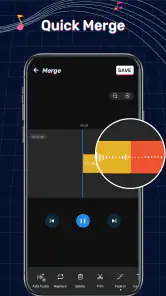
- Allows precise audio trimming and merging.
- Offers a variety of sound effects.
- No internet connection required for basic features.
Cons
- Contains ads that can disrupt workflow.
- Limited features in free version.
- Occasional crashes on older devices.
- Some advanced functions require in-app purchases.
- Interface could be more visually appealing.
- Category
- Music & Audio
- Version
- 1.01.82.1111













