Remote for Smart Samsung TV
- 760.00
- 4.1
- Installs
- 10.00M
- Price
- Free

Screenshots
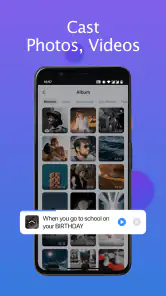
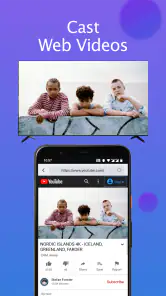
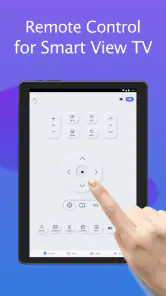
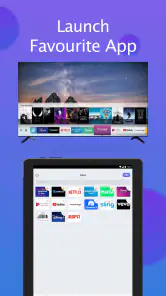
Analysis by Reviewed
I find Remote for Smart Samsung TV most useful as a backup for the everyday moments when the physical remote is out of reach, rather than as a guaranteed replacement for every TV setup. It is a free House & Home app from BoostVision, and its 4.1 average from around 116,000 ratings suggests many people find the basic idea worthwhile. I’d still treat it as a practical extra: the experience depends on your phone and TV staying connected, and a phone remote won’t suit everyone’s preferred way of watching.
What to expect from the current app
The app is at version 1.7.1 and has been available since July 18, 2022. That gives it an established place in the Samsung TV remote-app space, but a version number alone doesn’t tell me exactly what has changed over time. I wouldn’t assume that an update adds a particular control or fixes a specific issue unless I saw it in the app itself. What matters in day-to-day use is whether it connects to your television and keeps responding when you need it.
Its appeal is straightforward: use a phone as a controller for a compatible Samsung Smart TV instead of searching for the handset that came with the set. With more than 10 million installs, it is a familiar option, though that reach doesn’t guarantee it will fit every home network or every person’s habits. The app is free to install, rated for Everyone, and offers in-app purchases priced from $1.99 to $36.99 per item, so I’d check what is included before paying for anything.
Where it fits in a real home
Picture a weeknight when dinner is ready, the TV is playing too loudly, and the remote has slipped between the sofa cushions. If your phone is nearby and connected to the same Wi-Fi network, a phone-based remote can save you from pausing everything to hunt for it. I also find this approach useful when I want a backup controller in a shared room, or when someone has left the original remote in another part of the house.
The useful trade-off is that your phone becomes both the remote and the thing you may want to use for something else. If a call comes in, the screen locks, or you walk away from the Wi-Fi, control can be less convenient than a physical remote that is ready in your hand. For guests or family members who just want to press a button without unlocking a phone, the original Samsung remote may remain the simpler choice.
Small habits that can make control easier
I’d start by checking that the phone and TV are on the same Wi-Fi network before troubleshooting the app. If control drops after the phone sleeps, keeping the app available while you’re actively watching may reduce interruptions; if it disconnects, reopening it and reconnecting is a reasonable first step. These are practical workarounds, not a promise that every connection issue has the same cause.
Another useful way to think about a phone remote is as a second control point, not the only one. Keeping the physical remote somewhere predictable gives you a fallback if the phone battery is low or you need to use your phone at the same time. If you share the TV, it is also worth letting other household members know how to reconnect rather than assuming the app will stay ready on every device.
More From Our News Desk

Clash of Clans Is Won Between the Battles

Android Auto Makes the Case for Quieter Car Software

MobiOffice: Transforming Mobile Productivity with Seamless Integration

EA SPORTS FC™ Mobile Soccer: Redefining Mobile Sports Gaming

How Microsoft OneDrive Became a Mobile Productivity Giant

How Google Translate Breaks Language Barriers Effortlessly
Seamless Connectivity
Hooking up the Remote for Smart Samsung TV app to your television is as straightforward as it gets. Once you download the app and ensure your phone is on the same Wi-Fi network as your TV, you're pretty much set. I was pleasantly surprised by the app's ability to quickly sync with my TV without any hitches. No more fumbling with codes or waiting for ages for devices to pair – it's as smooth as butter!
User-Friendly Interface
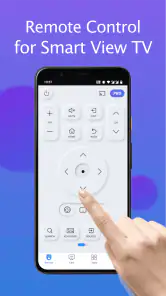
The app's interface is incredibly intuitive. Whether you're a tech-savvy millennial or someone who still struggles with the concept of "apps," navigating through the Remote for Smart Samsung TV is a breeze. The buttons are clearly labeled, and the layout mirrors that of a traditional remote, so there’s no learning curve involved. I found myself easily switching channels and adjusting the volume with just a few taps.
Features That Stand Out
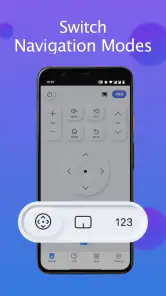
One of the standout features has to be the voice control. Imagine being able to say, "Turn on Netflix," and voila, you're binge-watching your favorite series. The voice recognition is surprisingly accurate, even with my subpar enunciation. Plus, the touchpad feature on the app turns your phone screen into a mini trackpad, making navigation even more fluid.
For a careful comparison, I’d put it beside the physical remote first. A handset usually wins for quick, tactile actions and doesn’t need a phone screen kept awake; this app is more convenient when the handset is missing or when using a touch surface feels easier. Compared with other third-party TV remote apps, the key question is not which one has the flashiest interface, but which one connects reliably to your particular TV. I’d try the free option before committing to a purchase, and avoid paying for features you don’t expect to use.
Making the phone remote work for shared viewing
In a household where people take turns choosing what to watch, I’d treat setup as a small shared routine rather than a one-time personal convenience. Try connecting from each person’s phone before settling in for a movie night, then check whether the TV appears and responds from the place where each person normally sits. That simple test helps distinguish a one-device convenience from a dependable household backup.
It also helps to decide who will keep the physical handset nearby. If one person is using the phone remote to browse while another is using that phone for messages, the controller can become a source of friction instead of a shortcut. A sensible arrangement is to use the app for the occasional missing-remote moment and leave the handset accessible for longer viewing sessions or guests who do not want to install and learn anything.
Performance and Reliability
In terms of performance, the app holds up pretty well. I didn't experience any lag while using it, which is crucial when you're trying to quickly mute the TV when the doorbell rings. The app is also regularly updated, ensuring compatibility with the latest Smart Samsung TVs and fixing any pesky bugs that might crop up.
What connection problems can mean in practice
A remote app relies on a different path to the television than a button press from the handset, so a working internet connection alone may not tell the whole story. If the TV is reachable from one phone but not another, I’d check whether both phones are using the same home network before reinstalling anything. If neither phone finds it, I’d restart with the basic checks: confirm the TV is on, make sure the devices share Wi-Fi, and try reconnecting from the app.
For an important moment—muting a loud TV during a call, for example—I would not make the phone the only control method. A physical remote has the advantage of being ready without opening an app or relying on the phone being awake. This is not a reason to avoid the app; it is a reminder that convenience tools are most useful when they have a practical fallback.
A Few Quirks
While the app is largely efficient, I did notice that the app occasionally disconnects if my phone goes to sleep. It’s a minor inconvenience, but it’s worth mentioning. However, reconnecting is usually a swift process – just a tap of a button and you’re back in control.
Who benefits most—and who may prefer another option
I’d recommend trying it if you own a Samsung Smart TV, often misplace the remote, and are comfortable using your phone over Wi-Fi. It is especially handy for someone who already keeps a phone close by and wants a spare way to pause, adjust volume, or navigate without getting up. It can also be useful in a room where a remote tends to wander between seats, provided the people using the TV are comfortable with a phone-based control.
I’d skip it as a primary controller if you need a dependable button-first experience for children, older relatives, or visitors who may not want to unlock a phone and find the right app. It is also a poor fit if your phone is often charging elsewhere, if you use it continuously while watching, or if the TV and phone do not stay on the same Wi-Fi. In those situations, the original handset is simpler; if that is lost or damaged, replacing it with a compatible physical remote may be a better long-term answer than depending on a phone.
Costs, compatibility, and sensible expectations
The app is free to install, which makes trying it a low-commitment way to see whether your own TV and home network work well together. The in-app purchase range runs from $1.99 to $36.99 per item, so I would look closely at the purchase screen and identify exactly what a paid option adds before deciding. If all you need is a backup for occasional volume changes and navigation, there is little reason to buy something before confirming that the free experience meets that need.
Compatibility is best judged in your own room rather than inferred from the app’s popularity. Its 10 million-plus installs show that it has reached many users, but a large audience cannot guarantee that every Samsung television, router arrangement, or phone behaves identically. I’d test it on the TV you actually plan to control and keep expectations focused on the job you want it to do, rather than assuming every function of a dedicated handset will translate perfectly.
Who should choose it—and what to watch
I’d recommend trying it if you own a Samsung Smart TV, often misplace the remote, and are comfortable using your phone over Wi-Fi. I’d skip it if you need a dependable controller that anyone can pick up instantly, or if your phone is frequently away from the TV or busy with other tasks. Before relying on it for a whole evening, test the connection from your usual seat and see how it behaves when your screen locks. That quick check tells you more than assuming every home setup will work the same way.
For existing users, the practical question is whether the current version continues to do the basics well on your TV, not whether its version number sounds new. If a connection problem appears, first check the shared network and then reconnect; if the same trouble keeps returning, the physical remote is the sensible fallback. I’d watch future updates for changes that directly improve stability or compatibility, while treating those as possibilities rather than assuming a specific improvement is on the way.
Overall, the Remote for Smart Samsung TV app is a fantastic tool for anyone looking to enhance their TV viewing experience. It brings a level of convenience that’s hard to beat, especially if you’re as prone to losing remotes as I am. With its easy setup, user-friendly interface, and nifty features, it's definitely earned a spot on my smartphone. So, if you're a proud owner of a Samsung Smart TV, this app might just become your new best friend.
Remote for Smart Samsung TV Frequently Asked Questions
Can Remote for Smart Samsung TV replace my physical remote if it is lost or out of batteries?
It can serve as a phone-based alternative for controlling a compatible Samsung SmartThings TV, which may be handy when the physical remote is unavailable. The app is described as a Samsung remote app, but it is sensible to keep a physical remote nearby until you have confirmed that the app connects and works with your particular TV and home setup.
What do I need to prepare before setting up Remote for Smart Samsung TV?
Before using the app, check that your phone meets its Android requirement and that you can connect the phone and television to the same Wi-Fi network. The app is intended for Samsung SmartThings TVs, so make sure your television fits that description. Having both devices ready on your home network makes it easier to try the app’s remote controls.
Is Remote for Smart Samsung TV free to download, and what does it cost to use?
Remote for Smart Samsung TV is free to download, so you can try it without paying upfront. It also offers optional in-app purchases, with prices ranging from $1.99 to $36.99 per item. Those purchases are separate from the free download, so check the available options in the app and decide whether any paid extras are useful to you.
What is Remote for Smart Samsung TV, and who makes it?
Remote for Smart Samsung TV is a House & Home app by BoostVision, intended to help control Samsung SmartThings TVs. Its short description is simple and practical: a remote for a smart Samsung TV. The app has an Everyone content rating, making it suitable for a general audience, and its stated purpose is to provide an alternative way to control a compatible television.
What features does the Remote for Smart Samsung TV app offer?
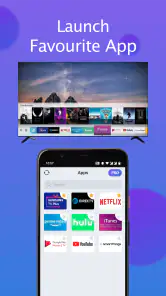
The Remote for Smart Samsung TV app provides a comprehensive suite of features that allow users to control their Samsung Smart TV effortlessly. Users can navigate through channels, adjust volume, and even access smart features like apps and streaming services. The app also supports voice commands for hands-free operation, providing a seamless and enhanced viewing experience.
Pros
- Easy setup process.
- Intuitive user interface.
- Supports multiple TV models.
- Includes voice command feature.
- Free to download.
Cons
- Ads can be intrusive.
- Limited features in free version.
- Some compatibility issues.
- Occasional connection drops.
- No landscape mode support.
- Category
- House & Home
- Version
- 1.7.1











