Remote for Fire TV & FireStick
- 6.65K
- 4.0
- Installs
- 10.00M
- Price
- Free
Screenshots

Analysis by Reviewed
When a household shares one living-room screen, the remote tends to travel: it ends up between sofa cushions, in another room, or with someone who has already started watching. I find a phone-based controller handy in exactly that moment. Remote for Fire TV & FireStick turns a compatible phone into a way to navigate a Fire TV, so a missing physical remote need not bring movie night to a halt.
When a second controller earns its place
The clearest reason to keep a phone remote ready is not that it can replace every button, but that it solves a particular household problem: someone needs to control the TV while the physical remote is missing, out of reach, or being used by another person. A phone is often already nearby, and a keyboard can make text entry less cumbersome than moving through letters one at a time with directional buttons.
That difference matters during ordinary use. If I want to search for a film by its full title, or enter text on the TV, using a phone keyboard can feel more direct than navigating an on-screen keyboard with a small physical remote. It is a practical advantage for occasional searching, rather than a reason to expect the phone to be the best control method for every part of watching.
A useful backup for shared screens
Picture this: one person has settled in, another is choosing something to watch, and the remote is nowhere nearby. A phone can be quicker to retrieve than searching the whole room, and the keyboard is particularly helpful when someone needs to enter a long title or password. That makes the app useful as a backup, not just a replacement for a remote that has gone missing.
It suits people who regularly use a Fire TV and want a second control option close at hand. If you mostly watch on a different streaming device, or prefer physical buttons and don’t want to use a phone while watching, this is probably not worth adding to your routine. It is also sensible to keep the original remote nearby for the times a phone is unavailable or not the control you want to use.
For shared use, I would treat the phone controller as something each person can choose to use rather than a reason to pass one person’s unlocked phone around the room. A household can agree that one person handles searching while another keeps the physical remote, or simply use the app when the usual remote cannot be found. That small bit of coordination helps avoid the familiar tussle where two people try to steer the same screen in different directions.
What setup depends on
The first practical question is whether the phone and Fire TV are connected in a way that lets the app find the device. Being in the same home is not enough if the devices are using different Wi-Fi networks. If a TV does not appear, I would check the network connection on both ends before repeatedly tapping controls or reinstalling anything. That is a useful first check because it addresses a common home-network mismatch without turning setup into a guessing game.
More From Our News Desk

Weather by Xiaomi Review: Clear at a Glance, Less Clear Up Close

X Under Pressure: Can It Recover When Posting Goes Wrong?

Clash of Clans Is Won Between the Battles

Android Auto Makes the Case for Quieter Car Software

MobiOffice: Transforming Mobile Productivity with Seamless Integration

EA SPORTS FC™ Mobile Soccer: Redefining Mobile Sports Gaming
It is also worth thinking about which device the phone is meant to control before starting a search. In a home with more than one Fire TV, selecting the intended screen matters: the living-room TV and a bedroom device may be available at the same time, but controlling the wrong one can interrupt someone else. Taking a moment to confirm the device is a simple habit that makes a shared setup feel less chaotic.
Getting Started with Ease
First things first, downloading and setting up the app is as painless as it gets. Available on both Android and iOS, it’s just a quick trip to the app store, and you’re ready to rock. The app guides you through a simple setup process. Just make sure your phone and Fire TV or FireStick are on the same Wi-Fi network, and you’re golden.
Features That Make Life Simpler
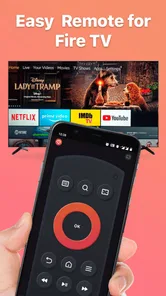
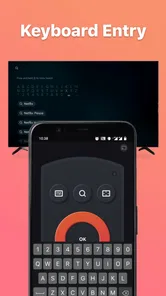
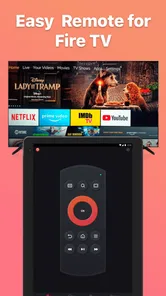
Once you’re in, the Remote for Fire TV & FireStick app offers a straightforward interface. Navigating through your Fire TV interface is a breeze with the touch controls. No more fiddling with tiny buttons on a remote. You can swipe, tap, and scroll with ease. Plus, the app includes a keyboard feature, which is a game-changer when it comes to searching for shows or entering passwords.
That keyboard is best treated as a convenience for text entry rather than a reason to hand over your phone. If another household member needs to enter account details, they can use their own device or the usual on-screen method; keep passwords private and avoid leaving a personal phone unlocked with someone else. When the app cannot find the TV, checking that both devices are on the same Wi-Fi is the first practical step, since sharing a home or sitting in the same room does not necessarily mean the phones and TV are connected to the same network.
For a smoother search, I would decide what to watch before reaching for the keyboard and enter a full title or a distinctive word rather than typing a vague fragment and browsing a long list. That is where phone input has a practical edge: it can reduce the time spent navigating the TV’s on-screen letters. For a quick pause, back action, or routine movement through menus, the physical remote may still feel more immediate because its buttons are always in the same place.
Choosing the right control for the moment
Compared with the standard Fire TV remote, a phone offers a larger typing surface and can be easier for searching, while the physical remote is simpler to grab, doesn’t depend on your phone being available, and keeps control separate from personal notifications. I’d use the app for text-heavy searches or as a spare, then rely on the physical remote when quick, tactile button presses matter. A universal remote may make more sense if your main goal is to operate several kinds of home entertainment equipment with one physical controller.
This distinction is especially useful in a household where not everyone wants to control the TV in the same way. Someone who likes typing searches may appreciate a phone; someone who wants a familiar button layout may not. Rather than trying to persuade every viewer to switch, I would keep both options available and use whichever fits the moment. The app is most convincing as a complement to the usual remote, not as a universal answer to different preferences.
There is a separate trade-off around attention. A phone may be convenient for text, but it also brings notifications and other distractions into the viewing session. If I am settling in for a film, I may prefer to put the phone aside once the search is done. That makes the app useful in bursts—finding a title, navigating a menu, or filling in text—without requiring me to keep a screen in my hand for the whole evening.
Voice command is another feature that takes the app a notch higher. If you’re feeling a bit lazy or just channeling your inner tech guru, voice search lets you find your favorite shows without lifting a finger.
Voice search can be handy when typing is awkward, but I would not make it the only way I expect to find something. In a shared room, someone may prefer not to speak a search aloud, and background conversation can make voice input less convenient than tapping a title. The useful choice is having another route available: touch controls for browsing, the keyboard for precise text, and voice when speaking a request suits the room.
Why You’ll Love It
Now, let’s talk about why this app is a must-have. Imagine the convenience of controlling your TV without having to leave the comfort of your couch. The app also integrates seamlessly with Alexa, which is a huge bonus if you’re already using Amazon’s smart home ecosystem.
In a shared home, the useful habit is to agree who is choosing what before passing a phone around. The app’s ability to switch between Fire TV devices can help when different rooms have different viewing plans, but it doesn’t replace household communication or create separate viewing boundaries. If a child is using the television, an adult should still manage the device and the accounts in the way the household normally does; the app is a controller, not a substitute for supervision.
That boundary is important because controlling a screen and deciding what is appropriate to watch are different jobs. A phone remote can help someone navigate, but it should not be mistaken for a household rule system or a way to manage another person’s account. If children use a shared television, I would keep adult account details private and have an adult handle any account-related text entry. The app’s Everyone rating describes the app’s age suitability; it does not decide whether a particular programme, profile, or account is suitable for a child.
One point to consider before relying on it every evening is cost: the app is free to start, with in-app purchases ranging from $3.99 to $29.99 per item. Its Everyone age rating makes the app broadly suitable to install, but that does not mean every show or account on a connected TV is intended for every viewer. BoostVision develops the app, which is in the entertainment category; it has a 4.2 average from around 80,000 ratings and over 5 million installs. The current version is 1.9.1, and it runs on Android 7.0 or later.
The free starting point makes it reasonable to try if the phone-as-remote idea solves a real problem in your home, but I would look at the in-app purchase options before deciding to pay. A purchase is easiest to justify when you already know you regularly use the app and value its phone-based controls. If you only need a backup once in a while, the physical remote may already do enough, so there is no reason to assume that spending is necessary.
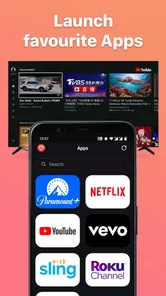
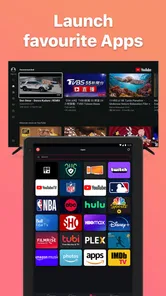
And yes, for those of us who love a good binge-watching session, the app’s ability to control multiple Fire TV devices is a real treat. You can switch between devices effortlessly, making it perfect for a household where everyone has their own TV preferences.
For a multi-room routine, I would make device choice part of the handoff: check which Fire TV is selected before changing playback or searching. That is a small but non-obvious way to avoid disturbing someone in another room. It also helps clarify what the app does well in a household: it can make a phone useful across more than one Fire TV, but people still need to coordinate who is watching where and which screen they intend to control.
Where I would choose something else
This app is a poor fit if you want a controller that works independently of your phone, or if you rely on physical buttons and do not want to unlock a device whenever you need to navigate. It is also not the best answer for someone trying to combine control of several different types of home entertainment equipment; a universal physical remote may be a better match for that goal. And if you do not use Fire TV, a controller aimed at that platform is unlikely to add much to your setup.
For a person who regularly searches by title, loses the remote, or wants a second way to reach a Fire TV in another room, the app has a clearer case. Someone who already has a reliable physical remote and rarely types on the television may find it offers little day-to-day benefit. I would make that decision based on the friction it removes in your own routine, rather than expecting a phone remote to improve every part of watching.
Wrapping It Up
In conclusion, the Remote for Fire TV & FireStick app is like having a universal remote in your pocket. It’s convenient, user-friendly, and packed with features that make managing your TV experience more enjoyable. Whether you’re a tech enthusiast or just someone who perpetually loses their remote, this app is worth giving a shot.
My household verdict is that it works best as a practical second controller: especially useful for typing, searching, or taking over when the physical remote has disappeared, but not a complete replacement for every viewer. If you share devices, keep account access personal and use the phone only when its convenience outweighs the simplicity of the regular remote.
Before relying on it as the only way to operate a television, I would try the connection and control routine on an ordinary evening, while the physical remote is still within reach. That gives you a chance to see whether your phone can find the intended device and whether its controls suit the people who actually use that screen. If it does, it can become a reassuring backup; if not, you have not stranded the household without its usual controller.
So, why not make life a little easier? Download the app today, and join the ranks of those who never have to worry about misplaced remotes again!
Remote for Fire TV & FireStick Frequently Asked Questions
Can I use Remote for Fire TV & FireStick to share my phone screen on a television?
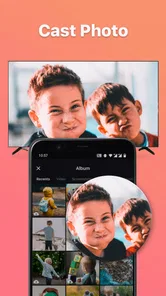
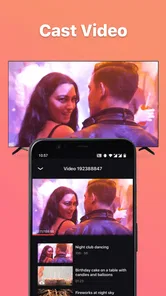
Yes. Screen mirroring is one of the app’s advertised functions, allowing you to mirror a phone screen to an Amazon Fire TV Stick. This may be useful for showing phone content on a larger display, alongside using the app as a remote. The app is intended for Fire TV and FireStick use, so check that your setup is compatible before relying on mirroring.
Who makes Remote for Fire TV & FireStick, and what is it mainly designed to do?
Remote for Fire TV & FireStick is an entertainment app developed by BoostVision. It is designed to provide remote control for Fire TV and FireStick, with advertised features that include automatic connection, TV control, and screen mirroring to an Amazon Fire TV Stick. Its store description is simply “Remote for Fire TV,” so its main purpose is controlling a Fire TV from a mobile device.
Is Remote for Fire TV & FireStick suitable for someone looking for a simple way to control a Fire TV?
Remote for Fire TV & FireStick is an entertainment app by BoostVision that brings Fire TV control to a mobile device. Its main appeal is convenience: rather than reaching for a physical remote, you can use your phone to control a compatible television or streaming device. It is free to download, with in-app purchases available, so consider whether its basic remote functions fit your needs before installing.
Does the app offer anything beyond remote control?
Yes. Its advertised functions include automatically connecting to a FireStick, controlling a TV, and mirroring a phone screen to an Amazon Fire TV Stick. That makes it potentially useful for more than navigation with a virtual remote. Screen mirroring can be handy when you want to show phone content on a larger display, while the remote functions are aimed at everyday control.
What devices are compatible with the Remote for Fire TV & FireStick app?
The Remote for Fire TV & FireStick app is designed to be compatible with all Fire TV and FireStick devices. Whether you have a Fire TV Stick, Fire TV Cube, or a Fire TV Edition Smart TV, this app should work seamlessly. Ensure your device is updated to the latest software version for optimal performance.
Pros
- Seamless integration with Fire TV.
- User-friendly interface.
- Quick setup process.
- Wide range of control features.
- Supports voice commands.
Cons
- Requires stable internet connection.
- Limited to Fire TV devices.
- Occasional lag with older devices.
- Ads in the free version.
- No support for other streaming devices.













