Remitly: Send Money & Transfer
- 55.91K
- 4.8
- Installs
- 10.00M
- Price
- Free

Screenshots



Analysis by Reviewed
I think an international transfer app earns its place in a household when it makes a shared responsibility easier without blurring who controls the money. Imagine one person abroad needs help with a bill: the sender can arrange the transfer, then keep the recipient informed about its progress rather than leaving them to guess when funds might arrive. For relatives coordinating across time zones, that small bit of visibility can make planning less stressful.
Keep the account and the decision-maker clear
I would treat the account as belonging to the person who is actually sending the money, not as a communal household login. Before setting up a transfer, agree on the recipient and amount, and review the delivery details together if another family member is helping. That simple boundary reduces the chance of a rushed or mistaken send. I also wouldn’t hand over account access just because someone else needs to follow along; coordination does not require everyone to manage the same financial account.
Remitly is a finance app from developer Remitly, and it is free to download. It has an average rating of 4.8 from around 1.3 million ratings, with more than 10 million installs. Those figures suggest it is widely used, but I’d still judge it by whether its available route and delivery method fit the transfer I need to make.
Make coordination practical, not complicated
A useful habit is to check the recipient’s details with them before sending, especially if you are arranging a payment for a relative who does not handle transfers often. Ask which receiving option they can actually use, then compare the amount they expect to receive with the amount shown before you commit. This is more helpful than focusing only on a headline exchange rate: the delivery choice and the recipient’s access to it matter too.
Compared with a bank transfer, a specialist remittance app can make it easier to see transfer choices and follow a payment in one place. A bank may still be the better fit if you already use it for international payments or prefer keeping everything within your existing banking relationship. I would compare the final amount, timing, and convenience for the specific destination rather than assuming one method is always cheaper or faster.
Who should use it—and who may prefer another route
The Everyone content rating makes the app suitable for a broad audience, but that is not a reason to treat money transfers as a child’s independent task. For a household, I’d keep an adult responsible for payment decisions and use conversation to help younger family members understand what is being sent and why. The app is most useful for people who regularly support someone in another country, or who need an organized way to send money for personal or business needs.
If you only make a rare transfer, or your recipient cannot conveniently collect funds through the options available to them, pause and compare another provider or your bank. Before relying on a particular speed, check the estimate shown for your own transfer; delivery can depend on the method selected. The same goes for cost: look at the amount the recipient is expected to get, not just a promotional-sounding rate.
More From Our News Desk

Weather by Xiaomi Review: Clear at a Glance, Less Clear Up Close

X Under Pressure: Can It Recover When Posting Goes Wrong?

Clash of Clans Is Won Between the Battles

Android Auto Makes the Case for Quieter Car Software

MobiOffice: Transforming Mobile Productivity with Seamless Integration

EA SPORTS FC™ Mobile Soccer: Redefining Mobile Sports Gaming
When a transfer is part of an ordinary family routine
Picture a relative who needs help paying an expense abroad while you are at work and they are several time zones away. I would settle the amount and receiving method with them in advance, then make the transfer when I can carefully review the details. That avoids turning a time-sensitive need into a rushed decision made from incomplete information. If the recipient is unfamiliar with cash pickup or a mobile wallet, a quick conversation beforehand is more useful than choosing a method simply because it sounds fast.
For recurring support, I’d keep a simple private note of the purpose, amount, and date of each transfer. That helps me distinguish regular household help from one-off requests and makes it easier to discuss contributions with other relatives. The note is not a substitute for the app’s transfer information; it is a household bookkeeping habit that keeps expectations clear without sharing account access.
Think through the recipient’s side first
Before choosing Remitly, I would ask the recipient what they can practically receive, not just what sounds convenient to the sender. Someone who can use a bank account comfortably may prefer a deposit, while another person may need a different available option. The right choice depends on the destination and the recipient’s situation. A transfer that looks straightforward on the sender’s screen can still create extra effort for the person collecting it, so their preference should be part of the decision.
I would also confirm names and receiving details through a trusted conversation rather than relying on an old message or a saved contact alone. This is especially worthwhile when sending to someone who has recently changed accounts or when another family member is passing along the details. A short verification step may feel repetitive, but it is a much better use of time than discovering a mistake after confirming a payment.
Ever found yourself in a situation where you need to send money abroad but got tangled up in a web of complicated processes and hefty fees? Well, that's where Remitly: Send Money & Transfer comes to the rescue! This app has been a game-changer for me, and I bet it can be for you too. Let me walk you through my experience with it.
Getting Started with Remitly
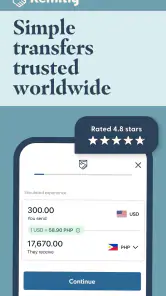
The first thing you notice about Remitly: Send Money & Transfer is its user-friendly interface. Signing up is as easy as pie! You just need to download the app from the Play Store or App Store, create an account, and voila, you're ready to go. The app guides you step by step, making the process feel like a breeze. No more fumbling through complex setups.
Features That Stand Out
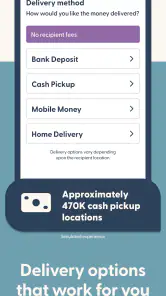
What makes this app a standout are its unique features. First off, the exchange rates are pretty competitive. I’ve used other platforms before, and let me tell you, Remitly gives you more bang for your buck! Plus, they offer multiple delivery options. Whether you want to send money directly to a bank account, for cash pickup, or even to a mobile wallet, Remitly has got you covered.
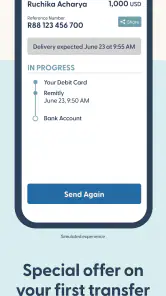
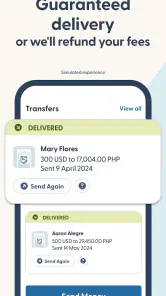
And talk about speed! Depending on your choice of delivery, you can have your funds transferred in a matter of minutes. Really, it’s like sending a text message. They also offer a tracking feature, so you’re never left wondering where your money is. Peace of mind, right?
Security and Support
In today's digital age, security is a big concern, and Remitly takes it very seriously. They use advanced encryption to protect your data, ensuring that your money lands safely in the hands of your loved ones. I found their customer support to be top-notch as well. Anytime I had a query, their team was just a call away, ready to assist.
Moreover, the app supports multiple languages, making it accessible to a broader audience. Whether you're tech-savvy or not, the app's design is intuitive enough for anyone to navigate without a hitch.
How I’d compare the available routes
For me, the useful comparison is not simply “app versus bank.” It is whether the recipient can use the selected delivery method, what the displayed payout looks like, and how much coordination each option takes. A bank may win for someone who already handles international payments there and values keeping records in one familiar place. A specialist transfer app may be easier to follow when I want the choices and progress together. I would check both for the actual destination and amount rather than assume that a familiar provider is automatically the best value.
Cash pickup can suit a recipient who needs access without relying on a bank deposit, but it also means considering the practicalities of collecting it. A mobile wallet is only helpful if the recipient uses one and can access the funds there. I would not choose a payout method for its label alone; I’d ask the person receiving the money what works for them, then check the terms and estimate shown for that transfer before deciding.
Small checks that prevent avoidable friction
One useful workflow is to separate deciding from sending. First agree with the recipient on the amount and delivery route; later, when you are ready to pay, verify the details again on the transfer screen. That second look is particularly valuable if you are sending after a long gap or helping several relatives. It keeps an old recipient detail from silently becoming the default for a new situation.
I would also avoid promising a precise arrival time based on a previous transfer. The estimate for the current transaction is the one to use, because the delivery choice can affect timing. If the money is needed for a bill, I’d make the arrangement early enough to leave room for the recipient to confirm receipt and ask questions, rather than treating a fast option as a guarantee that every transfer will arrive immediately.
My Final Take
All in all, my experience with Remitly has been nothing short of fantastic. It’s reliable, fast, and secure - everything you could ask for in a money transfer app. If you’re looking for a hassle-free way to send money internationally, I’d highly recommend giving Remitly a shot. Trust me, you won’t be disappointed!
A sensible check before pressing send
For a first transfer, I’d avoid treating setup as a one-time chore to rush through. Confirm the recipient’s name and receiving details directly with them, then make sure the destination and chosen payout method match what they can access. If you are sending money on behalf of a household, agree beforehand who will approve the amount; this is especially useful when several relatives contribute but only one person is making the transfer.
The app is free, but that does not mean every transfer has the same overall cost. I would review the displayed rate, any applicable charges, the delivery estimate, and the amount the recipient is expected to receive before confirming. The current version is 6.54.2, and it requires Android 8.0 or later; iPhone users should check compatibility in their app store before installing. Remitly was released on July 25, 2013, and has accumulated around 56,000 written reviews alongside its ratings.
Useful for recurring support, with a few trade-offs
For example, if I were helping a parent cover an occasional household expense overseas, I’d first ask whether a bank deposit, cash pickup, or mobile wallet is genuinely convenient for them. A fast option is not automatically the best one if the recipient has to travel or cannot access that method. Keeping the recipient involved in this choice is a practical way to avoid a transfer that arrives technically but is awkward to use.
One non-obvious benefit of tracking is that it can reduce repeated check-in messages: the sender can monitor progress and share a clear update with the recipient. It does not remove the need to double-check details or keep a record of what was sent. I’d also compare the final payout with a bank or another transfer service when the amount matters; exchange rates and delivery choices can change the real value of convenience.
Age, trust, and household boundaries
The Everyone rating describes the app’s broad content suitability, not a recommendation that children manage payments. In a shared home, I’d let younger family members see how a transfer is planned only if it makes sense for them, while keeping the account and the final decision with the responsible adult. That approach gives them a chance to understand cross-border support without turning a financial login into a shared family utility.
Trust also means being clear about who is sending, who is receiving, and what the money is for. If several relatives are contributing, I’d agree on the total before one person submits the transfer, then tell contributors what was sent and when. This kind of simple coordination can prevent duplicated payments and misunderstandings without requiring everyone to use the same account.
My household verdict
Remitly has been around since 2013 and is now on version 6.54.2, so it is an established option rather than a brand-new experiment. I’d choose it for regular cross-border support when its available delivery routes suit the recipient and I want transfer tracking in the same app. I would skip it for a particular payment if another route offers a better fit, or if I cannot confidently verify the recipient’s details. For me, the best household setup is simple: one accountable sender, a recipient who confirms how they can receive the money, and a final review of the transfer before it goes through.
Remitly: Send Money & Transfer Frequently Asked Questions
Can I preview the transfer details before I send money?
Yes. Remitly lets you review the details of a transfer before you confirm it, including the destination, delivery method, fees, exchange rate, and amount involved. Take a moment to check the recipient information and the full transaction summary, since mistakes can affect delivery. If anything looks wrong, correct it before completing the payment.
Can I use Remitly for both personal and business transfers?
Remitly is presented as an option for international transfers for personal and business needs. The app is built around sending money across borders, so it may suit users looking for a digital way to arrange a transfer. Before relying on it for a particular business payment, check the available options for your route and make sure the transfer details fit your needs.
Is Remitly available for my country and the destination I need?
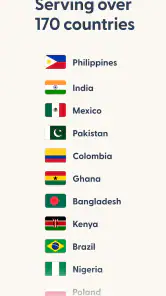
Remitly is designed for international money transfers, but the routes and services available depend on where you are sending from and where the recipient is located. Before downloading, consider whether your intended countries are supported and whether the recipient can use the delivery method you prefer. Check the available options in the app before setting up a transfer.
What do I need to set up a Remitly account and send money?
Remitly is an app for personal and business international money transfers. To get started, you create an account and provide the recipient's information, then choose a delivery method and make the payment. Have the details needed to identify your recipient and complete the transaction ready, and review the information carefully before confirming a transfer.
What is Remitly and how does it work?
Remitly is a digital financial service that allows users to send money internationally with ease. To use Remitly, you simply need to create an account, input the recipient's information, choose the delivery method, and make the payment. The app offers competitive exchange rates and transparent fees, ensuring that your money reaches its destination quickly and securely.
Pros
- Fast money transfers globally
- User-friendly interface design
- Competitive exchange rates
- 24/7 customer support
- Multiple payment options
Cons
- Transaction fees may apply
- Limited currency options
- Requires internet connection
- Verification can take time
- Not available in all countries
- Category
- Finance
- Version
- 6.54.2











