Radio FM
- 35.32K
- 4.4
- Installs
- 100.00M
- Price
- Free
Screenshots


Analysis by Reviewed
I reach for Radio FM when I want live audio without choosing an album or building a playlist first. It is a radio-focused music and audio app from RadioFM, and its appeal is the simple idea of browsing stations rather than managing a personal music library. It has been available since March 21, 2013, and its 4.4 average from around 999,000 ratings suggests that many listeners find that straightforward approach useful. I would think of it as a companion for casual listening, not a replacement for every audio service on a phone.
How quickly you can get to listening
With a station-based app, speed is less about launching into a specific song and more about finding a stream that suits the moment. I find it helpful to decide what I want before I start searching: a location, a genre, or a station I already know gives me a useful starting point. Browsing with no particular direction can turn a quick listening break into a longer hunt, especially when I am not sure what kind of broadcast I am looking for.
Radio FM is free to download, and the developer is RadioFM. In-app purchases range from $0.49 to $36.99 per item, so I would check the purchase details in the app before paying for anything. Its Teen content rating is also worth keeping in mind for families. The app has more than 100 million installs, but that popularity is best read as evidence of broad use, not a promise that every station or listening setup will work equally well for everyone.
What to expect when opening a station
Radio is different from on-demand streaming: you choose a station and join whatever it is playing, rather than picking an exact track. That makes this app a good fit when I want background sound, local programming, or the chance of stumbling into something unfamiliar. The experience depends on the station and connection, so I would not use it when I need a specific song to start at a precise moment. When browsing, I find it more useful to search with a clear clue, such as a country, genre, or station name, than to scroll without a plan.
For a realistic everyday use, imagine getting ready in the morning and wanting something more varied than the same saved playlist. I can look for a station that suits the moment, then keep listening while I make breakfast. Saving a regular choice, when that option is available in the app, can make returning to it quicker than repeating a broad search. I would still keep a backup source of audio for an important commute: live streams can be affected by connectivity, and radio is not the same as a downloaded playlist that is ready offline.
Bringing Global Stations to Your Fingertips
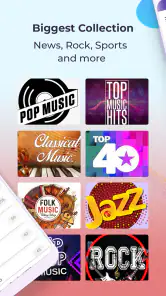
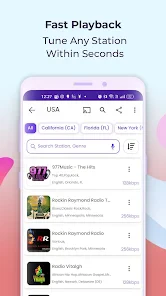
One of the standout features of Radio FM is its extensive directory of radio stations. You can tune into over 50,000 stations worldwide, which is pretty impressive. I mean, who knew you could listen to a local station from Tokyo or Rio de Janeiro with just a few taps? The app’s user interface is super intuitive, making it easy to search for stations by genre, country, or even specific keywords. It’s like having the whole world’s radio dial in your pocket.
Easy Navigation and User-Friendly Design
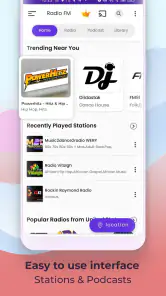
Let’s talk a bit about the design. The developers have done a fantastic job of keeping things simple and straightforward. You won’t find any cluttered screens or complicated menus here. Everything is laid out in a way that just makes sense. Plus, the app runs smoothly without any noticeable lag, which is always a bonus.
More From Our News Desk

Weather by Xiaomi Review: Clear at a Glance, Less Clear Up Close

X Under Pressure: Can It Recover When Posting Goes Wrong?

Clash of Clans Is Won Between the Battles

Android Auto Makes the Case for Quieter Car Software

MobiOffice: Transforming Mobile Productivity with Seamless Integration

EA SPORTS FC™ Mobile Soccer: Redefining Mobile Sports Gaming
Features That Keep You Hooked
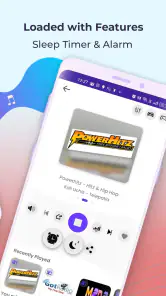
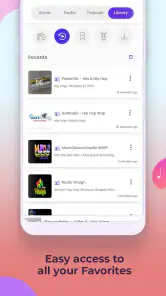
Aside from the vast array of stations, the app offers some cool features that I found quite handy. For instance, you can save your favorite stations for quick access, which is perfect for those times when you just want to jump straight to your go-to music. There’s also a sleep timer feature, which I personally love. It allows you to fall asleep to your favorite tunes without worrying about the app draining your battery all night long.
When radio beats a playlist—and when it doesn’t
The main trade-off is control. A music subscription is usually better when I want a particular artist, album, or track on demand, or when I need downloads for a flight or a dead-zone commute. Radio FM is more appealing when I want a presenter to fill the room, hear a mix I would not have chosen myself, or explore broadcasts tied to a place or style. I see the two formats as serving different moods rather than competing for exactly the same job.
Compared with a regular radio receiver, the app gives me a way to look beyond whatever stations are available over the air where I am. The receiver has the advantage when local reception is strong and I want simple listening without depending on an internet connection. With the app, connection quality matters, and a station may pause or fail to load when coverage is poor. I would choose based on the setting: the phone app for discovery and variety, a receiver for straightforward local listening, and downloaded audio when uninterrupted playback is essential.
Practical listening choices and trade-offs
Favorites are most useful when treated as a small personal dial: I would save a few reliable stations for different situations, rather than bookmarking every interesting result. That keeps the list easy to scan when I have only a moment to choose. The sleep timer also suits a deliberate bedtime routine, but I would set it before putting the phone down and check that playback has stopped as expected instead of assuming any streaming app is automatically gentle on battery.
For spoken audio, the app’s radio-and-podcast focus can be appealing when I want a presenter or a program to carry the listening, while a music subscription is usually the better choice if I need precise track selection, repeatable albums, or offline downloads. A conventional radio receiver may be simpler where reception is dependable and I do not want to rely on mobile data; this app makes more sense when browsing stations across places is the point. It is also worth remembering that live radio follows a schedule, so a program you discover may not be available on demand.
Radio FM is free to download, with in-app purchases ranging from $0.49 to $36.99 per item. Its Teen content rating is useful context for families deciding whether it suits a younger listener, though I would still check what a particular station broadcasts rather than assume every stream has the same tone. With over 100 million installs, it is clearly a widely used option, but popularity alone does not make it right for someone who wants an ad-free, tightly curated listening routine.
Making a dependable routine out of live audio
For a weekday desk session, I would choose a familiar station before settling in, then keep the phone nearby without repeatedly returning to browse. That turns the app into a background companion rather than another screen demanding attention. If I am trying a new station, I would give it a brief listen before relying on it for a longer stretch; the stream may be a poor fit for my mood, or the connection may prove less steady in that location. A small set of known alternatives makes switching less disruptive than starting a fresh search in the middle of a task.
There is also a useful distinction between discovering a station and following a particular program. A saved station makes it easier to revisit the broadcaster, but it does not mean I can choose when a live segment begins or replay something that has already aired. If timing matters, I would look for a service designed around on-demand episodes rather than assume radio behaves like a podcast library. For casual listening, that unpredictability can be part of the charm; for catching a specific interview, it can be a real drawback.
The app may also suit someone who has moved away from a familiar area and wants to explore stations connected with places they care about. Searching by country or station name is a more practical route than hoping a general browse page surfaces the right broadcast. At the same time, a station’s language, schedule, and style may not match what I expect from its location alone. I treat a search result as a starting point, not a guarantee that the stream will be exactly the kind of programming I had in mind.
Reliability, connection, and device limits
In practice, perceived speed is not just how quickly a screen responds; it is also how promptly a stream begins and whether it stays steady. My impression of the interface is positive, but live audio can still be interrupted by a weak connection or a station’s own stream. If a station stops, I would first try it again, then switch to a saved alternative; repeatedly restarting the same stream is unlikely to help if the connection is the problem. This is a sensible app for a stable Wi-Fi or mobile connection, less so for a long stretch with poor coverage.
Long listening sessions call for a little common sense. Streaming audio uses a connection, and the phone’s screen, network conditions, and other running apps can affect battery life and responsiveness. I would pick a station before setting off, lower screen use once playback is underway, and avoid leaving the app open on a bright display. On a device with limited storage, the appeal is that radio listening does not require building a large local music collection; the trade-off is that a reliable connection matters more than it would with downloaded audio.
Keeping expectations realistic on different phones
I would not assume every phone handles a long stream in exactly the same way. Network conditions, battery level, and what else is running can all shape how stable listening feels, so I would test a usual station at home before depending on it for a long trip or an overnight routine. If playback is interrupted, checking whether other online services are also struggling can help distinguish a broader connection issue from a station-specific problem. That simple check is more useful than repeatedly changing settings without knowing what caused the interruption.
For anyone watching mobile data, internet radio deserves the same attention as other streaming audio. I would use Wi-Fi when it is convenient for extended listening and keep mobile listening for situations where the convenience is worth it. The app is not a substitute for locally stored audio when I know I will be offline. Likewise, if the phone is older or already busy with navigation and other demanding tasks, I would keep the screen off where possible and avoid treating a live stream as guaranteed background playback in every circumstance.
The sleep timer and alarm can make the app fit into routines beyond daytime background listening, but they are best used thoughtfully. Before relying on a radio alarm for an important morning, I would check that the chosen station is one I can access reliably and that the phone is set up as intended. For bedtime, I would choose a station with a calm presentation and use the timer rather than leave audio running without a plan. These are small habits, but they help account for the fact that radio depends on a live stream rather than a local file.
Who will enjoy it most
I would recommend this app to curious listeners who like discovering broadcasts, enjoy radio presenters, or want a simple source of background audio for cooking, desk work, or a relaxed evening. It is especially handy when mood matters more than choosing the next exact track. I would steer playlist-focused listeners, frequent travelers with unreliable connectivity, and anyone who needs dependable offline playback toward a service built around downloaded music instead. That distinction is the clearest way to decide whether this radio-first approach belongs on your phone.
It is also a reasonable choice for someone who wants to sample radio without buying a separate receiver, or who likes switching between music and spoken broadcasts from one listening habit. The most satisfied user is likely to be flexible: someone who accepts that a station may not match the moment perfectly and is happy to explore another. If I want to control every song, avoid streaming altogether, or guarantee access on a journey with poor coverage, I would pick another kind of audio app instead.
Final Thoughts
So, is Radio FM worth downloading? In my opinion, absolutely! It’s a great app for anyone who loves music or enjoys discovering new radio stations from around the world. Its user-friendly interface and handy features make it a must-have on your phone. Whether you’re commuting, working, or just chilling at home, this app provides a soundtrack to match your mood. Give it a try, and you might just find your new favorite station!
My performance verdict
Overall, I see Radio FM as a quick way to move from browsing to live listening when I have a decent connection and an open mind about what will be on. The simple navigation and station favorites help keep routine use manageable, while the sleep timer and alarm broaden its usefulness beyond casual daytime playback. Those conveniences do not remove the basic limits of live radio: a stream can depend on network quality, schedules are not under my control, and offline listening is not the strength of this format.
I would install it for discovery, local or international broadcasts, and easy background sound, then keep a downloaded music option available for situations where connection or precise control matters more. RadioFM’s app is free to start, and its 4.4 average across around 999,000 ratings reflects a broad audience for this style of listening. My recommendation is positive with that distinction in mind: it is a useful radio companion, not a universal answer to every audio need.
Radio FM Frequently Asked Questions
Can I listen to podcasts and drama as well as radio on Radio FM?
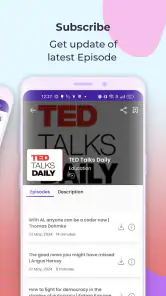
Radio FM is presented as an all-in-one audio streaming app for radio, drama, and podcasts, so it may appeal to people who want more than live radio in one place. The store summary identifies all three types of audio. If you mainly want a particular kind of program, you can explore the app to see whether its available content matches your listening interests.
Who develops Radio FM, and how long has it been available?
Radio FM is developed by RadioFM and was released on March 21, 2013. Its long-standing presence makes it an established option for listeners exploring audio apps. It is designed around listening to radio and other audio content, so it may be worth considering if you want a dedicated place to browse audio on your phone.
What is Radio FM, and who is it for?
Radio FM is a Music & Audio app for people who want to listen to radio and other audio content through one app. Its store summary describes it as an all-in-one audio streaming app for radio, drama, and podcasts. It may suit listeners looking for a convenient way to explore audio on a phone, whether they are settling in for a program or browsing for something new.
What are the main features of the Radio FM app?
Radio FM allows users to stream live radio stations from around the world. It features a user-friendly interface, the ability to save favorite stations, and options for browsing by genre, country, or language. The app also supports background play, which means you can listen to radio stations while using other apps.
Is Radio FM free to use, or does it require a subscription?
Radio FM is free to download and use, offering access to a wide variety of radio stations at no cost. However, the app may have ads, and users might have the option to make in-app purchases to remove them or to unlock additional features, such as an ad-free experience or enhanced streaming quality. In-app purchases are available, so check the purchase details in the app before buying anything.
Pros
- Wide variety of stations available.
- User-friendly interface.
- Free to use with minimal ads.
- Supports background play.
- High-quality audio streaming.
Cons
- Limited offline functionality.
- Some stations may have regional restrictions.
- Occasional buffering issues.
- Lacks advanced customization options.
- Ads can be intrusive at times.
- Category
- Music & Audio
- Version
- Varies with device











