Publix Pharmacy
- 4.16K
- 4.8
- Installs
- 1.00M
- Price
- Free

Screenshots
Analysis by Reviewed
When one person in a household handles several pharmacy errands, the hardest part is often not the refill itself but remembering whose prescription needs attention and when. I can see the Publix Pharmacy app being useful for that kind of routine: it brings prescription tasks onto a phone instead of leaving them scattered among paper labels, calls, and mental reminders. It is a medical app from Publix Super Markets Inc., and its appeal is practical rather than complicated—useful when you already rely on Publix Pharmacy and want to manage prescription errands around an ordinary day.
A household workflow that stays manageable
Picture a weekday when someone notices a prescription bottle is running low while getting ready for work. Rather than waiting until the next trip to the pharmacy to ask about a refill, they can use the app to start handling it from their phone. If another person in the household usually makes the pickup, notifications can help that person keep track of the task too. The benefit is less about turning everyone into a pharmacy manager and more about making one recurring chore easier to remember.
That arrangement works best when the household agrees on who is responsible for each step. A shared routine can prevent duplicate requests or the assumption that somebody else has taken care of a refill. I would still treat the account as a personal health tool, not a general family calendar: discuss who checks notifications and who follows through, rather than assuming the app itself will coordinate every handoff.
Keep account access and expectations clear
Before using a single account for household needs, I would decide whose phone and login are involved and who is allowed to see prescription information. Health details are more personal than a shared shopping list, so convenience should not mean passing around credentials casually. If different adults want separate control over their own prescriptions, separate accounts may feel more appropriate than putting everything under one person’s access.
For parents helping a child or an adult supporting an older relative, it is worth agreeing on the practical boundary: who places refill requests, who receives alerts, and who can speak with the pharmacy if a question comes up. The app can support a routine, but it cannot replace clear consent and communication between people. That distinction matters especially when a relative is capable of managing their own medicines but appreciates help remembering errands.
Your Personal Pharmacy, Anytime
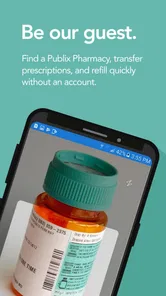
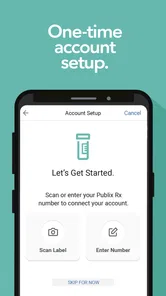
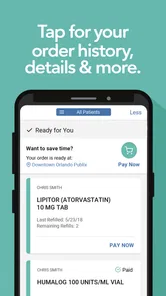
First off, the convenience factor is off the charts. With the Publix Pharmacy app, you’ve got access to your prescriptions 24/7. I mean, who needs to call in or wait in line when you can handle everything with a few taps? Refilling prescriptions has never been easier. You can scan your prescription bottle using your phone’s camera, and boom, it’s added to your cart. It’s like having a pharmacy in your pocket.
Easy Navigation and User Interface
The app is super user-friendly. Whether you’re tech-savvy or just getting the hang of apps, you’ll find navigating this one a breeze. The layout is intuitive, with all the main features easily accessible from the home screen. Plus, the design is clean and uncluttered, which makes using it a pleasant experience.
More From Our News Desk

Weather by Xiaomi Review: Clear at a Glance, Less Clear Up Close

X Under Pressure: Can It Recover When Posting Goes Wrong?

Clash of Clans Is Won Between the Battles

Android Auto Makes the Case for Quieter Car Software

MobiOffice: Transforming Mobile Productivity with Seamless Integration

EA SPORTS FC™ Mobile Soccer: Redefining Mobile Sports Gaming
That straightforward approach is a real advantage for quick errands, but I would not treat the phone as a substitute for the pharmacy counter. If a medicine has changed, a label is hard to read, or a refill raises a question, a pharmacist or the pharmacy team is the better place to get clarification. I see the app as a convenient route for routine tasks, not a way to resolve every medication concern without a conversation.
Health Management at Your Fingertips
Beyond prescriptions, the app also offers some neat features for managing your health. You can set reminders for taking your meds, which is perfect if you’re like me and tend to forget. There’s also a section where you can track your health progress and even get tips on how to maintain a healthy lifestyle. It’s like having a little health coach right in your pocket!
A useful habit is to check the prescription details before starting a refill rather than relying only on memory or a quick scan. A scan can save typing, but it does not remove the need to make sure you selected the intended bottle. For a person managing several prescriptions, handling one request at a time and reviewing the result can reduce mix-ups. I would also keep following the instructions provided by the prescriber and pharmacist; app reminders are prompts, not medical advice.
Family Accounts and Notifications
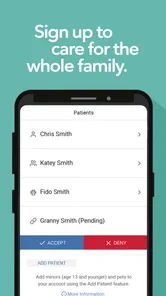
One feature that really caught my attention is the ability to manage family prescriptions under one account. This is especially handy if you’re taking care of multiple family members. You’ll get notifications about refills and pick-up times, which means one less thing to worry about in your busy schedule.
In a household with a teenager, an older adult, or someone who does not use a smartphone, the person handling the phone may become the practical coordinator. I would make the arrangement explicit and keep the patient involved in decisions as much as possible. For a child, a parent may naturally oversee the errand; for an independent adult, support should not quietly become control. Age alone does not determine who should manage an account—comfort, consent, and the family’s actual needs do.
Another cool aspect is the app’s integration with Publix grocery services. You can link your pharmacy account to your grocery shopping, so it’s all streamlined. Talk about a one-stop-shop!
Making coordination work in real life
For a household that shares errands, I would use the app as the place to initiate routine pharmacy tasks, then make the pickup plan explicit outside it. For example, if I notice a refill need while checking a bottle, I can handle the request and tell the person who usually passes the pharmacy which step is theirs. That small handoff avoids relying on someone else to infer what a notification means or whether the errand is already covered.
It also helps to agree on what counts as “done.” Starting a refill is not the same as confirming it is ready, and a pickup reminder is not proof that another person has collected it. I would check the app before making a second request and use a quick household message for the practical details. This is especially useful when two adults alternate shopping trips: the app can keep the pharmacy task accessible, while a direct check-in handles responsibility.
The grocery connection may suit someone who already combines a Publix run with a pharmacy visit, but I would not assume that every prescription task can be folded into the same trip. Treat the pharmacy errand as its own item to verify, particularly if timing matters or the prescription is not a routine refill. Combining tasks is convenient only when it does not lead the household to overlook whether the pharmacy step is actually complete.
When another option makes more sense
Compared with calling the pharmacy, using the app is appealing when the task is routine and you want to deal with it on your own schedule. Compared with a general medication tracker, it is more directly suited to Publix prescription errands; a standalone tracker may be a better fit if your main need is organizing medicines from several pharmacies. Likewise, if you do not use Publix Pharmacy, this app is unlikely to become the central tool you need. Its usefulness depends on the pharmacy relationship, not simply on wanting a health app.
The app is free, rated for Everyone, and has a 4.8 average from around 8.7 thousand ratings, with over a million installs. It was released on May 31, 2017, and version 3.1.12 requires Android 8.0 or later. Those details make it an accessible option for many Android users, though the real deciding question is whether its pharmacy workflow fits your household. I would skip it if you prefer to handle every prescription conversation by phone or need one place to coordinate medicines across unrelated pharmacies.
What to check before relying on it
If you are deciding whether to install it, start with your actual pattern of pharmacy use: do you fill prescriptions at Publix often enough for a dedicated tool to earn a place on your phone? If yes, the app’s value is in making recurring tasks easier to begin and keep visible. If you visit different pharmacies for different medicines, a broader medication organizer or a written list may give you a clearer overall picture, while the Publix app remains useful only for the prescriptions handled there.
I would also make the first use a low-pressure one. Open the app when you have a prescription bottle handy, confirm that you are working with the right details, and learn where the routine refill steps sit before you need them in a hurry. That is more useful than installing it during a rushed moment when a family member is waiting for an answer. A quick practice run can show whether the interface fits your habits without making the app responsible for a time-sensitive decision.
For someone new to pharmacy apps, the main practical question is whether the app is meant to replace a conversation. My answer is no: I would use it to handle familiar administrative steps, then contact the pharmacy for questions about a changed prescription, an unclear instruction, or a problem that needs a person’s attention. That division keeps the convenience while avoiding the mistake of treating a digital workflow as clinical guidance.
Age, trust, and shared devices
The Everyone age rating makes the app broadly suitable from a content perspective, but household access still deserves care because prescription information is personal. A child using a parent’s phone to help with an errand is different from a child being given unrestricted access to an adult’s account. I would keep the account holder involved and avoid treating a family device as permission for everyone to browse health details.
On a phone used by more than one person, practical privacy starts with deciding who can unlock it and who should handle the pharmacy task. If a relative wants help but also values independence, agree on the specific assistance they want rather than taking over every step. That can mean one person helps remember a refill while the patient remains the decision-maker and communicates directly with the pharmacy when needed.
For an older relative who does not use apps, the app may still help the person who regularly assists with errands, but it should not become the only way the family knows what is happening. A simple verbal check-in can confirm whether the relative wants a refill handled and whether anything has changed. The app is most helpful when it supports that conversation, not when it replaces it.
Security and Peace of Mind
Now, I know what you’re thinking—how secure is this app? Rest assured, Publix has got you covered. The app uses top-notch security measures to protect your information, so you can feel safe managing your health data online.
Even with a pharmacy app, I would use sensible account habits: keep access limited to the people who need it and avoid leaving a signed-in device available to everyone in the home. On a shared phone, a lock screen and a clear agreement about who uses the account are especially important. That small bit of care is worthwhile because prescription information is personal, even when the errand is shared.
One trade-off with phone-based access is that the household’s routine can depend on the device being available and the right person seeing a notification. If the main account holder is away, the family should know who is responsible for checking the next step rather than assuming alerts will reach everyone. I would keep an ordinary backup habit—such as noting the errand in a shared household reminder—if missing a refill task would create a problem. That is not a substitute for the app; it is a sensible way to avoid making one phone the sole point of coordination.
In conclusion, the Publix Pharmacy app is an absolute must-have if you want to simplify your pharmacy needs. It’s convenient, reliable, and designed with the user in mind. So why not give it a try? Your future self will thank you!
My household take
I would recommend it most to people who already fill prescriptions through Publix and want a straightforward way to keep routine refills and pickup tasks from slipping through the cracks. For households, the strongest approach is to pair its convenience with a simple agreement about account access and responsibility. It can make coordination easier, but the people involved still need to communicate—and for anything medically uncertain, speaking with the pharmacy remains the sensible choice.
For a single adult, the app can be a handy way to bring everyday prescription errands onto a phone. For a household, it works best when one person’s help does not blur who owns the health information or who makes decisions. I would choose it when Publix is already part of the routine and the goal is easier administration; I would choose a phone call for a complicated question, and a broader tracker if coordinating medicines from several pharmacies matters more. Used with those boundaries, it can make an ordinary pharmacy task feel less easy to forget without pretending to manage the household for you.
Publix Pharmacy Frequently Asked Questions
What devices can run the Publix Pharmacy app?
Publix Pharmacy is a medical app for managing prescriptions on a mobile device. It supports iOS 8.0 and later, so it may suit people using an older iPhone or iPad as well as newer devices. Before downloading, check that your device meets this requirement and that you are installing the app published by Publix Super Markets Inc.
What services does the Publix Pharmacy app offer?
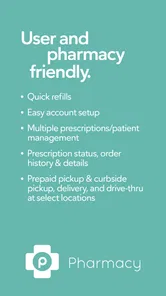
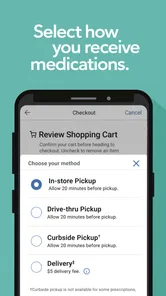
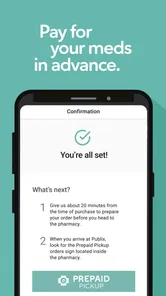
The Publix Pharmacy app offers a variety of services to make managing your prescriptions easier. Users can refill prescriptions, set medication reminders, and check the status of their orders. Additionally, the app allows you to transfer prescriptions from other pharmacies and locate nearby Publix Pharmacy locations, ensuring you have access to your medications when needed.
Is the Publix Pharmacy app free to use?
Yes, the Publix Pharmacy app is completely free to download and use. There are no hidden fees associated with using the app's primary features, such as prescription refills and reminders. However, you will need to have a valid prescription from a healthcare provider to utilize the pharmacy services offered through the app.
Can I manage prescriptions for my family members using the Publix Pharmacy app?
Yes, the Publix Pharmacy app allows you to manage prescriptions for your family members. By adding family profiles within the app, you can refill their prescriptions, set reminders, and view their medication history. This feature is particularly useful for caregivers who need to manage multiple prescriptions for their loved ones.
How secure is my personal information in the Publix Pharmacy app?
The Publix Pharmacy app prioritizes the security of your personal information. It uses advanced encryption protocols to protect your data and ensure privacy. The app complies with all relevant healthcare regulations, such as HIPAA, to safeguard your medical information from unauthorized access. Users can feel confident that their information is secure while using the app.
Pros
- Easy prescription refills
- User-friendly interface
- Secure payment options
- Medication reminders
- Multiple pharmacy locations
Cons
- Limited customer support
- Occasional app crashes
- No international access
- Limited insurance provider integration
- Requires frequent updates