Publix
- 18.80K
- 4.8
- Installs
- 5.00M
- Price
- Free

Screenshots
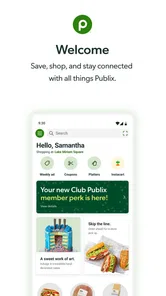
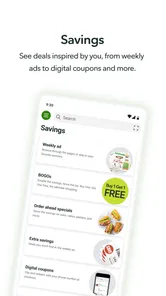
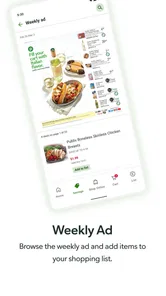
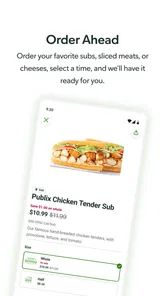
Analysis by Reviewed
I judge grocery apps by what happens after the first burst of curiosity: do they still help when the shopping list is routine, the week is busy, and I do not feel like managing another screen? In my first few days with the Publix app, the appeal was easy to understand. It gives familiar errands a place to organize themselves, bringing store offers, a shopping list, recipes, and store information into one retailer-focused tool. Its lasting value depends less on how many features it has than on whether Publix is already where you shop.
A useful routine, not just a first-week novelty
The longer-term value depends on how often Publix is already part of your routine. If I shop there regularly, checking offers while planning a list can become a natural weekly step rather than another chore. The recipe-to-list workflow is especially practical when I have chosen a meal but do not want to retype every ingredient. I would still review the resulting list before heading out: meal plans change, and a suggested ingredient list is a starting point, not a substitute for checking what I actually need.
A realistic use is planning dinner after work. I can browse recipes at home, add ingredients to a list, then check the ad before leaving. If someone else is picking up groceries, sharing that list can help avoid the familiar back-and-forth about what is missing. The payoff is less about a dramatic transformation and more about keeping the plan, deals, and shopping notes together.
Making a shared list work in real life
A shared list is most helpful when the household treats it as the current version of the plan. I would add items as soon as I notice they are running low, rather than waiting until the person doing the shopping asks what we need. Before leaving, a quick review can catch duplicate entries, items already bought, or ingredients that belonged to a meal plan we have since changed. The app can make coordination easier, but it cannot decide which message or note is the one everyone should follow; the household still needs a simple habit.
This is also a useful way to split a larger shop. One person can add staples during the week, while the shopper checks the list before going in. For a one-off errand, however, sharing may be unnecessary overhead. If the list is only a few items long and nobody else needs to see it, a note on the phone may be quicker. I see the Publix list as a better fit for recurring household shopping than for every tiny stop.
What it asks of you over time
There is some upkeep. Lists need pruning when plans change, and saved offers are useful only if I remember to look through them before shopping. Scanning a barcode can speed up adding a familiar item, but searching or scanning still takes attention, so I would not expect the app to build a perfect basket with no input. For a short, spontaneous stop, a paper note or a quick mental list may be faster.
It also makes most sense when Publix is the store you intend to visit. A general notes app can be more flexible for someone comparing several grocery chains, while a store-specific app is better suited to checking that retailer’s offers and planning around its locations. The Publix app’s convenience is tied to that focus; it is not a universal shopping planner.
More From Our News Desk

Weather by Xiaomi Review: Clear at a Glance, Less Clear Up Close

X Under Pressure: Can It Recover When Posting Goes Wrong?

Clash of Clans Is Won Between the Battles

Android Auto Makes the Case for Quieter Car Software

MobiOffice: Transforming Mobile Productivity with Seamless Integration

EA SPORTS FC™ Mobile Soccer: Redefining Mobile Sports Gaming
Using offers without turning shopping into homework
I would check the weekly ad when I am already deciding what to buy, rather than browsing every deal simply because it is there. That order matters: start with meals and household needs, then see whether an offer fits the plan. It is an easy way to keep coupons from driving unnecessary purchases. A discount only helps when it applies to something I wanted in the first place, and savings are harder to judge if I add items just to feel that I used the app fully.
For a regular shop, I would scan the ad before finalizing the list, then do one last pass through the list at home. That gives me a chance to add an item I genuinely need while avoiding a last-minute rush through offers in the store. If I do not find anything relevant, I can simply shop from the list. The app earns its place by making this check convenient, not by requiring me to treat every trip as a coupon hunt.
Where routine can wear thin
The main risk is feature fatigue. If you do not use recipes, digital coupons, prescription tools, or shared lists, some of the app’s breadth may not matter to you. I would start with one recurring task—such as checking the weekly ad or keeping a shared list—and add more only if they genuinely save time. That keeps the app from becoming another place to maintain information you already track elsewhere.
Store details and the usefulness of a location search matter most when I am away from my usual neighborhood, while the pharmacy section is relevant only to people who use Publix pharmacy services. Those tools can make the app more valuable for the right household, but they are not reasons every shopper needs it. If you rarely shop at Publix, another retailer’s app or a store-neutral list will likely fit better.
Choosing the right tool for the kind of shop
Compared with a general notes app, Publix’s advantage is that the shopping list sits alongside Publix-specific offers, recipes, and store tools. A notes app, by contrast, is often simpler to adapt when the same list needs to work across several supermarkets or when you want to record things unrelated to groceries. I would not replace a reliable general list just for the sake of having more functions; I would switch only if the store-specific information saves enough repeated effort.
Compared with checking offers in a browser or relying on paper, the app keeps planning and browsing in one place. That is convenient for someone who already shops at Publix, but it also makes the experience more dependent on using that retailer’s app as part of the routine. If I am visiting several stores on one trip, a neutral list can remain the clearer master plan, with the Publix app serving as a focused tool for the Publix portion.
How the App Holds Up Beyond the First Shop
First things first, downloading and setting up the app was a breeze. Available on both Android and iOS, the app doesn’t take up much space and installs quicker than you can say "supermarket sweep." Once I opened it, the clean and intuitive design immediately caught my eye. It’s got that friendly vibe that makes you feel like it’s going to be your shopping buddy, not just another app on your phone.
Exploring the Features
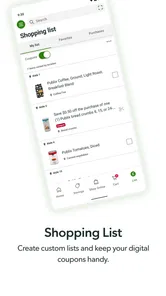
The app is chock-full of features that aim to make your shopping experience as smooth as possible. One of my favorites is the digital shopping list. You can easily add items with a quick search or simply by scanning the barcode. This means less time typing and more time getting things done. Plus, the list is super easy to organize. You can categorize by type or even by aisle, which is a game-changer when you’re trying to navigate a busy store.
Another nifty feature is the weekly ad section. You can browse all the current deals and even clip digital coupons directly in the app. Trust me, nothing feels better than seeing those savings stack up at the checkout! And if you’re someone who loves trying out new recipes, the app’s recipe section is a goldmine. You can find a recipe you like and with one tap, add all the ingredients to your shopping list. It’s like having a personal grocery assistant.
Shopping Made Social
Now, what surprised me was how social the app makes the shopping experience. You can share your shopping lists with family or friends, which is perfect for planning a party or just coordinating weekly groceries with your partner. Plus, the app’s store locator tool is super handy if you’re ever in a new area or looking for a specific item that might not be available at your usual store.
Oh, and did I mention the pharmacy section? If you’re a regular at the Publix pharmacy, you’ll appreciate how easy it is to manage prescriptions through the app. It’s all about convenience, and this app knows how to deliver it.
When it is a good fit—and when it is not
I would recommend it most to people whose weekly routine already includes Publix and who will use at least one of its practical tools consistently. A shopper who checks the ad before setting a budget, a family that shares grocery duties, or someone who wants recipes to feed directly into a list has a clear reason to keep it installed. The value comes from reducing small repeated steps, not from using every section.
I would be less enthusiastic for someone who shops at Publix only occasionally, prefers one list that works equally well at several chains, or dislikes keeping store accounts and routines inside retailer-specific apps. In those cases, a basic list app may be more straightforward. If prescription management is the main reason for installing it, the pharmacy tools may be useful, but shoppers who do not use Publix pharmacy can ignore that part without losing the core grocery-planning value.
Long-term verdict
Publix is a free lifestyle app from Publix Super Markets Inc. It has an average rating of 4.8 from around 142,000 ratings, with roughly 17,000 written reviews and over 5 million installs. It is rated for Everyone, and version 4.76.0 requires Android 10 or later. The app has been around since November 20, 2012, so its appeal is less about novelty than whether its everyday tools earn a lasting place on your phone.
My overall recommendation is for people who shop at Publix often enough to benefit from checking offers, building lists, or using its pharmacy services. If you are deciding whether to keep it after the first week, ask whether it replaces steps you already take: checking paper or online ads, texting a household member, or writing a note. If it gathers those tasks in one place, it can be worth keeping. If you only visit occasionally, it may be easier to use a general list app and skip maintaining another account of your shopping routine.
What to expect before relying on it
One practical question is whether the app suits a household rather than just one shopper. Shared lists are useful when people coordinate, but the benefit comes from everyone agreeing to update the same list instead of sending separate messages. I would also treat digital coupons as something to check while planning, not as a guarantee that every shop will be cheaper; the real value depends on whether the offers match items I would buy anyway.
Another trade-off is that a list organized for a particular store can be easier to follow in that store, yet less convenient if I change plans and shop somewhere else. For a mixed-store household, keeping a simple general list may be the better primary system, with the Publix app used for store-specific planning. That distinction helps avoid maintaining duplicate lists and makes the app feel like a useful companion rather than the only place groceries can be tracked.
Keeping the routine light enough to last
To make the app stick, I would choose one moment in the week to handle the recurring tasks: review the list, check whether any offers match planned purchases, and decide which meals need ingredients. That is more sustainable than opening the app repeatedly without a clear purpose. If a list becomes cluttered, clearing out completed or abandoned items is worth a quick pause; otherwise, old plans can make the next shop harder rather than easier.
I would also avoid treating every available feature as a commitment. Someone who gets reliable value from the ad and a shared list does not need to build a recipe habit or use the pharmacy section. A small, repeatable workflow is more likely to survive busy weeks than an ambitious system that asks every household member to update several things. For me, that is the practical test of whether a grocery app deserves a lasting place on the phone.
Final Thoughts
All in all, the Publix app is more than just a grocery shopping tool; it’s like having a little helper in your pocket. It streamlines the entire process from planning to purchasing and even helps you save a few bucks along the way. Whether you’re a frequent Publix shopper or just looking for a new way to manage your groceries, this app is definitely worth a download. So, next time you’re heading out to get your groceries, give it a try and see how it transforms your shopping experience.
Publix Frequently Asked Questions
What can I use the Publix app for while planning a shopping trip?
The Publix app is a lifestyle app centered on bringing your store’s deals to your phone. It can help you browse grocery products and organize shopping with lists, while Club Publix features include personalized deals and digital coupons. It may be useful to check the app before a trip if you want to plan what to buy and keep store offers in view.
Who develops the Publix app, and is it suitable for all ages?
The app is developed by Publix Super Markets Inc. and has an Everyone content rating, so it is presented as suitable for a broad audience. Its focus is on Publix shopping, store deals, and related grocery features. If you are considering it for a family device, the Everyone rating provides a quick indication of its intended audience.
Is the Publix app free, and which devices can use it?
Publix is a free lifestyle app from Publix Super Markets Inc. It is available for Android and iOS, and the current version requires Android 10 or later. The app is suitable for everyone. Before downloading, check that your device meets the operating-system requirement so you can install and use it smoothly.
What is Publix and what services does it offer?
Publix is a supermarket chain app that allows users to shop for groceries online. Through the app, users can browse a wide variety of products, including fresh produce, dairy, bakery items, and more. The app offers services like home delivery, curbside pickup, and personalized shopping lists, making grocery shopping convenient and efficient for its users.
How can I create an account on the Publix app?
To create an account on the Publix app, download it from the App Store or Google Play Store. Once installed, open the app and select 'Sign Up.' You will need to provide your email address, create a password, and enter some personal information such as your name and phone number. Follow the prompts to complete your registration and start using the app.
Pros
- User-friendly interface
- Wide range of products
- Convenient online shopping
- Loyalty rewards program
- Fast and reliable delivery
Cons
- Limited international shipping
- Occasional app crashes
- Requires stable internet
- Limited payment options
- No dark mode available













