PREQUEL AI Filter Photo Editor
- 6.44K
- 4.6
- Installs
- 50.00M
- Price
- Free
Screenshots
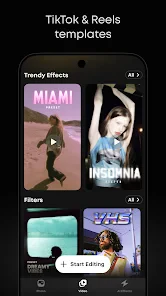
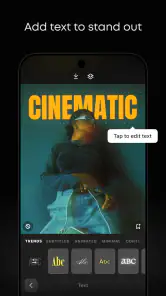
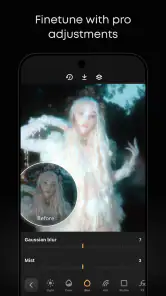
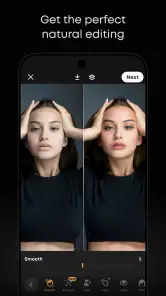
Analysis by Reviewed
I usually open a photo editor with one small job in mind: make a picture feel more like the moment I remember, without spending ages tuning every slider. PREQUEL AI Filter Photo Editor is aimed at that kind of quick, expressive edit, with a strong emphasis on stylized looks for both photos and video. It is a free photography app from Prequel Inc., and its 4.6 average rating across around 346,000 ratings suggests that plenty of people enjoy the same filter-first approach. I find it most appealing when I want a clear visual mood rather than a technically perfect, neutral correction.
When a connection changes the editing rhythm
The network question matters most when I am browsing effects rather than making a basic adjustment. PREQUEL is centered on a changing collection of creative looks, so I prefer to explore and choose a direction when my connection is steady. If something takes longer to load than I expect, I would not keep tapping the same option; I would move to a look already available on screen or return to the photo later. That small change in habit keeps a quick edit from turning into a frustrating wait.
I also separate deciding on a style from finishing the picture. I can browse first, settle on a mood, and then make the smaller edits that suit the image. That is more useful than opening a photo while I am already rushing to post and trying to audition every effect at once. The app is most enjoyable for me when I treat browsing as its own creative step instead of expecting every part of the process to happen instantly.
A useful fit for short mobile sessions
PREQUEL makes the most sense when I have a few minutes with my phone and a clear outcome in mind: make a travel picture feel warmer, give a casual portrait a more distinctive look, or bring a visual mood to a short video. It is less suited to a long, meticulous editing session where I want to manage every detail precisely. The filter-led approach gets me to a recognizable style quickly, but it does not remove the need to judge whether that style works for the particular subject.
For example, after taking a café photo, I might pick one preset, adjust brightness or color slightly, and check the crop before sharing. I would avoid scrolling through every option if I were about to meet someone. With a clip, I would choose the overall direction before applying edits across it; changing the look repeatedly halfway through can turn a simple mobile task into unnecessary work.
What to do when an edit stalls
When browsing or previewing does not feel responsive, I find it better to simplify the task than to repeatedly retry the same action. I can stop testing effects, make a modest adjustment that is already available, or leave the edit until I can continue comfortably. This is a practical distinction between a creative effects app and a basic editor: the more time I spend exploring a library, the more the experience depends on being able to browse without interruption.
I would also protect an image I care about before experimenting with a strong treatment. Keeping the untouched original separately gives me a straightforward way back if the final result feels too intense. This is especially useful for family pictures, important travel shots, or anything I might want to edit again in a different style. It is a simple habit, but it removes the pressure to get every choice right on the first try.
More From Our News Desk

Weather by Xiaomi Review: Clear at a Glance, Less Clear Up Close

X Under Pressure: Can It Recover When Posting Goes Wrong?

Clash of Clans Is Won Between the Battles

Android Auto Makes the Case for Quieter Car Software

MobiOffice: Transforming Mobile Productivity with Seamless Integration

EA SPORTS FC™ Mobile Soccer: Redefining Mobile Sports Gaming
Making data-conscious choices
I would use the app deliberately if I am trying to limit mobile data: decide what I want to edit, avoid aimless browsing through effects, and leave a long session of exploration for a time when I am comfortable using the connection. That is not a claim about a particular data setting; it is simply a more controlled way to use an editor whose appeal includes browsing creative options. If I am unsure whether an effect is worth exploring, I can compare a few likely choices rather than opening every one.
There is another useful trade-off: the boldest look is not necessarily the best one to keep. A preset that changes the whole image dramatically can be attractive in preview and still obscure the details I wanted to remember. I tend to compare the result with the original before deciding, especially when the subject is a face or a scene with subtle colors. A little restraint often gives the picture more character without making it feel disconnected from the moment.
A World of Filters at Your Fingertips
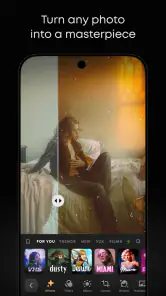
One of the most compelling features of PREQUEL AI Filter Photo Editor is its extensive library of filters. Seriously, it feels like there’s an option for every mood and theme you could think of. From retro and vintage vibes to futuristic and aesthetic feels, this app has got you covered. What’s cool is that they keep updating the filter library, so you’ll never run out of options to experiment with. Trust me, diving into this app is like stepping into a digital playground for your photos.
That breadth is useful, but it can also make choosing a look the slowest part of editing. I get better results when I begin with the feeling I want—warm and nostalgic, for example—rather than browsing every option in sequence. A subtle preset can give a portrait personality without overwhelming skin tones, while a stronger effect may work better on a scene where texture and color matter more than natural detail. I also compare the result with the untouched image before committing; a dramatic preview can be fun, but it is not always the best version to share.
Editing Tools That Wow
Besides the filters, the editing tools here are top-notch. You can adjust the usual suspects like brightness, contrast, and saturation. But what sets it apart are the unique tools such as the AI effects, which can completely transform your image into something out of a fantasy. You can also play around with blurring effects, overlays, and other creative adjustments. It’s like having a mini professional photo studio right in your pocket!
My practical tip is to treat the preset as a starting point, not a finish line. If a filter makes a cloudy-day photo too heavy, easing back the contrast or saturation can keep the mood while bringing back detail. For portraits, I’d check faces and highlights closely: an effect that looks striking across the whole frame may be less flattering on skin. This is where a few restrained adjustments can make an edit feel personal instead of like a one-tap template.
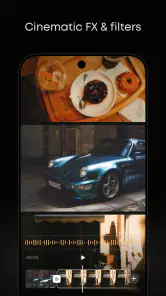
And let’s not forget about the video editing capabilities. That’s right, you can apply these amazing filters and edits to your videos, too! Whether you’re posting a quick story or a full-length vlog, PREQUEL makes it super easy to elevate your video content.
Using It on the Move
Connectivity is worth considering because PREQUEL is built around a changing collection of creative effects, and browsing that collection can make the experience feel more network-dependent than a basic editor with a fixed set of manual controls. When I’m choosing a look, I prefer to do that while I have a steady connection rather than leave the decision until I’m rushing to post. If a preview or collection takes longer to appear, I can switch to a simpler edit instead of repeatedly tapping and waiting.
For an everyday example, imagine taking a quick café photo and wanting to share it before meeting a friend. I would pick one preset, make a small brightness or color adjustment, and check the crop before moving on. That short workflow suits PREQUEL better than trying to test every effect on a weak mobile connection. If I’m making a video, I’d also decide on the general look before editing the whole clip, so I don’t spend time changing direction halfway through.
User Experience and Design
Now, let’s talk about usability. The interface is slick and intuitive, making it easy for anyone to navigate. Even if you’re not a tech wizard, you’ll find it straightforward to apply effects and make edits. The design is visually appealing without being cluttered, ensuring that you have a smooth editing experience without any hitches.
Plus, the app is pretty quick. I’ve used some photo editors that take forever to load or crash midway through an edit, but PREQUEL is impressively stable and fast. It’s designed to enhance your creativity without those annoying technical hiccups.
As with any effect-heavy editor, a busy screen and many choices can still interrupt a quick job, and the result depends on the image you start with. A filter that works on a colorful street scene may not suit a dim indoor shot. I’d save the original separately when the picture matters, then try a bolder treatment on a copy; that gives me room to experiment without losing a natural version. For routine exposure fixes or precise, repeatable color work, a conventional editor with more direct controls may be a better fit.
Choosing the Right Workflow
PREQUEL is a strong match for people who enjoy a recognizable style and want effects without building a look from scratch. It is also handy for creators who move between still images and short videos and want a similar creative direction across both. By contrast, anyone who mainly needs careful retouching, consistent product colors, or detailed manual corrections may prefer a more technical photo editor. PREQUEL’s strength is its expressive range, not replacing every specialized tool.
There is a useful trade-off in that range: a striking effect can make a post memorable, but using the same conspicuous treatment on every image can make a feed feel repetitive. I’d keep a small set of favorite looks for different situations—one for portraits, another for travel or objects—and adjust each image rather than applying a single signature indiscriminately. That gives a more coherent style while still letting the lighting and subject lead.
The Community and Inspiration
Another aspect I love about this app is the community vibe. PREQUEL AI Filter Photo Editor has a pretty active user base, and you can get loads of inspiration from the edits and styles shared by others. It’s like a never-ending source of creative ideas that keeps you coming back for more.
Its reach is substantial, with over 50 million installs, and the app is rated for Everyone. The current version is 1.95.1, and it runs on operating systems from version 10 onward. PREQUEL is free to download, with optional in-app purchases ranging from $0.49 to $39.99 per item. I’d explore the free experience first and consider a purchase only if I know I’ll use the relevant option regularly; the range makes it sensible to check the price attached to an item before committing.
PREQUEL was released on May 24, 2020, and it has received around 6,400 written reviews. Those figures tell me it is an established app, but they do not settle whether its style suits a particular person. I’d judge it by editing a few different images: a portrait, a bright outdoor shot, and a dimmer indoor picture. That quick test reveals more than a single dramatic preview, especially if you care about keeping faces and natural colors believable.
In conclusion, if you’re someone who loves to play around with photo and video editing, or if you just want your social media posts to stand out, this app is a fantastic choice. It’s easy to use, packed with features, and continuously evolving, ensuring you always have fresh content to work with. So, go ahead and unleash your creativity with PREQUEL!
My final recommendation is to choose PREQUEL for mood, experimentation, and fast visual personality—not as a substitute for every editing tool. It is especially enjoyable when I have time to browse effects over a reliable connection, then refine one look instead of piling on adjustments. If I need exact control or dependable speed while connectivity is uncertain, I’d reach for a simpler, more manual workflow. For casual creators who want photos and videos to feel more distinctive, though, it is an approachable place to start.
PREQUEL AI Filter Photo Editor Frequently Asked Questions
What should I check before installing PREQUEL AI Filter Photo Editor?
PREQUEL AI Filter Photo Editor is a photography app from Prequel Inc. for people interested in giving photos and videos a more stylized look. Before installing, check that your device meets the operating-system requirement and consider whether you are comfortable with optional in-app purchases. The app is free to download, and its content rating is Everyone.
What kinds of edits can I make with PREQUEL AI Filter Photo Editor?
PREQUEL focuses on photo filters and video effects, with retro and vintage presets among its creative options. It is suited to users who want to change the mood or appearance of images and clips without treating the app as a full professional editing suite. The range of edits you use will depend on the filters and effects available in the app.
Is PREQUEL AI Filter Photo Editor suitable for beginners?
Yes. PREQUEL AI Filter Photo Editor is designed for creative photo editing, so you can explore its filters and effects without needing professional editing experience. Its focus on presets makes it approachable for people who want to give pictures a different look quickly, while still leaving room to experiment with more expressive edits.
Can PREQUEL AI Filter Photo Editor edit videos as well as photos?
Yes. PREQUEL offers video effects alongside its photo filters, making it useful if you want a consistent creative style across both pictures and clips. Its store summary highlights retro and vintage presets for editing pictures, while the app’s broader focus includes effects for video. The available editing options may vary depending on the feature you choose.
What is Prequel AI Filter Photo Editor?
Prequel AI Filter Photo Editor is a versatile photo editing app that offers a wide array of filters and editing tools. Known for its unique AI-driven features, it allows users to transform their photos with artistic effects, enhancing visuals creatively. It's a favorite among users who love to experiment with their images.
Pros
- User-friendly interface for quick edits.
- Wide range of unique filters available.
- Fast processing even for high-res photos.
- Regular updates with new features.
- Intuitive design for easy navigation.
Cons
- Limited features in the free version.
- Occasional ads disrupt editing flow.
- Some filters require in-app purchases.
- High battery consumption during use.
- Requires stable internet for best results.
- Category
- Photography
- Version
- 1.95.1












