GIO: AI Headshot Generator
- 1.37K
- 4.4
- Installs
- 1.00M
- Price
- Free

Screenshots
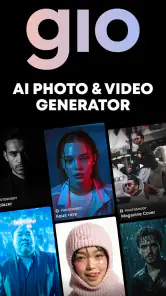
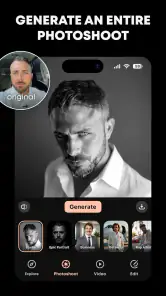
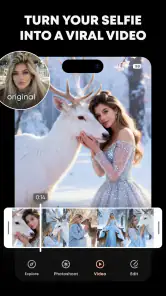
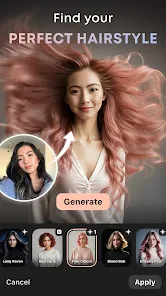
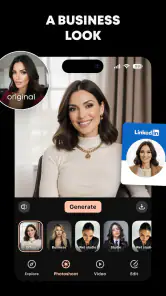
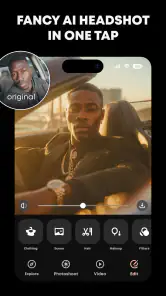
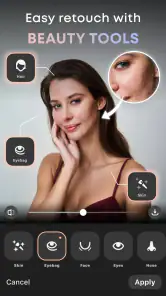
Analysis by Reviewed
I’d treat GIO as a quick creative tool for a specific job: turning a personal photo into a more polished, work-ready portrait. That can be useful when a new profile picture is suddenly needed and arranging a photographer feels like too much effort. It is a photography app from Prequel Inc., and its focus is much narrower than a full photo editor: the goal is a headshot, not a complete set of tools for retouching every kind of image.
Choose the right starting point
For a profile image, the best result is not necessarily the most dramatic one. I’d begin with a clear, recent selfie that shows my face plainly, rather than a heavily filtered picture or an image with distracting shadows. That gives the app a more useful starting point and makes it easier to judge whether the finished portrait feels credible. A polished image is only helpful if colleagues, clients, or interviewers would recognize me in person.
This is where an AI headshot workflow differs from taking a selfie and adjusting it in a general-purpose editor. An editor gives me direct control over individual changes; GIO is intended to handle the transformation toward a studio-style portrait. That is convenient when speed matters, but it also means I should review the result carefully instead of assuming every generated detail is right. I would compare the image with my source photo before using it anywhere professional.
Make a portrait fit the moment
Picture needing a new profile photo before updating a résumé or sending a portfolio to a prospective client. I could choose a suitable selfie, make a headshot, then save the version that looks most like me and use it consistently across those materials. That avoids the delay of organizing a formal shoot, while keeping the task small enough to do between other errands. For a small business owner or freelancer without a current portrait, that convenience may be the main reason to try it.
I would not use one generated portrait blindly for every context. A friendly image may suit a social profile, while a more restrained look may fit a résumé or company bio. If I’m choosing between results, I’d prioritize natural expression and recognizable features over dramatic lighting or a style that feels impressive at first glance. The practical test is whether the image supports the impression I want to make, not whether it looks the most artificial or polished.
Where it fits among photo tools
Compared with a regular camera app, GIO is aimed at producing a finished headshot rather than helping me capture and adjust a standard photograph. Compared with a broad editing app, it offers a more focused route to that particular outcome, but less reason to choose it when I want detailed manual control over a landscape, product shot, or everyday picture. I’d pick it for a quick portrait task; for precise retouching or a consistent set of brand images, a conventional editor or a professional photographer may be a better fit.
There is also a sensible trade-off in relying on generated imagery for work. If a role, client, or organization expects a literal photograph, I’d use an ordinary photo instead of presenting an AI-created portrait as a documentary image. And if the first output does not resemble me closely enough, I would rather start over with a better source photo or use a real camera than keep polishing an image that feels wrong. That judgment matters more than getting a result quickly.
More From Our News Desk

Weather by Xiaomi Review: Clear at a Glance, Less Clear Up Close

X Under Pressure: Can It Recover When Posting Goes Wrong?

Clash of Clans Is Won Between the Battles

Android Auto Makes the Case for Quieter Car Software

MobiOffice: Transforming Mobile Productivity with Seamless Integration

EA SPORTS FC™ Mobile Soccer: Redefining Mobile Sports Gaming
From first pass to a portrait worth using
Hey there, tech enthusiasts! Have you ever found yourself in a pinch, needing a professional headshot but just can’t seem to get one done? Well, let me introduce you to an app that’s been making waves in the digital sphere: GIO: AI Headshot Generator. This nifty app is here to save the day by crafting stunning headshots using the magic of AI. Let’s dive into what makes this app a must-have!
What the AI approach means
So, what’s the deal with GIO? Essentially, it’s an app designed to generate professional-grade headshots using artificial intelligence. Imagine having a personal photographer in your pocket, ready to snap the perfect picture anytime you need it. The app uses advanced algorithms to analyze your features and create a headshot that looks like it was done in a studio. Pretty cool, right?
A straightforward start, with a review step
One of the first things I noticed about this app is its super user-friendly interface. Even if you’re not the most tech-savvy person out there, don’t sweat it. The app guides you through the process step-by-step, making it nearly impossible to mess up. Just upload a selfie, let the AI work its magic, and voilà! You’ve got yourself a professional headshot.
The easy path through the app is useful when I’m making a portrait in a short break, but I’d still treat the generated image as a draft. I look closely at the face, hairline, and expression, then compare them with the original selfie. The more polished the lighting appears, the more important that comparison becomes: a convincing studio feel is not a substitute for an accurate likeness. If something about the result seems unlike me, I wouldn’t try to explain it away just because the image looks tidy.
Judge realism by the details
Now, you might be wondering about the quality of these AI-generated headshots. Let me tell you, they are impressive. The details and lighting adjustments make the images look incredibly realistic. It’s like having a professional photographer tweak your photos to perfection. Plus, the app gives you options to customize your headshots, ensuring you get the look you’re going for.
For a useful second look, I’d step away from the screen for a moment and return to the image with the intended audience in mind. Ask whether the portrait still reads as a plausible version of you rather than an idealized character. This is particularly worthwhile if the picture will appear beside written work, a business profile, or a résumé, where people may later meet you in person. A small mismatch can matter more there than it would on a casual social account.
Think about the destination before choosing
Whether you need a headshot for LinkedIn, a resume, or even your social media profiles, this app has got you covered. It’s versatile enough to cater to different styles and preferences, which is a huge plus. I mean, who doesn’t love a good multitasker?
A practical workflow is to decide on the destination before settling on a look. For a professional profile, I’d favor a crop that keeps my face easy to recognize at thumbnail size and an expression that feels approachable without looking staged. For a portfolio page, I might allow a little more personality, as long as the image does not fight with the work around it. This is a small decision, but it prevents choosing a portrait that looks appealing full-screen and becomes awkward once it is placed in context.
The app also allows you to save and share your headshots directly from the app, making it super convenient when you’re on the go. No need to worry about downloading and uploading images across different platforms.
Keep handoff simple and deliberate
For handoff, I’d keep the saved portrait alongside the original selfie until I’ve checked how it looks in its destination: a small profile circle, a résumé page, or a larger portfolio layout can make the same image feel quite different. Cropping is worth checking before sharing, especially if the framing that looks balanced on a phone becomes tight in a profile thumbnail. I’d also keep a second, less stylized option if I’m unsure how formal the final setting should feel.
When sharing a portrait, I’d avoid treating speed as a reason to skip a final check. Confirm that the version I’m sending is the one I chose, that it crops sensibly in the destination, and that the image still feels appropriate for that audience. If I’m preparing several materials at once, using the same approved portrait can make them feel consistent; if the audience or tone changes, a different, more natural photo may be the better handoff.
Cost and compatibility in practice
GIO is free to install and is rated for everyone, so it is easy to explore without committing to a paid download. It has a 4.4 average from around 88,000 ratings, and more than a million installs. In-app purchases range from $0.99 to $49.99 per item, so I’d check what a particular choice costs before assuming every part of the workflow is included at no charge. The app’s current version is 1.22.1, and it requires Android 9 or later.
That purchase range is a reason to decide what I actually need before spending: I’d first see whether the available result and customization suit the intended use, then consider any paid choice only if it solves a specific problem. Someone who only needs a single profile update may have a different threshold from a creator who expects to revisit the app for several portraits. The free install makes trying the workflow approachable, but it does not mean every option should be treated as included.
Who benefits, and who may prefer another route
I’d recommend it to someone who needs a usable portrait quickly, is comfortable starting from a selfie, and does not want to learn a full editing suite just to update a profile. It is also a reasonable option for a freelancer who needs a temporary headshot while planning a more deliberate brand shoot. Someone who wants exact control over lighting, wardrobe, background, or a set of matching team portraits should lean toward a photographer or a manual editing workflow instead.
It is also less suitable if the image needs to document a real event, satisfy a strict identity or professional-photo requirement, or represent a team whose portraits need to match precisely. In those cases, a conventional camera photo or a planned shoot gives me a more direct relationship between the final image and what was actually photographed. GIO’s focused convenience is most valuable when a polished personal portrait is the goal and a generated interpretation is acceptable.
One useful habit is to decide the intended use before making a portrait, then judge the result at the size and tone that use demands. A casual social profile can tolerate more personality; a résumé usually benefits from a straightforward image that keeps attention on the person. The app’s customization can help shape the look, but the final choice is still yours. If a result looks polished yet no longer feels like you, it is not the right one to publish.
My take on using it as a creative tool
All in all, GIO: AI Headshot Generator is a game-changer in the realm of digital photography. It’s perfect for anyone who needs a quick and professional-looking headshot without the hassle of a photoshoot. The app is efficient, easy to use, and delivers high-quality results. So, if you’re in need of a headshot and want to skip the traditional route, give this app a shot. You won’t be disappointed!
My recommendation is more specific than that enthusiasm suggests: I’d use it as a convenient first route to a profile portrait, not as a replacement for every kind of photography. Its focused process suits a busy person who can provide a clear selfie, inspect the likeness, and make a careful choice about where the image will appear. If you need exact creative control, documentary accuracy, or a coordinated set of portraits, another route is likely to serve you better. For a quick, considered headshot, though, it can make the gap between “I need a photo” and “I have one ready to review” much easier to bridge.
GIO: AI Headshot Generator Frequently Asked Questions
What devices and operating systems can I use with GIO: AI Headshot Generator?
GIO: AI Headshot Generator is designed for mobile photography, and its minimum operating-system requirement is version 9. Before downloading, check that your device runs a compatible system and has enough room for the app and the photos you want to work with. The app is available for Android and iOS, so you can choose the version that matches your device.
Who develops GIO: AI Headshot Generator, and what should I expect from the app?
GIO: AI Headshot Generator is developed by Prequel Inc. and focuses on creating polished portraits, particularly business headshots. Its store summary describes it as a realistic photo studio for business headshots, hair styling, and photoshoots. That gives you a clear sense of its intended use: refining portrait images rather than serving as a general-purpose camera or photo library.
What is GIO: AI Headshot Generator?
GIO: AI Headshot Generator is an innovative application designed to create professional quality headshots using artificial intelligence. It caters to individuals who need polished and sophisticated profile pictures for professional, social, or personal use. Users can generate high-quality images without the need for a professional photographer, saving both time and money while ensuring top-notch results.
Who is GIO: AI Headshot Generator designed for?
GIO is aimed at people looking for polished business headshots or profile pictures, including professionals who want an image for work-related use. Its focus is photography, with a store description that presents it as a realistic photo studio for business headshots, hair styling, and photoshoots. It may also suit anyone who wants a more refined portrait for personal or social profiles.
How does GIO: AI Headshot Generator work?
GIO: AI Headshot Generator uses advanced AI algorithms to analyze and enhance your photos, transforming them into professional-grade headshots. Simply upload a photo, and the app will automatically adjust lighting, remove blemishes, and correct any imperfections. The result is a polished image that is perfect for resumes, social media profiles, or any other professional needs.
Pros
- Easy-to-use interface for quick photo editing.
- High-quality output suitable for professional use.
- Customizable settings to suit personal preferences.
- Fast processing time for generating images.
- Integrates well with social media platforms.
Cons
- Limited free features compared to competitors.
- Requires strong internet for smooth operation.
- Occasional glitches in face detection.
- Subscription needed for premium features.
- Not available on all devices.
- Category
- Photography
- Version
- 1.22.1












