Hula - AI Video Generator
- 1.66K
- 4.5
- Installs
- 1.00M
- Price
- Free

Screenshots
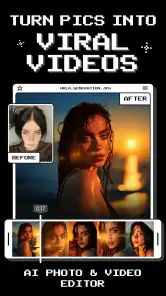
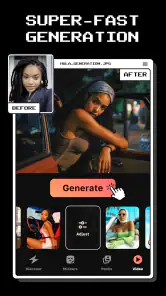
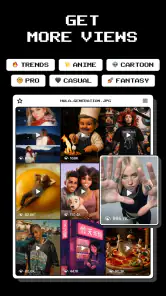
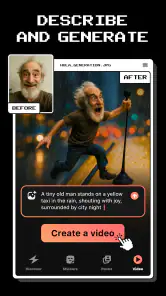
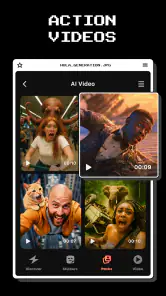
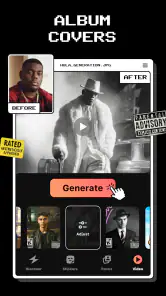
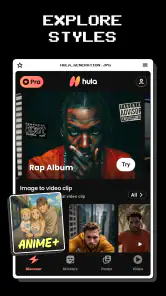
Analysis by Reviewed
I tend to judge creative apps by what happens after the first burst of curiosity: do I still reach for them when I have an ordinary photo to share, or do they become clutter? Hula - AI Video Generator makes a strong first impression because its central idea is easy to grasp: use a still image as the starting point for a moving, stylized result. It sits in the photography space, but its appeal is really for people who want a quick visual transformation without learning a full editing workflow.
The first-week appeal: quick experiments with a clear purpose
In the first few sessions, I’d use Hula for playful portraits, a short post for social media, or a small surprise to send to a friend. It is especially suited to trying out realistic and anime-inspired treatments, so one useful approach is to begin with a photo where the subject is easy to recognize and the background is not too busy. That gives the transformation a better chance of being the focus instead of competing with clutter.
A practical everyday example: after taking a favorite picture on a walk, I might turn it into a brief visual greeting rather than building a video from scratch. I’d keep the source image simple, preview a couple of treatments, and choose the one that still looks like the person or place I meant to share. That last check matters; a striking effect is not automatically a flattering or faithful one.
Choosing photos that give the effect room to work
I’d also think about the photo’s purpose before opening the app. A clear portrait or a memorable travel image gives the transformation one obvious subject. A crowded group shot, a dim image, or a frame with several competing focal points may be harder to judge, because visual novelty can distract from the reason I wanted to keep the picture. The simplest practical test is to ask whether I would still like the original image if the effect did not work out.
For a personal post, I would keep the original beside the generated result and compare them before sharing. That is not just a backup habit: it helps me notice whether the new version adds a mood or merely changes details I cared about. If a friend’s face or a landmark no longer reads clearly, I’d choose another image rather than trying to force the effect to rescue it.
Where it fits among photography apps
Compared with a conventional photo editor, Hula is about changing the feel of an image rather than carefully correcting exposure, cropping every edge, or retouching small details. Compared with a full video editor, it lowers the effort required to get a moving, stylized result, but it is not the tool I’d choose when I need precise timing, layered footage, or detailed control over a finished project. I see it as a creative shortcut, not a replacement for either kind of specialist app.
That distinction helps set expectations. If I want to make a polished sequence from several clips, I’d reach for a dedicated editor. If I only want a portrait to feel more animated or imaginative, Hula is the more direct experiment. The best results are likely to come from treating it as a finishing idea for selected photos, rather than expecting every image in my camera roll to become a compelling video.
More From Our News Desk

Weather by Xiaomi Review: Clear at a Glance, Less Clear Up Close

X Under Pressure: Can It Recover When Posting Goes Wrong?

Clash of Clans Is Won Between the Battles

Android Auto Makes the Case for Quieter Car Software

MobiOffice: Transforming Mobile Productivity with Seamless Integration

EA SPORTS FC™ Mobile Soccer: Redefining Mobile Sports Gaming
It also occupies a different niche from filters that simply adjust color or add a familiar overlay. Hula’s appeal is the sense of transformation from a still image, so it is better suited to a one-off visual moment than to correcting a whole batch of photos in a consistent style. If my main goal is a reliable look across a business account or a family album, I would favor tools built around repeatable adjustments. If I want to surprise someone with a single image that feels less static, this is where Hula makes more sense.
Unleashing Creativity with AI
Alright, let me break it down for you. Hula - AI Video Generator is this super cool app that uses artificial intelligence to help you create stunning videos with minimal effort. Now, I'm no video editing guru, but this app made me feel like one. The user interface is sleek and intuitive, making it a breeze to navigate through all the features. Seriously, even if you're a total newbie, you'll find yourself whipping up professional-looking videos in no time.
Features That Make It Stand Out
First off, the range of templates available is mind-blowing. Whether you're crafting a promo video, a vlog, or just some fun content for social media, there's a template for everything. And the best part? These templates are fully customizable. You can tweak the colors, text, and even the music to fit your vibe.
Another feature I absolutely loved is the AI-powered editing tools. The app analyzes your clips and suggests edits that would enhance the overall look and feel of your video. It's like having a personal video editor right in your pocket. Plus, the built-in music library is pretty vast, so you’ll always find the perfect track to accompany your visuals.
Making it a repeat habit
For month-to-month value, I’d give Hula a small, deliberate role rather than trying to use it for every post. A recurring habit could be turning one meaningful photo into a short visual keepsake at the end of a trip, a birthday, or a family gathering. That keeps the app useful without making the novelty effect the only reason to open it. It is also a sensible way to compare styles: save the original, try one treatment at a time, and decide whether the result suits the occasion before sharing.
There is a trade-off in that workflow. AI transformations can make an image feel fresh, but they can also shift details or produce a look that feels less personal than the original. I would avoid using an effect on an image where accurate appearance matters, such as a professional headshot or a photograph intended to document a specific moment. For casual creativity, a little visual surprise is the point; for faithful editing, ordinary photo tools are a better fit.
For example, I can imagine using it after a weekend away: I pick one photo that captures the trip, make a stylized version to send to the people who came along, and leave the rest of the album untouched. That gives the app a clear job rather than turning every memory into an experiment. It is also a useful way to learn what kinds of source images suit the transformations I like, without spending time processing a whole folder.
Who gets the most from it
Hula is a good match for someone who already enjoys sharing portraits, playful edits, or occasional visual greetings and wants a simple route to a more animated presentation. It may also suit a casual creator who needs an eye-catching post now and then but does not want to assemble a video from multiple clips. The strongest reason to keep it is having a handful of photos whose emotional value makes a fresh treatment worthwhile.
I would be less inclined to recommend it to someone whose everyday work depends on exact edits, consistent branding, or control over a video’s structure. A small business preparing a carefully timed product demonstration, for instance, would be better served by a dedicated video editor. Likewise, anyone who mainly wants natural retouching or dependable color correction should use a conventional photo editor first. Hula’s distinctive appeal is also its limitation: it is aimed at transformation, not comprehensive image management.
Maintenance, cost, and reasons to take a break
Hula is free to download, with in-app purchases ranging from $0.99 to $99.99 per item, so I’d explore the experience before paying for anything and check what a purchase unlocks in the app. Its age rating is Everyone, and Prequel Inc. is the developer. The app has a 4.5 average from around 128,000 ratings, with roughly 1,700 written reviews and over a million installs. It is on version 2.20.0, was released on January 15, 2025, and requires Android 10 or later.
Maintenance is mostly about keeping expectations and your own workflow tidy: choose a few photos that are worth transforming, keep the unedited originals, and avoid making several near-identical versions just because the effects are tempting. That small bit of restraint helps prevent a crowded camera roll and makes it easier to find the version you actually want. I would also treat the app as an occasional creative tool rather than a daily necessity; if you rarely share stylized images, it may not earn a permanent place on your home screen.
Before spending money, I would first decide what I want to make and see whether the free experience already serves that purpose. The available purchase range is broad, so I would not assume that paying is necessary for a casual experiment or that every purchase offers the same kind of value. A sensible approach is to explore the options in the app, understand what a particular purchase gives access to, and only then judge whether it fits how often I expect to use Hula. If I cannot name a specific recurring use, I would hold off.
Keeping the workflow light
One small habit makes a noticeable difference: I would make a separate choice about the source image before thinking about effects. Picking a photo because it has a clear subject and matters to me keeps the process focused; browsing endlessly for something that might look interesting can turn a quick creative break into a chore. After making a result, I would keep only the version I genuinely prefer and leave the original intact.
That also helps answer a common practical concern: whether this is an app to open every day. I do not think it needs to be. It is more naturally useful at moments when I have a reason to make one image feel special, rather than as a routine editor for everything I capture. If an app only earns its keep through frequent use, Hula may feel intermittent. If I value occasional, personal experiments, a lighter rhythm is enough.
Smooth Performance
Now, let's talk about performance. The app runs smoothly without any annoying lags or crashes, which is a huge plus in my book. I mean, there's nothing more frustrating than an app that keeps freezing up, right? But with Hula, I had none of that nonsense. Everything was seamless from start to finish.
And if you're worried about compatibility, don't be. The app is available on both Android and iOS, so no matter what device you're rocking, you're good to go. The installation process is straightforward, and it doesn't take up much space, which is always a win.
For Android users, the minimum requirement is Android 10, so it is worth checking that before planning to install it on an older device. More generally, I would treat a transformation as something to review rather than accept automatically. The point is not simply that the image has changed; it is whether the result still works for the person who will see it and the message I want to send. Taking a moment to make that judgment is more useful than generating a stack of versions without a clear favorite.
When the novelty fades
The likely source of fatigue is repetition: once you have tried the visual styles that suit you, another transformation may not feel as surprising. I’d keep it for occasions when I want a photo to do something unexpected, then take a break when the results start to look interchangeable. People who want dependable, natural-looking corrections or exact control over video edits may be happier with a standard photo editor or a timeline-based video app instead.
Another possible source of fatigue is decision-making. If I keep reopening the app to compare minor variations without knowing what I want, the process can become less enjoyable than simply sharing the original. I would set a simple stopping point: try a couple of directions, choose the one that best suits the photo, or decide that the original is already right. This keeps experimentation playful and stops the tool from making an ordinary post feel like a project.
Wrapping It Up
In conclusion, if you're looking to take your video creation game to the next level, Hula - AI Video Generator is definitely worth checking out. It's packed with features that make video editing fun and accessible, all while delivering high-quality results. Trust me, once you start using it, you'll wonder how you ever managed without it. So why not give it a whirl and see the magic unfold?
Happy video creating!
My long-term verdict
I’d recommend Hula to someone who enjoys experimenting with portraits and wants a low-effort route from a still photo to a more expressive result. I would skip it if I needed fine-grained editing controls, a consistent professional look, or a reason to make videos every day. Its lasting value depends on whether occasional, personal experiments are enough for you; used that way, it can remain a fun tool instead of a novelty that demands constant attention.
For me, the deciding question is not whether Hula can make a photo look different, but whether I can picture a real moment when I would want that difference. A birthday message, a favorite travel portrait, or a lighthearted post gives the app a purpose. If those moments come up naturally, it can deserve a place among my creative tools. If I mostly want accurate edits or complete video projects, I would choose a more specialized alternative and let Hula stay off my regular rotation.
Hula - AI Video Generator Frequently Asked Questions
Who develops Hula - AI Video Generator, and how popular is it?
Hula - AI Video Generator is a photography app developed by Prequel Inc. It has an average rating of 4.5 from around 128,000 ratings, with about 1.7 thousand written reviews and over one million installs. Those figures suggest that many people have tried it, though whether its creative tools suit you will depend on what you want to make.
When was Hula released, and what version is available?
Hula was released on January 15, 2025, and its current version is 2.20.0. If you are checking whether to install it, these details help identify the app and version you are considering. You can also check the app store on your device for the version offered to you and any updates available.
Is Hula - AI Video Generator free to download, and does it include paid features?
Hula is free to download, so you can try the app without paying upfront. It also offers in-app purchases, with prices ranging from $0.99 to $99.99 per item. Keep that distinction in mind before creating content: downloading the app is free, but some features or options may involve an additional purchase.
What kind of images and videos can I create with Hula?
Hula is a photography app that turns photos into videos and helps users create images in realistic or anime styles. That makes it suited to people who want to give still images a more animated, creative presentation. The app’s focus is on AI-assisted visual creation, so it may appeal to casual users as well as creators exploring new looks for their content.
What is Hula - AI Video Generator?
Hula - AI Video Generator is an innovative application designed to simplify the process of creating high-quality videos with the help of artificial intelligence. It allows users to transform their ideas into engaging video content quickly and effortlessly, making it ideal for content creators, marketers, and anyone interested in video production.
Pros
- Easy to use interface
- High-quality video generation
- Fast processing time
- Variety of templates available
- Integration with social media
Cons
- Limited customization options
- Requires internet connection
- Subscription needed for full features
- Occasional processing errors
- Limited free version
- Category
- Photography
- Version
- 2.20.0












