Plantify: AI Plant Identifier
- 974.00
- 4.3
- Installs
- 5.00M
- Price
- Free

Screenshots
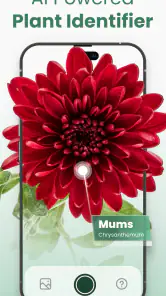
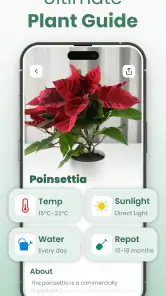
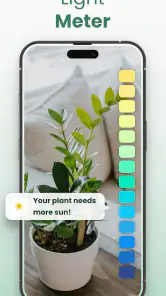

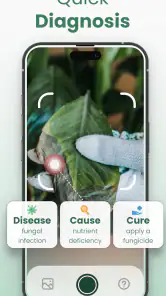
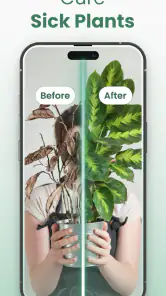
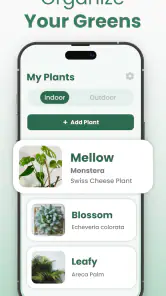
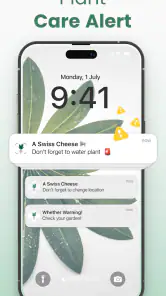
Analysis by Reviewed
I find plant-identification apps most useful when they help me turn a quick question into a sensible next step: learning a name, checking whether a plant might suit my home, or knowing what to look up before changing its care. Plantify: AI Plant Identifier is aimed at that curious, practical moment. It makes sense for casual plant owners and people who like noticing greenery on walks, though I wouldn’t treat a photo match as a substitute for careful identification when a mistake could matter.
What to check before choosing a plant app
For me, the main decision is whether I want a quick visual starting point or a deeper reference I can verify. A camera-based identifier is convenient when I don’t know a plant’s name, but photos can be misleading: a close-up of one leaf may hide differences between similar species, and poor light or damage can make a match less dependable. I get the best result by photographing a clear, healthy part of the plant and treating the answer as a lead to investigate, not an unquestionable verdict.
That distinction matters most when the question involves eating a wild plant, handling an unknown species, or diagnosing a serious problem. In those cases, I’d compare several reliable sources or ask a knowledgeable person rather than relying on a single app result. For everyday curiosity and routine houseplant learning, though, an identification tool can save time and give me useful vocabulary for further research.
Getting to Know Your Green Friends
The Plantify: AI Plant Identifier app is like a botanical encyclopedia that fits right in your pocket. It’s designed to make plant identification as easy as snapping a photo. Seriously, all you need to do is point your camera at the plant in question, and bam! The app gives you a rundown of what you’re looking at, complete with its scientific name, common names, and a bit of background info.
A Handy Tool for All Plant Lovers
Whether you’re a seasoned gardener or just someone who loves having a few plants around the house, this app is super handy. I took it for a test drive in my local park and was amazed by how quickly and accurately it identified everything from towering trees to tiny shrubs. It’s like having a personal plant guru who never gets tired of answering your questions.
What’s cool is that Plantify doesn’t just stop at identification. It goes a step further by providing care tips tailored to each plant. So, if you’re wondering how much sunlight your new leafy friend needs or how often you should water it, this app has got you covered. It’s like a plant care handbook that’s always updated and right at your fingertips.
Where it fits in a real routine
A useful way to try it is during a normal errand rather than setting aside a special “plant research” session. Imagine spotting an unfamiliar tree on the walk home: I’d take a clear picture, note the suggested name, then check the surrounding leaves or flowers before saving the result. Later, that saved identification can help me remember what I saw and give me a starting point for learning more. For a houseplant, I’d use the care guidance as a prompt to observe its light and watering conditions, not as an automatic schedule; rooms and seasons can change what a plant actually needs.
More From Our News Desk

Weather by Xiaomi Review: Clear at a Glance, Less Clear Up Close

X Under Pressure: Can It Recover When Posting Goes Wrong?

Clash of Clans Is Won Between the Battles

Android Auto Makes the Case for Quieter Car Software

MobiOffice: Transforming Mobile Productivity with Seamless Integration

EA SPORTS FC™ Mobile Soccer: Redefining Mobile Sports Gaming
That workflow also shows where a little patience pays off. If the first image gives an uncertain-looking answer, try another view that includes more of the plant rather than repeatedly photographing the same detail. A leaf, its arrangement on a stem, and any visible flowers can all help distinguish lookalikes. This is a practical tip, not a guarantee: some plants are hard to separate from photos, so I’d keep the identification provisional when the distinction has real consequences.
User-Friendly Experience
The interface is super user-friendly, which is a big plus for tech newbies like me. The navigation is intuitive, and the design is clean and straightforward. Plus, the app doesn’t bombard you with ads, which is a refreshing change from other free apps. It’s clear that a lot of thought has gone into making sure users have a smooth and enjoyable experience.
One feature I really appreciate is the ability to save and organize your plant identifications. You can create a little gallery of the plants you’ve discovered, complete with notes and care instructions. It’s a great way to keep track of your plant adventures and maybe even impress your friends with your newfound plant knowledge.
Making the gallery useful over time
I’d treat the saved collection as a field notebook rather than just a trophy shelf. When I identify a plant outdoors, a quick note about the location and the visible features can make the entry useful later, especially if I’m comparing it with another specimen. At home, I’d record what I actually observe—such as whether a plant sits near a bright window or has been watered recently—rather than simply copying general care guidance. Those details make it easier to spot patterns without assuming the app’s advice is a fixed recipe.
This habit also helps if an identification changes after closer inspection. Instead of deleting the first result, I can keep the original observation and add what led me to reconsider it. That’s a small but valuable distinction for anyone learning plant names: the goal is not to collect perfect answers immediately, but to improve how carefully I notice leaves, stems, flowers, and growing conditions.
How it compares with other ways to identify plants
Compared with a general web search, Plantify gives me a direct photo-led route to a possible name and related care information, instead of making me guess which words to search. A field guide or a specialist gardening reference can be better when I want to compare detailed characteristics or check a difficult identification, but those options take more effort and background knowledge. I see this app as a convenient first stop, with books, trusted references, or expert advice still useful for questions that need certainty.
The saved gallery is most valuable if I use it deliberately. I’d add a short note about where I found a plant or what its leaves looked like, because a name alone may not remind me which specimen I meant weeks later. For plants at home, notes can also help me connect care observations with the individual plant instead of assuming that every plant with a similar name behaves exactly the same way.
Choosing between a camera, a guide, and a person
Each identification method solves a slightly different problem. A photo-based app is the convenient option when I’m standing beside an unfamiliar shrub and need a starting point. A printed guide or a detailed online reference is better when I’m willing to compare multiple traits and want to understand why one species fits better than another. Asking a local gardener or botanically knowledgeable person can be the wiser route when the answer affects safety or a costly gardening decision.
That means Plantify doesn’t have to replace the tools I already use. I can let it suggest search terms, then check those terms against a trusted reference, or use its care information to decide what question to investigate next. If I mainly want a structured lesson in plant taxonomy, a dedicated course or field guide is likely to offer more depth. If I want a low-friction way to notice and record plants as I go about my day, this app’s approach is a better match.
Who should choose it—and who might not
Plantify is a good fit if you’re building confidence with common garden and houseplant questions, or if you want an easy way to make walks more observant. It is also approachable for someone who doesn’t know botanical terms yet: a suggested name gives you words to use when reading further. If you already rely on a detailed botanical key, need rigorous species verification, or want professional diagnosis for a failing plant, a dedicated reference or qualified specialist may serve you better.
It’s free to download, but the app includes in-app purchases, so I’d check the purchase details in the app before committing to anything. The developer is Codeway Dijital, and its 4.3 average rating from around 70,000 ratings, alongside over 5 million installs, suggests it has found a broad audience. It is rated for Everyone, which suits its accessible learning angle. On Android, it requires version 5.0 or later; the current version is 1.4.6.
What the cost means in practice
Free installation makes it easy to try the basic experience, but I wouldn’t assume every useful option is included at no cost. Plantify has in-app purchases ranging from $6.99 to $364.99 per item, a wide span that makes it sensible to inspect exactly what an offer covers before tapping through. I’d first try the tasks I actually care about—identifying a few plants and checking whether the saved collection suits me—then decide whether any paid option fills a real need.
That approach is especially helpful if you’re comparing it with a book or a general search habit. Those alternatives may involve no app purchase, but they require more time and, in the case of a printed guide, choosing and carrying a reference. I’d weigh convenience against the specific purchase screen in front of me rather than treating payment as necessary just because the app offers it. The free starting point is enough to judge whether the photo-and-gallery workflow fits your routine.
Switching habits and setting expectations
If you already keep plant notes in a notebook or use a general identification tool, switching does not need to mean abandoning that routine. I’d try Plantify on a few plants I can already recognize, then compare whether its suggested names and care pointers are useful to me. That small test helps separate a genuinely helpful workflow from the novelty of taking pictures. You can keep using a book or another reference for tricky cases while using the app for quick discoveries and an organized record.
The main trade-off is convenience versus certainty. A fast photo result can make learning feel accessible, but it can also encourage overconfidence if I accept the first match without checking the plant itself. I’d be especially cautious with lookalikes and care advice that seems too broad for the conditions in my home. The app works best when it supports observation rather than replacing it.
A practical trial before relying on it
For a fair test, I’d start with a plant whose identity I already know, photograph it in clear light, and see whether the suggested result is plausible. Then I’d try a less familiar plant and compare the answer with visible features instead of judging solely by how confident the result sounds. This gives me a feel for whether the app is useful in my own surroundings, where lighting, plant variety, and photo quality all affect the experience.
If I’m using it to care for a houseplant, I’d make one change at a time. For example, I wouldn’t alter watering, light, and placement together just because a care tip suggests an adjustment; I’d observe the plant and make a measured change that suits its actual setting. The app can help me frame the question, but a plant’s response over time remains important evidence. That’s a more reliable way to use a quick reference than treating any care note as a guaranteed diagnosis.
Final Thoughts
In a nutshell, Plantify: AI Plant Identifier is a fantastic tool for anyone who loves plants or just wants to learn more about the greenery around them. It’s informative, easy to use, and just plain fun. Whether you’re on a hike, visiting a botanical garden, or just curious about the plant sitting on your windowsill, this app is your go-to guide.
So, next time you’re puzzling over a plant, give Plantify a try. It might just become your new favorite app, helping you connect with nature one snap at a time. Happy plant hunting!
Plantify: AI Plant Identifier Frequently Asked Questions
What does Plantify offer beyond identifying plants?
Plantify’s store summary describes it as a way to identify plants and find flower, tree, and gardening care guidance and tips. That makes it relevant not only when you are curious about a plant you have spotted, but also when you want to learn more about caring for plants. Its focus is educational, so it can serve as a starting point for exploring plant topics.
Can Plantify help me learn about flowers, trees, and gardening?
Yes. Plantify is presented as an app for plant identification as well as flower, tree, and gardening care guidance and tips. This mix may appeal to someone who wants to explore different kinds of plants or pick up general care information while gardening. It is a handy educational companion, though you should use your own judgment when applying care advice to a particular plant or situation.
Who develops Plantify: AI Plant Identifier, and what kind of app is it?
Plantify: AI Plant Identifier is an education app developed by Codeway Dijital. Its focus is making plant identification and learning about plants more approachable, whether you are curious about a flower you spotted or looking for help with gardening. The app is free to download, and it is rated for everyone, so its intended audience includes a broad range of users.
What is Plantify: AI Plant Identifier and how does it work?
Plantify: AI Plant Identifier is an innovative app designed to help users identify plants using artificial intelligence. By simply taking a photo of a plant, the app analyzes the image and provides detailed information about the plant species, care instructions, and other relevant data. This makes it an essential tool for plant enthusiasts, gardeners, and anyone interested in botany.
Is Plantify: AI Plant Identifier free to use?
Plantify offers both free and premium versions. The free version provides basic plant identification features, while the premium version unlocks additional features such as detailed plant care guides, unlimited identifications, and ad-free usage. Users can choose according to their needs and budget, making it accessible to everyone. In-app purchases range from $6.99 to $364.99 per item, so check the available options before choosing a purchase.
Pros
- Identifies plants accurately in seconds.
- User-friendly interface for easy navigation.
- Extensive database of plant species.
- Provides care tips for each plant.
- Offline mode available for convenience.
Cons
- Requires premium for some features.
- Occasional misidentification issues.
- Limited language support.
- Ads can be intrusive.
- No community features for plant sharing.
- Category
- Education
- Version
- 1.4.6













