Plant Identifier & Plant Care
- 748.00
- 2.7
- Installs
- 1.00M
- Price
- Free

Screenshots
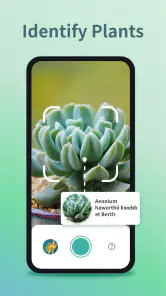
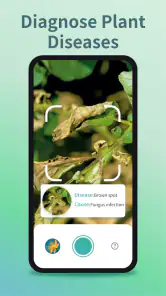
Analysis by Reviewed
I often reach for a plant identifier when a leaf or flower catches my eye and I can’t put a name to it. Plant Identifier & Plant Care makes that first step feel approachable: rather than searching through pages of photos, I can start with a picture and use the result as a lead. It is an educational app from Braly JSC, and its main appeal is the link between recognizing a plant and finding guidance to look after it.
Why a photo can be a useful starting point
Plant identification is most helpful when it turns curiosity into a better question. A suggested name gives me something concrete to investigate, while care guidance can point me toward factors worth checking, such as the plant’s growing conditions. I treat an identification as a starting point, not an unquestionable verdict: similar-looking plants, a blurred image, or a close-up that hides the leaf shape can all make recognition less certain.
For a more useful photo, I try to include a clear view of the leaves and, when possible, a flower or other distinctive feature. I avoid strong shadows and busy backgrounds, and I take another picture from a different angle if the first result seems surprising. That small habit matters because a plant’s overall shape can be as informative as one attractive bloom. It also helps me avoid acting on care advice before I’m reasonably sure what I’m looking after.
From identification to a practical care routine
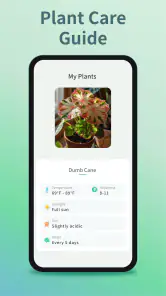
After identifying a plant, I can use the care material to guide what I check next. The app’s plant-care focus is useful for beginners who are unsure where to start, but I wouldn’t treat a reminder or general schedule as a command to water automatically. Soil, light, pot size, and room conditions affect how quickly a plant dries out. I use guidance as a prompt to inspect the plant and its soil, then decide what it needs in that moment.
A realistic use is bringing home an unfamiliar plant and taking a photo before choosing a spot for it. Once I have a likely identification, I can read about its needs and watch how it responds in the space I picked. If the leaves look different from the app’s description, or the plant seems unhappy, I’d reassess the identification and conditions rather than keep following the same routine. That makes the app more useful as a learning aid than as an automatic plant doctor.
Where it fits among other plant tools
Compared with manually searching the web, a photo-based identifier can save the effort of guessing the right search terms. Compared with a general gardening guide, it connects the question “What is this?” with “How might I care for it?” in one place. Still, a field guide or a knowledgeable local gardener may be a better choice when the plant is difficult to distinguish or the consequences of a wrong identification matter. I’d also seek expert help for serious plant-health problems rather than rely on an app alone.
The care reminders can help someone who forgets to check plants, but I find them most useful as nudges, not fixed instructions. A schedule that works for one home may not suit another, especially when light and temperature differ. I’d start with a few plants I know well, compare the advice with their actual condition, and adjust my routine before relying on reminders across a whole collection. This makes it easier to notice when a general suggestion doesn’t fit a particular pot or room.
More From Our News Desk

Clash of Clans Is Won Between the Battles

Android Auto Makes the Case for Quieter Car Software

MobiOffice: Transforming Mobile Productivity with Seamless Integration

EA SPORTS FC™ Mobile Soccer: Redefining Mobile Sports Gaming

How Microsoft OneDrive Became a Mobile Productivity Giant

How Google Translate Breaks Language Barriers Effortlessly
Getting Started with Ease
So, let me walk you through my experience with this app. First off, downloading and setting up Plant Identifier & Plant Care was a breeze. The user interface is intuitive, and I was up and running within minutes. As soon as you open the app, you’re greeted with a simple layout that guides you to either identify a plant or learn how to care for it. It's as straightforward as it gets.
Identifying Plants: A Snap!
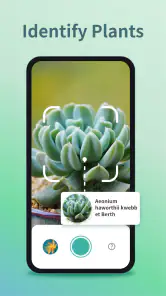
One of the standout features of this app is its plant identification capability. I tested it out on a few of my houseplants, and let me tell you, it was like magic. You snap a photo of the plant, and within seconds, the app provides you with detailed information about it. It’s not just about putting a name to the plant; the app dives deep into its characteristics, native habitat, and even fun facts. Who knew my peace lily has such a rich history?
Plant Care Tips: Your Green Thumb Guide
Now, onto the plant care section, which is equally impressive. Whether you're a seasoned gardener or a newbie plant parent, the app offers tailored advice for each plant species. I found the watering schedule particularly helpful. No more guessing games about whether your fern needs a drink or if it's had enough. Plus, the app sends reminders so you’re always on top of your plant care game.
Turning an identification into a useful decision
The identification is most valuable when I use it to decide what to inspect, rather than treating a name as the finish line. If I’m unsure about a plant in a garden bed, I take a photo that shows the leaf arrangement and the whole growth habit, then use the result to narrow down what to compare. A second picture of a flower, fruit, or stem can help me notice details I missed at first. That process is more dependable than repeatedly photographing the same leaf from the same angle.
This also changes how I use the care advice. I look for a practical next step—whether the plant prefers a brighter place, for example—then make one modest adjustment and observe it before changing several things at once. If a plant improves or declines, I have a clearer idea of what mattered. For a new houseplant, this is a calmer approach than immediately changing its location, watering pattern, and potting setup based on one identification.
A small routine for houseplants and outdoor finds
For everyday use, I’d keep identification and care checks tied to moments when they answer a real question. A plant from a market might need a name before I choose a spot for it; an unfamiliar volunteer in the yard might be worth identifying before I pull it out. On a walk, I can photograph a flower to satisfy curiosity, then compare its visible features with the suggested result later. In each case, the photo is a useful record as well as an input.
One helpful habit is to include a familiar object or a wider view in a separate photo when size or growth pattern matters. I wouldn’t rely on a close crop alone: it can conceal whether a leaf belongs to a shrub, a groundcover, or a young tree. I also try to photograph the plant in natural light without cutting or handling it. That keeps the process simple and avoids damaging something I may not recognize.
Why You’ll Love This App
What truly sets this app apart is its community feature. You can join a global network of plant enthusiasts, share your plant photos, and get advice from fellow green thumbs. It's like having a support group that actually understands your obsession with succulents!
For me, that social angle is most valuable when I use it to compare observations, not to replace careful identification. If a community member suggests a different plant name, I’d take that as a reason to retake a clearer photo or check distinctive features. Advice from other enthusiasts can be encouraging, but care suggestions can vary with climate and growing conditions, so I still make the final call based on what I see at home.
Where a second opinion matters
A photo-based result can be a poor basis for a high-stakes decision. I would not use a likely name as proof that a wild plant is safe to eat, suitable for a pet, or harmless to touch. Similar species can be difficult to separate from a single image, and a mistake in those situations has consequences beyond choosing the wrong watering routine. A regional field guide or a qualified local expert is the better choice when certainty matters.
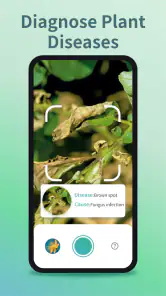
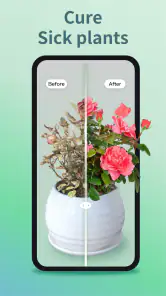
The same caution applies to diagnosing a sick plant. A photograph may help me describe what I’m seeing, but yellow leaves, spots, or drooping can have several causes. I would check the soil and growing conditions and look for changes in the plant before deciding on a treatment. If the problem is spreading or the plant is valuable, I’d seek knowledgeable help instead of assuming an app’s identification or general care notes amount to a diagnosis.
Plant Identifier & Plant Care isn't just for plant identification or care; it's a holistic tool for anyone looking to enhance their gardening skills. The app updates regularly, ensuring you have the latest plant care tips and identification technology at your fingertips.
Who is likely to get the most from it?
I’d recommend it most to curious beginners, houseplant owners building confidence, and casual walkers who like learning the names of plants they encounter. It’s less suitable for someone who needs definitive species verification, specialist botanical references, or a diagnosis they can safely act on without a second opinion. The app is free to download, rated for Everyone, and has more than a million installs; its average rating is 2.7 from around 3,300 ratings, so I’d approach it with realistic expectations rather than assume every result will satisfy every user.
Its best audience is someone who wants a quick bridge between a photograph and a follow-up question. A beginner can use it to learn what details distinguish one houseplant from another, while a casual gardener can make a short list of candidates before checking a regional reference. People with a large or unusual collection may still find it handy for common plants, but they should expect to verify difficult identifications elsewhere. If you mainly want a structured botany reference or dependable treatment advice, a specialist source is a better fit.
The app is currently version 4.3.0 and requires Android 7.0 or later. Optional in-app purchases range from $2.99 to $64.99 per item, so I’d explore the free experience first and decide whether any paid option is worthwhile for my own routine. Its release date was May 30, 2024, and the mix of identification, care guidance, and community makes it more appealing as a casual learning companion than as a professional reference.
What to expect before settling into it
The app is free to start, but the presence of optional purchases means I’d check what is available before building a routine around a paid feature. I’d begin with a few identification attempts and see whether the results are useful for the plants I actually encounter. That gives me a fair sense of its value without assuming I need to pay to get started. Anyone who prefers a completely offline reference or a one-time printed guide may be happier with another option.
I would also keep expectations grounded around consistency. A clear photo of a familiar houseplant is a much fairer test than a distant shot of a young wild plant with no flowers. If one result feels off, I’d change the image or use another source rather than conclude that every result is unreliable—or accept the first suggestion simply because it appeared. The value is in making identification easier to begin, not removing the need for judgment.
In conclusion, if you’re looking to transform your gardening experience from "meh" to "wow," this app is a must-have. Whether you’re identifying a plant on a hiking trail or nurturing your indoor jungle, it’s got you covered. Happy planting!
Plant Identifier & Plant Care Frequently Asked Questions
Is Plant Identifier & Plant Care free to download, and are there in-app purchases?
Plant Identifier & Plant Care is free to download, so you can try its plant-identification and care features without paying upfront. It also offers in-app purchases, with prices ranging from $2.99 to $64.99 per item. Check the purchase details in the app before confirming anything, especially if you plan to use it regularly or want access to additional features.
Who develops Plant Identifier & Plant Care, and is it intended for a particular age group?
Plant Identifier & Plant Care is developed by Braly JSC and is rated Everyone, making it suitable for a general audience. Its educational focus and approachable plant-care guidance may appeal to curious learners, gardeners, and families exploring plants together. As with any app that offers purchases, parents may want to review purchase settings before letting children use it independently.
What is Plant Identifier & Plant Care and how does it work?
Plant Identifier & Plant Care is a mobile application designed to help users identify various plant species using advanced image recognition technology. Simply take a photo of the plant you wish to identify, and the app will quickly analyze and provide you with detailed information about the plant's name, characteristics, and care instructions. This tool is perfect for plant enthusiasts, gardeners, and anyone interested in learning more about plants.
Is Plant Identifier & Plant Care suitable for beginners?
Yes, Plant Identifier & Plant Care is highly suitable for beginners. The app provides user-friendly features that guide you through the process of identifying and caring for plants. It includes easy-to-understand care tips and instructions, making it accessible even for those with little to no prior knowledge about plants. Whether you're a novice gardener or just curious about plant species, this app is an excellent companion.
What are the main features of Plant Identifier & Plant Care?
Plant Identifier & Plant Care offers several key features, including a sophisticated plant identification tool, detailed plant information, personalized plant care reminders, and a plant diary to track growth. Additionally, it provides expert advice on plant health and troubleshooting, ensuring your plants thrive. The app's comprehensive database covers a wide range of plant species, making it a versatile tool for plant lovers.
Pros
- Accurate plant identification.
- Comprehensive plant care tips.
- User-friendly interface.
- Offline database access.
- Regular updates with new plants.
Cons
- Requires in-app purchases.
- Limited free features.
- Occasional identification errors.
- Ads in the free version.
- Needs internet for updates.

- Category
- Education
- Version
- 4.3.0