Pinkfong Shapes & Colors
- 49.00
- 3.7
- Installs
- 1.00M
- Price
- Free

Screenshots




Analysis by Reviewed
I’d treat Pinkfong Shapes & Colors as a short, guided activity for introducing early shape and color ideas, rather than a complete preschool curriculum. Its bright presentation and touch-based play are aimed at young children, and I found that the simplest way to use it is alongside real objects: after a round, ask your child to spot a circle on a plate or name the color of a toy. That small step turns screen time into a conversation instead of leaving the learning inside the app.
When a connection affects the experience
Connectivity is worth thinking about before handing a phone or tablet to a child. I wouldn’t assume every part of the experience will be available without a connection, so I’d open the app and check that the activity I want to use is ready before travelling or settling in somewhere with unreliable service. That quick check helps avoid a child tapping into a screen that is still loading when they expect to start playing.
For a predictable routine, I’d choose an activity at home first and see how smoothly it moves from the opening screen into play. If a song or game takes time to become available, a parent can guide the child through that transition rather than leaving them to interpret a pause as a broken game. The useful takeaway is simple: test the flow once when you have time, then use the app in the situations where it behaves reliably for your household.
Small-screen play in everyday settings
A short wait at home, a quiet moment before dinner, or a calm break between activities can suit this kind of focused learning better than an extended stretch of unsupervised screen time. I’d sit nearby for the first few sessions, both to help with unfamiliar taps and to notice whether a child is enjoying the matching and recognition tasks or merely repeating actions quickly. That makes it easier to keep the activity gentle and age-appropriate.
On a phone, younger children may need an adult to steady the device and help them avoid accidental taps near the edge of the screen. A tablet can feel more comfortable for dragging and matching, but the larger display doesn’t remove the need for guidance. In either case, I’d keep the session short and use the app as a prompt for talking, pointing, and naming things together rather than as a substitute for hands-on play.
Colorful Learning Adventures
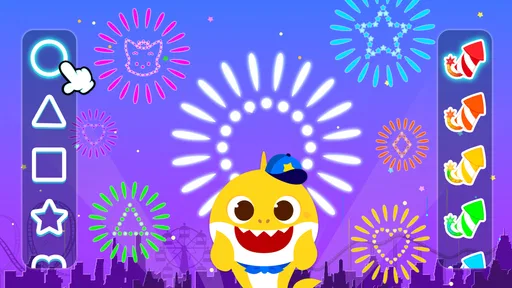
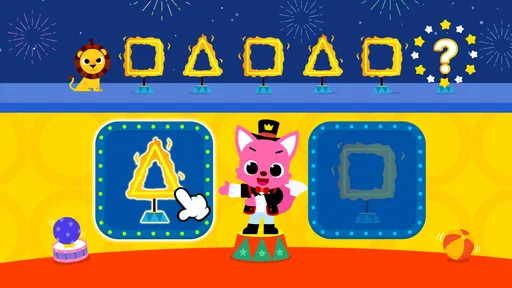
At first glance, Pinkfong Shapes & Colors seems like your typical kids’ app, but let me tell you, it’s packed with educational goodness. The app is designed to teach kids about different shapes and colors through interactive songs and games. Each game is crafted to be both educational and entertaining, which is a win-win for both parents and kids.
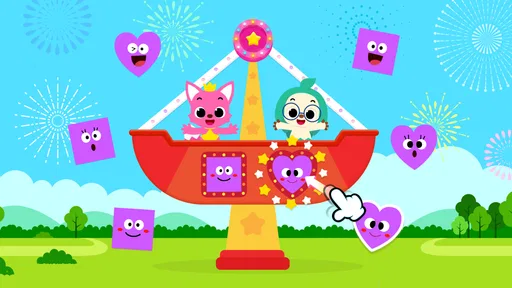
The app features a variety of mini-games that focus on recognition and differentiation. These games are structured to reinforce the learning of shapes and colors in an intuitive manner. My kids absolutely loved the matching games, where they had to pair colors with corresponding objects. It’s amazing how quickly they began to identify and name colors in their real environment after playing!
More From Our News Desk

Weather by Xiaomi Review: Clear at a Glance, Less Clear Up Close

X Under Pressure: Can It Recover When Posting Goes Wrong?

Clash of Clans Is Won Between the Battles

Android Auto Makes the Case for Quieter Car Software

MobiOffice: Transforming Mobile Productivity with Seamless Integration

EA SPORTS FC™ Mobile Soccer: Redefining Mobile Sports Gaming
Engaging and Interactive Content
What sets this app apart is its interactive content. Kids can tap, drag, and drop elements on the screen, making the learning experience hands-on and highly engaging. The Pinkfong characters guide them through each step, providing encouragement and feedback, which made my kids feel like they had their personal cheerleaders!
The songs are catchy, trust me, they’ll be stuck in your head too! They cleverly incorporate educational content, ensuring that the learning doesn’t feel like a chore. The bright and colorful graphics are designed to capture and hold the attention of young minds, making it easier for them to absorb and retain information.
Safe and Child-Friendly Environment
As a parent, one of my top priorities is ensuring that any app my kids use is safe. Pinkfong Shapes & Colors scores high on this front with its child-friendly interface. There are no ads or in-app purchases to worry about, which means uninterrupted playtime for the kids and peace of mind for the parents.
The app is easy to navigate, even for the littlest fingers. The controls are intuitive, so kids can easily move from one game to another without getting frustrated. Plus, the app supports multiple languages, which is a great bonus if you’re trying to raise multilingual kids.
A practical look at value and fit
Pinkfong Shapes is a free educational app from The Pinkfong Company, with an Everyone content rating. It has a 3.7 average from around 2.9 thousand ratings, and more than a million installs. Those figures suggest it has found a broad audience, though they don’t guarantee that every child will connect with its pace or presentation. I’d judge it by whether your child stays engaged and starts noticing shapes and colors outside the screen.
The app offers 12 activities and games, which gives families more than a single matching exercise to revisit. It was released in 2017 and its current version is 18.26, so it has a long-running place in Pinkfong’s children’s app range. The free entry point makes it easy to try, but the app also lists in-app purchases ranging from $8.99 to $107.88 per item. I’d check the purchase screens with an adult before letting a child explore alone; the earlier impression that there are no purchases is not accurate.
Choosing it over other early-learning options
Compared with a general preschool video, the tap-and-drag activities give a child a more active role: they have to make a choice rather than simply watch a song play. Compared with physical shape sorters or coloring, though, the screen offers less tactile feedback and fewer chances to handle objects. I think the best balance is to use a game as a brief introduction, then follow it with blocks, picture books, or a scavenger hunt around the room.
It’s a particularly good fit for a young child who enjoys familiar characters, music, and short guided tasks, and for a parent who can join in now and then. I’d skip it if you want a broad learning program covering many school subjects, a quiet activity without songs, or a replacement for hands-on toys. The narrow focus is a strength when a child is practising basic recognition, but it also means the app won’t answer every early-learning need.
Handling pauses and keeping use predictable
If an activity stalls or doesn’t open as expected, I’d avoid repeatedly tapping through menus with a child waiting beside me. I’d pause, check the connection, and reopen the app when things are stable, then redirect the child to a simple offline activity such as sorting toys by color while the device is set aside. This keeps a brief technical hiccup from becoming the main event and gives the child a familiar way to continue the same idea.
For families watching mobile data, the practical approach is to use the app on a trusted connection when possible and avoid assuming that songs or activities will behave the same way on every network. I’d also keep an eye on the device during play so a child doesn’t accidentally navigate toward purchase options. These are modest habits, but they make a children’s app easier to fit into a routine without surprises.
Where I land
Released on May 17, 2017, and listed for devices running version 7.1 or later, Pinkfong Shapes & Colors remains a focused option for playful practice with basic shapes and colors. The songs and character-led prompts can make repetition feel less like drilling, while the short activities are easy to fit into a busy day. Its limitations are just as clear: it is screen-based, narrowly focused, and best used with an adult nearby, especially when connectivity or purchase prompts could interrupt the moment.
In conclusion, Pinkfong Shapes & Colors is more than just an app; it’s a playful learning adventure that your kids will love. It’s educational, safe, and incredibly fun. If you’re looking to add a splash of color and learning to your child’s screen time, this app is definitely worth a download. Happy learning!
Pinkfong Shapes & Colors Frequently Asked Questions
What devices and operating systems can run Pinkfong Shapes & Colors?
Pinkfong Shapes & Colors is an educational app from The Pinkfong Company, and it supports devices running iOS 7.1 or later. Before downloading, check your device’s operating system version and available storage so installation can proceed smoothly. The app is free to download, while some content may involve in-app purchases.
What is Pinkfong Shapes & Colors?
Pinkfong Shapes & Colors is an educational app designed to help young children learn about shapes and colors through interactive games and activities. It offers a variety of engaging lessons that cater to preschoolers, making learning fun and effective. The app is part of the popular Pinkfong series, known for its educational content for kids. Its store summary highlights 12 activities and games.
Is Pinkfong Shapes & Colors suitable for my child?
Pinkfong Shapes & Colors is specifically designed for preschool-aged children, generally between the ages of 2 to 5 years. It provides a safe and engaging learning environment with age-appropriate content. Parents can feel confident that the app is tailored to support early childhood development in a fun and interactive way. Its content rating is Everyone, so families can consider it for young learners.
What features does Pinkfong Shapes & Colors offer?
The app includes a variety of interactive games and activities that teach children about different shapes and colors. It features colorful animations, catchy music, and intuitive touch controls that are easy for young kids to navigate. The app also provides rewards and feedback to encourage learning and keep children motivated. The store summary describes 12 activities and games for children to enjoy.
Does Pinkfong Shapes & Colors require an internet connection?
Pinkfong Shapes & Colors does not require a constant internet connection to play the basic games and activities, allowing children to enjoy learning offline. However, some features, such as updates or additional content downloads, may require internet access. Parents should ensure that any necessary downloads are completed before offline use.
Pros
- Engaging educational content
- Colorful and interactive design
- Child-friendly interface
- Promotes creativity in kids
- Offline play available
Cons
- Limited free content
- In-app purchases can add up
- May require adult supervision
- Some ads present
- No multiplayer options













