PictureThis - Plant Identifier
- 34.68K
- 4.6
- Installs
- 50.00M
- Price
- Free

Screenshots

Analysis by Reviewed
I find plant-identification apps most useful when curiosity meets a practical question: What is growing beside this path, and should I be worried about the condition of the plant on my windowsill? PictureThis - Plant Identifier is an education app from Glority Global Group Ltd. that makes a phone photo the starting point for those questions. It is free to install, rated for Everyone, and has an average rating of 4.6 from around 718,000 ratings, with more than 50 million installs. That popularity makes it an easy option to try, though I still treat an identification as a helpful lead rather than a substitute for careful observation.
Where a quick identification can go wrong
The appealing part is also the main source of friction: the app needs a useful image to make a useful suggestion. A distant shot with several leaves, flowers, and branches competing for attention may leave you unsure which plant it recognized. In my experience, it is worth pausing before taking the picture and framing one subject clearly. Move closer if you can do so safely, avoid blocking the light, and include a recognizable feature such as a flower, leaf shape, or fruit.
Plant appearances can change with season, age, growing conditions, and damage. A small or immature specimen may not show the details that make it easy to distinguish from a similar plant. If the result seems surprising, take another photo from a different angle and compare what you see with the description rather than accepting the first name automatically. This is especially important when the identification might affect a decision about eating, handling, or treating a plant; I would not rely on an image result alone for anything safety-critical.
That caution does not make the app less useful. It gives the result the right role: a quick way to narrow down possibilities and learn what details to check next. The same photo can be much more informative when you include the whole plant for context and then take a closer view of a distinctive leaf or bloom. If the plant is in a public garden or on a trail, take care not to pull, break, or disturb it just to get a better shot.
Setup checks before the first photo
PictureThis is currently version 5.16.0 and requires Android 9 or later. Before troubleshooting a camera or loading problem, I would first check that the phone meets that minimum, that the app is updated through the relevant store, and that the camera can take an ordinary photo outside the app. Those simple checks help separate an app-specific snag from a broader device issue without changing settings unnecessarily.
It is also sensible to check the phone’s available storage and connection if a screen or result takes longer than expected. A photo-identification workflow can depend on the app being able to process what you submit, so a weak connection may interrupt the experience even when the camera itself is working. I would try again somewhere with a steadier connection and use a fresh, well-lit image before assuming the plant is impossible to identify.
The app is free to install, but it includes in-app purchases ranging from $1.99 to $49.99 per item. I recommend checking the current purchase screen carefully before confirming anything, especially if you only want occasional identifications or care advice. If you are evaluating it for a child, the Everyone age rating is reassuring as a content label, but it does not replace an adult’s usual checks around purchases and device use.
More From Our News Desk

Clash of Clans Is Won Between the Battles

Android Auto Makes the Case for Quieter Car Software

MobiOffice: Transforming Mobile Productivity with Seamless Integration

EA SPORTS FC™ Mobile Soccer: Redefining Mobile Sports Gaming

How Microsoft OneDrive Became a Mobile Productivity Giant

How Google Translate Breaks Language Barriers Effortlessly
Making the result useful, not just quick
Build a simple identification workflow
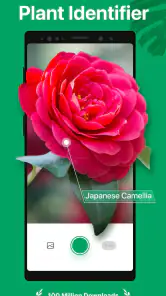
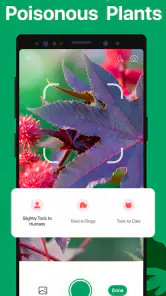
With PictureThis - Plant Identifier, identifying plants has never been easier. Imagine this: you're out on a walk, and you come across a beautiful flower that piques your curiosity. Simply whip out your phone, snap a photo using the app, and voilà! You have the plant's name, details about its species, and even some fascinating trivia. It's like having a botanist in your pocket!
For a more dependable result, I would make the process a little more deliberate. First, take one clear image that shows the plant’s overall form. Then, if the first result does not fit what you see, capture a close-up of the feature that seems most distinctive. Compare the result with the actual plant: Does the leaf arrangement match? Is the flower shape plausible? This quick second look is a better habit than repeatedly photographing the same blurry view.
A realistic example is a weekend walk where you notice an unfamiliar shrub near a path. You can photograph it without touching it, check the suggested identity, and save the name in your own notes along with the location and season. Later, if you see a similar shrub in a different setting, you have a starting point for comparison. That small record also helps explain why two plants that look alike in a single photo may turn out to be different once their flowers or leaves are visible.
Care advice needs context
The app's interface is a breeze to use, even if you’re not tech-savvy. It’s designed with simplicity in mind, allowing users to navigate through its features without a hitch. The home screen is uncluttered, presenting you with a camera button to click and capture. Plus, the results are quick and accurate, providing you with a satisfying user experience.
For houseplants, identification is only the first step. A care guide can help you think about watering and light, but I would treat general guidance as a starting point, not a rigid schedule. A pot near a bright window dries differently from the same kind of plant in a cooler, dimmer room. Check the soil and the plant’s condition before following a routine blindly; advice that ignores the actual home environment can lead to overwatering just as easily as neglect.
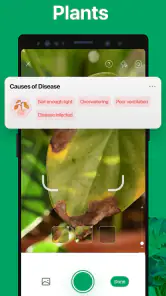
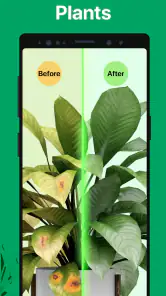
The disease-diagnosis function can be useful when leaves develop spots, yellowing, or other visible changes, because it gives you a reason to inspect the plant more closely. Take a clear photo of the affected area and consider whether the symptoms are limited to one leaf or appear across the plant. But a visual suggestion cannot account for every cause, such as a recent change in light, watering, or temperature. If the problem is spreading or the plant matters to you, use the result to guide further checks rather than treating it as a certain diagnosis.
That distinction is where the app can save time without pretending to replace experience. It can point a new gardener toward questions they might not have thought to ask, while a seasoned grower may use it as a quick cross-check. If you already know the plant and want a precise care plan tailored to a particular room or garden, your own observations—and advice from a knowledgeable local gardener when needed—may be more useful than a general prompt.
When another approach is better
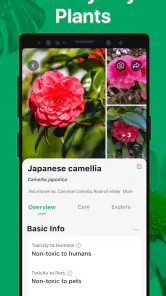
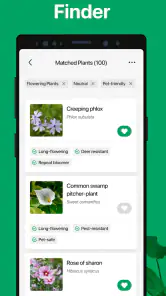
But wait, there’s more! Not only does the app identify plants, but it also gives you valuable plant care tips. Whether you have a knack for gardening or are just starting, these tips are your go-to guide for maintaining a healthy plant. From watering schedules to sunlight needs, the app covers it all. It’s like having a mini gardening encyclopedia at your fingertips.
Compared with searching the web by description, a photo-based tool is much faster when you do not know the words for what you are seeing. A field guide or a trusted botanical reference is still better when you want to compare several lookalike species in depth, understand local ecology, or verify a consequential identification. Asking an experienced gardener can also be more helpful for a struggling plant, because they can consider its setting and recent care rather than only its appearance in a picture.
I would skip PictureThis if you mainly want a fully manual reference, dislike app-based purchase prompts, or need certainty before making a safety or treatment decision. It is also less convenient when you cannot get a clear image or a stable connection. On the other hand, for casual nature walks, plant-shopping questions, and a first pass at caring for an unfamiliar houseplant, the photo-first approach is an approachable way to get oriented.
One practical tip is to avoid trying to identify every plant in a crowded bed from one wide shot. Choose one specimen, photograph it, and keep the surrounding setting in mind. If you are comparing several plants, do them one at a time; it is easier to notice which result matches which leaves, and you are less likely to mix up observations. For a plant with no flowers, revisit it later in the season if the first image leaves too much uncertainty.
Getting unstuck and deciding whether to keep it
One of the coolest features is the ability to join a community of fellow plant enthusiasts. Share your plant discoveries, exchange gardening tips, or simply showcase your beautiful garden with like-minded folks. There’s a certain joy in connecting with others who share your passion for plants, and this app facilitates that beautifully.
If an identification does not appear, I would avoid taking a dozen nearly identical pictures. Check the connection, reopen the app, and try a new image with a single plant in focus. If the camera view itself is the problem, test the phone’s camera separately and check the app’s camera access in the device settings. If only one plant is difficult to identify, the image or the plant’s stage of growth may be the issue rather than a general failure.
For someone deciding whether the app is worth keeping, the answer depends on how often plant questions come up. The developer is Glority Global Group Ltd., and the app’s scale—about 35,000 written reviews alongside its many ratings—suggests that plenty of people use it, but popularity does not guarantee every result will suit every situation. I would try it on plants I can verify or observe safely, then judge whether its explanations and care guidance are useful enough for my own routine.
It works best as a pocket reference for curiosity and early troubleshooting, not as an authority that removes the need to look closely. If you are learning plant names, start with common plants around your home or neighborhood and compare the suggestions with visible details. If you are looking for a definitive answer about toxicity, edibility, or a serious disease, turn to a qualified source instead of relying on an app result.
A grounded final take
In a nutshell, PictureThis - Plant Identifier is more than just an app; it’s a gateway to the enchanting world of plants. Whether you’re a seasoned gardener or someone who just loves nature, this app is a must-have. Download it today and start your plant identification journey. Trust me, once you start using it, you’ll wonder how you ever managed without it!
My recommendation is a little more measured: it is a handy companion if you often wonder what is growing around you or want a first clue about a plant at home. Its most useful habit is encouraging you to look carefully at leaves, flowers, and symptoms instead of treating greenery as a blur. Keep the purchase options in mind, check the image and context, and use another source when the stakes are high. With those limits understood, I think it earns a place on the phone of a curious walker or a new plant owner.
PictureThis - Plant Identifier Frequently Asked Questions
Can I use PictureThis without an internet connection?
PictureThis identifies plants by analyzing photos, so having an internet connection available is a sensible way to use its identification and information features. If you expect to be outdoors with limited connectivity, you can take photos and try the app when you are back online. That makes it easier to get a result and explore the related plant information when needed.
Who makes PictureThis, and is it mainly for gardeners?
PictureThis is an education app from Glority Global Group Ltd. It is useful for gardeners, but its plant-identification focus can also suit people who are curious about flowers, trees, and other plants they encounter. The app combines photo-based identification with care guidance and automatic disease diagnosis, so it may be relevant both to someone maintaining plants and to someone who simply wants to learn more about them.
Does PictureThis need access to my camera, and can I use it to identify a plant from a photo?
PictureThis is built around identifying plants from photos, so camera access is useful when you want to take a picture directly in the app. You can also use an existing image if that option is available on your device. For the clearest result, frame the plant well and make sure its visible features are in focus.
What is PictureThis - Plant Identifier and how does it work?
PictureThis - Plant Identifier is a mobile application designed to help users identify plants, flowers, and trees simply by taking a photo. The app utilizes advanced AI technology to analyze the image and provide detailed information about the plant, including its name, characteristics, care tips, and more. It's a handy tool for gardeners, botanists, or anyone interested in plant life.
Is PictureThis - Plant Identifier free to use?
PictureThis offers both a free version and a premium subscription. The free version allows basic plant identification and access to some features, while the premium subscription unlocks additional features such as unlimited identifications, detailed plant care guides, and an ad-free experience. Users can choose the best option based on their needs and usage frequency. In-app purchases range from $1.99 to $49.99 per item, so check the available options before making a purchase.
Pros
- Accurate plant identification
- User-friendly interface
- Comprehensive plant database
- Offline access available
- Includes plant care tips
Cons
- In-app purchases required
- Limited free features
- Occasional misidentifications
- Requires internet for updates
- Some ads in free version
- Category
- Education
- Version
- 5.16.0













