GrowIt: Vegetable Garden Care
- 245.00
- 4.3
- Installs
- 500.00K
- Price
- Free

Screenshots
Analysis by Reviewed
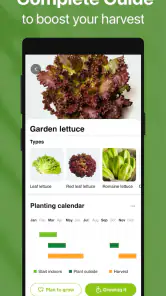
I approached GrowIt: Vegetable Garden Care as a practical companion for someone who wants to grow vegetables and fruit with a little more structure. It is a free lifestyle app from Glority Global Group Ltd., aimed at turning gardening questions into a more manageable routine. The central idea is simple: instead of relying on scattered advice, you keep a planting guide close at hand while deciding what to grow and how to care for it.
That simplicity is also the app’s main strength. It does not try to replace your garden, your local conditions, or your own observation. What it offers is a reference point for planning and care. After using it, I see it as most useful for beginners, balcony growers, families starting a small food garden, and experienced gardeners who want a convenient reference rather than a full professional crop-management system.
Building a dependable gardening routine
My preferred way to use the app is not to open it only when something looks wrong. The better workflow is to consult it before planting, return to it while a crop is developing, and use the information to create a repeatable habit. That changes the experience from a one-off search tool into a small part of weekly garden care.
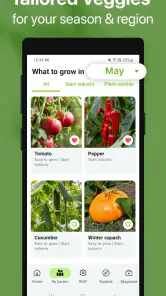
For example, imagine planning a few containers beside a kitchen window. I would begin by checking the guidance for the vegetables and fruit I am considering, then narrow the list to plants that fit the available space and the amount of attention I can realistically give them. This matters because an ambitious planting plan often fails for ordinary reasons: too many containers, inconsistent watering, or choosing crops that do not suit the available light.
The app is especially approachable in that early stage. A new gardener does not need to know the difference between every planting method before opening it. The guide gives the planning process a clearer starting point, while the user still makes the important real-world decisions about soil, containers, sunlight, and timing.
I also found value in treating each plant as a small project. Rather than browsing randomly, I would select a crop, read its care guidance, and make a short note of what needs checking during the week. This is a useful habit for people who tend to forget whether they watered yesterday or who buy seeds without thinking through the follow-up care.
The most useful mindset is to use GrowIt as a decision aid, not as an automatic gardener. It can help you remember what to consider, but it cannot feel the moisture in your soil or see whether a plant is receiving harsh afternoon sun. The closer your use is to that division of responsibility, the more helpful the app becomes.
More From Our News Desk

Weather by Xiaomi Review: Clear at a Glance, Less Clear Up Close

X Under Pressure: Can It Recover When Posting Goes Wrong?

Clash of Clans Is Won Between the Battles

Android Auto Makes the Case for Quieter Car Software

MobiOffice: Transforming Mobile Productivity with Seamless Integration

EA SPORTS FC™ Mobile Soccer: Redefining Mobile Sports Gaming
There is also a practical benefit for households gardening together. One person can use the guide to choose plants, while another handles watering or checking growth. Even without turning the process into a formal project, having one shared reference can reduce the usual confusion over what was planted and what needs attention next.
What the first session is really good for
During an initial session, I would avoid trying to absorb every piece of advice. A better approach is to choose a small group of plants and compare their needs. That comparison can reveal which choices are compatible with your space and routine. A compact selection that receives regular care is usually more useful than a large collection that becomes difficult to manage.
This is one area where the app feels more welcoming than a pile of separate web searches. Search results often mix beginner explanations, specialist discussions, and advice written for very different climates. A dedicated planting guide gives the activity a more focused shape, even though you should still apply common sense to your own conditions.
For an experienced gardener, the same workflow serves a different purpose. Instead of learning basic terms, you can use the app as a quick reminder when rotating crops, trying an unfamiliar vegetable, or checking a care detail you have not needed recently. It is less about replacing knowledge and more about reducing the effort required to retrieve it.
Settings and choices worth checking early
One of the first things I would do after installation is look through the available in-app choices rather than immediately accepting every default. The app is free to download, but it includes optional in-app purchases ranging from $5.99 to $39.99 per item. That makes it sensible to understand which parts of the experience are available without payment and which extras may appear as you browse.
I would also check how the app presents its guidance and whether the reading experience suits the way I plan to use it. A gardening reference is most useful when it is comfortable to consult with dirty hands, in bright outdoor light, or during a quick break between other tasks. If you prefer short checks, focus on the most relevant care details instead of reading every entry from beginning to end.
Because the application is rated for Everyone, it is suitable for a broad household audience. I can see it working well for parents introducing children to growing food, provided an adult handles decisions involving tools, soil products, or anything that requires supervision. The age rating makes it approachable, but it does not turn gardening into a risk-free activity.
The app runs on operating systems version 10 or later, so compatibility is worth checking before planning around it. On a supported device, I would keep it available in the same place where I store other household references. That small organizational choice matters: if the guide is buried among rarely used apps, it is less likely to become part of a regular routine.
Another setting-related habit is to decide how much attention you want the app to receive. If you prefer a quiet phone, avoid building your gardening routine around constant prompts or frequent checking. Instead, choose a fixed moment, such as the weekend, to review plants and consult the guide. If you enjoy more regular tracking, use each visit to compare what the guide recommends with what you can actually observe.
I would not assume that a setting can personalize every recommendation to the exact conditions of your garden. A guide can explain general care, but local weather, soil quality, container size, and sunlight still change the result. For that reason, I treat the app’s guidance as a baseline and adjust my actions when the plant itself gives me evidence that conditions are different.
Small shortcuts that make the guide more useful
The fastest pattern is to prepare before you need an answer. If I am planning a weekend planting session, I would review the relevant entries beforehand and make a short checklist. This avoids standing outdoors with a phone in one hand while trying to decide what to do next. It also makes it easier to notice missing supplies before the work begins.
A second useful pattern is comparison. Instead of reading about one plant in isolation, look at several possible crops and ask which one fits your available time. This is a non-obvious advantage of a planting guide: it can improve the choice of project, not merely the care of a project already started.
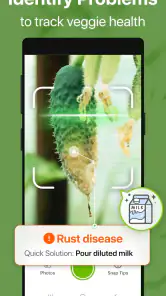
A third pattern is to use the app after observing a change, not before every single action. If a plant looks stressed, first inspect the soil, light, container, and nearby plants. Then consult the guide to frame possible explanations. This prevents the common mistake of treating one symptom as proof of one cause.
I also recommend keeping the first growing cycle deliberately small. Use the app to establish a rhythm with a manageable number of plants, then expand only after you know how much time watering, checking, and adjusting actually takes. The guide can support planning, but it cannot make an oversized garden less demanding.
For repeat use, I would create a simple weekly sequence: inspect the plants, identify the ones that changed, consult the relevant guidance, and decide on one or two actions. That sequence is more effective than opening the app repeatedly without a question in mind. It turns information into a practical loop.
Another helpful shortcut is separating “planning information” from “urgent action.” Before planting, I might read broadly and compare options. When a plant is already struggling, I would look for the most relevant care guidance and then return to observation. Mixing both modes can make the app feel more complicated than it is.
Where an experienced gardener will notice the limits
GrowIt: Vegetable Garden Care is not a substitute for local horticultural knowledge. A general guide cannot fully account for every microclimate, soil type, pest population, or unusual weather pattern. If you grow in a region with demanding seasonal conditions, you may need local extension advice, a specialist book, or an experienced gardener alongside the app.
It is also not the right choice for someone expecting a complete professional record-keeping system. If your priority is detailed harvest accounting, advanced crop rotation planning, greenhouse management, or extensive garden mapping, a more specialized tool may suit you better. The app’s value is in accessible planting and care guidance, not in turning a home garden into an agricultural operation.
The presence of optional purchases is another point to consider. Some users will be perfectly happy with a free guide and may not want to encounter paid extras. Others may appreciate having additional material available if the free experience leads them to use the app regularly. Either way, I would decide in advance whether I am looking for a basic reference or willing to consider expanded content.
There is a difference between knowing what a plant generally needs and knowing why it is failing in your exact garden. The app can help with the first problem, but the second still requires observation and judgment. If you want one tap to diagnose every issue, this will probably disappoint you. If you are willing to combine guidance with careful checking, the limitation feels reasonable.
I would also skip it if my main interest is ornamental gardening rather than vegetables and fruit. Its focus is clearly food-growing guidance, so the experience makes most sense when your goal is to cultivate edible plants. Someone looking for a broad landscape-design planner or a flower-focused reference should choose a different category of app.
How it compares with ordinary alternatives
The usual alternative is a web search. Searches are useful when you need a very specific answer or local advice, but they can produce contradictory recommendations and force you to judge the quality of every source. GrowIt offers a more focused starting point, which is valuable when you are still learning what questions to ask.
Another alternative is a printed gardening book. Books can be richer and more comfortable for long reading, especially when planning an entire season away from a screen. The app is more convenient when you want a quick reference beside a planter or when you are deciding between crops while shopping.
Advice from a local nursery or gardening group may be better for regional problems. People who know your climate can often explain details that a general guide cannot. I would use GrowIt for structure and basic reference, then turn to local experience when weather, pests, or soil conditions become the main issue.
Compared with a blank notes app, it saves the effort of building all the care information yourself. Compared with a highly specialized garden-management application, it is likely to feel less demanding and less technical. That middle position is its appeal: enough guidance to make home growing less intimidating without requiring you to manage a complex database.
Who should install it, and who should pass
I would recommend it to a first-time vegetable grower who wants a clear place to begin, especially someone working with containers or a modest home plot. It also makes sense for a busy person who needs a repeatable care routine, a family sharing gardening tasks, or an experienced grower who wants a lightweight reference for occasional questions.
I would be more cautious about recommending it to commercial growers, gardeners who need region-specific diagnosis, or users seeking detailed production records. Those people may outgrow a general lifestyle app quickly. The same is true for anyone who dislikes consulting a phone while gardening or who already owns a trusted specialist reference that covers their crops in greater depth.
The application has built a respectable audience, with a 4.3 average from around 4.4 thousand ratings and over 500 thousand installs. Those figures suggest that its approachable format has found a real audience, but they do not remove the need to judge whether its level of detail matches your own goals.
My final view after using it as a routine
Released on February 5, 2024, and currently at version 1.2.3, GrowIt: Vegetable Garden Care feels best when used consistently but lightly. I would not open it expecting a complete gardening command center. I would open it before planting, during a weekly inspection, or whenever I need a sensible starting point for a vegetable or fruit-growing question.
Its free entry point makes experimenting easy, while the optional purchases mean I would pay attention to the app’s boundaries before committing to a long-term workflow. The Everyone rating also makes it approachable for shared household use, though practical gardening safety still depends on the adults involved.
My strongest recommendation is to pair the app with observation. Read the guidance, choose a manageable plan, and then compare the advice with the actual condition of your plants. That combination is more reliable than either blind trust in an app or random trial and error.
In the end, I see this as a useful companion for ordinary home gardening rather than an expert replacement. If you want a friendly planting guide that helps turn good intentions into repeatable care, it is worth trying. If you need precise local diagnosis, advanced records, or a full professional workflow, I would look elsewhere and use this only as a supplementary reference.
GrowIt: Vegetable Garden Care Frequently Asked Questions
Is GrowIt suitable for children and family gardening projects?
GrowIt is rated Everyone, so its stated age classification is suitable for a broad audience. Families can use a gardening app as a starting point for learning about vegetable care and organizing a shared growing project. Adults should still guide young gardeners when a task involves tools, soil treatments, or other activities that require supervision. The app supports gardening information; it does not replace practical safety precautions.
Which devices and operating systems can run GrowIt?
GrowIt is available for Android and iOS, and the listed minimum operating-system requirement is version 10. Before downloading, check your device’s software version and available storage in its app store. Keeping your operating system updated can also help with compatibility. The app is developed by Glority Global Group Ltd. and is listed as a Lifestyle app, making it relevant to users looking for practical support for home gardening.
What is GrowIt: Vegetable Garden Care, and who is it designed for?
GrowIt: Vegetable Garden Care is a gardening companion aimed at people who want help planning, growing, and maintaining vegetables at home. It can be useful for beginners who need simple guidance, as well as more experienced gardeners looking for reminders and practical information. The app is particularly suitable for container gardens, raised beds, balconies, and small backyard plots.
What features does GrowIt offer for caring for vegetables?
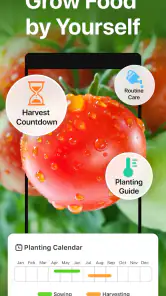
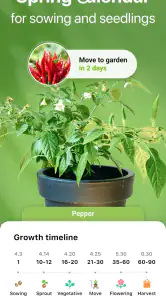
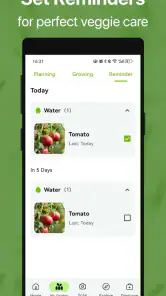
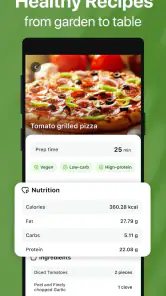
The app brings together several tools intended to make vegetable gardening easier, including plant information, growing guidance, care suggestions, and organization features for keeping track of a garden. Depending on the version and device, users may also find planting recommendations, watering or maintenance reminders, and advice related to sunlight, spacing, and harvesting. Its main benefit is having routine gardening information in one convenient place.
Can beginners use GrowIt without previous gardening experience?
Yes. GrowIt is approachable for beginners because it presents gardening tasks in a more organized and understandable way than searching through scattered websites. New gardeners can use the plant information and care guidance to learn what vegetables need, when regular maintenance is required, and which growing conditions are important. However, results can still vary according to climate, soil quality, pests, and the amount of sunlight available.
Pros
- Clear planting guidance helps beginners start growing vegetables.
- Reminders make it easier to keep up with routine garden tasks.
- Useful plant information supports better crop selection and care.
- Community features offer ideas and encouragement from other gardeners.
- Suitable for planning small home gardens and container growing.
Cons
- Some advice may not match your local climate or growing conditions.
- The community content can vary in quality and accuracy.
- Notifications may become repetitive during busy gardening periods.
- Advanced gardeners may find the guidance too basic.
- Some features may require an account or in-app permissions.
- Category
- Lifestyle
- Version
- 1.2.3













