Plant Parent: Plant Care Guide
- 1.95K
- 4.5
- Installs
- 10.00M
- Price
- Free

Screenshots
Analysis by Reviewed
I like that Plant Parent: Plant Care Guide treats indoor plant care as a routine you can learn, rather than a test of instinct. That matters when you have a new plant, an uncertain watering habit, or a shelf of leaves that all seem to need different things. In my experience, the app works best as a practical companion: it helps organize care and gives you somewhere to start when a plant looks unhappy, but it cannot replace observing the plant and its surroundings.
Where it fits into a real plant-care routine
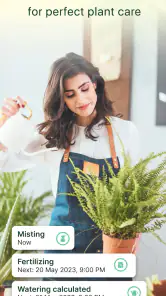
A useful way to begin is to add the plants you already own, then use the care guidance as a reference while you get to know each one. For example, after bringing home a plant from a shop, I would use its profile to learn what to watch for, set a reminder that suits my routine, and then check the plant itself before acting. That last step matters: a reminder is a prompt to inspect, not proof that the soil is dry or that watering is due.
This distinction is one of the app’s most important trade-offs. Schedules make it easier to remember recurring jobs, especially if your collection is spread across rooms, but indoor conditions change with light, temperature, pot size, and season. I would avoid treating a calendar alert as an automatic instruction. Check the soil and the leaves first, and adjust your habits when the plant’s response suggests the schedule is too frequent or too relaxed.
Who will get the most from it
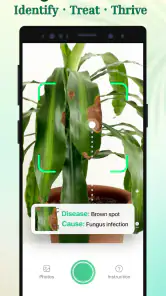
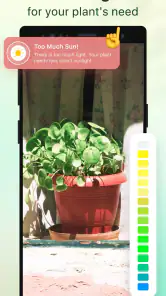
I’d recommend it most to beginners and casual indoor gardeners who want structured guidance without building their own tracking system. It can also suit someone caring for several kinds of houseplants who tends to forget when they last checked them. The light meter and pest diagnosis are especially useful starting points when you are deciding where a plant might do better or trying to make sense of a visible problem.
On the other hand, experienced growers who already keep detailed notes, recognize common pests, and adapt care by season may find parts of the experience unnecessary. If you only own one hardy plant and prefer a simple calendar reminder, a basic notes app may be enough. Plant Parent is most worthwhile when its plant information, reminders, and diagnostic tools solve separate problems for you, rather than when you expect one app to make every care decision.
How it compares with familiar alternatives
Compared with searching the web each time a leaf changes color, a dedicated plant-care app can keep guidance and reminders in one place, which saves the effort of repeating the same searches. A general calendar is simpler and more flexible, but it will not provide the plant-focused context described here. The best choice depends on whether you want an organized plant reference or just a nudge to check your pots.
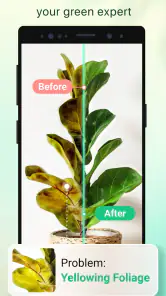
I would also use pest diagnosis as a first step, not a final verdict. A photo or symptom can point you toward possibilities, but different causes can look alike, and a mistaken treatment can make matters worse. Compare the guidance with what you can see, consider recent changes in the plant’s location or watering, and seek another reliable opinion if the problem persists. That cautious workflow is more useful than treating any automated diagnosis as certainty.
More From Our News Desk

Weather by Xiaomi Review: Clear at a Glance, Less Clear Up Close

X Under Pressure: Can It Recover When Posting Goes Wrong?

Clash of Clans Is Won Between the Battles

Android Auto Makes the Case for Quieter Car Software

MobiOffice: Transforming Mobile Productivity with Seamless Integration

EA SPORTS FC™ Mobile Soccer: Redefining Mobile Sports Gaming
Getting to Know Your Green Buddies
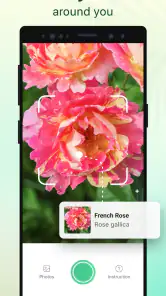
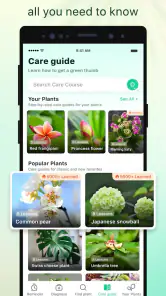
The first thing you notice about Plant Parent: Plant Care Guide is its user-friendly interface. I mean, even if you’re not exactly a tech whiz, you’ll find navigating this app a breeze. As soon as you open it, you’re greeted with a vibrant display of plant profiles, each more detailed than the last. I spent a good chunk of time just scrolling through and learning about plants I didn’t even know existed!
Features That Make You Go "Wow!"
So, what does this app actually do? Well, aside from its vast plant database, it offers personalized care reminders, watering schedules, and even pest diagnosis. Have you ever felt like your plants were speaking a language you didn’t understand? This app translates for you. I particularly loved the light meter feature—it’s like having a tiny scientist in your phone, helping you find the perfect spot for your fiddle leaf fig.
Another cool aspect is the community feature where you can connect with fellow plant enthusiasts. Sharing tips, photos, and even swapping plants has never been easier. Trust me, the community vibe here is so supportive, it feels like everyone genuinely wants your plants to thrive.
A Few Thoughts on Usability
While the app is pretty comprehensive, it’s not without its quirks. There were moments when the loading times felt a tad sluggish, especially when accessing the more data-heavy sections. However, these are minor hiccups in an otherwise smooth experience. The developers seem pretty responsive too, so I’m hopeful these will be ironed out in future updates.
In terms of aesthetics, the app is a real looker. The design is sleek, with a soothing color palette that makes plant care feel less like a chore and more like a meditative ritual. The icons and illustrations are thoughtfully crafted, adding to the overall charm.
Using profiles without turning care into a checklist
Plant profiles are most valuable when I use them to set a starting point, then add my own observations. A practical habit is to check a plant at roughly the same time each week and note what has changed: whether the soil still feels damp, whether new growth has appeared, or whether leaves are drooping. Even a brief note alongside a reminder can help me distinguish a recurring problem from a one-off change in the room.
This also helps when a plant is new to my home. Rather than making several changes at once, I’d first give it a suitable spot, watch how it responds, and then adjust one thing at a time. If I move it, change watering, and repot it all together, I have no clear way to tell which change helped or caused stress. The app can organize the care prompts, but a simple, measured approach makes those prompts easier to interpret.
Making the tools useful in a small space
For someone with plants on a windowsill, a desk, and a dimmer corner, the light meter can help compare locations. I would take readings in the places I am actually considering, rather than relying on one measurement from across the room. Then I’d watch the plant over time; the tool can inform a decision, but it cannot capture every detail of how that plant responds throughout the day.
A useful trade-off is that moving a plant to a brighter position may help with light, but a sudden change can be an adjustment in itself. I’d make a gradual move when practical and keep track of where the plant was, instead of repeatedly shifting it whenever a reading looks better elsewhere. That keeps the meter in its proper role: a way to compare options, not a command to rearrange the whole collection.
When a diagnosis needs a second look
If a leaf develops spots or a plant looks generally unhealthy, pest diagnosis gives me a place to begin investigating. I’d inspect more than the most visible leaf, including the undersides and nearby plants, and think back to recent changes in watering or placement. Those details can provide context that a single image cannot, and they help avoid treating the first possible explanation as settled fact.
When a problem is spreading or the suggested cause does not match what I can see, I would pause before taking action and compare the symptoms with another dependable source. This is especially important if treatment could affect other plants in the same area. The diagnostic tool is useful for narrowing the question; it is less suitable as a substitute for careful identification or expert help when the issue is serious.
Community advice and personal judgment
The community can make plant care feel less solitary, particularly when I want to see how other people approach a familiar challenge. I would treat shared experiences as ideas to evaluate rather than rules to copy. Two plants with the same name can be growing in different light, pots, and indoor conditions, so advice that worked for one person may not transfer neatly to mine.
That distinction matters if a discussion suggests a quick fix. I’d compare the suggestion with the plant’s symptoms and care history, and avoid changing several parts of its routine at once. Used this way, the community adds perspective without replacing the individual observation that good plant care depends on.
Wrapping It Up
To sum it up, if you’re a plant parent—or even if you’re just starting out on your leafy journey—this app is a game-changer. It’s informative, fun, and incredibly handy. Whether you’re a seasoned gardener or a newbie just trying not to kill your cactus, Plant Parent: Plant Care Guide is definitely worth a download.
Current version and what it means for regular users
Plant Parent is a free lifestyle app from Glority Global Group Ltd., with a 4.5 average from around 98,000 ratings and over 10 million installs. It is rated for everyone, and its current version is 1.102. Those details make it a well-established option rather than a brand-new experiment, but they do not tell me whether every care recommendation will suit a particular room or plant. I’d still treat its advice as a useful baseline and let the plant’s condition guide the final decision.
The app was released on May 7, 2022, and version 1.102 is the current point of reference. Without a confirmed change history to compare, I wouldn’t claim that a specific feature is new or that a particular update fixed a known issue. For existing users, the sensible approach is to keep the app current and judge any changes by how the tools you rely on behave in your own routine, rather than expecting an update to replace careful observation.
Practical details before you settle in
On a busy weekday, the app’s reminders can help me remember to check the plant by the window while I’m already tidying the room. I’d open its profile, look at the leaves and soil, and use the prompt as a cue to assess rather than water automatically. That small habit is more reliable than following a fixed schedule blindly, and it turns the app into a record-keeping aid instead of an authority over the plant.
The light meter is another tool I’d use comparatively: check a few possible spots, then notice how the plant responds over time instead of assuming one reading settles the question. Likewise, a pest suggestion is a reason to inspect leaf undersides and nearby plants, not an instruction to apply treatment immediately. These checks make the app more helpful, though they also mean it works best for users willing to observe and adjust.
Cost, compatibility, and expectations
The app is free to download, with in-app purchases ranging from $2.99 to $39.99 per item, so I would look at what is available in the app before deciding whether any paid option is worthwhile for me. The minimum operating-system requirement is version 8.0. If you want a completely manual, no-purchase approach, a notebook or ordinary reminder tool may suit you better; if you want plant profiles and care prompts together, the free entry point makes it easier to try the workflow first.
My main thing to watch is whether the reminders and plant guidance continue to fit your actual collection as seasons and indoor conditions shift. I’d also pay attention to whether the community and diagnostic tools add useful context or simply create more to browse. For someone who enjoys learning about houseplants and wants a central place to organize care, Plant Parent is a friendly starting point. For someone seeking guaranteed diagnoses or a schedule that can be followed without checking the plants, it is not the right substitute for judgment.
Plant Parent: Plant Care Guide Frequently Asked Questions
Can I use Plant Parent to organize care for several houseplants?
Plant Parent is intended to help users keep their houseplants alive by bringing plant-care guidance and reminders together in one app. If you look after several plants, having their care information and tasks organized can make it easier to keep track of what needs attention. The app’s focus is home gardening, so it is aimed at everyday plant owners rather than a specialized gardening setup.
Is Plant Parent free to download, and are there in-app purchases?
Plant Parent is free to download, with in-app purchases available for users who want to explore paid options. These purchases range from $2.99 to $39.99 per item, so consider that range when deciding whether the app suits your budget. The app is rated for everyone and is designed around learning about home gardening and caring for houseplants.
What devices can run Plant Parent: Plant Care Guide?
Plant Parent is available for Android and iOS users who want help caring for houseplants. On Android, the app requires version 8.0 or later, so it is worth checking your device’s operating system before downloading. The app is listed as a Lifestyle app and is suitable for everyone, making it an option for a broad range of plant owners.
Who develops Plant Parent, and is it popular?
Plant Parent is developed by Glority Global Group Ltd. It has a 4.5 average rating, based on around 98,000 ratings, and has been installed over 10 million times. Those figures suggest that it has reached a large audience of plant owners, though the best fit depends on whether its care guidance and organization tools match the way you prefer to look after your plants.
What is Plant Parent: Plant Care Guide and how does it work?
Plant Parent: Plant Care Guide is a comprehensive app designed to assist plant enthusiasts in maintaining healthy plants. The app provides detailed care instructions, tailored reminders, and useful tips for a wide variety of plants. Users can input their plant types and receive personalized guidance on watering schedules, light requirements, and more, ensuring optimal plant health.
Pros
- User-friendly interface for easy navigation.
- Comprehensive plant care tips and guides.
- Customizable plant watering reminders.
- Supports a wide variety of plant species.
- Offline access to plant care information.
Cons
- Limited features in free version.
- Occasional bugs in plant identification.
- High battery usage for notifications.
- Requires frequent updates to fix issues.
- Some features need internet connection.
- Category
- Lifestyle
- Version
- 1.102













