Picture Insect: Bug Identifier
- 3.06K
- 4.3
- Installs
- 5.00M
- Price
- Free

Screenshots
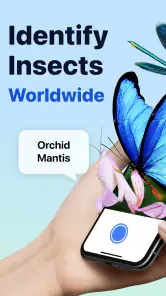
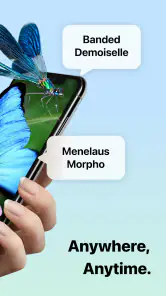
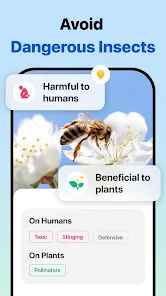
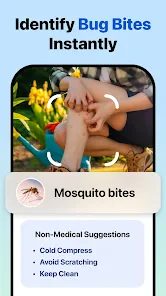
Analysis by Reviewed
I like insect-identification apps best when they help me pause, look carefully, and ask a better question—not when they encourage me to treat a photo result as a definite scientific verdict. That is the useful way to approach Picture Insect: Bug Identifier: it can turn a quick encounter into a starting point for learning, while the insect itself still deserves a closer look. I’d reach for it on a garden wander, a family nature walk, or when an unfamiliar bug turns up indoors and I want a sensible first clue.
Where it fits today
Picture Insect: Bug Identifier is a free education app from Next Vision Limited, aimed at identifying insects and related small creatures from pictures. It has a 4.3 average from around 38,000 ratings, and more than five million installs, which suggests that many people use it as an accessible first stop for curiosity rather than as a specialist field instrument. The audience rating is Everyone, so it is suitable for general household and family use; that does not mean every identification should be treated as advice about pest control or safety.
The current version is 2.8.33, and the app first appeared on October 18, 2019. Those details give a useful frame for judging it: this is an established product that has continued to receive version updates, not a brand-new experiment. The version number alone does not tell me which features changed or how identification quality has evolved, so I would not infer a specific improvement from it. What matters to a new user is whether the present workflow helps make sense of a photo, and what limits to keep in mind when the result matters.
What a photo can—and cannot—tell you
The main appeal is speed. A picture can give you a likely name and a way into learning about an insect without having to search through a general web page full of unrelated results. That convenience is valuable when you have no idea whether the creature you saw was a moth, beetle, spider, or something else. Still, a phone image is only as useful as the view it captures. A distant, blurred, shadowed, or partly blocked subject gives the app less to work with, and similar-looking species can be difficult to separate even when a photo looks clear to us.
I recommend taking more than one photograph when it is safe and practical: one showing the whole insect and another with its distinctive markings or shape in focus. Keep a little context too. A bug on a leaf, near a window, or on a damp surface may be easier to interpret when you remember where you found it. Avoid touching an unfamiliar insect just to get a better angle. If the app suggests a match, compare the visible traits in your photo with the information shown rather than accepting the first label automatically. That extra check is especially worthwhile before deciding whether a creature is harmless or whether a plant has a pest problem.
A useful routine for garden and home sightings
A realistic use case is finding a small insect on a houseplant while watering. I would take a steady close-up before disturbing it, note which plant it is on, and use the app’s result to decide what to investigate next. If the match points toward a familiar group, I can look more carefully for repeated sightings or visible plant damage. If the picture is poor or the suggested identification seems inconsistent with the insect’s shape, I would retake it in better light or compare it with a trusted reference before acting. The app can help organize that first investigation; it should not be the sole basis for applying a treatment.
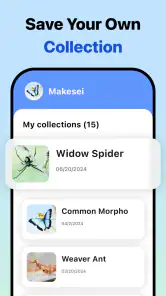
For outdoor use, I find the strongest approach is to treat each identification as a small observation rather than a contest to collect the most names. Take the photo where the insect is, record what you noticed, and check the result later when you have time to read. That makes the experience more educational and avoids rushing after a moving subject. It also makes the history feature more useful: a record of what caught your attention can help you notice which insects recur around your garden or on walks, though it is not the same thing as a formal survey.
More From Our News Desk

Weather by Xiaomi Review: Clear at a Glance, Less Clear Up Close

X Under Pressure: Can It Recover When Posting Goes Wrong?

Clash of Clans Is Won Between the Battles

Android Auto Makes the Case for Quieter Car Software

MobiOffice: Transforming Mobile Productivity with Seamless Integration

EA SPORTS FC™ Mobile Soccer: Redefining Mobile Sports Gaming
Ever been on a hike or in your garden and wondered what type of insect just scuttled past you? Well, I’ve got the app for you! Say hello to Picture Insect: Bug Identifier. This nifty little tool is perfect for anyone with a curious mind about the insect world. Whether you’re an amateur bug enthusiast or just someone who wants to keep track of what’s crawling around your home, this app has got you covered!
A Closer Look at the Features
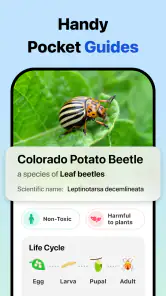
The Picture Insect: Bug Identifier app is essentially your personal entomologist, right in your pocket. The app uses advanced AI technology to identify insects in seconds. All you have to do is snap a picture of the bug in question, and voilà, the app will provide you with detailed information about it.
One of the coolest features is the detailed database it comes with. It’s packed with over a thousand insects, so chances are, your creepy crawler is in there. From butterflies and beetles to moths and mantises, the app covers a wide range of species. The identification process is super quick, making it perfect for those spur-of-the-moment identifications while you’re out and about.
User Experience
Let’s talk about the user interface. It’s sleek, intuitive, and extremely easy to navigate. Even if you’re not tech-savvy, you’ll have no trouble using this app. The design is clean, with just the right amount of information displayed, so you won’t feel overwhelmed.
Once you take a snapshot of the insect, the app not only identifies it but also provides interesting tidbits about the little critter. It’s like having a mini encyclopedia of insects on your phone! Plus, there are no annoying ads popping up every minute, which is a huge relief.
Getting better results without disturbing the insect
A few small choices can make the photo step more useful. I try to hold still, tap to focus on the insect rather than the background, and avoid using a strong zoom if it makes the image grainy. If the insect is moving, a wider shot that preserves its outline can be more informative than a close crop that loses its shape. I also avoid placing anything beside it for scale if doing so would mean handling it. The aim is a clear, natural picture—not a perfect specimen photograph.
There is a trade-off between speed and confidence. A quick single image is convenient when I am just curious, but a second angle can help me judge whether a proposed match makes sense. If two attempts produce uncertain or noticeably different possibilities, I take that as a reason to slow down, not as proof that one result must be right. That is one of the most useful habits for anyone using an automated identifier: let the app narrow the field, then use visible features and context to decide what to read next.
What changes mean for returning users
With version 2.8.33 as the current release, returning users have a clear version marker when they check which build they are using. The product’s release history begins in 2019, but a version number is not a changelog. I would look at release notes in the app’s download source when deciding whether an update affects a particular workflow, rather than assuming that a higher number guarantees more accurate results or a new capability. Identification tools can change over time, and the best way to judge a change is to try the same kind of clear, well-lit photo and see whether the experience suits your needs.
For someone who already keeps a history of sightings, the practical question is whether the current app still serves as a handy personal log. Before relying on any record for a long-term project, I would check how the app presents and preserves those entries on my own device. A casual collection for remembering a walk has different demands from a carefully documented biodiversity record. For the latter, I would keep the original photographs and my own notes as well, so an app result is not the only copy of the observation.
When a field guide or expert is the better choice
Compared with a printed field guide, a photo identifier is faster when you do not know where to begin, while a good guide encourages you to compare several traits and learn the distinctions among related species. A general web search can offer more sources, but it often takes longer to sift through image results and may lead to pages that do not fit the insect in front of you. Picture Insect sits between those options: it offers a quick first suggestion and accessible background, but I would use a field guide or specialist reference when precise identification is important.
For a child asking what landed on a picnic blanket, the app can make a nice prompt for a short discussion, with an adult checking the result and keeping the insect undisturbed. For a gardener who sees repeated damage, it can help generate a lead to research, but a local gardening resource may be more useful for deciding what to do. And if someone needs a dependable answer about a potentially harmful bite, infestation, or species with health implications, I would not rely on a photo match alone; seek appropriate professional guidance instead.
The app is less compelling if you already know how to identify local insects with a guide and want a rigorous record with carefully documented evidence. It may also frustrate someone expecting every blurry or unusual photo to yield a certain answer. Its value is greatest when the stakes are low and curiosity is high: a quick identification to orient your reading, not an authority that replaces observation or expertise.
Why You’ll Love It
If you’re someone who loves to share your discoveries, the app allows you to save and share your findings with friends and family. Imagine the fun you can have on a nature walk, spotting different bugs and sharing your knowledge with others!
The app also offers a history feature, which keeps track of all the insects you’ve identified. It’s like having a digital collection of all your encounters, which is pretty cool if you ask me. And for those worried about storage, don’t fret! The app is optimized to ensure it doesn’t take up too much space on your device.
Free to start, with paid choices
The app is free to download, while in-app purchases range from $2.99 to $39.99 per item. I would begin with the free experience and decide whether the basic identification and learning flow actually fits how often I use it before spending anything. Occasional curiosity on a walk is a different need from frequent use, so the purchase options are worth considering only if the app’s available paid offering solves a problem you personally encounter. Check the purchase details in the app before confirming; the range is broad enough that it makes sense to understand the specific item rather than assume every option costs the same.
It is compatible with devices running Android 9 or later. That makes the minimum system requirement worth checking before downloading, particularly if you are installing it on an older phone or a family device. If you plan to use it outside, I would also make sure the phone has enough battery for taking pictures and looking up results, just as I would for any nature-walk tool; that is a practical habit, not a special feature of the app.
Limits worth keeping in mind
The first limitation is inherent to picture-based identification: the image may not show the details needed to distinguish close relatives. Lighting, angle, scale, and the insect’s movement all affect what you can inspect. The second is that a quick label can create more confidence than the evidence deserves. I treat the result as a useful hypothesis and cross-check it whenever the distinction would change what I do. Finally, an educational identifier is not a substitute for a pest professional, medical advice, or a field expert. That boundary is not a flaw unique to this app; it is simply the sensible way to use an identification result.
Its broad appeal also means it is not designed around every specialist’s workflow. A learner who wants a guided, step-by-step lesson may prefer a structured course, while someone documenting research observations may need a dedicated recording method. Picture Insect is more convenient when the immediate question is simply, “What might this be?” Recognizing that narrower strength helps prevent disappointment and makes the app more rewarding when it is the right tool for the moment.
What I would watch next
For existing users, I would pay attention to the actual release notes as the app moves beyond version 2.8.33, especially if an update changes the identification flow, saved sightings, or the way information is presented. Those are the areas that affect day-to-day usefulness. I would judge any claimed improvement by how it handles my own clear photographs and by whether the explanations help me verify a match, rather than by version progression alone. Until then, the current version is best assessed on what it does in your hands today, not on an expectation about future changes.
I would also keep an eye on whether the app continues to make its paid choices understandable and its basic experience useful for occasional users. Those details matter more to me than a promise of instant certainty. A good identification tool should make it easy to learn from a sighting while leaving room for doubt when the photo does not support a firm answer.
Final Thoughts
In a nutshell, the Picture Insect: Bug Identifier app is a must-have for nature lovers and curious minds alike. It’s not just an app; it’s an educational tool that brings you closer to nature. Next time you’re outdoors and spot an unfamiliar insect, just remember you’ve got a trusty companion in your pocket ready to help you out.
So, go ahead and download it now. Happy bug hunting!
Picture Insect: Bug Identifier Frequently Asked Questions
Can Picture Insect: Bug Identifier help me decide whether a bug is a pest?
Picture Insect: Bug Identifier is intended to identify insects, spiders, pests, butterflies, and more from pictures. That can make it a useful first step when you encounter an unfamiliar bug at home or outdoors and want to learn what it may be. Treat an app result as an identification aid rather than a substitute for professional advice when a pest poses a health or property concern.
Can children use Picture Insect: Bug Identifier for learning?
The app is rated Everyone and is an education app, so it may suit families who want to explore insects and other small creatures together. Its photo-based identification approach can give children a starting point for asking questions about what they find. As with any app that processes photos, an adult can help children choose appropriate images and understand that a suggested identification may need checking.
Does Picture Insect: Bug Identifier identify more than insects?
Yes. Picture Insect: Bug Identifier is presented as a tool for identifying insects, spiders, pests, butterflies, and more from pictures. This broader scope makes it potentially useful when the creature you have found is not obviously an insect. Take a clear photo and review the result carefully, especially when you are unsure whether the animal has been identified correctly.
What devices can I use Picture Insect: Bug Identifier on?
Picture Insect: Bug Identifier is an app for identifying insects, spiders, pests, butterflies, and more from pictures. Before downloading, check that your device meets the app’s minimum operating-system requirement: version 9. It is listed as suitable for everyone, making it accessible to a broad range of users interested in learning about the small creatures they encounter.
What is Picture Insect: Bug Identifier and how does it work?
Picture Insect: Bug Identifier is a mobile application that helps users identify bugs and insects by taking a picture. The app uses advanced image recognition technology to analyze the photo and provide detailed information about the insect, including its species, habitat, and characteristics. It’s designed for both amateur bug enthusiasts and professionals needing quick identification.
Pros
- Accurate insect identification
- Large insect database
- Easy-to-use interface
- Offline mode available
- Educational insights provided
Cons
- Limited free features
- Occasional misidentifications
- Requires internet for full features
- Frequent ads in free version
- Subscription model can be costly
- Category
- Education
- Version
- 2.8.33













