Rock Identifier: Stone ID
- 8.47K
- 4.5
- Installs
- 10.00M
- Price
- Free
Screenshots
Analysis by Reviewed
When I find an unfamiliar stone, my first question is usually simple: what am I looking at? Rock Identifier: Stone ID gives me a quick way to turn that curiosity into a possible answer, using a photo as the starting point. I see its value less as a pocket expert and more as a bridge between spotting something interesting and knowing what to investigate next.
A quick identification, not a field verdict
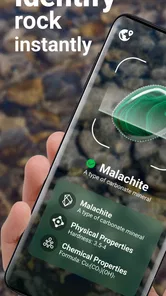
The basic idea is appealingly simple: photograph a rock, crystal, or mineral and use the result as a starting point for learning what you may have found. I find that kind of quick lookup most useful when curiosity strikes outdoors, rather than when I need a definitive answer for research or a purchase. A photo can show color and visible texture, but it cannot capture every clue a geologist would use, so I treat an identification as a lead to investigate, not a lab result.
For a better first pass, I try to photograph the specimen in even natural light, keep the camera steady, and include a close view of its surface. If the stone is wet, dirty, or partly covered, I take another image after changing the angle or moving it to a plain background. These small steps matter because lighting and surrounding objects can make colors misleading. I would also compare the suggested identity with visible features rather than accepting a confident-sounding match at face value.
The Allure of Discovery
Rock Identifier: Stone ID serves up an enticing mix of education and adventure, turning anyone into a budding geologist. The app is straightforward to use. Simply snap a picture of the rock in question, and voilà, the app analyzes it and provides you with detailed information about its type and composition. It's like magic for rock enthusiasts!
Learning from a promising match
One of the standout features of the app is its extensive database. With thousands of rock types cataloged, the app provides highly accurate identifications. The developers have clearly poured a lot of effort into ensuring that the database is both comprehensive and up-to-date, making it a reliable source for both amateurs and seasoned rock collectors.
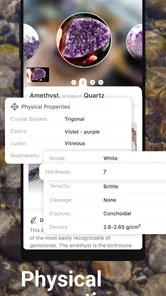
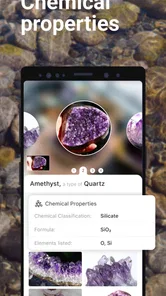
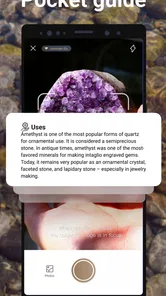
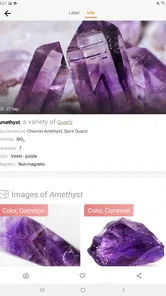
Another cool feature is the educational aspect. Each identified rock comes with a wealth of information, including its origin, common locations, and uses. It's not just about identifying rocks; it's about understanding them. This makes the app a fantastic tool for students, educators, and anyone with a curious mind.
I would use the information as a prompt for follow-up questions: what features distinguish this candidate from similar stones, and does the description fit the place where I found it? That approach makes the app more useful for a family walk or a classroom discussion than simply collecting names. It also helps avoid a common trap with visual identification: two minerals can look alike in a photograph even when their properties differ.
More From Our News Desk

Weather by Xiaomi Review: Clear at a Glance, Less Clear Up Close

X Under Pressure: Can It Recover When Posting Goes Wrong?

Clash of Clans Is Won Between the Battles

Android Auto Makes the Case for Quieter Car Software

MobiOffice: Transforming Mobile Productivity with Seamless Integration

EA SPORTS FC™ Mobile Soccer: Redefining Mobile Sports Gaming
A photo habit that improves the result
One useful trade-off is that a little preparation can make a photo more informative, but it also means the app is not always a one-tap answer while walking. I would take one image showing the whole specimen and another close enough to reveal its grain, bands, or crystals. If the stone has several distinct areas, a separate view of each can be more helpful than cropping one image until it loses context.
It is also worth keeping the location in mind without treating it as proof. A stone found on a beach, in a garden, or beside a trail may have been moved there, so the setting can suggest questions but cannot settle the identification. I would note the general location for my own reference and compare the candidate’s described habits with what is actually visible. That small workflow is especially useful for children: they can make a guess first, then check which details support or contradict it.
If the first result seems too broad or surprising, I would retake the picture rather than repeatedly photographing the same angle. A plain background, softer light, and a dry surface can remove visual distractions. This is not a guarantee of accuracy, but it gives an image-based identifier a fairer chance and makes later comparison easier.
Keeping a record of finds
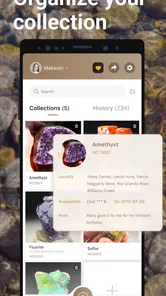
The app also lets you keep a digital collection of all your finds. This is particularly handy if you're someone who likes to keep track of your discoveries or share them with fellow enthusiasts. Plus, it adds an element of gamification, encouraging users to explore more and learn more.
A practical way to make that collection more valuable is to record a useful photo rather than a rushed snapshot: include the stone’s setting when that helps explain where it came from, then take a separate close-up for detail. On a weekend walk, for example, I might save a few candidates and revisit them later instead of stopping to research every pebble on the path. That keeps the outing enjoyable while leaving me with something concrete to check at home.
This is also where I would be thoughtful about what I photograph. A landscape or a specimen can reveal more than intended if other personal details are in frame. I would crop the image to the rock when possible and check the app’s visible choices before sharing or saving anything. I don’t assume that a photo-based app handles images in a particular way without reviewing its current permissions and privacy information first.
Trust, controls, and what I would check
Because the identification begins with a photo, trust is part of the decision to use the app, not an afterthought. I would look at the permission prompts on my device and allow only what makes sense for the action I’m taking. If I am choosing an existing picture, for instance, I would pay attention to the photo access option presented by the operating system; if I am taking a new one, I would consider the camera permission at that point. The exact controls can vary by device, so I would use the choices actually shown rather than assume a particular setup.
I would also check the app’s current privacy information and any account or collection controls before making the digital record a long-term habit. A saved find is convenient, but I would want to understand the visible options for managing it and sharing it before adding personal context. If I only want an occasional identification, I can keep the photo tightly framed and avoid including faces, home details, or anything unrelated to the stone.
That cautious approach is not a reason to avoid the app; it is a sensible way to use any photo-based tool. I would treat permission requests as choices to review, not as an automatic part of identifying a pebble. If a control or explanation is unclear, I would pause and decide whether the feature is important enough to continue.
Everyday handling and alternatives
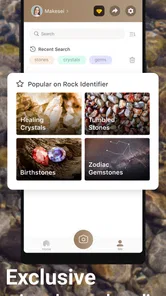
The user interface is clean and intuitive, making it easy for anyone to navigate. The design is visually appealing, with a color palette that feels earthy and natural, fitting the theme of the app perfectly. It's clear that the developers focused on creating a seamless user experience, which is always a big plus in my book.
Performance-wise, the app runs smoothly. I didn't encounter any bugs or crashes during my time using it, which is quite impressive given the complexity of the image recognition technology involved. The speed of identification is also commendable, with results provided in just a few seconds.
Compared with searching the web manually, a photo-first tool is convenient when I don’t know the right terms to type. A field guide or geology reference is better when I want a careful comparison of properties, while a knowledgeable local expert is a wiser choice for a valuable specimen or a consequential decision. I would skip an app-based guess if the answer needs to be scientifically certain, or if I’m identifying a stone for safety, sale, or collecting claims. The useful middle ground is to let the image suggest possibilities, then check those possibilities against a trusted reference.
A realistic example is a family walk where a child spots a striped stone and wants to know whether it is a crystal. I would photograph it in good light, look at the suggested match together, and use the description to notice details we might otherwise miss. If the candidate does not fit the specimen, that mismatch is still useful: we can look up the visible pattern in a book or ask someone with more experience. The app works best in that sort of low-stakes moment, where exploration matters more than an instant authoritative label.
It is less suitable when I need to distinguish look-alike minerals by properties that a photograph cannot show, or when an identification affects a purchase, valuation, or safety decision. A visual match should not be treated as confirmation of composition or origin. For those situations, a specialist reference or a qualified person is a better next step, even if the app helps me arrive with more focused questions.
Rock Identifier is a free lifestyle app from Next Vision Limited, with a 4.5 average from around 107,000 ratings and over 10 million installs. It is rated for everyone, and its current version is 2.4.1; in-app purchases range from $0.99 to $39.99 per item. I’d check the purchase screen carefully before confirming anything, especially if a child is exploring the app. The free starting point makes it easy to try, but I would not assume every option is included without charge.
For a parent or teacher, I would make the purchase check part of the first look around the app rather than waiting until a child reaches a feature they want. For my own casual use, I would decide whether the free experience suits my needs before paying for anything. The price range makes it particularly important to read the on-screen terms at the moment of purchase and make a deliberate choice.
Who will get the most from it
I think the best fit is someone who enjoys noticing small details outdoors and wants an easy prompt for learning more: a beginner collector, a curious walker, or a family looking for a hands-on topic to explore. It may also suit a student who needs an initial lead before doing proper research. The app’s appeal is strongest when the user is happy to compare, question, and learn rather than simply accept a label.
Someone who already knows how to identify minerals through physical properties may prefer a reference book or specialist tool that supports systematic comparison. Likewise, a person who rarely wants to take or save photos may find a printed guide more comfortable. And anyone who expects every result to be definitive is likely to be disappointed by the basic limits of identifying stones from images.
My cautious recommendation
Overall, Rock Identifier: Stone ID is a gem of an app for anyone interested in geology, nature, or simply curious about the rocks they come across. It combines technology and education in a way that's both accessible and fun. Whether you're a seasoned rockhound or just someone who enjoys a walk in nature, this app is worth checking out. It's like having a rock encyclopedia in your pocket, ready to enlighten you at a moment's notice. So next time you find a mysterious stone, let this app be your guide to uncovering its secrets.
My recommendation is strongest for curious beginners, casual collectors, and parents or teachers who want a simple way to turn a find into a conversation. I’d approach it more cautiously if you need expert-grade identification, dislike optional in-app spending, or prefer not to photograph objects with a mobile app. Before relying on it, I would review the permissions and the privacy and account controls currently shown on my device, then decide what I’m comfortable sharing. Used with those limits in mind, it can make an ordinary walk feel more observant without pretending that a camera can replace careful geological judgement.
Rock Identifier: Stone ID Frequently Asked Questions
Can I use Rock Identifier: Stone ID to identify crystals as well as rocks?
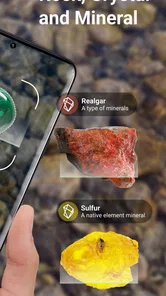
Yes. Rock Identifier: Stone ID is described as an app for identifying rocks, crystals, and minerals from a photo, so it can be useful when you find a specimen that does not look like an ordinary stone. Take a clear image of the item and use the suggested match as a starting point for learning more about what you found.
Is Rock Identifier: Stone ID free to download?
Yes, the app is free to download. It also offers optional in-app purchases, with listed item prices ranging from $0.99 to $39.99. You can start with the free download and consider any paid options based on what you need; check the purchase details in the app before confirming a transaction so you know what you are choosing.
Does the app’s photo identification replace advice from a geologist?
No photo-based tool should be treated as a guaranteed expert determination. Rock Identifier: Stone ID can help you explore a likely match, but similar-looking specimens and unclear photos can make visual identification uncertain. If you need to know a specimen’s identity for an important collecting, safety, or practical decision, ask a knowledgeable specialist rather than relying on the app alone.
What should I check before taking a photo for identification?
For a useful identification attempt, choose a clear, well-lit photo in which the rock fills much of the frame. Avoid strong shadows, glare, and distracting objects, since these can make visible details harder to assess. If the specimen has several distinctive surfaces, taking separate photos can give the app more visual information to work with. Treat the result as a helpful starting point rather than a substitute for expert assessment.
Who develops Rock Identifier: Stone ID, and what is its age rating?
Rock Identifier: Stone ID is developed by Next Vision Limited and is listed in the Lifestyle category. Its content rating is Everyone, making it suitable for a broad audience. The app is intended for people curious about rocks, crystals, and minerals, whether they are exploring outdoors, studying, or simply learning about a specimen they have found.
Pros
- User-friendly interface for easy navigation.
- Accurate stone identification results.
- Extensive database of rocks and minerals.
- Offline mode available for remote areas.
- Regular updates with new features.
Cons
- Requires internet for full feature access.
- Ads can be intrusive at times.
- Limited free version features.
- Occasional misidentification of stones.
- No option for user-submitted corrections.













