Phone Tracker: Phone Locator
- 1.62K
- 4.2
- Installs
- 10.00M
- Price
- Free

Screenshots

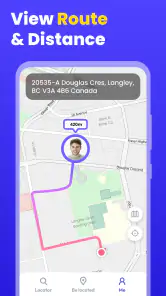
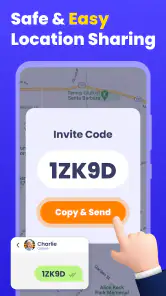
Analysis by Reviewed
I’d approach Phone Tracker as a shared family tool, not a way to secretly locate someone. Before relying on any location app, I’d agree with the other person on when tracking is useful and what they’re comfortable sharing. That conversation matters as much as the map: a location marker is only helpful when everyone understands why it is being checked.
Start with a clear, shared purpose
A practical first use is coordinating a household’s day: one person is travelling home, another is waiting to meet them, and a quick location check can replace a string of “Where are you?” messages. I’d keep the purpose narrow, such as confirming that a family member has started the trip or arrived, rather than treating constant checking as a substitute for communication.
The app is listed as free and is made by QR Code Scanner. It sits in the maps and navigation category, has an Everyone age rating, and has a 4.2 average from around 81,000 ratings. Those details make it a widely used option to consider, but they don’t tell me whether it suits every family’s privacy expectations or routine.
Getting Started with Phone Tracker
Jumping into the world of location tracking is surprisingly easy with the Phone Tracker: Phone Locator. All you need to do is download the app, set up your account, and you’re good to go. The interface is user-friendly, making it super simple even for the not-so-tech-savvy among us. Once installed, you can track the location of any phone that has the app installed, provided you have the necessary permissions.
Making the location check useful
That permission requirement is an important handoff in the real workflow: the person being located needs to participate, and the other person needs to know how to interpret what appears on the map. I would not assume that entering a phone number alone can locate any device without the other person’s involvement. If you’re setting it up with a relative, do it together and check that both people can open the app and understand what the location view means.
For an everyday example, imagine a parent waiting after an activity while a teenager is travelling home. A quick check can help the parent decide whether to wait or send a message, but it should not replace a call if plans change or the map seems out of date. A useful habit is to agree in advance on what to do when the location is unclear: contact the person first, rather than making assumptions from a pin.
A calmer pickup routine
One useful way to test the app is to choose a single predictable trip rather than turning it into an all-day monitoring habit. For example, a relative who regularly meets someone after an appointment can agree to check the map only when the person is on the way. The person travelling can still send a message if the plan changes; the map simply helps with the timing. That small boundary makes the tool easier to live with and gives both people a clear idea of what sharing is for.
More From Our News Desk

Weather by Xiaomi Review: Clear at a Glance, Less Clear Up Close

X Under Pressure: Can It Recover When Posting Goes Wrong?

Clash of Clans Is Won Between the Battles

Android Auto Makes the Case for Quieter Car Software

MobiOffice: Transforming Mobile Productivity with Seamless Integration

EA SPORTS FC™ Mobile Soccer: Redefining Mobile Sports Gaming
I’d also settle the practical details before the first trip: who will check, when they will check, and what they will do if the display doesn’t answer the question. If the person is late, a direct call or message is more useful than repeatedly refreshing a map. This is a small workflow choice, but it prevents a location app from turning an ordinary delay into a string of anxious guesses.
Features That Stand Out
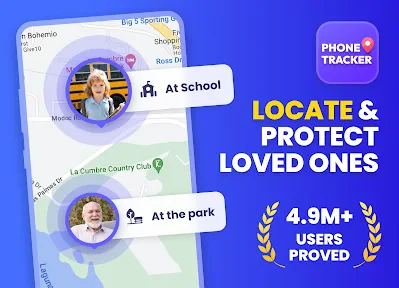
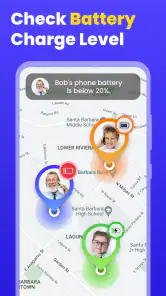
One of the standout features of this app is its real-time location tracking. You can see where your family members are at any given moment, which is perfect for those times when you’re anxiously waiting for them to get home. Another cool feature is the ability to set up geofences. You can mark specific areas on the map, and you’ll get a notification whenever the tracked phone enters or leaves those areas. This is particularly useful for keeping tabs on kids or elderly family members who might wander off.
Geofences work best when they answer a concrete question, such as whether someone has reached a familiar destination. I’d use a small number of meaningful places rather than marking every stop: too many alerts can make the important one easy to miss. Before relying on a boundary notification, agree on who will respond and what action is actually needed. That turns an alert into a plan instead of another source of worry.
Make alerts earn their place
A boundary alert is most helpful when it changes what you do. If a family member is expected to arrive somewhere and nobody needs to act on the notification, checking the map later may be enough. If someone is meeting them, the alert can be a cue to leave or head to the entrance. I’d avoid setting up alerts for places that do not affect the day’s plan; otherwise, notifications can become background noise rather than useful handoffs.
It is also worth agreeing on how to handle a notification that arrives at an unexpected time. A geofence crossing is a prompt to check the context, not a full explanation of why someone moved. The person may have changed plans or taken a different route, and a message is still the best way to clarify that. Used this way, the app can help coordinate rather than encourage conclusions from a single alert.
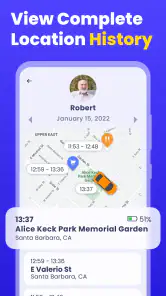
The app also provides a detailed location history, so you can look back and see where the person has been throughout the day. This feature is great for those of us who are a bit forgetful and can’t quite remember where we were last Tuesday!
Using history with care
For a family, the history view is better treated as a practical reference than as a way to audit every stop. It may help when someone is trying to remember whether they already visited a place or when a shared plan needs clarification, but checking another person’s past movements should be part of the agreement too. I’d be especially careful not to turn a feature meant to support coordination into a silent test of trust.
A simple ground rule helps: look back together when there is a real reason, and ask the person directly if the route or timing seems confusing. That keeps the history from becoming a substitute for conversation. It also gives the person being located a chance to explain a detour or change in plans instead of leaving someone else to interpret a trail without context.
Choosing it over familiar alternatives
Compared with simply texting for an update, location sharing can save a round of messages when both people have agreed to use it. Compared with built-in location-sharing tools already available on a phone, a separate tracker means another app and another setup to manage. I’d choose the option that the people involved already understand and can keep enabled comfortably; a new app is not automatically better just because it offers a map.
The difference is mainly about the job you need done. A text is often the better choice for a one-off question, because it lets someone explain a delay or change of plan in their own words. A shared map is more convenient when two people are coordinating a trip and both want to check progress without repeatedly asking for updates. A built-in phone-sharing option may be easier if everyone already uses it, while this separate app may make sense when the household prefers its own dedicated tracker.
Who is likely to find it useful
I can see this fitting households where people travel on familiar routes, coordinate pickups, or want a shared way to confirm arrivals. It is especially reasonable when the person being located is comfortable with the arrangement and can participate in setup. The practical benefit is not that it removes every uncertainty; it is that it can reduce a few routine check-in messages when everyone knows what the location view is meant to answer.
It is less compelling for people who rarely need to coordinate, already have a location-sharing routine that works, or would rather keep location private. It is not the right tool for finding a lost phone if the owner cannot participate, nor should anyone use it to monitor a partner, relative, or child secretly. In those situations, a direct conversation or the phone’s own lost-device tools are more appropriate.
Where the routine can break
Location tools depend on the tracked phone and the people using it, so a missed update or confusing map should be treated as a reason to check in, not proof that something has happened. Notifications can also become distracting if boundaries are too broad or too numerous. I’d start with one agreed use case, test the handoff between the person sharing and the person checking, and only add another routine if the first one genuinely helps.
What I would check before relying on it
One practical question is whether both people can complete the setup and understand the sharing arrangement without one person taking over the other’s phone. I’d make that a joint task, then test the intended workflow while nobody is in a hurry. If either person cannot tell who is sharing with whom or what a notification means, pause and sort that out before depending on it for a pickup or an arrival.
Another question is whether the app is the best fit for the devices and habits in the household. It supports Android 6.0 and later, so an Android user should check that their device meets that minimum before planning a shared routine. If the people involved use a different built-in solution already, comparing the effort of maintaining a second app against the convenience of a dedicated tracker is worthwhile.
Is It Worth It?
Now, let’s talk about the nitty-gritty. Is this app worth your time and, potentially, your money? If you’re someone who values peace of mind and wants to ensure the safety of your loved ones, then absolutely. The basic features are free, but there are premium options available for those who want to unlock more advanced functionalities.
Privacy is also a big concern when it comes to location tracking apps. Rest assured, Phone Tracker: Phone Locator takes privacy seriously. You have full control over who can track your location, and the app requires explicit consent for tracking.
For a sensible trial, I’d begin with one consenting family member and a familiar journey, then decide whether the location view or alerts actually reduce uncertainty. If either person finds the routine intrusive, cumbersome, or unnecessary, turning back to direct messages is a reasonable choice. The app’s current version is 1.2.10, and it supports Android 6.0 and later; it has passed 10 million installs. Those figures show broad uptake, but the deciding factor for me is still whether the sharing arrangement feels clear and useful to everyone involved.
When another option is better
If the need is occasional, a quick message is usually the least complicated answer. If the need is locating your own missing device, the phone’s dedicated lost-device service is a more fitting starting point than a family tracker. And if the people involved already share locations through tools built into their phones, I would not add another app unless its particular setup makes coordination easier. Every extra service creates another routine to explain and maintain.
Phone Tracker is most convincing when everyone has agreed on a modest, specific use: a pickup, a journey home, or a familiar arrival point. It is less convincing as a general promise of safety, since no map can explain every delay or replace a person’s judgment. The choice I’d make is to keep the arrangement easy to pause, review whether it is genuinely helping, and stop using it if the shared benefit is not worth the extra attention.
In conclusion, this app is a solid choice for anyone looking to keep their family safe and secure. It’s not just about tracking locations; it’s about being connected and ensuring peace of mind. So, if you’re on the fence about downloading it, I’d say go for it and give it a try—you might just find it’s exactly what you need.
Phone Tracker: Phone Locator Frequently Asked Questions
Can Phone Tracker: Phone Locator locate a phone without the owner’s knowledge?
Location tracking should be used transparently and with the other person’s knowledge and agreement. Phone Tracker: Phone Locator is described as a tool for locating by phone number and helping protect family, but that does not make covert tracking appropriate. Before using it with someone else, discuss what location information will be shared and make sure everyone involved is comfortable with the arrangement.
What should I consider before sharing my location with family or friends?
Think about who will be able to see your location, when you want to share it, and whether everyone involved understands the arrangement. Location information is sensitive, so share it only with people you trust and review any permissions the app requests. Clear expectations can help make location sharing useful for family coordination without creating surprises or unwanted monitoring.
Does Phone Tracker: Phone Locator work by entering any phone number?
The app’s summary describes locating by phone number, but users should not assume that entering any number will reveal a person’s location. Location sharing generally depends on access, compatible devices, connectivity, and the other person’s participation. Before relying on the app, understand how its location-sharing process works and use it only in ways that respect other people’s consent and privacy.
Is Phone Tracker: Phone Locator free to download?
Phone Tracker: Phone Locator is free to download. Its store summary presents it as an all-in-one phone location tracker for locating by phone number and helping protect family. Before installing, consider whether its location-sharing features suit your needs and make sure you understand the permissions you grant to any app that accesses location information.
What devices and operating systems can I use Phone Tracker: Phone Locator on?
Phone Tracker: Phone Locator is an app for Android, with support starting at Android 6.0. Check your device’s Android version before downloading so you can confirm compatibility. The app is listed as version 1.2.10, and its content rating is Everyone. If you use an iPhone or another platform, check the relevant app store for availability and compatibility before proceeding.
Pros
- Accurate real-time location tracking.
- User-friendly interface for easy navigation.
- Low battery consumption during use.
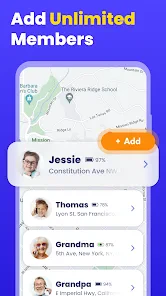
- Supports multiple devices per account.
- Instant alerts for location changes.
Cons
- Requires internet for accurate tracking.
- May raise privacy concerns for some.
- Limited features in free version.
- Occasional app crashes reported.
- High data usage on mobile networks.
- Category
- Maps & Navigation
- Version
- 1.2.10













