Optum Perks: Rx Discount Card
- 425.00
- 4.4
- Installs
- 500.00K
- Price
- Free

Screenshots

Analysis by Reviewed
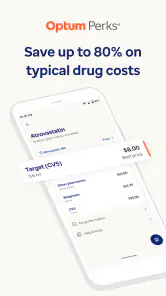
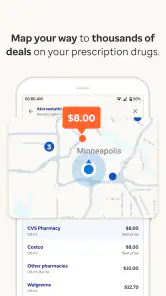
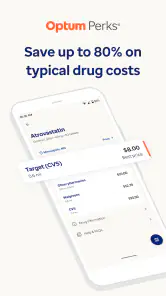
When a prescription suddenly costs more than expected, the hardest part is often not finding a pharmacy but finding a realistic way to lower the bill. I tested Optum Perks: Rx Discount Card with that situation in mind, and I found it most useful as a quick price-checking tool rather than as a replacement for insurance or a full medication-management service. It is a free medical app from Optum Inc. with an average rating of 4.4 from around 1.2 thousand ratings, and its main appeal is simple: it helps you look for prescription discounts at nearby pharmacies before paying.
That straightforward purpose is also the key to understanding the app. It does not make a prescription free, guarantee the lowest possible price, or replace advice from a pharmacist. Instead, it gives you another payment option to compare with your insurance, a pharmacy’s normal cash price, or other discount programs. In my experience, that comparison can be valuable when a medication is not covered, when a deductible makes the insured price unexpectedly high, or when you are helping someone who does not have insurance.
How Optum Perks fits into a real prescription-shopping routine
A useful first check before you reach the counter
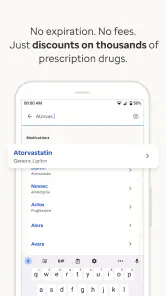
The most practical way I see using this app is before leaving home. If a doctor has just prescribed a medicine, I would enter the medication details, review the available discount information, and then compare the result with the price I expect to pay through insurance. That extra step matters because the cheapest route is not always the one a person assumes. A prescription can be covered but still expensive, while a discount-card price may be lower in a particular situation.
I would also use it when transferring a prescription between pharmacies. People often treat pharmacy prices as fixed, but cash prices and discount offers can differ by location. The app is useful here because it encourages you to check locally instead of relying on a price remembered from a previous refill. The result should be treated as a quote to investigate, not as a promise that every pharmacy will charge exactly the same amount at the register.
One habit makes the tool more useful: check the exact medication form and strength, not just the broad drug name. Tablets, capsules, liquids, different strengths, and different quantities can produce different prices. If you search too casually, you may compare the wrong prescription. I would keep the prescription label nearby and confirm the details with the pharmacist before making a decision.
Where it helps people most
This is especially helpful for occasional prescriptions, people between insurance plans, and households managing several medications. It can also be worthwhile for a medicine that insurance excludes. In those cases, a discount card may provide a practical alternative to simply accepting the first cash price offered.
I can imagine a common evening scenario: someone leaves an urgent-care visit with a prescription, reaches the pharmacy, and learns that the insured price is higher than expected. Rather than abandoning the medicine or guessing at another location, they can use the app to investigate a discount option and ask the pharmacy whether it applies. That workflow does not eliminate the need for a pharmacist, but it gives the patient a more informed question to ask.
Another less obvious use is preparing before a recurring refill. Instead of checking only when the prescription is due, I would compare the available route early enough to speak with the pharmacy, prescriber, or insurer if something looks wrong. This is particularly useful when a price change would affect whether the household can comfortably complete the refill. The app cannot solve every affordability problem, but it can make the first step less passive.
What the current version tells me about the product
The current version is 2.8.1, identified by the longer build number 2026080302. I see that as evidence of an app that has continued through multiple revisions rather than remaining a one-time coupon page. The product was released on September 17, 2020, and it has grown to over 500 thousand installs. Those details do not prove that every search will be perfect, but they do suggest that the service has been maintained as an ongoing consumer tool.
For existing users, the important question is whether an update changes the everyday workflow. A version number alone cannot tell me that a particular screen, pharmacy result, or discount process has improved. What I can say is that users should keep the app updated through their normal app store process, especially when using it for time-sensitive prescription decisions. A current build is the sensible starting point when an older installation behaves differently from what you expect.
The app is free, which removes the most obvious barrier to trying it. It is also rated for Everyone, making its basic audience broad. That does not mean every person should make medication decisions alone. Children, older adults, and anyone managing complex treatment should still have a parent, caregiver, doctor, or pharmacist involved where appropriate.
How I would compare its result with insurance
The most important trade-off is that a discount-card transaction may not work like an insurance claim. Before presenting it, I would ask the pharmacy which price is being used and whether the purchase is being processed through insurance or as a discount transaction. I would not assume that paying the lower amount automatically counts toward a deductible or out-of-pocket maximum. That accounting question belongs with the insurer and pharmacy, not the app.
My preferred routine would be to write down three pieces of information: the insurance price, the ordinary cash price, and the price associated with the discount option. Then I would ask which one applies to the exact prescription and quantity. This small comparison prevents a common mistake: choosing a lower immediate price without realizing that a different route might matter more over the rest of the insurance year.
For a one-off prescription, the lowest immediate price may reasonably be the priority. For an expensive long-term medicine, the answer is more complicated. A pharmacist may know about manufacturer assistance, a generic alternative, a therapeutic substitute, or a mail-order benefit that the discount app does not replace. In that situation, Optum Perks is best used as one data point in a broader conversation.
Where it differs from ordinary pharmacy searching
Calling pharmacies one by one can work, but it is slow and inconsistent. You may reach different staff members, describe the prescription differently, or forget which price belonged to which location. A discount app gives you a more organized starting point and makes it easier to investigate before you travel.
On the other hand, a phone call has an advantage the app cannot fully reproduce: a pharmacist can explain whether a prescription detail, dosage form, or insurance rule changes the outcome. A pharmacy’s own program may also be more convenient for people who already use that chain regularly. I would therefore use the app for discovery, then confirm the result directly with the chosen pharmacy.
Compared with a general price-comparison service, this app is more focused on prescription savings and the practical idea of a discount card. That focus makes it easier to understand when the problem is simply “How can I reduce this pharmacy bill?” It is less suitable if you want a complete record of medications, refill reminders, symptom tracking, telehealth, or clinical guidance. Those are different categories of healthcare tools, and adding them would not automatically make this app better at its central job.
Small workflow choices that make a big difference
First, I would search before arriving at the pharmacy, not while standing in line. That gives me time to compare the result with insurance and to call if the price or eligibility is unclear. Second, I would save the prescription information in a private note rather than relying on memory, while avoiding unnecessary sharing of sensitive health details. Third, I would confirm the final price at pickup because a displayed discount is not the same thing as a completed transaction.
A fourth tip is to check the quantity carefully. A price that looks attractive for one quantity may not answer the question for the quantity actually prescribed. If the prescription changes, I would repeat the search instead of assuming the earlier result still applies. This is a simple step, but it protects against comparing two different purchases.
Finally, I would never delay an essential medicine solely to chase a better price. If affordability is preventing someone from starting or continuing treatment, the right next call may be to the prescriber, pharmacist, insurer, or a local assistance service. The app can support that conversation, but it should not become a reason to postpone necessary care.
Remaining gaps and real sources of friction
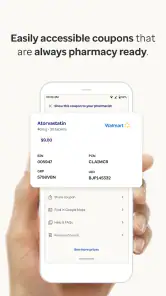
The biggest limitation is that a discount search cannot guarantee a smooth checkout. Pharmacy participation, prescription details, stock, insurance rules, and local pricing can all affect what happens in practice. A user may still need to show or identify the discount information and ask the pharmacy to process it correctly. That extra interaction is manageable, but it means the app is not completely hands-off.
There is also a psychological trap in seeing a low advertised price. People may read it as the final amount for everyone, even though their prescription, quantity, location, or payment route may differ. I would treat every displayed result as something to verify. The app is most trustworthy when used to improve your questions, not when used as permission to skip them.
Privacy is another reason to be deliberate. Prescription searches can reveal sensitive health information. I would use the minimum information needed, avoid sharing screenshots publicly, and review the app’s current privacy details before entering anything I would not want associated with my device or account. That is not a criticism unique to this product; it is a sensible precaution for any medical app.
People who need clinical reassurance should also look elsewhere. Optum Perks can help with the cost side of a prescription, but it should not be treated as a source for diagnosing symptoms, changing a dose, checking whether two medicines are safe together, or deciding whether a treatment is appropriate. A pharmacist or clinician is the right person for those questions.
Who should use it, and who should skip it
I would recommend trying it if you regularly pay cash for prescriptions, have encountered an unexpectedly high pharmacy price, or want a quick comparison before using insurance. It is also a sensible tool for caregivers who help relatives with routine medication purchases, provided they verify every prescription detail and keep the patient’s information private.
I would be less enthusiastic for someone whose insurance consistently provides a very low copay and whose pharmacy process is already simple. In that case, a discount search may add an extra step without producing a meaningful benefit. I would also not choose this as my main app if my priority were medication reminders, electronic records, appointment management, or medical advice.
People taking high-cost specialty medicines should approach it with modest expectations. A discount card may not be the strongest route for that kind of treatment, where insurer authorization, manufacturer support, specialty-pharmacy rules, and clinical coordination can matter more. The app is better suited to ordinary prescription-price comparisons than to solving every complex affordability case.
What I would watch as the app continues to evolve
The ongoing version history makes future refinement worth watching, especially around clarity at the point of purchase. The most valuable improvements would be anything that helps users distinguish a discount price from an insurance price, confirm prescription details, and understand what to do when a pharmacy cannot apply the expected offer. Clear explanations are more important here than adding decorative features.
I would also watch how well the app handles the gap between a search result and a real pharmacy visit. A strong experience should help users move from comparison to confirmation without confusion. If future updates make that handoff clearer, the app could become more useful for first-time discount-card users, not just people already comfortable comparing cash prices.
My final view is positive but practical. Optum Perks: Rx Discount Card is worth keeping as a free backup for prescription-price checks, especially when insurance is not helping enough or a cash price feels unexpectedly high. I would not use it as my only source of medication information, and I would always verify the final amount with the pharmacy. Used that way, it fills a specific gap: it gives you a concrete alternative to accepting the first price you hear.
Pros
- Free to use with no membership or insurance required.
- Discounts can apply to many generic and brand-name prescriptions.
- Easy to compare prices at nearby participating pharmacies.
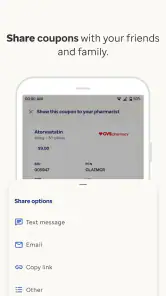
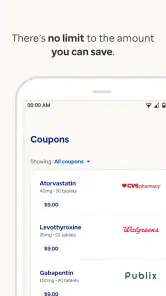
- Digital card can be saved on your phone for convenient access.
- Useful for uninsured users or medicines excluded from an insurance plan.
Cons
- Savings vary widely by pharmacy
- location
- and medication.
- It cannot usually be combined with health insurance or other coupons.
- Some participating pharmacies may not accept every listed discount.
- Prices and availability can change before you reach the pharmacy.
- Prescription discounts do not count toward most insurance deductibles.

- Category
- Medical
- Version
- 2.8.1 (2026080302)